TabliSync: Chat to Excel com IA, Imagem e PDF para Excel, Painéis de dados
TabliSync: Chat to Excel com IA, Imagem e PDF para Excel, Painéis de dados
Extraia texto de capturas, converta documentos digitalizados, recibos e tabelas PDF e automatize assistente de planilhas, dashboards, graficos, BI e relatorios com IA com ate 99,9% de precisao.
Explore 9 fluxos de trabalho de dados com IA - OCR, Excel, BI e relatorios
Teste OCR de imagem para texto, imagem para Excel, PDF para Excel, geracao de planilhas, assistente de planilhas, analise de dados, business intelligence, geracao de graficos e fluxos de Excel para dashboard em um unico espaco de trabalho com IA.
Drop an image or PDF to see the magic
Or click to browse files
Supported formats: JPG, PNG, PDF • Max size: 5MB
Veja Nosso Conversor de Imagem para Excel com IA em Ação
Assista como converter foto para Excel editável online usando nosso agente de entrada de dados automatizado. Demonstração real do OCR TabliSync extraindo dados de planilhas sujas de fábrica de cerâmica para o Notion.
Ultrarrápido
Extraia dados de tabelas em segundos, não horas
99.9% Preciso
Precisão alimentada por IA para resultados perfeitos
Qualquer Formato
Funciona com imagens, PDFs e capturas de tela
Podemos ajudá-lo a resolver isso.
Sobrecarregado por Planilhas Excel Complexas
Arquivos Excel podem ser complexos, com várias planilhas, fórmulas e tipos de dados. Pode ser difícil entender o que os dados significam e como usá-los efetivamente.
Não Consegue Entender Métricas Estatísticas
Métricas estatísticas podem ser confusas, com diferentes fórmulas e cálculos. Pode ser difícil entender o que os dados significam e como usá-los efetivamente.
Gastando Horas Criando Gráficos e Relatórios
Pode ser demorado criar gráficos e relatórios, especialmente se você não está confortável com Excel.
Preocupado em Perder Insights Críticos
Pode ser difícil identificar os dados e insights mais importantes, especialmente se você não é um especialista na área.
Por Que Escolher TabliSync
A melhor IA para extração de dados estruturados de imagens - o extrator de tabelas mais rápido e preciso que se conecta a todas as suas ferramentas favoritas
Sincronização Ultra-Rápida
Tempo médio de processamento de 1,2 segundos alimentado pelo TabliSync Engine (Gemini Flash). Extração de tabelas ultrarrápida que mantém você no fluxo.
99.9% de Precisão
O motor de IA TabliSync lida com tabelas complexas, texto manuscrito e conteúdo multilíngue com precisão líder do setor.
Conecte em Qualquer Lugar
Sincronização direta para Excel, Google Sheets, Airtable e Notion. Exportação com um clique para suas ferramentas de produtividade favoritas.
Transforme Qualquer Documento em Excel Digital
De formulários comerciais manuscritos a documentos danificados, a IA do TabliSync lida com qualquer formato de tabela e converte em planilhas limpas e editáveis em segundos.
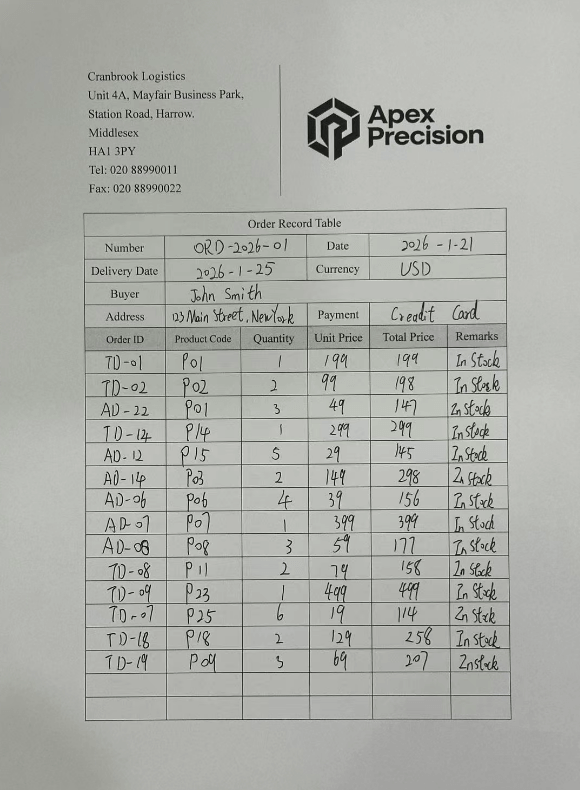
Antes
Formulários de pedidos manuscritos
TabliSync AI
Processamento em 1.2s
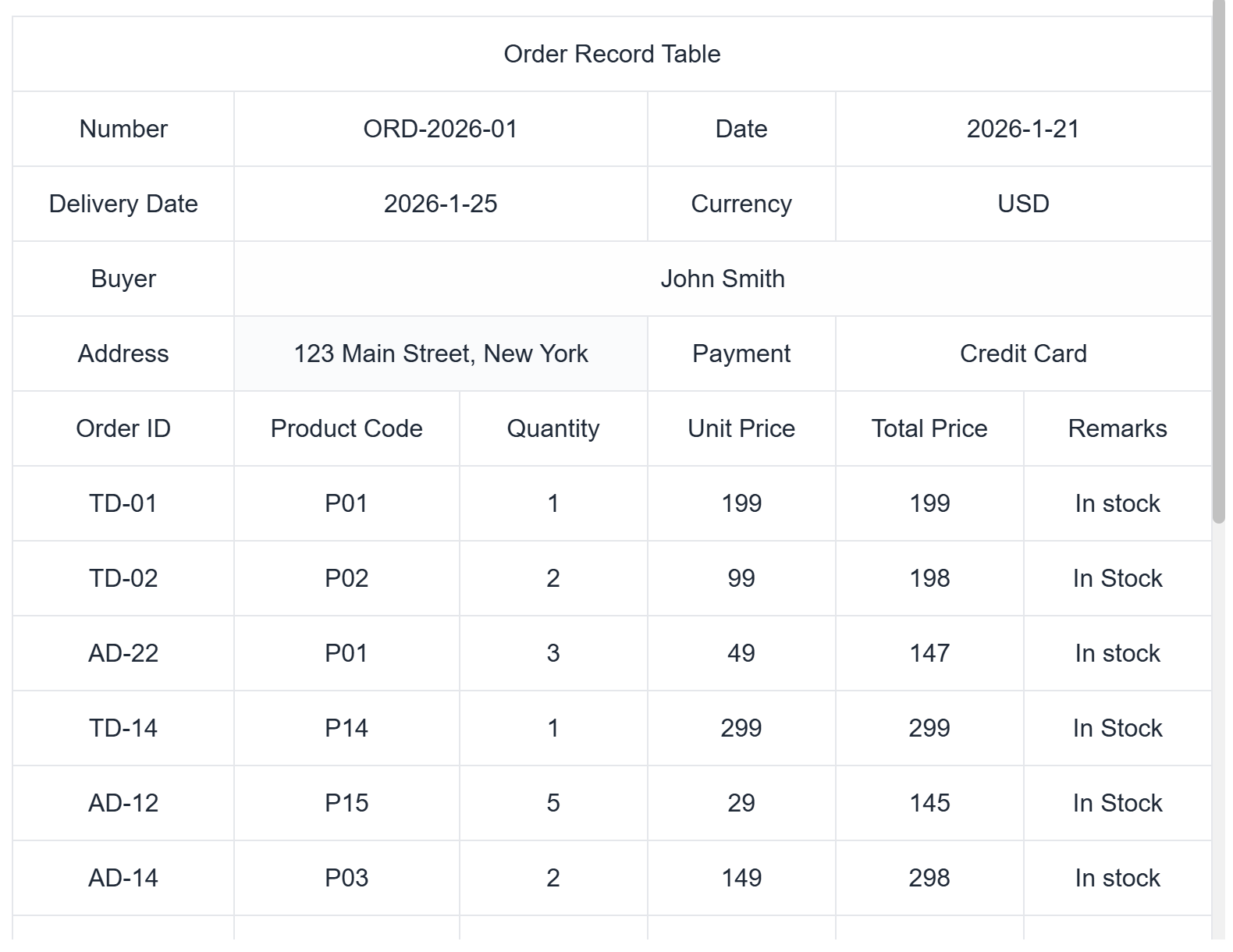
Depois
Gestão de pedidos digital
Pedidos
Transforme pedidos manuscritos ou impressos em tabelas Excel digitais
Converta rapidamente pedidos de clientes em tabelas Excel editáveis para fácil rastreamento e gestão de pedidos
Taxa de Precisão
Tempo de Processamento
Formatos de Arquivo
Processamento com IA
Como o TabliSync funciona
Upload Simples
Arraste e solte ou clique para fazer upload de qualquer imagem ou PDF
Processamento com IA
IA avançada analisa e extrai dados de tabelas automaticamente
Resultados Instantâneos
Obtenha dados estruturados prontos para Excel, CSV ou qualquer formato
Sincronize em Qualquer Lugar
Extraia uma vez, sincronize em qualquer lugar. O TabliSync envia automaticamente seus dados extraídos para todas as suas ferramentas favoritas em tempo real.
Microsoft Excel
Sincronize diretamente para arquivos Excel
Google Sheets
Sincronização automática para Google Workspace
Airtable
Envie dados para bases Airtable
Notion
Sincronize para bancos de dados Notion
CSV Files
Baixe no formato CSV
API Integration
Envie via REST API
Sincronização com Um Clique
Extraia dados uma vez e sincronize para várias plataformas instantaneamente
Sincronização Automática
A sincronização automática de dados mantém tudo atualizado
Sincronização Segura
Segurança de nível empresarial para toda a sincronização de seus dados
Confiado por fábricas em todo o mundo - Processando milhares de documentos diariamente

Sarah Johnson
Production Supervisor - Manchester Manufacturing Ltd
"Nossa fábrica processa milhares de documentos de envio diariamente. A entrada manual no Excel era lenta e propensa a erros. Com o TabliSync, apenas tiramos fotos e obtemos tabelas automáticas com mais de 99% de precisão, economizando 80% do nosso tempo!"
Nov 28, 2024

Michael Rodriguez
Warehouse Manager - Barcelona Textile Group
"Documentos de inventário mensais se acumulam como montanhas. A entrada manual significava trabalhar horas extras até meia-noite. Agora o TabliSync processa em lote PDFs de várias páginas - o que levava horas agora leva minutos. Realmente libertou nossas mãos!"
Nov 20, 2024

Emily Thompson
Finance Accountant - Sydney Electronics Factory
"Faturas, recibos, relatórios de despesas - centenas diariamente. O OCR do TabliSync é incrivelmente preciso, até reconhecendo valores manuscritos. A importação direta para nosso sistema financeiro aumentou a eficiência várias vezes!"
Nov 15, 2024

James Wilson
Quality Control Director - Texas Hardware Factory
"Relatórios de inspeção de qualidade são complexos com dados densos. A entrada manual levava 30 minutos por relatório. Agora eu fotografo e faço upload para o TabliSync - tabelas Excel completas em segundos, dados perfeitamente precisos. Incrível!"
Nov 10, 2024

Carlos Silva
Procurement Manager - Lisbon Chemical Plant
"Cotações de fornecedores vêm em vários formatos, dificultando a organização. O TabliSync reconhece todos os formatos de tabela e os converte em Excel unificado, facilitando muito nossas comparações de compras!"
Nov 5, 2024

Rebecca Davis
HR Specialist - Birmingham Garment Factory
"Folhas de ponto, folha de pagamento, documentos de seguro - tabelas de papel massivas mensalmente. Com o TabliSync, digitalizar e fazer upload cria tabelas eletrônicas automaticamente. Chega de noites de horas extras inserindo dados!"
Oct 30, 2024

Sarah Johnson
Production Supervisor - Manchester Manufacturing Ltd
"Nossa fábrica processa milhares de documentos de envio diariamente. A entrada manual no Excel era lenta e propensa a erros. Com o TabliSync, apenas tiramos fotos e obtemos tabelas automáticas com mais de 99% de precisão, economizando 80% do nosso tempo!"
Nov 28, 2024

Michael Rodriguez
Warehouse Manager - Barcelona Textile Group
"Documentos de inventário mensais se acumulam como montanhas. A entrada manual significava trabalhar horas extras até meia-noite. Agora o TabliSync processa em lote PDFs de várias páginas - o que levava horas agora leva minutos. Realmente libertou nossas mãos!"
Nov 20, 2024
Preços
Comece grátis, faça upgrade a qualquer momento conforme suas necessidades crescem
Free
Teste alguns ficheiros antes de pagar.
Sem cartão · Faça upgrade quando quiser
- 5 páginas incluídas
- Image to Text
- Imagem para Excel
- PDF para Excel
- Exportação XLSX
- Tamanho máx.: 5 MB
- Reconhecimento básico de tabelas
- Ficheiros apagados após 24 horas
- Sem upload em lote
Starter Pack
For occasional conversions.
No subscription
- 30 pages
- Image to Text
- Image to Excel
- PDF to Excel
- XLSX export
- Max file size: 20 MB
- Choose whether to save uploaded content
- No subscription
Standard Pack
For larger PDFs or several small jobs.
Sem assinatura
- 120 pages
- Image to Text
- Image to Excel
- PDF to Excel
- XLSX export
- Max file size: 50 MB
- Better value per page
- Create new conversation
- Excel to Dashboard
- Template Generation
- Choose whether to save uploaded content
- No subscription
Power Pack
For heavy one-off conversion tasks.
Sem assinatura
- 400 pages
- Image to Text
- Image to Excel
- PDF to Excel
- XLSX export
- Max file size: 100 MB
- Batch upload
- ZIP export
- Create new conversation
- Excel to Dashboard
- Template Generation
- Choose whether to save uploaded content
- No subscription
Compare Plans
See what's included in each plan.
| Free | Starter Pack | Standard Pack | Power Pack | Pro | Business | Business Plus | |
|---|---|---|---|---|---|---|---|
Price | $0 | $6 | $15 | $39 | $19/mo | $59/mo | Custom |
| Credits | |||||||
pages Image to Text, Image to Table, PDF to Table | 5 | 30 | 120 | 400 | 200/mo | 1,000/mo | Custom |
chat messages Create new conversation, Template Generation, Excel to dashboard blocks messages | 20 | 200 | 500 | 1,000 | 600/mo | 2,000/mo | Custom |
Excel to dashboard | 3 | 10 | 30 | 100 | 50/mo | 180/mo | Custom |
| Advanced Features | |||||||
Max file size | 5MB | 20MB | 50MB | 100MB | 100MB | 300MB | Custom |
Upload retention | Saved | Saved | Optional | Optional | Optional | Optional | Optional |
Chat history retention | 30 days | 90 days | 180 days | 360 days | 180 days | 360 days | Custom |
Team workspace | — | — | — | — | — | ||
| Support | |||||||
API | — | — | — | — | — | — | |
Support | — | Priority | Priority | 1-on-1 | |||
Perguntas Frequentes
Tudo o que você precisa saber sobre o TabliSync
Quais formatos de arquivo o TabliSync suporta?
O TabliSync suporta arquivos de imagem (.jpg, .jpeg, .png) e arquivos PDF (.pdf) contendo tabelas. Nossa IA pode extrair tabelas de capturas de tela, fotos, documentos digitalizados e relatórios PDF.
Como funciona a extração de tabelas com IA?
Simplesmente faça upload de sua imagem ou arquivo PDF contendo tabelas. Nossa IA alimentada pelo TabliSync Engine detecta, extrai e converte automaticamente tabelas para formato Excel em apenas 1,2 segundos em média.
Meus dados estão seguros com o TabliSync?
Sim, levamos a segurança de dados a sério. Todos os dados são criptografados em trânsito e em repouso. Não armazenamos seus arquivos permanentemente e você pode excluir seus dados a qualquer momento. Somos compatíveis com SOC 2 e seguimos as melhores práticas do setor.
Posso exportar para diferentes formatos?
Absolutamente! Você pode exportar suas tabelas extraídas como Excel (.xlsx), arquivos CSV ou sincronizar diretamente com Google Sheets, Airtable e Notion. Usuários Premium também obtêm acesso à API para integrações personalizadas.
Qual é a diferença entre os planos Grátis e Premium?
O plano Grátis inclui 3 extrações por sessão e opções básicas de exportação. O Premium oferece extrações ilimitadas, todos os formatos de exportação, suporte prioritário, processamento em lote e acesso à API.
Quão precisa é a extração de tabelas?
Nossa IA atinge 99,9% de precisão para a maioria dos formatos de tabela, incluindo layouts complexos e tabelas manuscritas. O motor TabliSync é especificamente treinado em milhões de imagens de tabelas para garantir alta precisão.
Posso processar vários arquivos de uma vez?
Sim! Usuários Premium podem fazer upload de várias imagens ou PDFs para processamento em lote. Nosso sistema pode lidar com dezenas de arquivos simultaneamente, economizando horas de entrada manual de dados.
Posso integrar o TabliSync com outras ferramentas?
Sim, oferecemos acesso à API para usuários Premium e temos integrações diretas com Google Sheets, Excel Online, Airtable e Notion. Estamos constantemente adicionando novas integrações com base no feedback dos usuários.
Ainda tem dúvidas? Estamos aqui para ajudar.
Contatar Suporte