KI-Spreadsheet-Assistent für smartere Excel-Arbeit: Datenoperationen in natürlicher Sprache
Komplexe Excel-Aufgaben in einfache Gespräche verwandeln - Tabellen per Klartext bearbeiten, bereinigen und automatisieren
Hören Sie auf, mit komplexen Excel-Formeln zu kämpfen. Unser KI-Spreadsheet-Assistent versteht natürliche Sprache und führt anspruchsvolle Datenoperationen sofort aus. Von Datenbereinigung und Formelerstellung bis zu automatisierten Workflows - beschreiben Sie einfach Ihr Ziel in Alltagssprache.
What is KI-Spreadsheet-Assistent für smartere Excel-Arbeit: Datenoperationen in natürlicher Sprache?
Hören Sie auf, mit komplexen Excel-Formeln zu kämpfen. Unser KI-Spreadsheet-Assistent versteht natürliche Sprache und führt anspruchsvolle Datenoperationen sofort aus. Von Datenbereinigung und Formelerstellung bis zu automatisierten Workflows - beschreiben Sie einfach Ihr Ziel in Alltagssprache.
TabliSync: Ihre KI-gestützte Excel-Automatisierung
Eine intelligente Automatisierungsschicht für Tabellenkalkulationen – entwickelt für reale Workflows, Datenaufgaben und Teamzusammenarbeit.
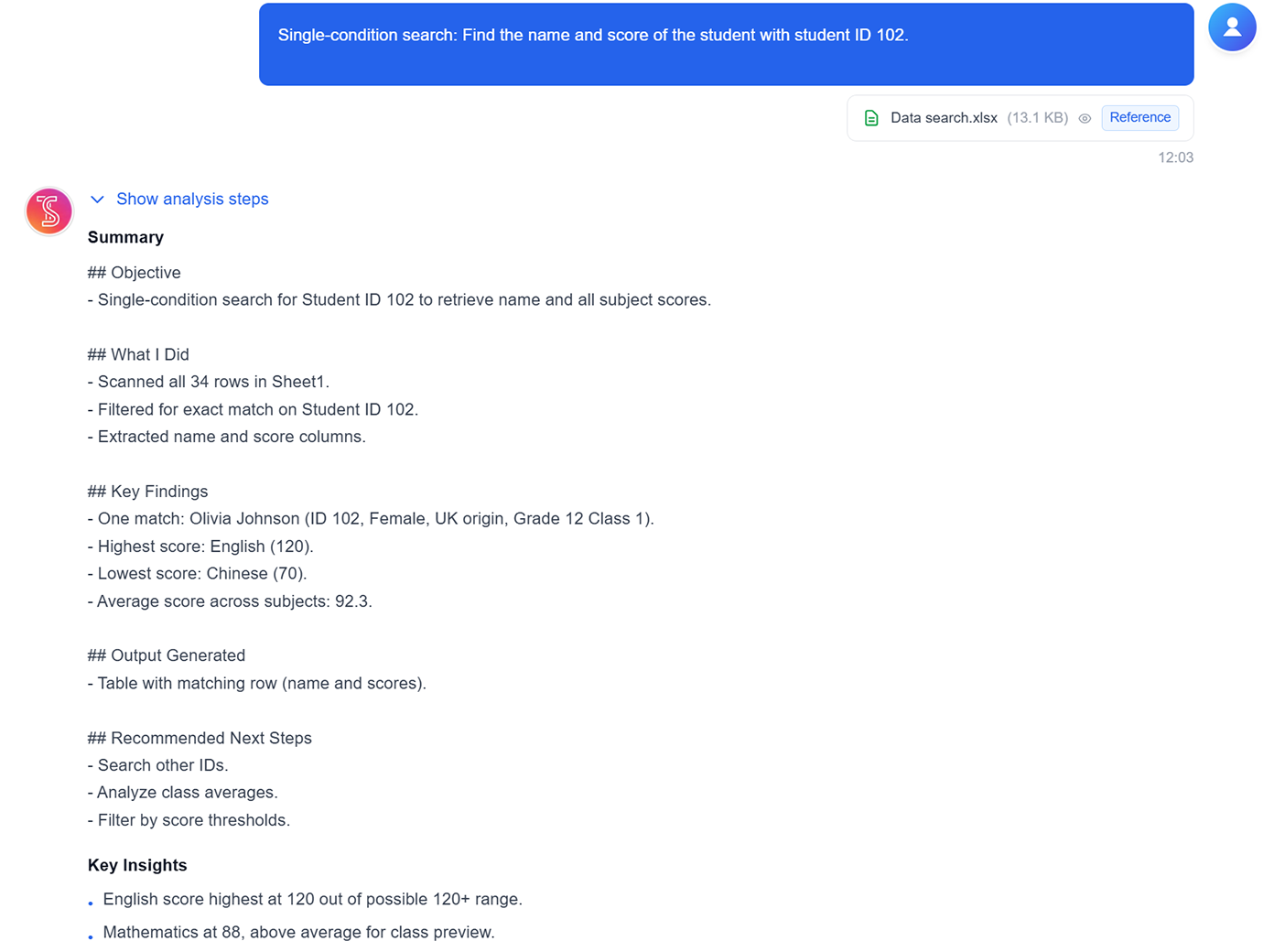
Einzelkriterium-Datensuche
Zeilen nach einer bestimmten ID, einem Keyword oder Feldwert finden – ohne Formeln zu schreiben.
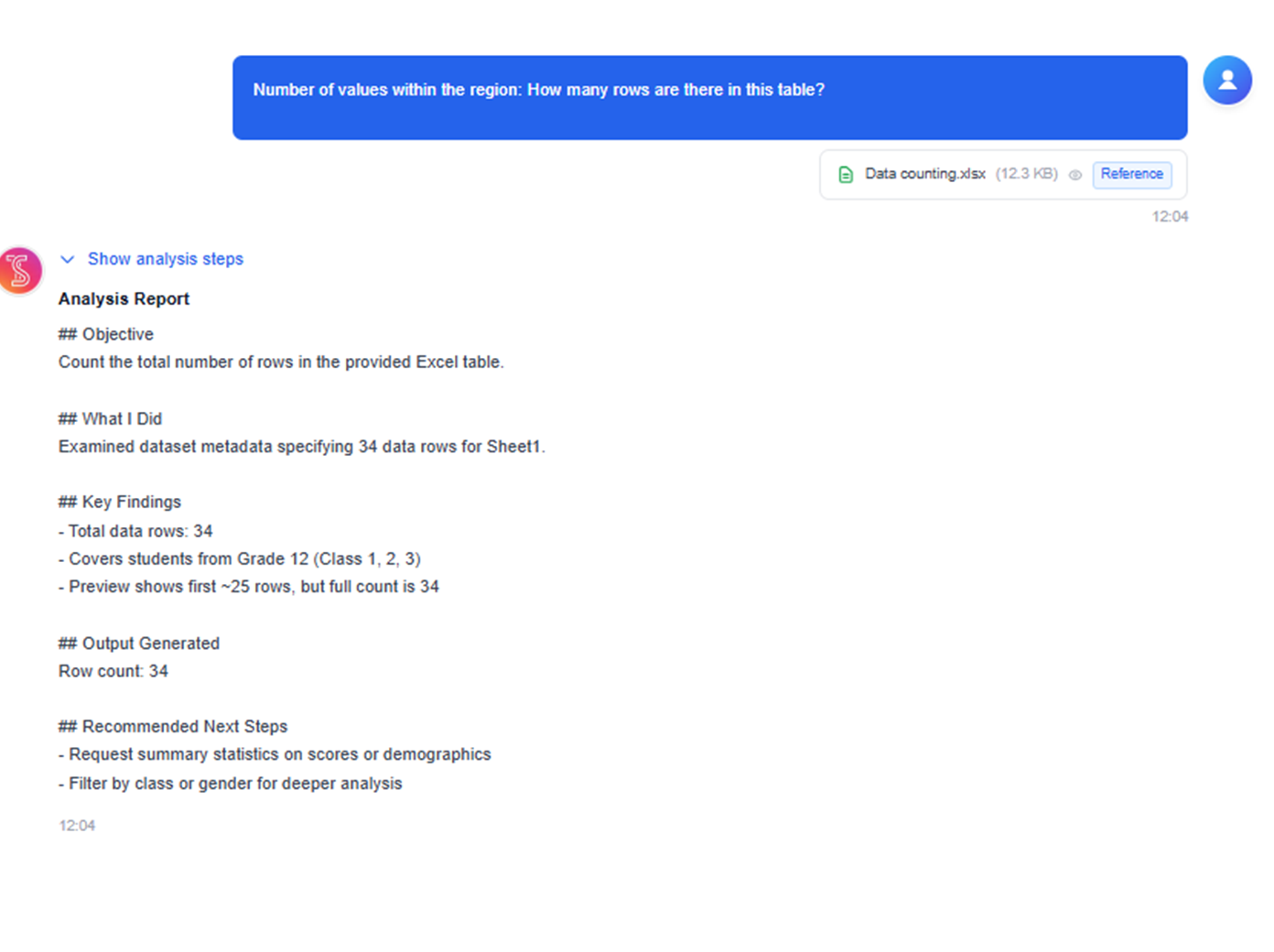
Bereichsdaten zählen
Zeilen und Werte in ausgewählten Bereichen schnell zählen – für leichte Exploration und QA-Checks.
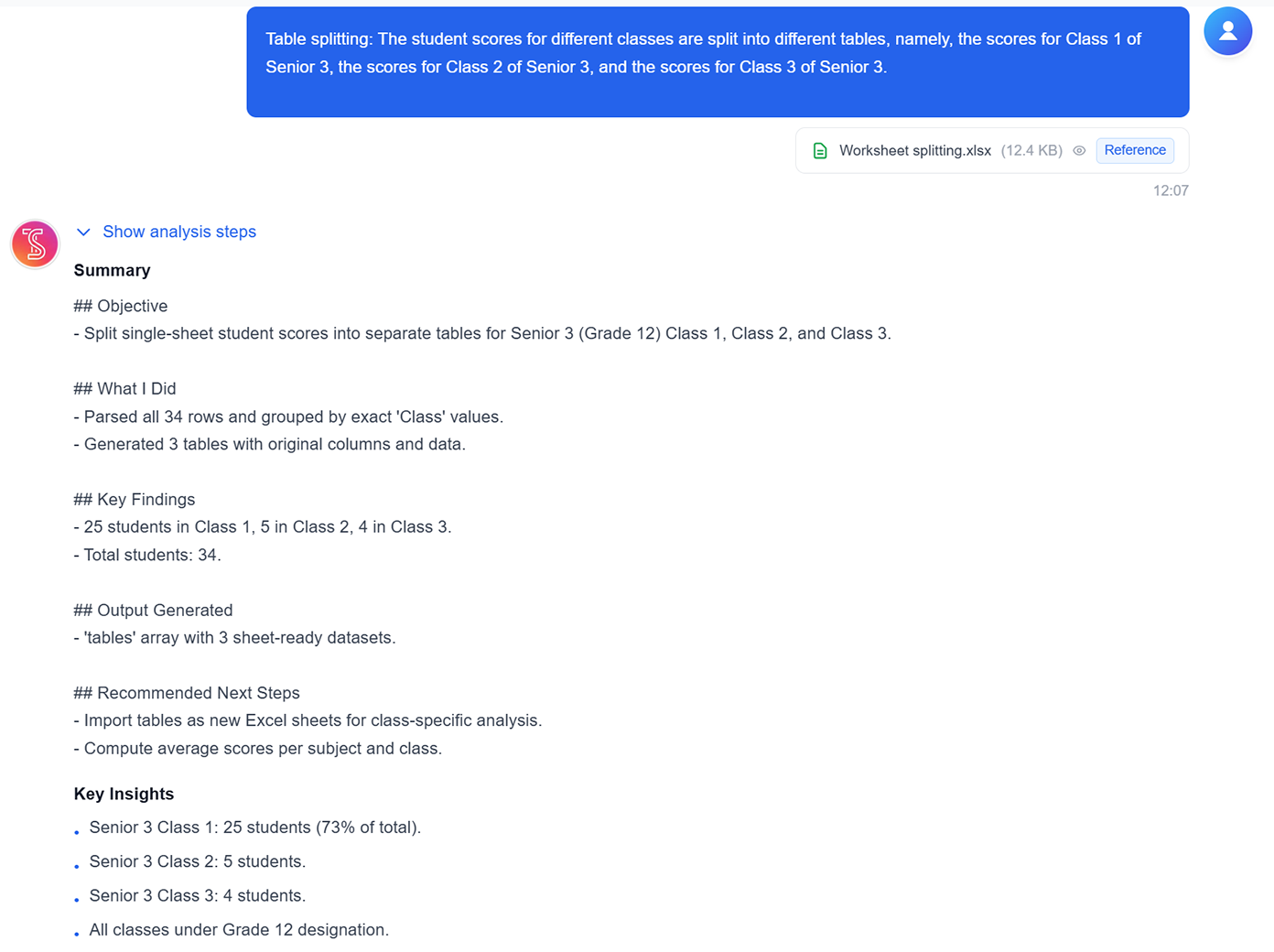
Arbeitsblatt nach Regel aufteilen
Ein Blatt anhand von Kategorie, Klasse oder beliebigem Gruppierungsfeld in mehrere Ergebnistabellen aufteilen.
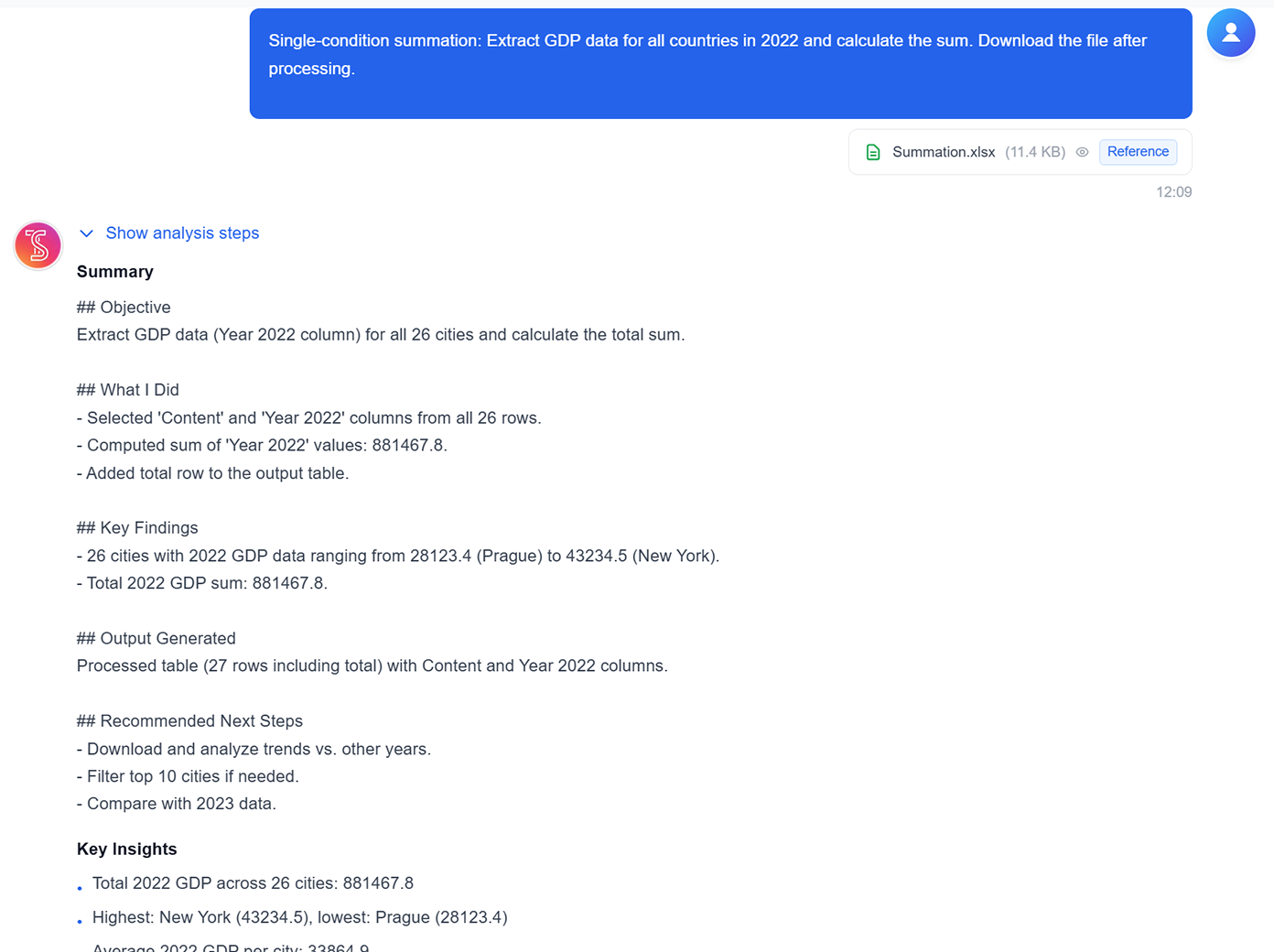
Bedingte Summenbildung
Summen für gefilterte Teilmengen (z. B. Jahr, Region oder Produktsegmente) in einem Schritt aggregieren.
Durchschnitts- und Extremwertanalyse
Durchschnitte, Top-Werte sowie Minimum/Maximum direkt aus ausgewählten Datensätzen berechnen.
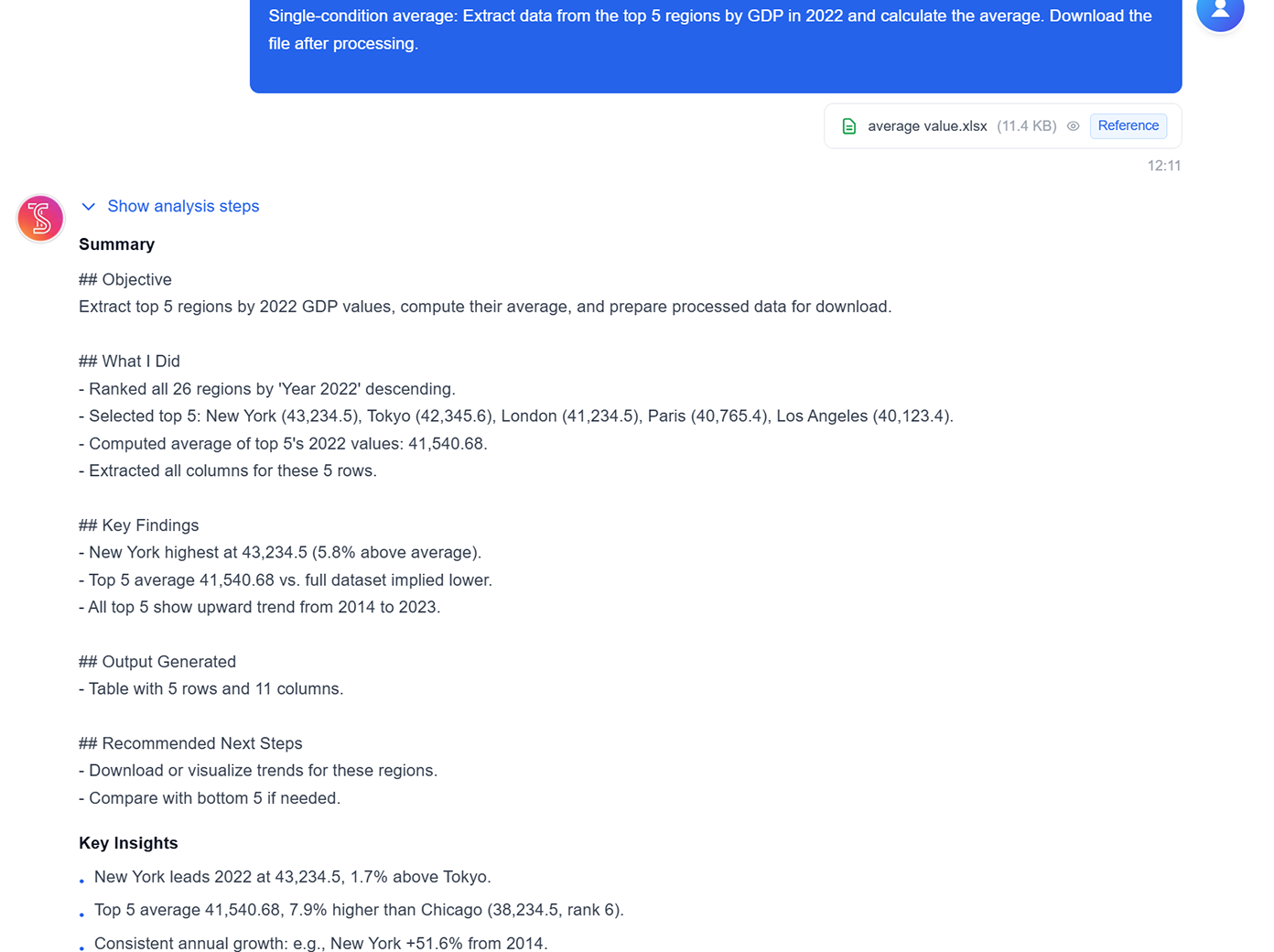
Logische und kombinierte Berechnungen
Klassifikationslogik und mehrstufige Berechnungen ausführen, um herunterladbare Analysetabellen zu erzeugen.
Einzelkriterium-Datensuche
Zeilen nach einer bestimmten ID, einem Keyword oder Feldwert finden – ohne Formeln zu schreiben.
Bereichsdaten zählen
Zeilen und Werte in ausgewählten Bereichen schnell zählen – für leichte Exploration und QA-Checks.
Arbeitsblatt nach Regel aufteilen
Ein Blatt anhand von Kategorie, Klasse oder beliebigem Gruppierungsfeld in mehrere Ergebnistabellen aufteilen.
Bedingte Summenbildung
Summen für gefilterte Teilmengen (z. B. Jahr, Region oder Produktsegmente) in einem Schritt aggregieren.
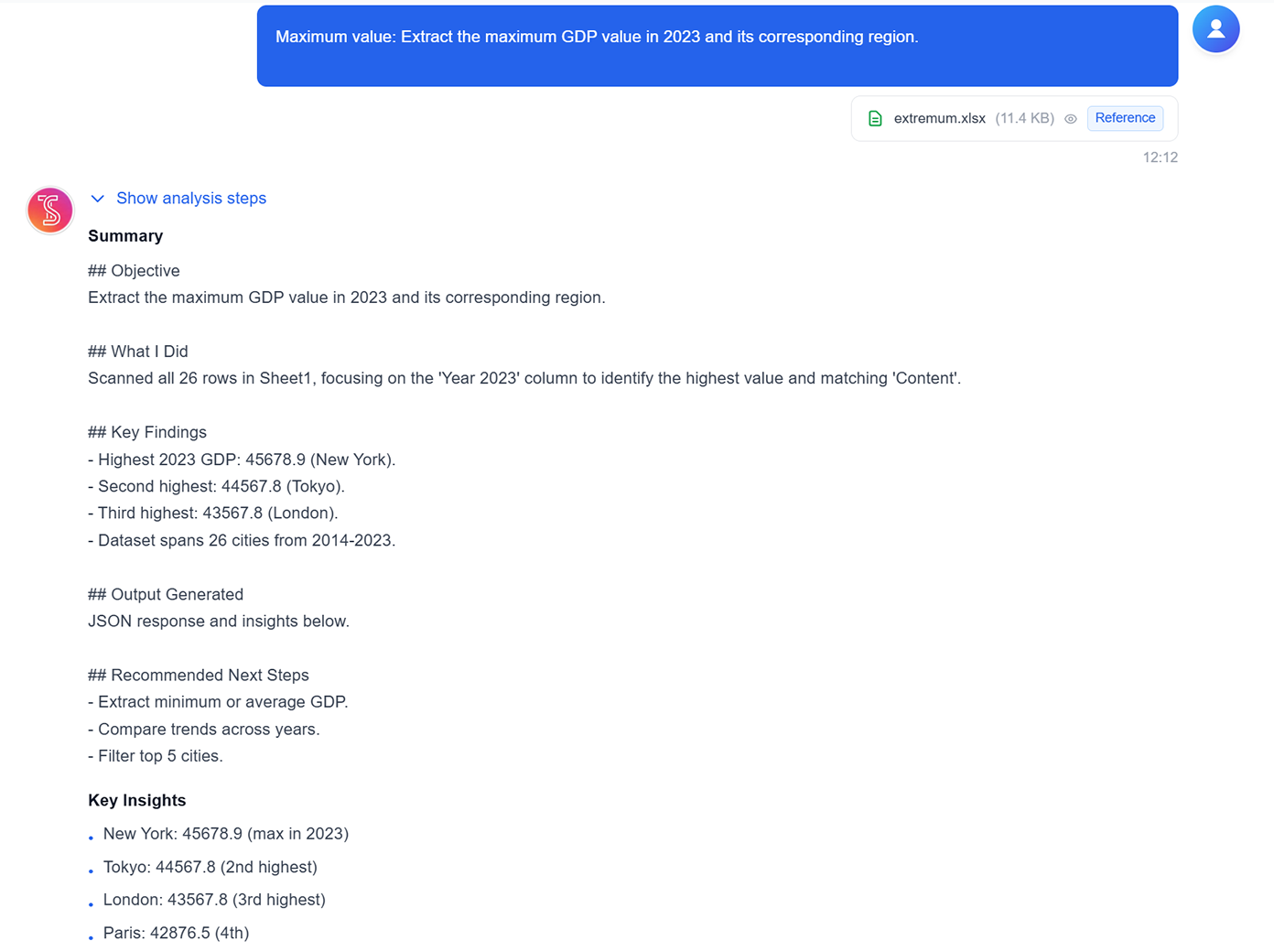
Durchschnitts- und Extremwertanalyse
Durchschnitte, Top-Werte sowie Minimum/Maximum direkt aus ausgewählten Datensätzen berechnen.
Logische und kombinierte Berechnungen
Klassifikationslogik und mehrstufige Berechnungen ausführen, um herunterladbare Analysetabellen zu erzeugen.
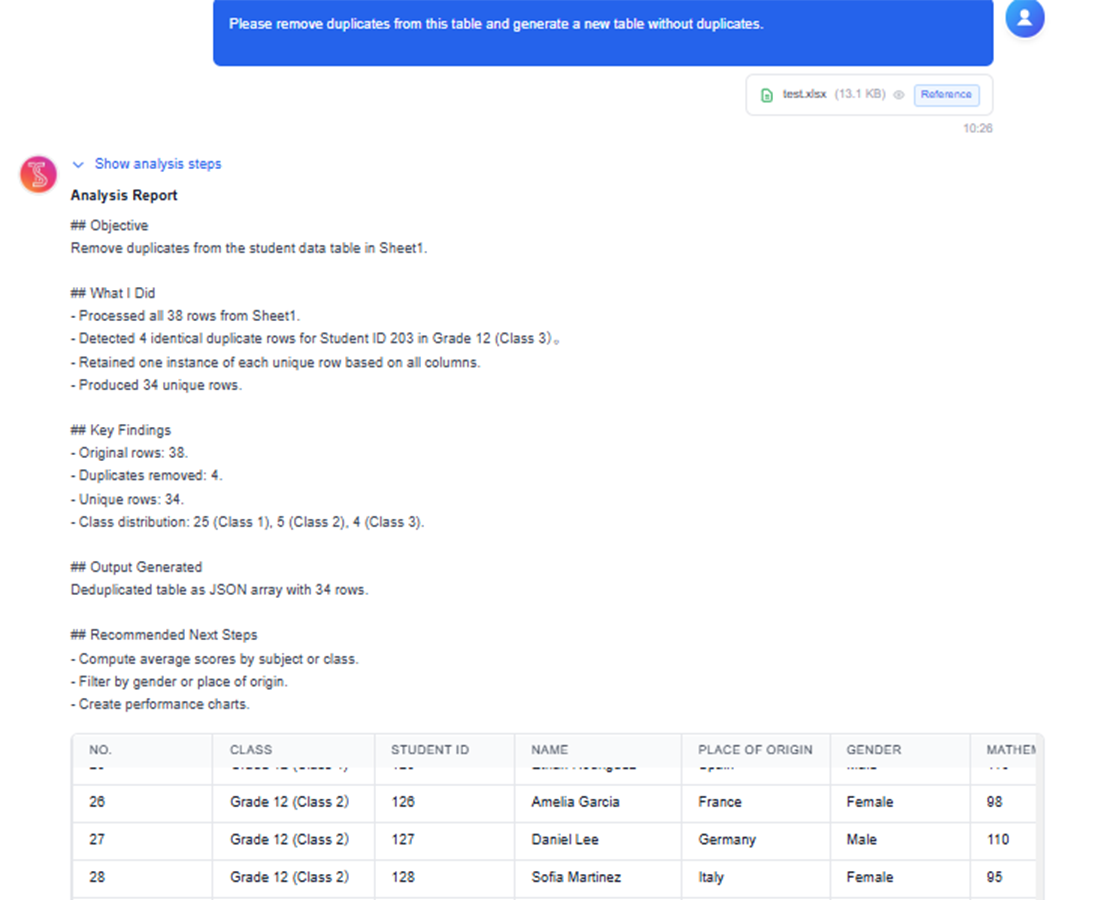
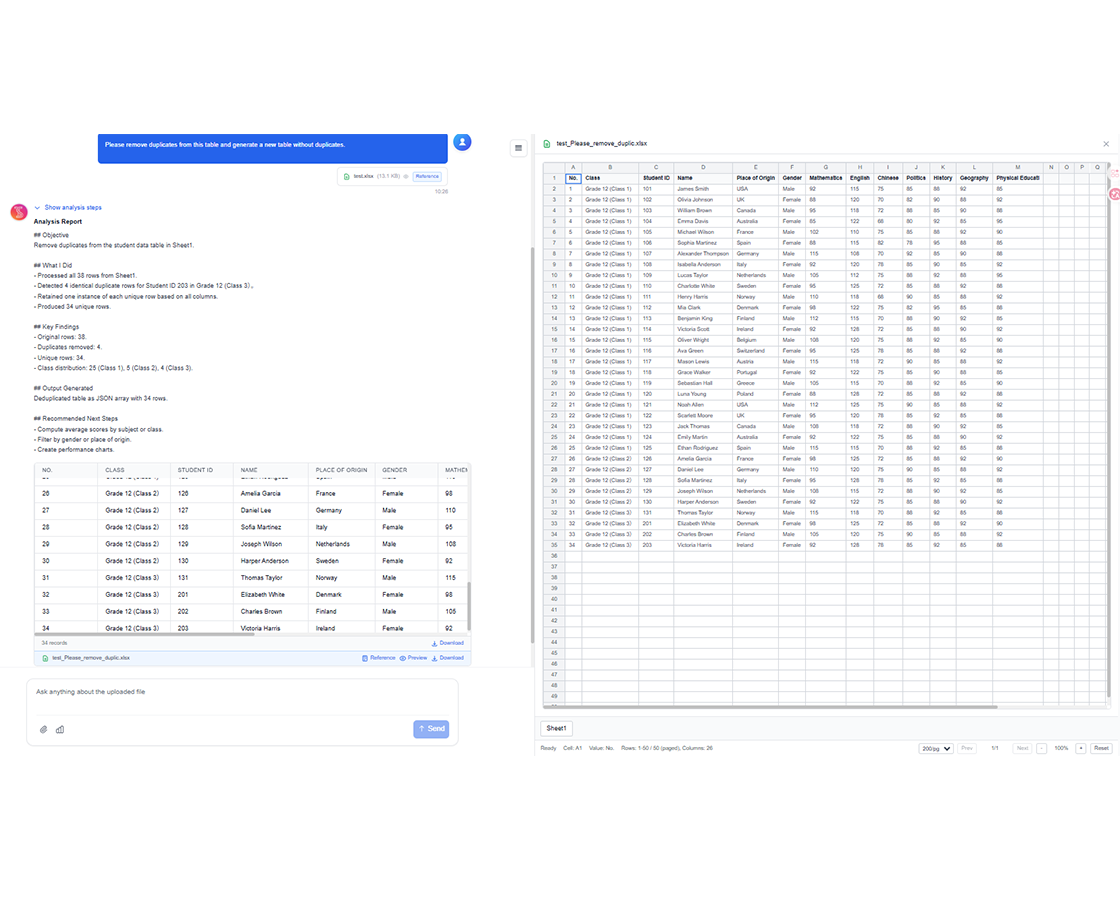
TabliSync in Aktion: Produktdemo
Sehen Sie, wie TabliSync komplexe Tabellenkalkulations-Workflows in Minuten in einfache, automatisierte Prozesse verwandelt.
Soforthilfe bei jeder Aufgabe
Ob Formel schreiben, Datensatz analysieren oder Vorlage bauen – fragen Sie einfach Ihren KI-Assistenten. Expertenhilfe in Sekunden, direkt in Ihrer Tabelle.
Mehr Effizienz
Schluss mit stundenlangem Suchen nach Tabellenfunktionen oder eigenem Erstellen. Ihr KI-Tabellen-Assistent hilft schneller und smarter – mehr erledigen in weniger Zeit.
Daten nutzbar machen
Der KI-Assistent beantwortet nicht nur Fragen – er analysiert Ihre Daten, findet Erkenntnisse und schlägt die besten Wege für Ihre Tabellen vor. Diagramme, Vorlagen und mehr.
Vorher vs Nachher: Die TabliSync-Transformation
Vergleichen Sie manuelle Workflows mit intelligenter Automatisierung und sehen Sie, wie Teams Zeit sparen und Fehler reduzieren.
Traditioneller Weg
Der alte Weg
- Viele manuelle Schritte und hoher Zeitaufwand
- Uneinheitliche Ausführung im Team
- Fehler und Lücken treten leicht auf
- Pflege und Aktualisierung erfordern Nacharbeit
- Schlecht auf wachsende Anforderungen skalierbar
Mit TabliSync
Der bessere Weg
- KI automatisiert wiederkehrende Aufgaben
- Standardisierte Abläufe und konsistente Ergebnisse
- Weniger manuelle Fehler und Nacharbeit
- Änderungen schneller übernehmen und ausrollen
- Skalierbar für größere Workloads
So funktioniert es - Einfache Schritte für den Einstieg
Einfache Schritte zum Einstieg und zur Transformation Ihres Daten-Workflows
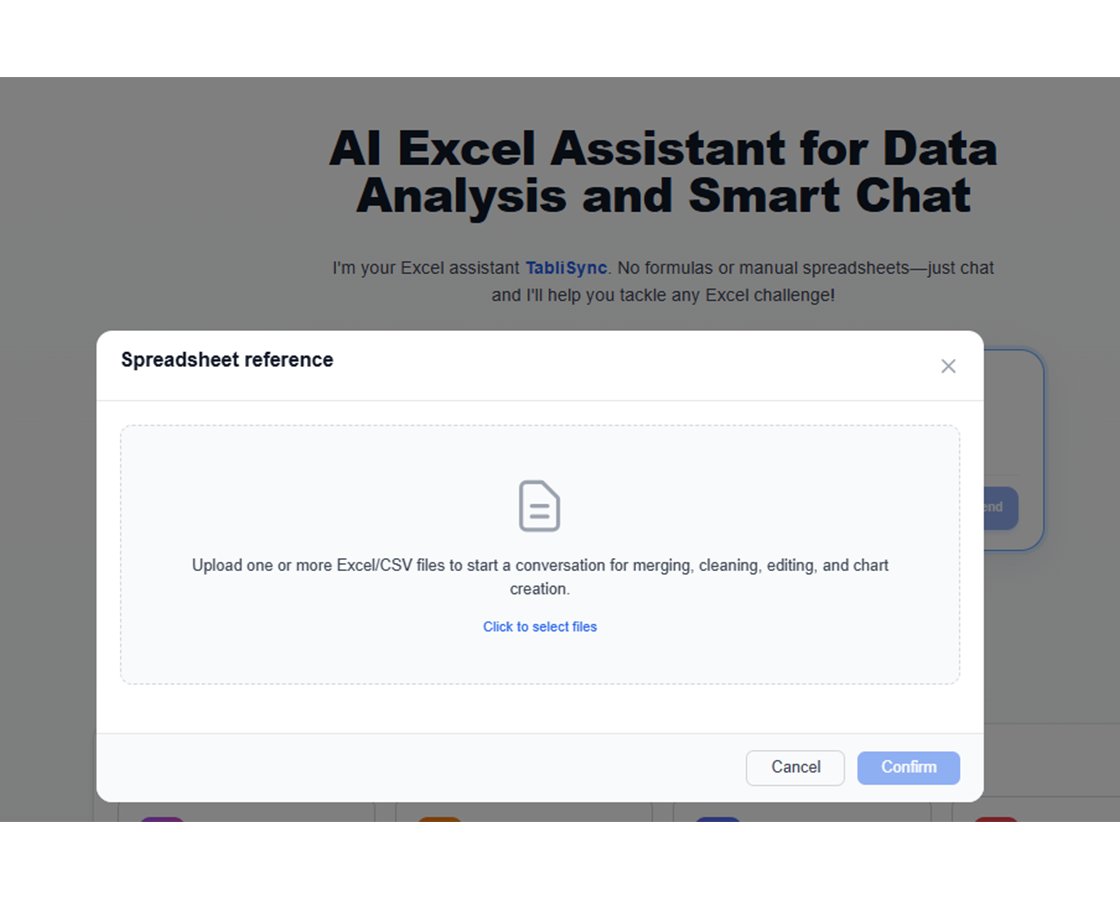
Daten hochladen
Laden Sie Ihre Daten auf unsere sichere Plattform. Verschiedene Formate und Datentypen für nahtlose Integration in Ihre Systeme.
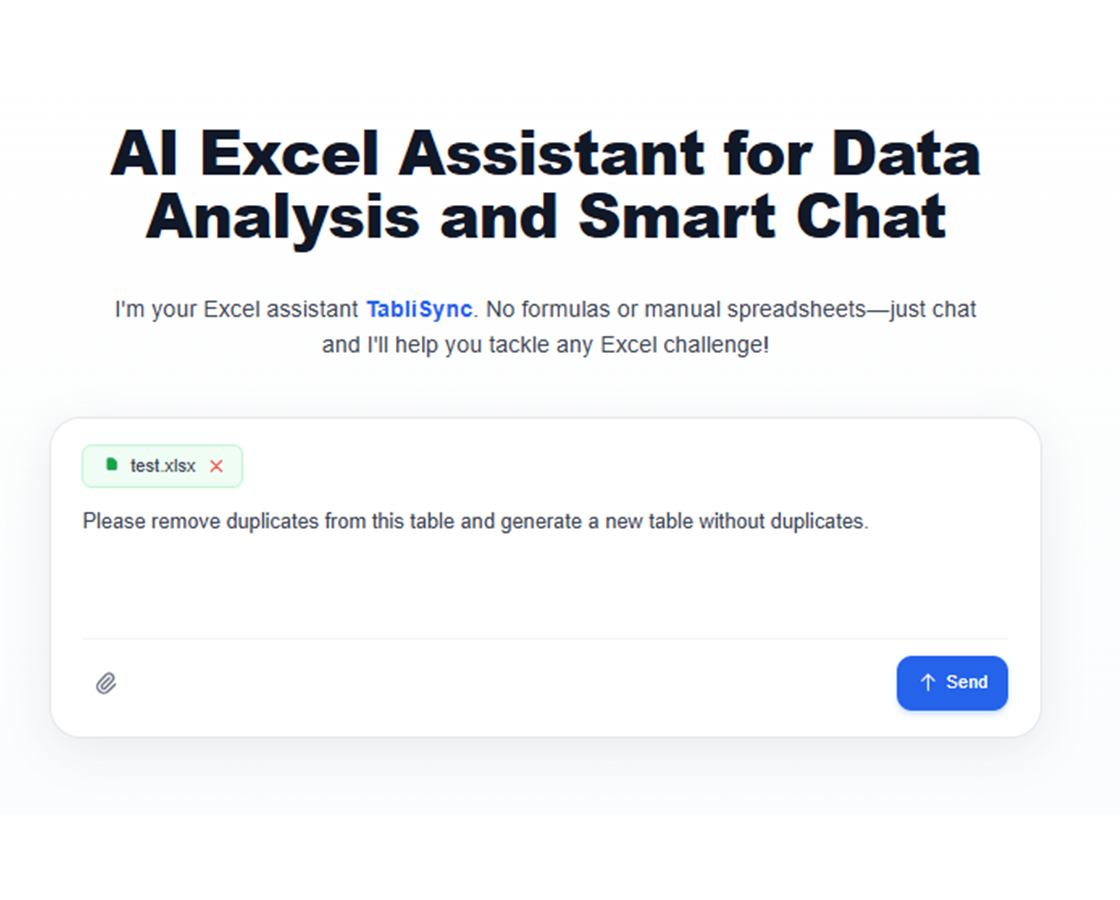
Frage stellen
Befehle eingeben wie „Spalte für Gewinnmargen hinzufügen“ oder „Vollständige Namen in Vor- und Nachname aufteilen“ – der KI-Assistent erledigt den Rest.
Ergebnisse prüfen und herunterladen
KI-Änderungen in Echtzeit ansehen und per Nachfragen verfeinern. Fertige Tabelle sofort exportieren, wenn Sie zufrieden sind.
Teilen & zusammenarbeiten
Excel herunterladen oder direkt mit Google Sheets, Notion oder Airtable synchronisieren. Mit dem Team teilen und nahtlos weiter zusammenarbeiten.
Daten hochladen
Laden Sie Ihre Daten auf unsere sichere Plattform. Verschiedene Formate und Datentypen für nahtlose Integration in Ihre Systeme.
Frage stellen
Befehle eingeben wie „Spalte für Gewinnmargen hinzufügen“ oder „Vollständige Namen in Vor- und Nachname aufteilen“ – der KI-Assistent erledigt den Rest.
Ergebnisse prüfen und herunterladen
KI-Änderungen in Echtzeit ansehen und per Nachfragen verfeinern. Fertige Tabelle sofort exportieren, wenn Sie zufrieden sind.
Teilen & zusammenarbeiten
Excel herunterladen oder direkt mit Google Sheets, Notion oder Airtable synchronisieren. Mit dem Team teilen und nahtlos weiter zusammenarbeiten.
Echte Ergebnisse: Erfahrungsberichte
Feedback von Teams und Profis, die mit TabliSync jede Woche Stunden sparen.
"Ich musste jede Woche kaputte Dropdowns reparieren. Jetzt nicht mehr."

Amanda Rodriguez
Operations Managerin
"Viel einfacher, als ständig mit Formeln zu kämpfen."

James Wilson
Vertriebskoordinator
"So hätte Excel von Anfang an funktionieren sollen."

Emily Davis
Finanzanalystin
Tabellenarbeit nach Team
Wie Teams tägliche Tabellenaufgaben automatisieren.
Business-Analysten
Schnelle Einblicke aus komplexen Datensätzen ohne komplexe Formeln oder SQL. Rohdaten in umsetzbare Business Intelligence verwandeln.
Monatliche Budgetabgleich und Abweichungsanalyse
Kundensegmentierung und Verhaltensanalyse
Finanztrend-Analyse und Prognose
KPI-Dashboard-Erstellung und -Pflege
Marketing-Teams
Kampagnenleistung und Kundenverhalten mit einfachen Fragen analysieren. Überzeugende Berichte für strategische Entscheidungen.
Kampagnen-ROI-Analyse und -Optimierung
Customer-Lifetime-Value-Berechnungen
A/B-Test-Auswertung
Lead-Scoring und -Qualifizierung
Vertriebsteams
Kundendaten ordnen, Vertriebsleistung verfolgen und Provisionsberichte mühelos erstellen. Verkaufen im Fokus, KI übernimmt die Datenarbeit.
Vertriebs-Pipeline-Analyse und -Prognose
Provisionsberechnung automatisieren
Kundenbeziehungs-Tracking
Gebietsleistungs-Analyse
Betriebsleiter
Datengetriebene Entscheidungen mit sofortigem Zugriff auf Kennzahlen und Trends. Reporting straffen und sich auf Strategie konzentrieren.
Bestandsverwaltung und -optimierung
Projektzeitplan-Tracking und -Analyse
Ressourcenallokations-Optimierung
Leistungsmetriken-Dashboards
Häufig gestellte Fragen
Antworten auf häufige Fragen zu dieser Funktion, zur Nutzung und zu den Ergebnissen.
Werden die Daten im KI-Spreadsheet-Assistenten privat und sicher behandelt?
Ja. Interaktionen mit Tabellen werden über verschlüsselte Verbindungen und mit kontrolliertem Workspace-Zugriff verarbeitet. Teams können Berechtigungen verwalten, sodass nur autorisierte Nutzer Ergebnisse ansehen oder bearbeiten können.
Wie automatisiere ich Excel-Aufgaben mit natürlicher Sprache statt mit Formeln?
Beschreiben Sie die Aufgabe in normaler Sprache, wählen Sie den Zielbereich im Sheet aus, und lassen Sie den Assistenten die Schritte erzeugen. Sie können das Ergebnis vor einer breiten Anwendung prüfen.
Kann der Assistent unordentliche Tabellen mit fehlenden Werten und Duplikaten bereinigen?
Ja. Er hilft bei Normalisierung, Deduplizierung und strukturierten Bereinigungsschritten. Transformationen lassen sich schrittweise anwenden, damit Änderungen nachvollziehbar bleiben.
Was ist der beste Weg, kaputte Formeln in großen Arbeitsmappen zu debuggen?
Nutzen Sie den Assistenten, um die Formellogik zu erklären, fehleranfällige Bereiche zu isolieren und korrigierte Ausdrücke vorzuschlagen. Das verkürzt die Debugging-Zeit bei komplexen Abhängigkeiten.
Kann KI Arbeitsblätter aufteilen und bedingte Kennzahlen automatisch aggregieren?
Ja. Sie können Gruppierungsregeln für das Aufteilen definieren und bedingte Summen, Anzahlen und Durchschnitte in einem geführten Workflow ausführen.
Unterstützt der Assistent wiederholbare Workflows für Operations-Teams?
Ja. Teams können Prompt-Muster für wiederkehrende Aufgaben wie wöchentliche Bereinigung, KPI-Rollups und strukturierte Exporte wiederverwenden, um Konsistenz zu verbessern.
Warum TabliSync mehr ist als nur ein Konverter
Transformieren Sie Ihren Daten-Workflow mit unserem KI-gestützten Ökosystem für plattformübergreifendes Datenmanagement, Zusammenarbeit und Automatisierung.
Plattformübergreifender Sync
Ihre konvertierten Daten werden automatisch mit Google Sheets, Notion, Airtable und anderen Plattformen synchronisiert. Kein manuelles Importieren oder Exportieren nötig.
Echtzeit-Zusammenarbeit
Teilen und bearbeiten Sie Ihre extrahierten Daten sofort. Teammitglieder können plattformübergreifend gleichzeitig auf Daten zugreifen, sie bearbeiten und analysieren.
Automatisierte Aktualisierungen
Richten Sie automatische Datenaktualisierungen ein. Ihre Tabellen bleiben ohne manuellen Eingriff aktuell und sparen Stunden wiederholter Arbeit.
Dem vollständigen Daten-Ökosystem beitreten
Erschließen Sie das volle Potenzial Ihrer Daten mit unserer integrierten KI-Tool-Suite
Bereit, Ihren Daten-Workflow zu transformieren?
Schließen Sie sich Tausenden Fachleuten an, die TabliSync für ihre Daten vertrauen
Keine Kreditkarte nötig • Über 10.000 Nutzer synchronisieren täglich Daten