AI Excel to Dashboard 변환기: 스프레드시트를 대화형 시각 Dashboard로 전환
정적인 Excel 데이터를 한 번의 클릭으로 동적이고 공유 가능한 Dashboard로 변환 - 디자인/코딩 지식 불필요
Excel 데이터를 이해관계자가 바로 이해할 수 있는 Dashboard로 자동 전환합니다. 실시간 KPI 추적, 인터랙티브 필터, 반응형 디자인을 몇 분 안에 제공하여 기존에 수개월 걸리던 Dashboard 작업을 크게 단축합니다.
What is AI Excel to Dashboard 변환기: 스프레드시트를 대화형 시각 Dashboard로 전환?
Excel 데이터를 이해관계자가 바로 이해할 수 있는 Dashboard로 자동 전환합니다. 실시간 KPI 추적, 인터랙티브 필터, 반응형 디자인을 몇 분 안에 제공하여 기존에 수개월 걸리던 Dashboard 작업을 크게 단축합니다.
TabliSync 소개: AI 기반 Excel 자동화
실제 비즈니스 워크플로, 데이터 작업, 팀 협업을 위해 설계된 지능형 자동화 레이어입니다.
원클릭 변환
한 번의 클릭으로 모든 Excel 스프레드시트를 전문적인 대화형 대시보드로 변환합니다. 디자인 기술이 필요 없습니다.
원클릭 변환
한 번의 클릭으로 모든 Excel 스프레드시트를 전문적인 대화형 대시보드로 변환합니다. 디자인 기술이 필요 없습니다....
대화형 요소
사용자가 데이터를 동적으로 탐색할 수 있는 필터, 드릴다운 기능 및 대화형 차트를 추가합니다.
대화형 요소
사용자가 데이터를 동적으로 탐색할 수 있는 필터, 드릴다운 기능 및 대화형 차트를 추가합니다....
실시간 업데이트
소스 Excel 데이터가 변경되면 대시보드가 자동으로 업데이트됩니다. 실시간 데이터로 이해 관계자에게 정보를 제공합니다.
실시간 업데이트
소스 Excel 데이터가 변경되면 대시보드가 자동으로 업데이트됩니다. 실시간 데이터로 이해 관계자에게 정보를 제공합니다....
모바일 반응형
대시보드는 반응형 디자인 최적화를 통해 데스크톱, 태블릿 및 모바일 기기에서 완벽하게 작동합니다.
모바일 반응형
대시보드는 반응형 디자인 최적화를 통해 데스크톱, 태블릿 및 모바일 기기에서 완벽하게 작동합니다....
공유 및 협업
보안 링크를 통해 대시보드를 공유하거나 웹사이트에 포함하거나 회의용 프레젠테이션으로 내보냅니다.
공유 및 협업
보안 링크를 통해 대시보드를 공유하거나 웹사이트에 포함하거나 회의용 프레젠테이션으로 내보냅니다....
사용자 정의 브랜딩
회사 색상, 로고 및 브랜딩을 적용하여 정체성과 일치하는 전문 대시보드를 만듭니다.
사용자 정의 브랜딩
회사 색상, 로고 및 브랜딩을 적용하여 정체성과 일치하는 전문 대시보드를 만듭니다....
원클릭 변환
한 번의 클릭으로 모든 Excel 스프레드시트를 전문적인 대화형 대시보드로 변환합니다. 디자인 기술이 필요 없습니다.
대화형 요소
사용자가 데이터를 동적으로 탐색할 수 있는 필터, 드릴다운 기능 및 대화형 차트를 추가합니다.
실시간 업데이트
소스 Excel 데이터가 변경되면 대시보드가 자동으로 업데이트됩니다. 실시간 데이터로 이해 관계자에게 정보를 제공합니다.
원클릭 변환
한 번의 클릭으로 모든 Excel 스프레드시트를 전문적인 대화형 대시보드로 변환합니다. 디자인 기술이 필요 없습니다....
대화형 요소
사용자가 데이터를 동적으로 탐색할 수 있는 필터, 드릴다운 기능 및 대화형 차트를 추가합니다....
실시간 업데이트
소스 Excel 데이터가 변경되면 대시보드가 자동으로 업데이트됩니다. 실시간 데이터로 이해 관계자에게 정보를 제공합니다....
모바일 반응형
대시보드는 반응형 디자인 최적화를 통해 데스크톱, 태블릿 및 모바일 기기에서 완벽하게 작동합니다....
공유 및 협업
보안 링크를 통해 대시보드를 공유하거나 웹사이트에 포함하거나 회의용 프레젠테이션으로 내보냅니다....
사용자 정의 브랜딩
회사 색상, 로고 및 브랜딩을 적용하여 정체성과 일치하는 전문 대시보드를 만듭니다....
모바일 반응형
대시보드는 반응형 디자인 최적화를 통해 데스크톱, 태블릿 및 모바일 기기에서 완벽하게 작동합니다.
공유 및 협업
보안 링크를 통해 대시보드를 공유하거나 웹사이트에 포함하거나 회의용 프레젠테이션으로 내보냅니다.
사용자 정의 브랜딩
회사 색상, 로고 및 브랜딩을 적용하여 정체성과 일치하는 전문 대시보드를 만듭니다.
TabliSync 데모: 실제 동작 보기
TabliSync가 복잡한 워크플로를 몇 분 안에 간단한 자동화 프로세스로 바꾸는 모습을 확인하세요.
데이터에 생명 불어넣기
지루한 Excel 시트를 설득력 있는 데이터 스토리를 전달하고 주의를 끄는 매력적이고 대화형 대시보드로 변환합니다.
이해 관계자 감동
경영진 및 고객을 감동시키는 전문적이고 대화형 대시보드로 데이터를 제시합니다. 인사이트를 무시할 수 없게 만듭니다.
개발 시간 절약
몇 달간의 대시보드 개발을 건너뜁니다. 몇 주가 아닌 몇 분 만에 전문적인 결과를 얻습니다. 코딩이나 디자인 기술이 필요 없습니다.
사용 전/후: TabliSync 변화
수동 워크플로와 지능형 자동화를 비교하고, 시간 절약과 오류 감소를 확인하세요.
기존 방식
기존 방식
- 수작업 단계가 많아 시간이 오래 걸림
- 팀원별 작업 방식이 일관되지 않음
- 데이터 누락과 입력 오류가 자주 발생
- 업데이트와 유지보수에 재작업 필요
- 업무가 커질수록 확장하기 어려움
TabliSync 사용 시
스마트한 방식
- AI로 반복 업무 자동화
- 표준화된 프로세스로 결과 일관성 확보
- 수작업 오류와 재작업 비용 감소
- 변경사항을 빠르게 반영
- 증가하는 업무량에도 유연하게 확장
작동 방식 - 간단한 시작 단계
시작하고 데이터 워크플로를 변환하는 간단한 단계
Excel 파일 업로드
데이터가 포함된 Excel 스프레드시트를 가져옵니다. AI가 구조를 분석하고 주요 지표 및 차원을 식별합니다.
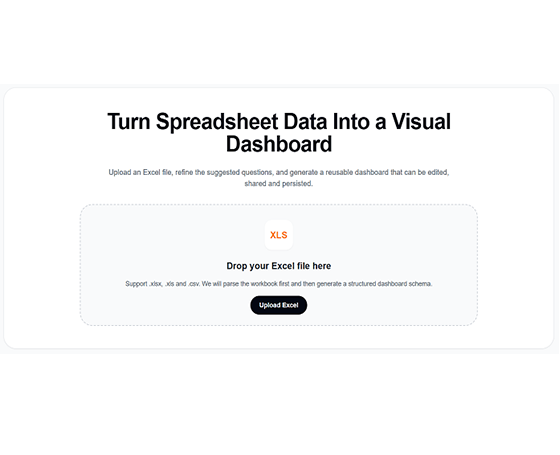
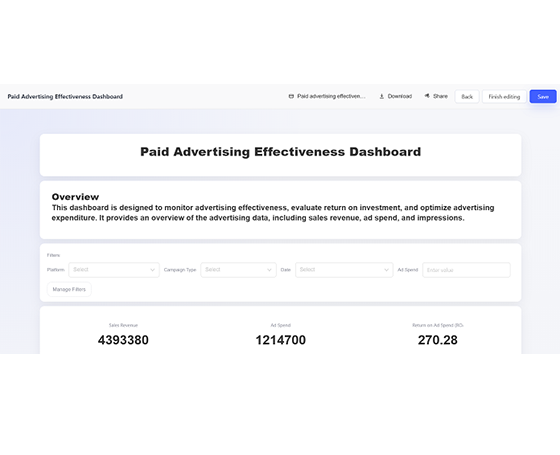
AI가 대시보드 생성
AI가 데이터를 기반으로 적절한 차트, 필터 및 레이아웃이 포함된 대화형 대시보드를 자동으로 생성합니다.
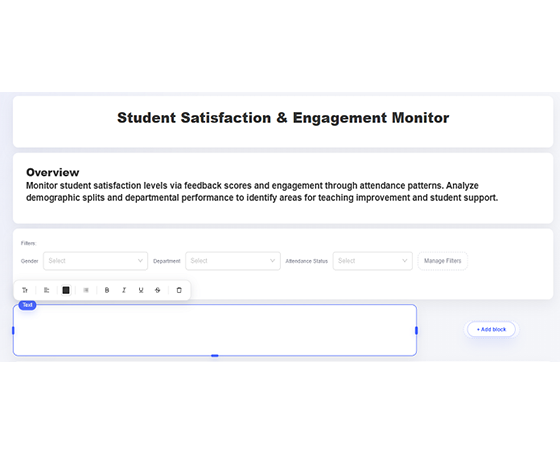
사용자 정의 및 개선
색상을 조정하고 필터를 추가하며 차트 유형을 수정하고 레이아웃을 사용자 정의하여 선호도에 맞춥니다.
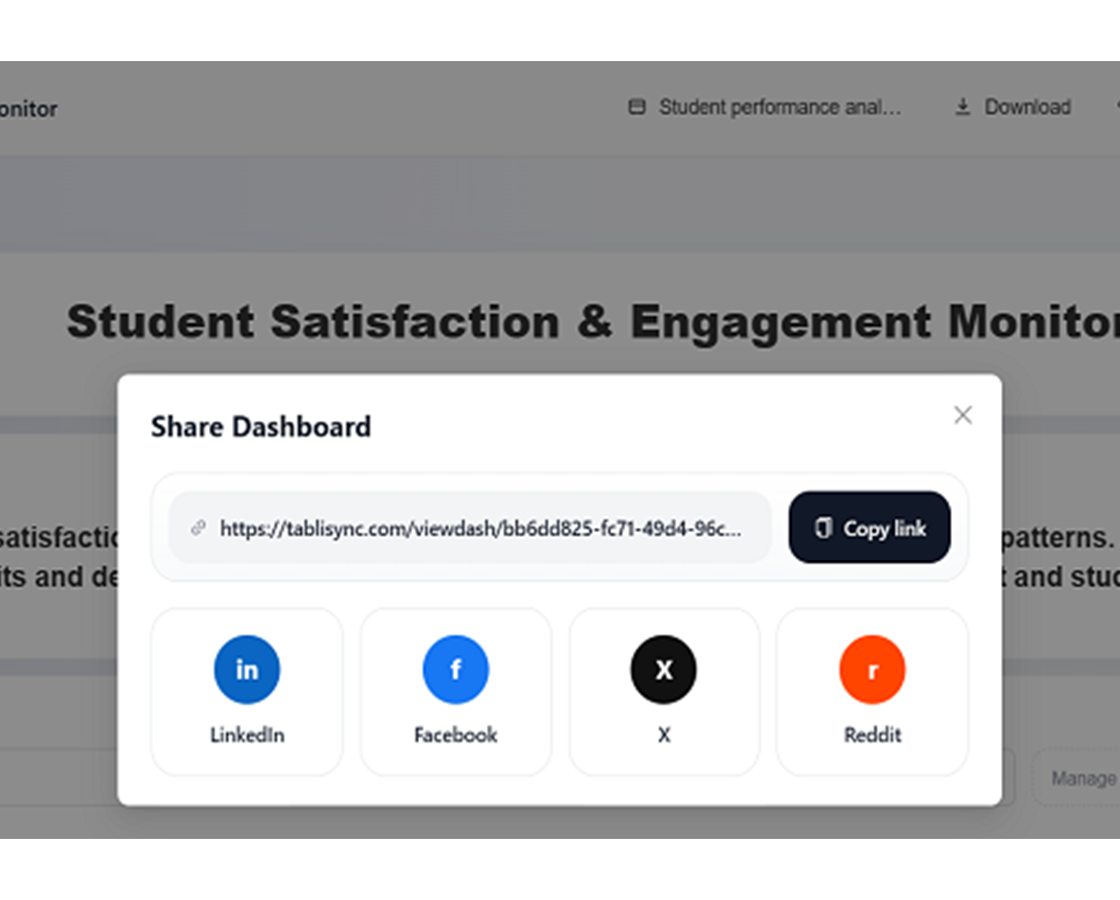
공유 및 협업
보안 링크로 대시보드를 게시하거나 웹사이트에 포함하거나 프레젠테이션용으로 내보냅니다.
Excel 파일 업로드
데이터가 포함된 Excel 스프레드시트를 가져옵니다. AI가 구조를 분석하고 주요 지표 및 차원을 식별합니다.
AI가 대시보드 생성
AI가 데이터를 기반으로 적절한 차트, 필터 및 레이아웃이 포함된 대화형 대시보드를 자동으로 생성합니다.
사용자 정의 및 개선
색상을 조정하고 필터를 추가하며 차트 유형을 수정하고 레이아웃을 사용자 정의하여 선호도에 맞춥니다.
공유 및 협업
보안 링크로 대시보드를 게시하거나 웹사이트에 포함하거나 프레젠테이션용으로 내보냅니다.
실제 성과: 고객 성공 사례
TabliSync로 매주 시간을 절약하는 팀과 전문가들의 피드백을 확인하세요.
"실시간 대시보드 덕분에 임원 회의의 질이 훨씬 좋아졌습니다."

Richard Martinez
CEO
"예전엔 차트 업데이트에 몇 시간씩 썼는데 이제 자동으로 갱신됩니다."

Karen White
비즈니스 분석가
"이해관계자들이 매우 좋아합니다. 엑셀 스크린샷보다 훨씬 낫습니다."

Steven Clark
프로덕트 매니저
역할별 대시보드 사용 사례
스프레드시트를 KPI 대시보드로 전환.
영업 팀
영업 데이터를 성과, 파이프라인 및 수익 지표를 추적하기 위한 동적 대시보드로 변환합니다.
영업 성과 대시보드
파이프라인 추적 시각화
수익 추세 분석
마케팅 부서
캠페인 데이터를 ROI, 참여 및 전환 지표를 모니터링하기 위한 대화형 대시보드로 변환합니다.
캠페인 성과 추적
소셜 미디어 분석 대시보드
리드 생성 시각화
경영진
전략적 의사 결정을 위해 재무 및 운영 데이터에서 경영진 대시보드를 만듭니다.
경영진 KPI 대시보드
재무 성과 추적
운영 지표 시각화
프로젝트 관리자
프로젝트 데이터를 진행 상황, 리소스 및 결과물을 추적하기 위한 시각적 대시보드로 변환합니다.
프로젝트 타임라인 대시보드
리소스 할당 추적
마일스톤 진행 상황 시각화
자주 묻는 질문
이 기능에 대해 자주 묻는 질문과 사용 방법, 기대할 수 있는 결과를 확인하세요.
TabliSync는 대시보드 소스 스프레드시트 데이터를 어떻게 안전하고 비공개로 보장하나요?
통합 문서 업로드와 대시보드 생성은 암호화 채널과 workspace 수준 접근 제어로 처리됩니다. 누가 대시보드 출력을 보고, 편집하고, 공유할지 통제할 수 있습니다.
Excel 파일을 대화형 대시보드로 빠르게 변환하려면?
워크북을 업로드하고 KPI 우선순위를 선택한 뒤, AI가 차트 블록과 필터를 생성하게 하세요. 레이아웃을 조정하고 팀에 게시하세요.
소스 Excel 데이터가 변경되면 대시보드 지표가 자동으로 새로고침되나요?
네. 새로고침 동작을 설정해 KPI 패널이 업데이트된 소스 데이터와 일치하도록 할 수 있으며, 수동 보고서 재구축 작업을 줄일 수 있습니다.
주간 경영 KPI 검토에 최적인 대시보드 구조는?
상단 요약 행, 트렌드 패널, 차이 분해, 지역·제품별 드릴다운 필터를 사용하세요. 의사결정 회의를 더 빠르고 일관되게 만듭니다.
팀이 역할 기반 권한으로 동일한 대시보드를 공유할 수 있나요?
네. 팀은 통제된 권한으로 대시보드 뷰를 공유해, 기여자와 이해관계자가 적절한 세부 수준을 볼 수 있도록 할 수 있습니다.
AI 생성 대시보드에 회사 브랜드를 적용할 수 있나요?
네. 색상, 레이블, 시각 스타일을 사용자 지정해 내부 보고 표준과 대외 프레젠테이션 요구에 맞출 수 있습니다.
TabliSync가 단순한 변환기 이상인 이유
크로스 플랫폼 데이터 관리, 협업 및 자동화를 위한 AI 기반 도구의 완전한 생태계로 데이터 워크플로를 변환합니다.
크로스 플랫폼 동기화
변환된 데이터가 Google Sheets, Notion, Airtable 및 기타 플랫폼에 자동으로 동기화됩니다. 수동 가져오기 또는 내보내기가 필요 없습니다.
실시간 협업
추출된 데이터를 즉시 공유하고 협업합니다. 팀 구성원이 다양한 플랫폼에서 동시에 데이터에 액세스하고 편집하며 분석할 수 있습니다.
자동화된 업데이트
자동 데이터 새로 고침 일정을 설정합니다. 스프레드시트가 수동 개입 없이 최신 상태로 유지되어 반복 작업 시간을 절약합니다.
완전한 데이터 생태계에 참여
통합된 AI 도구 제품군으로 데이터의 잠재력을 최대한 발휘하세요
데이터 워크플로를 변환할 준비가 되셨나요?
데이터 요구 사항을 위해 TabliSync를 신뢰하는 수천 명의 전문가에 합류하세요
신용카드 불필요 • 매일 데이터를 동기화하는 10,000+ 사용자와 함께하세요