AI-Powered Image to Excel Converter: JPG & PNG to Editable Spreadsheets
Convert Table Images (JPG, PNG, WEBP) to Editable Excel with Semantic Understanding
Stop manually typing data from images! Our AI-powered JPG to Excel and PNG to Excel converter uses advanced semantic understanding to transform screenshots, photos, and scanned documents into fully editable spreadsheets. Beyond basic OCR - we understand context, relationships, and meaning in your data.
What is AI-Powered Image to Excel Converter: JPG & PNG to Editable Spreadsheets?
Stop manually typing data from images! Our AI-powered JPG to Excel and PNG to Excel converter uses advanced semantic understanding to transform screenshots, photos, and scanned documents into fully editable spreadsheets. Beyond basic OCR - we understand context, relationships, and meaning in your data.
Screenshot and Image Data Retyping Inefficiency
Converting images and screenshots to Excel manually is time-consuming and error-prone. Data entry teams face repetitive typing work and formatting inconsistencies.
Screenshot and Image Data Retyping Inefficiency
Teams capture table screenshots from meetings, presentations, and reports but then waste hours manually retyping visible data into Excel. This screenshot-to-spreadsheet workflow is unnecessarily time-consuming and introduces transcription errors that affect data accuracy.
This workflow bottleneck impacts team productivity, increases operational costs, and creates data quality issues that affect business decisions.
Mobile Photo to Excel Data Entry Challenges
Field teams and remote workers take photos of paper forms, whiteboards, and printed tables, but lack tools to convert these images to editable Excel data. Manual transcription from photos creates delays and prevents real-time data collection workflows.
Manual processes lead to inconsistent results, higher error rates, and frustrated team members who spend time on repetitive low-value tasks.
Image OCR Quality and Table Structure Recognition
Basic OCR tools fail to preserve table layouts, column alignment, and cell relationships when extracting data from images. Poor image-to-Excel conversion quality forces teams to spend extra time fixing formatting and validating extracted data.
Without automation, scaling operations becomes difficult, team efficiency suffers, and valuable time is lost on tasks that could be automated.
Meet TabliSync: Your AI-Powered Excel Automation Solution
An intelligent spreadsheet automation layer built on top of Microsoft Excel — designed for real-world business workflows, data processing tasks, and team collaboration. Transform manual Excel operations into automated, AI-driven processes that save time and reduce errors.
Semantic Understanding OCR
Our Smart OCR doesn't just read text - it understands table structure, data relationships, and context. Handles complex layouts, rotated images, and handwritten content that traditional OCR tools miss.
Semantic Understanding OCR
Our Smart OCR doesn't just read text - it understands table structure, data rela...
AI Table Detection
Advanced AI automatically identifies table structures, rows, columns, and headers from complex images and documents, even when tables are partially visible or distorted.
AI Table Detection
Advanced AI automatically identifies table structures, rows, columns, and header...
Cross-Platform Sync
Beyond Excel export - sync directly to Google Sheets, Notion, Airtable, and other platforms. Your data flows seamlessly across your entire workflow.
Cross-Platform Sync
Beyond Excel export - sync directly to Google Sheets, Notion, Airtable, and othe...
Intelligent Data Validation
AI validates extracted data, corrects common OCR errors, and ensures data integrity. Recognizes numbers, dates, currencies, and maintains formatting.
Intelligent Data Validation
AI validates extracted data, corrects common OCR errors, and ensures data integr...
Batch Processing
Upload multiple images at once and convert them into a single Excel file with separate sheets or combined data. Perfect for processing large document sets.
Batch Processing
Upload multiple images at once and convert them into a single Excel file with se...
Format Preservation
Maintains original formatting, cell styling, and data types. What you see in the image is what you get in your spreadsheet.
Format Preservation
Maintains original formatting, cell styling, and data types. What you see in the...
Semantic Understanding OCR
Our Smart OCR doesn't just read text - it understands table structure, data relationships, and context. Handles complex layouts, rotated images, and handwritten content that traditional OCR tools miss.
AI Table Detection
Advanced AI automatically identifies table structures, rows, columns, and headers from complex images and documents, even when tables are partially visible or distorted.
Cross-Platform Sync
Beyond Excel export - sync directly to Google Sheets, Notion, Airtable, and other platforms. Your data flows seamlessly across your entire workflow.
Semantic Understanding OCR
Our Smart OCR doesn't just read text - it understands table structure, data rela...
AI Table Detection
Advanced AI automatically identifies table structures, rows, columns, and header...
Cross-Platform Sync
Beyond Excel export - sync directly to Google Sheets, Notion, Airtable, and othe...
Intelligent Data Validation
AI validates extracted data, corrects common OCR errors, and ensures data integr...
Batch Processing
Upload multiple images at once and convert them into a single Excel file with se...
Format Preservation
Maintains original formatting, cell styling, and data types. What you see in the...
Intelligent Data Validation
AI validates extracted data, corrects common OCR errors, and ensures data integrity. Recognizes numbers, dates, currencies, and maintains formatting.
Batch Processing
Upload multiple images at once and convert them into a single Excel file with separate sheets or combined data. Perfect for processing large document sets.
Format Preservation
Maintains original formatting, cell styling, and data types. What you see in the image is what you get in your spreadsheet.
See TabliSync In Action: Live Product Demo
Watch how TabliSync transforms complex spreadsheet workflows into simple, automated processes in just minutes. See real-world examples of data extraction, automation, and intelligent processing that save teams hours every week.
Eliminate Manual Typing
Stop wasting time manually typing data from images. Our AI extracts table data automatically with 99%+ accuracy, saving hours of work.
Smart OCR Technology
Advanced semantic understanding handles blurry photos, scanned documents, screenshots, and even handwritten tables. Our AI goes beyond basic OCR to understand context and meaning.
Instant Sync & Download
Get your Excel file in seconds, or sync directly to Google Sheets, Notion, and other platforms with one click. No manual importing needed.
Before vs After: The TabliSync Transformation
Compare traditional manual workflows with TabliSync's intelligent automation. See how teams eliminate hours of repetitive work, reduce errors, and accelerate their data processing with AI-powered spreadsheet tools that actually work.
Traditional Way
The old way of working
- Manually retype data from screenshots
- Screenshots sit unused in camera roll
- Lost table structure
- Time-consuming transcription
- Prone to typos and errors
With TabliSync
The smart way forward
- Instant image-to-Excel conversion
- Turn screenshots into editable data
- Preserved table structure
- Fast and accurate extraction
- Ready-to-use spreadsheets
How It Works - Simple Steps to Get Started
Simple steps to get started and transform your data workflow
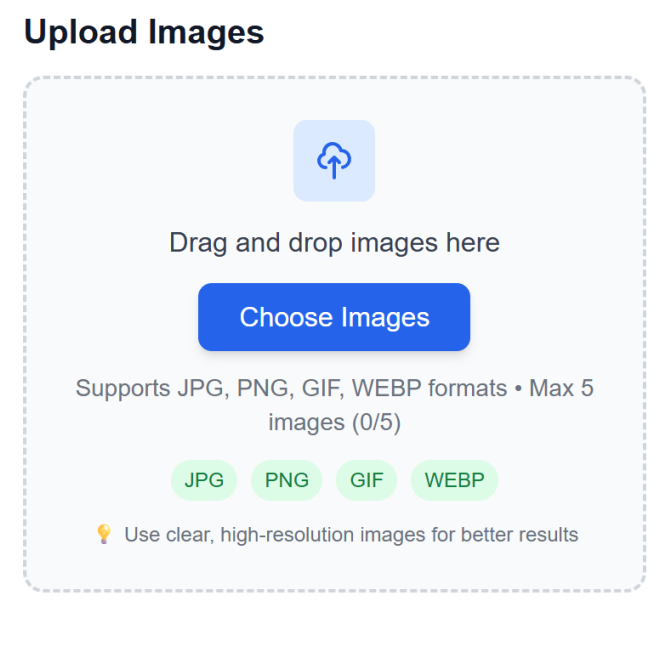
Upload image files
Drag and drop images containing tables, or select files from your device. Support for multiple formats and batch uploads.
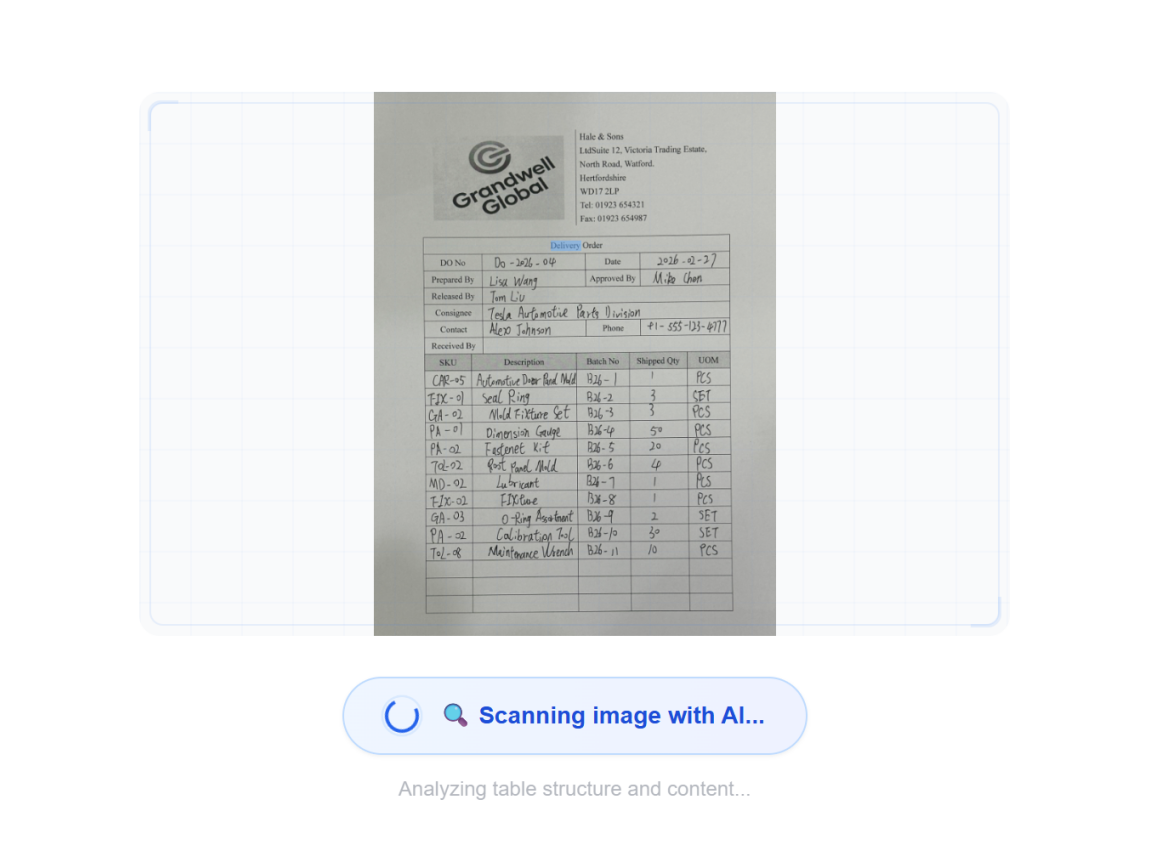
AI processes with semantic understanding
Advanced AI analyzes images using semantic understanding, detects table structures, and extracts data with context awareness - not just basic OCR.
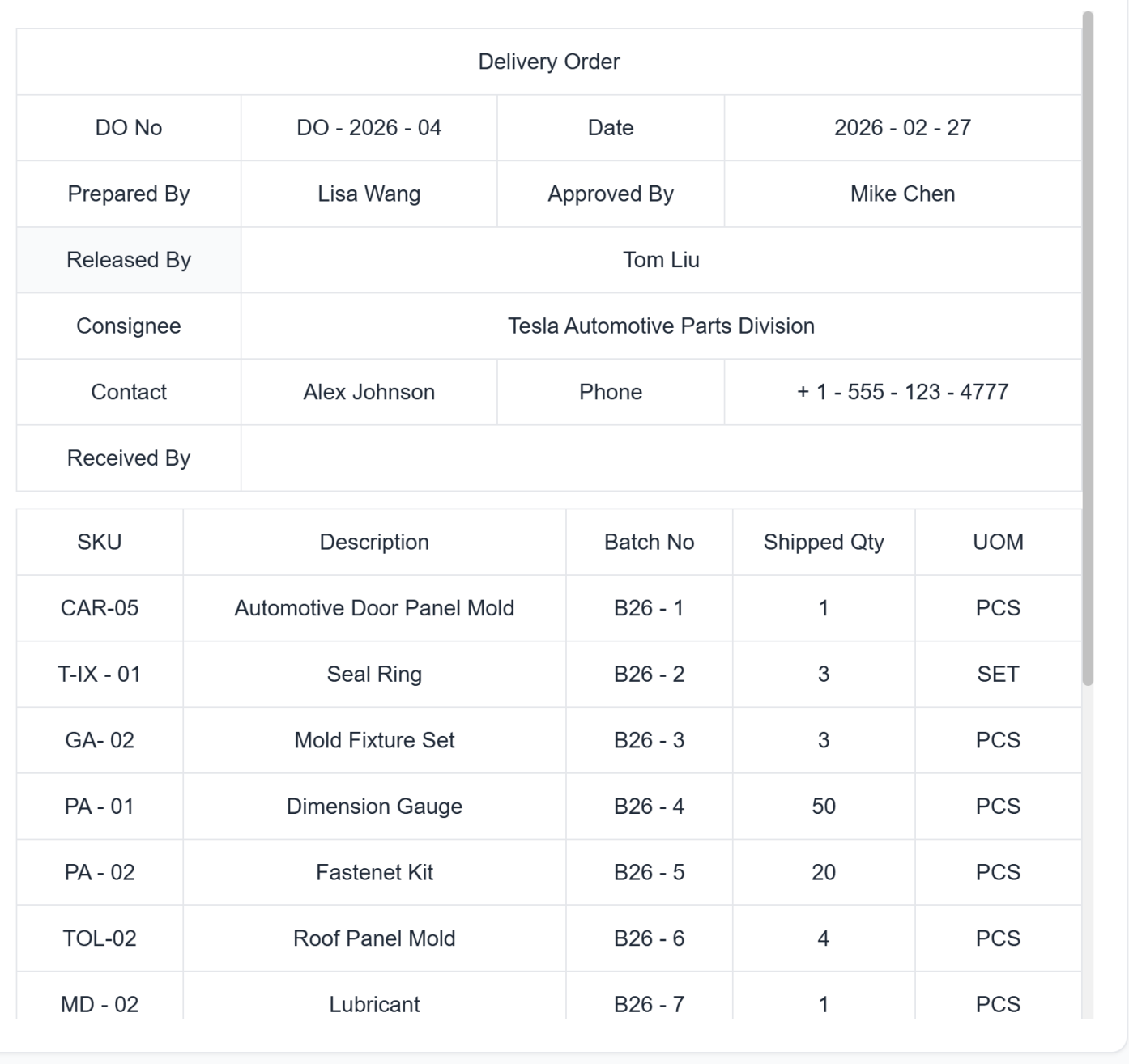
Review extracted data
Preview the extracted data in a table format. Make any necessary corrections before final conversion.
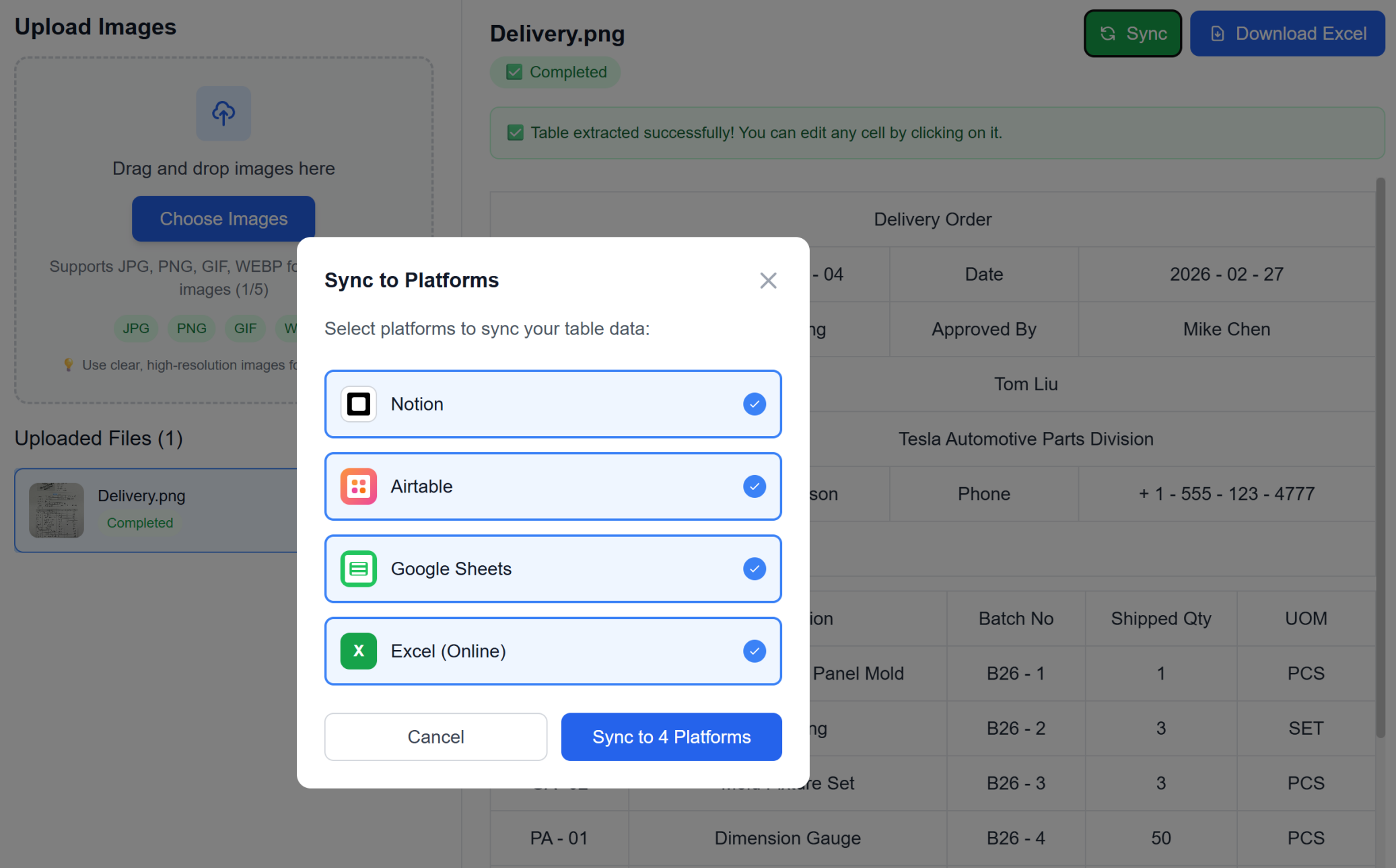
Download Excel or Sync directly
Instantly download as Excel or sync directly to your favorite workspace (Google Sheets, Notion, Airtable) with one click. No manual importing required.
Upload image files
Drag and drop images containing tables, or select files from your device. Support for multiple formats and batch uploads.
AI processes with semantic understanding
Advanced AI analyzes images using semantic understanding, detects table structures, and extracts data with context awareness - not just basic OCR.
Review extracted data
Preview the extracted data in a table format. Make any necessary corrections before final conversion.
Download Excel or Sync directly
Instantly download as Excel or sync directly to your favorite workspace (Google Sheets, Notion, Airtable) with one click. No manual importing required.
Real Results from Real Teams: Customer Success Stories
Don't just take our word for it. Hear from teams and professionals who are already saving hours every week with TabliSync. Real feedback from users who've transformed their spreadsheet workflows and reclaimed valuable time.
"I used to screenshot tables and then retype them. Not anymore."

Robert Chen
Data Analyst
"Finally, a way to turn meeting screenshots into actual usable data."

Sarah Williams
Project Manager
"Feels like magic. Point, click, and your image becomes an editable spreadsheet."

Michael Brown
Business Analyst
Use Cases for Every Industry
See how professionals across different fields leverage this powerful feature
Business Professionals
Convert financial reports, invoices, and business documents from images into editable spreadsheets with preserved formatting.
Invoice data extraction with automatic categorization
Financial report conversion maintaining formulas
Business document digitization with data validation
Students & Researchers
Transform research data, survey results, and academic tables from papers into analyzable Excel format with intelligent data recognition.
Research paper data extraction with statistical validation
Survey result digitization with response categorization
Academic table conversion preserving scientific notation
Data Entry Teams
Eliminate manual data entry by converting scanned documents and images directly into Excel files with 99%+ accuracy.
Form data extraction with field validation
Legacy document digitization with error correction
Bulk document processing with quality assurance
Accountants
Convert receipts, statements, and financial documents from images into organized Excel spreadsheets with automatic data categorization.
Receipt data extraction with expense categorization
Bank statement conversion with transaction analysis
Tax document processing with compliance validation
Frequently Asked Questions: Everything You Need to Know
Get answers to common questions about this TabliSync feature, including how to use it effectively, what results to expect, and how it integrates with your existing workflows. Find the information you need to get started with confidence.
What is the best way to convert scanned tables to editable Excel without manual retyping?
Upload JPG or PNG table images, let AI detect table structure automatically, then review extracted columns before exporting. This workflow removes most manual data entry and speeds up operations.
Can AI extract merged cells and complex table layouts from screenshots?
Yes. The extraction pipeline is designed for merged cells, multi-column headers, and irregular layouts. You can validate output quickly before using it in downstream reports.
How accurate is image-to-Excel OCR for low-quality photos and receipts?
Accuracy depends on image quality, table contrast, and layout complexity. For best results, use clear captures and then run a quick validation pass on totals and key fields.
Can I batch convert multiple table images into one structured workbook?
Yes. You can process multiple images in one workflow and consolidate outputs into organized sheets. This is useful for recurring operations and month-end document processing.
Can converted Excel data sync to Google Sheets, Airtable, or Notion?
Yes. After extraction, you can export as Excel/CSV and sync to connected tools depending on your workspace setup. This keeps teams aligned across systems.
How does TabliSync keep sensitive image-to-Excel data secure and confidential?
Uploaded files are encrypted in transit and processing workflows are access-controlled. Only authorized users in your workspace can access conversion results, and you can remove files after completion based on your retention policy.
Why TabliSync is More Than Just a Converter
Transform your data workflow with our complete ecosystem of AI-powered tools for cross-platform data management, collaboration, and automation.
Cross-Platform Sync
Your converted data automatically syncs across Google Sheets, Notion, Airtable, and other platforms. No manual importing or exporting needed.
Real-Time Collaboration
Share and collaborate on your extracted data instantly. Team members can access, edit, and analyze data across different platforms simultaneously.
Automated Updates
Set up automatic data refresh schedules. Your spreadsheets stay up-to-date without manual intervention, saving hours of repetitive work.
Join the Complete Data Ecosystem
Unlock the full potential of your data with our integrated suite of AI tools
Ready to Transform Your Data Workflow?
Join thousands of professionals who trust TabliSync for their data needs
No credit card required • Join 10,000+ users syncing data daily