Stop Manual Data Entry. AI PDF to Excel Converter
Transform Complex PDF Documents into Structured Excel Spreadsheets
Enterprise-grade AI technology that extracts tables, financial data, and reports from multi-page PDFs with 99.8% accuracy. Perfect for accountants, analysts, and data professionals who need reliable, automated PDF processing.
What is Stop Manual Data Entry. AI PDF to Excel Converter?
Enterprise-grade AI technology that extracts tables, financial data, and reports from multi-page PDFs with 99.8% accuracy. Perfect for accountants, analysts, and data professionals who need reliable, automated PDF processing.
Manual PDF Data Entry and Copy-Paste Workflows
Manual PDF data extraction wastes hours every week. Teams struggle with copy-paste errors, lost formatting, and slow document processing workflows that hurt productivity.
Manual PDF Data Entry and Copy-Paste Workflows
Finance and accounting teams waste 10-15 hours per week manually copying data from PDF invoices, bank statements, and financial reports into Excel spreadsheets. This repetitive manual data entry process is slow, error-prone, and prevents teams from focusing on higher-value analysis work.
This workflow bottleneck impacts team productivity, increases operational costs, and creates data quality issues that affect business decisions.
PDF Table Extraction Accuracy and Formatting Loss
Converting PDF documents to Excel often results in lost table structure, merged cells breaking apart, and number formatting errors. Manual correction of these PDF conversion issues adds hours of cleanup work and introduces data quality risks in financial reporting.
Manual processes lead to inconsistent results, higher error rates, and frustrated team members who spend time on repetitive low-value tasks.
Batch PDF Processing Limitations and Scalability Issues
Processing hundreds of PDF files one-by-one creates severe workflow bottlenecks. Without automated batch PDF to Excel conversion, document-heavy operations teams struggle to scale, leading to delayed reporting cycles and overtime costs.
Without automation, scaling operations becomes difficult, team efficiency suffers, and valuable time is lost on tasks that could be automated.
Meet TabliSync: Your AI-Powered Excel Automation Solution
An intelligent spreadsheet automation layer built on top of Microsoft Excel — designed for real-world business workflows, data processing tasks, and team collaboration. Transform manual Excel operations into automated, AI-driven processes that save time and reduce errors.
Advanced PDF Structure Intelligence
Our AI engine understands complex PDF layouts including multi-column reports, nested tables, and hierarchical data. It intelligently reconstructs table relationships across pages, handles merged cells, and preserves the semantic meaning of your financial documents.
Advanced PDF Structure Intelligence
Our AI engine understands complex PDF layouts including multi-column reports, ne...
Financial Data Type Recognition
Specialized algorithms automatically identify and format currencies, percentages, dates, and accounting numbers. Maintains decimal precision, recognizes negative values in parentheses, and preserves formula relationships for accurate financial analysis.
Financial Data Type Recognition
Specialized algorithms automatically identify and format currencies, percentages...
Multi-Table Detection & Extraction
Intelligently identifies and separates multiple tables within a single PDF page. Handles complex layouts with headers, footers, and mixed content. Perfect for extracting data from comprehensive financial reports and analytical documents.
Multi-Table Detection & Extraction
Intelligently identifies and separates multiple tables within a single PDF page....
Real-Time Cloud Synchronization
Instantly sync extracted data to Google Sheets, Notion, Airtable, or Excel Online. Enable team collaboration with automatic updates. Set up workflows that trigger when new PDFs are processed, streamlining your data pipeline.
Real-Time Cloud Synchronization
Instantly sync extracted data to Google Sheets, Notion, Airtable, or Excel Onlin...
Enterprise Batch Processing
Upload and process entire folders of PDFs simultaneously. Handle documents with 100+ pages each. Ideal for month-end closings, audit preparations, and large-scale data migration projects. Track processing status in real-time.
Enterprise Batch Processing
Upload and process entire folders of PDFs simultaneously. Handle documents with ...
Quality Assurance & Validation
Built-in validation engine checks data integrity and flags potential extraction errors. Provides confidence scores for each table. Allows manual review and correction before final export. Ensures audit-ready accuracy for compliance requirements.
Quality Assurance & Validation
Built-in validation engine checks data integrity and flags potential extraction ...
Advanced PDF Structure Intelligence
Our AI engine understands complex PDF layouts including multi-column reports, nested tables, and hierarchical data. It intelligently reconstructs table relationships across pages, handles merged cells, and preserves the semantic meaning of your financial documents.
Financial Data Type Recognition
Specialized algorithms automatically identify and format currencies, percentages, dates, and accounting numbers. Maintains decimal precision, recognizes negative values in parentheses, and preserves formula relationships for accurate financial analysis.
Multi-Table Detection & Extraction
Intelligently identifies and separates multiple tables within a single PDF page. Handles complex layouts with headers, footers, and mixed content. Perfect for extracting data from comprehensive financial reports and analytical documents.
Advanced PDF Structure Intelligence
Our AI engine understands complex PDF layouts including multi-column reports, ne...
Financial Data Type Recognition
Specialized algorithms automatically identify and format currencies, percentages...
Multi-Table Detection & Extraction
Intelligently identifies and separates multiple tables within a single PDF page....
Real-Time Cloud Synchronization
Instantly sync extracted data to Google Sheets, Notion, Airtable, or Excel Onlin...
Enterprise Batch Processing
Upload and process entire folders of PDFs simultaneously. Handle documents with ...
Quality Assurance & Validation
Built-in validation engine checks data integrity and flags potential extraction ...
Real-Time Cloud Synchronization
Instantly sync extracted data to Google Sheets, Notion, Airtable, or Excel Online. Enable team collaboration with automatic updates. Set up workflows that trigger when new PDFs are processed, streamlining your data pipeline.
Enterprise Batch Processing
Upload and process entire folders of PDFs simultaneously. Handle documents with 100+ pages each. Ideal for month-end closings, audit preparations, and large-scale data migration projects. Track processing status in real-time.
Quality Assurance & Validation
Built-in validation engine checks data integrity and flags potential extraction errors. Provides confidence scores for each table. Allows manual review and correction before final export. Ensures audit-ready accuracy for compliance requirements.
See TabliSync In Action: Live Product Demo
Watch how TabliSync transforms complex spreadsheet workflows into simple, automated processes in just minutes. See real-world examples of data extraction, automation, and intelligent processing that save teams hours every week.
Enterprise-Grade Accuracy
99.8% precision in extracting complex financial tables, multi-page reports, and nested data structures from any PDF document.
Batch Processing Power
Convert hundreds of PDF pages simultaneously. Process entire folders of financial statements, invoices, or reports in minutes.
Smart Data Recognition
Automatically detects currencies, dates, formulas, and accounting formats. Preserves number precision for financial calculations.
Before vs After: The TabliSync Transformation
Compare traditional manual workflows with TabliSync's intelligent automation. See how teams eliminate hours of repetitive work, reduce errors, and accelerate their data processing with AI-powered spreadsheet tools that actually work.
Traditional Way
The old way of working
- Manual copy-paste from PDF to Excel
- Hours spent on data entry
- High error rate from manual transcription
- One file at a time processing
- Lost table structure and formatting
With TabliSync
The smart way forward
- Automatic PDF data extraction
- Minutes instead of hours
- AI-powered accuracy
- Batch process hundreds of files
- Preserved table structure
How It Works - Simple Steps to Get Started
Simple steps to get started and transform your data workflow
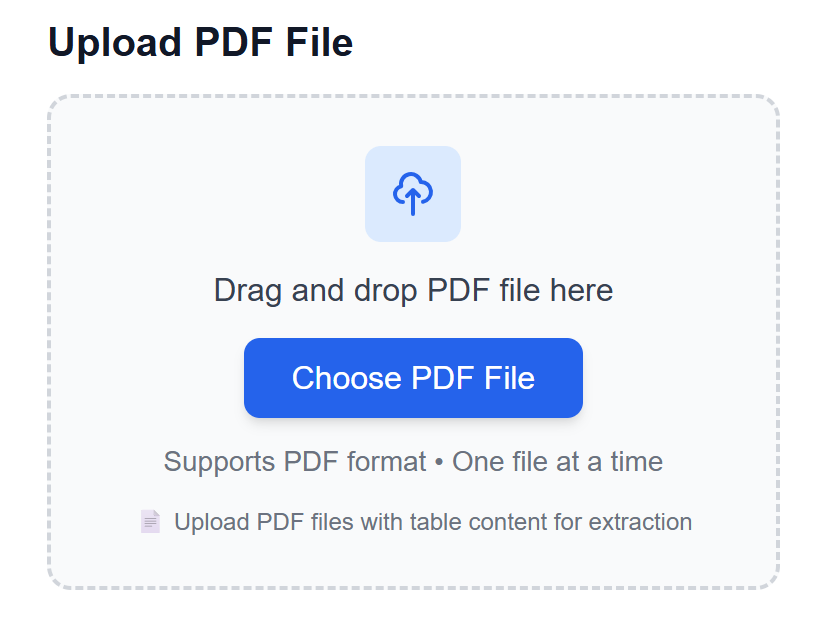
Upload Your PDF Documents
Drag and drop PDF files or upload entire folders. Supports both digital PDFs and scanned documents. Works with password-protected files. Process single pages or multi-hundred page reports with equal ease.
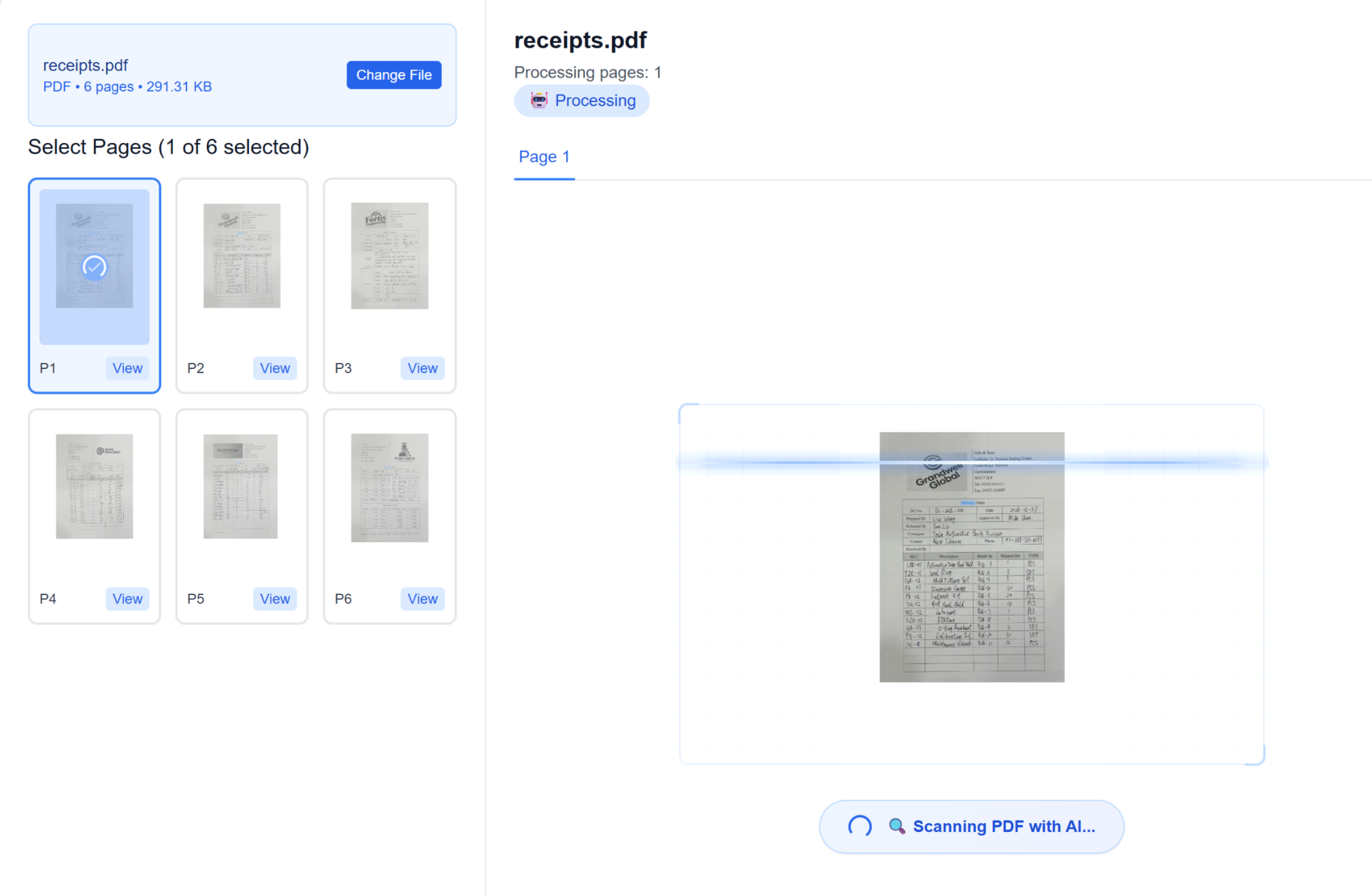
AI Analyzes Document Structure
Our advanced AI engine scans your PDF, identifying tables, headers, and data relationships. It understands complex layouts, merged cells, and multi-page tables. The system automatically detects data types and formats.
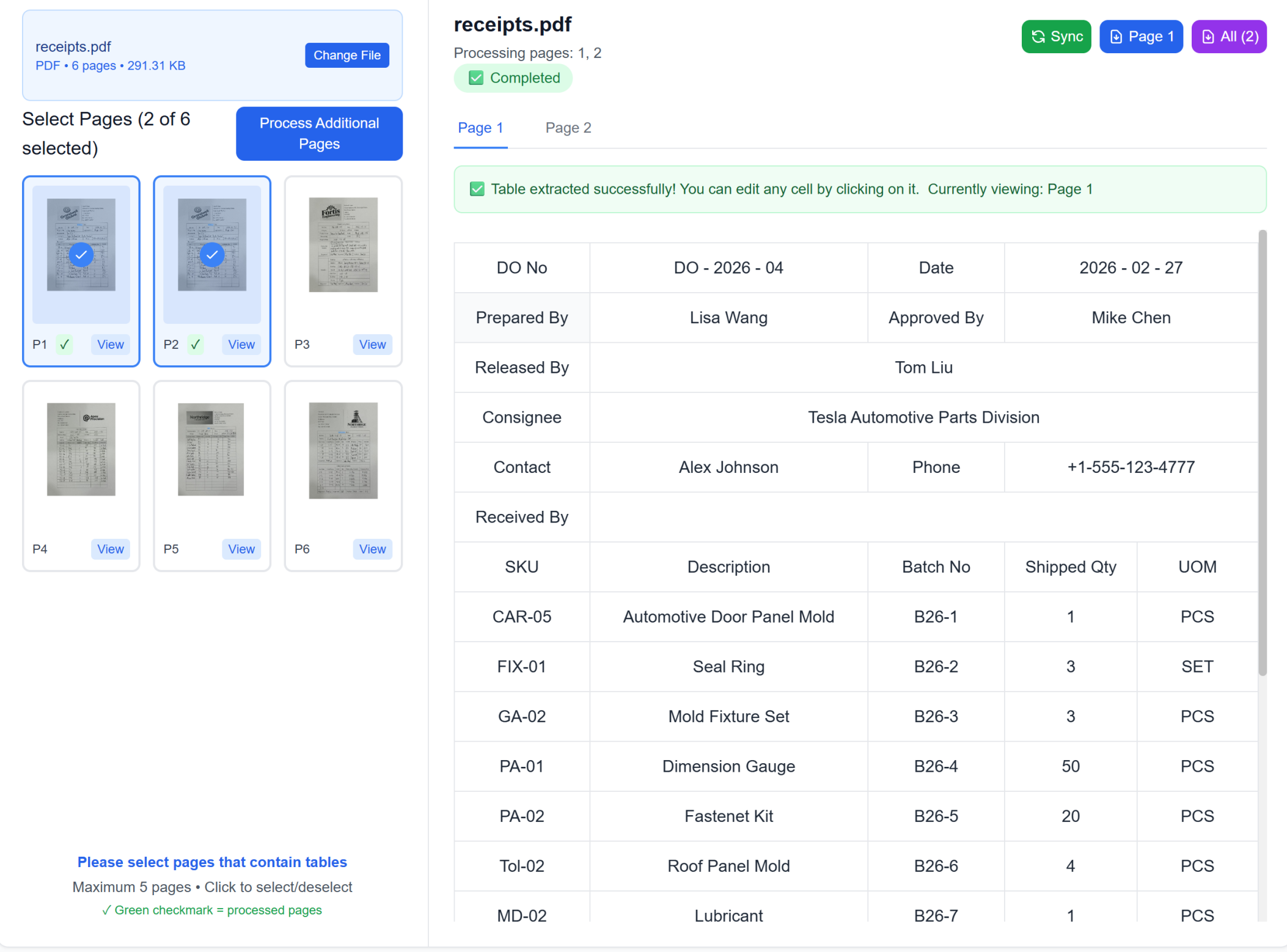
Review & Refine Results
Preview extracted tables in an interactive editor. Make adjustments if needed. Verify data accuracy with side-by-side comparison. Our quality assurance system highlights any potential issues for your review.
Export & Sync to Your Tools
Download as Excel, CSV, or sync directly to Google Sheets, Notion, or Airtable. Set up automated workflows for recurring PDF processing. Share results with your team instantly through cloud integration.
Upload Your PDF Documents
Drag and drop PDF files or upload entire folders. Supports both digital PDFs and scanned documents. Works with password-protected files. Process single pages or multi-hundred page reports with equal ease.
AI Analyzes Document Structure
Our advanced AI engine scans your PDF, identifying tables, headers, and data relationships. It understands complex layouts, merged cells, and multi-page tables. The system automatically detects data types and formats.
Review & Refine Results
Preview extracted tables in an interactive editor. Make adjustments if needed. Verify data accuracy with side-by-side comparison. Our quality assurance system highlights any potential issues for your review.
Export & Sync to Your Tools
Download as Excel, CSV, or sync directly to Google Sheets, Notion, or Airtable. Set up automated workflows for recurring PDF processing. Share results with your team instantly through cloud integration.
Real Results from Real Teams: Customer Success Stories
Don't just take our word for it. Hear from teams and professionals who are already saving hours every week with TabliSync. Real feedback from users who've transformed their spreadsheet workflows and reclaimed valuable time.
"I used to spend 3 hours every Monday processing invoice PDFs. Now it takes 10 minutes."

Jennifer Martinez
Finance Manager
"The accuracy is incredible. No more manual transcription errors in our financial reports."

David Thompson
Accounting Team Lead
"Batch processing saved our team 20+ hours per week. Game changer for document-heavy workflows."

Lisa Anderson
Operations Director
PDF Workflows by Industry
Real document-heavy scenarios where PDF extraction saves hours every week.
Manufacturing & Production
Digitize factory floor documents and automate production data collection
Production reports and quality inspection sheets digitization
Equipment maintenance logs and downtime analysis
Inventory tracking and material consumption reports
Supplier delivery notes and purchase order processing
Accounting Firms
Convert financial statements, tax documents, and audit reports from PDF format into editable Excel spreadsheets with perfect formatting preservation and data validation.
Financial statement conversion with formula preservation
Tax document processing with compliance validation
Audit report data extraction with cross-reference verification
Research Organizations
Extract research data, survey results, and statistical tables from PDF publications into analyzable Excel format with maintained data relationships.
Research paper data extraction with statistical validation
Multi-page report conversion with table linking
Survey result processing with response categorization
Legal Professionals
Convert legal documents, contracts, and case data from PDF format into organized Excel databases with preserved document structure.
Contract data extraction with clause categorization
Case information processing with timeline analysis
Legal document analysis with precedent tracking
Frequently Asked Questions: Everything You Need to Know
Get answers to common questions about this TabliSync feature, including how to use it effectively, what results to expect, and how it integrates with your existing workflows. Find the information you need to get started with confidence.
How can I convert multi-page PDF tables to Excel with formatting preserved?
Upload the PDF, allow AI to detect all table regions across pages, and export into structured worksheets. This helps retain rows, columns, and key formatting patterns.
Can TabliSync extract invoice and financial tables from scanned PDFs?
Yes. It supports scanned and digitally generated PDFs, including invoice-like layouts. You can review extracted fields such as totals, tax, and line items before final export.
What is the fastest workflow to batch process hundreds of PDF tables?
Use batch upload with consistent naming, run extraction in one queue, then validate by exception rules. This is typically faster than manual copy-paste across documents.
How accurate is PDF table extraction for complex layouts and footnotes?
Accuracy is highest on clean table structures, while complex footnotes may need quick manual confirmation. A validation step for critical metrics is recommended for finance workflows.
Can extracted PDF data be integrated with BI or reporting tools?
Yes. Export to Excel/CSV and connect to dashboard or reporting pipelines. This enables recurring analytics without rebuilding manual extraction steps.
How does TabliSync protect confidential PDF documents during conversion?
PDF uploads are encrypted during transfer and processing, with controlled access to outputs. You can enforce workspace-level permissions and remove converted files when no longer needed.
Why TabliSync is More Than Just a Converter
Transform your data workflow with our complete ecosystem of AI-powered tools for cross-platform data management, collaboration, and automation.
Cross-Platform Sync
Your converted data automatically syncs across Google Sheets, Notion, Airtable, and other platforms. No manual importing or exporting needed.
Real-Time Collaboration
Share and collaborate on your extracted data instantly. Team members can access, edit, and analyze data across different platforms simultaneously.
Automated Updates
Set up automatic data refresh schedules. Your spreadsheets stay up-to-date without manual intervention, saving hours of repetitive work.
Join the Complete Data Ecosystem
Unlock the full potential of your data with our integrated suite of AI tools
Ready to Transform Your Data Workflow?
Join thousands of professionals who trust TabliSync for their data needs
No credit card required • Join 10,000+ users syncing data daily