AI Spreadsheet Assistant for Smarter Excel Work: Natural Language Data Operations
Transform Complex Excel Tasks into Simple Conversations - Edit, Clean, and Automate Spreadsheets with Plain English
Stop wrestling with complex Excel formulas! Our AI Spreadsheet Assistant understands natural language commands and executes sophisticated data operations instantly. Just describe what you need in plain English - from data cleaning and formula generation to automated workflows. Perfect for teams who want Excel power without the Excel expertise.
What is AI Spreadsheet Assistant for Smarter Excel Work: Natural Language Data Operations?
Stop wrestling with complex Excel formulas! Our AI Spreadsheet Assistant understands natural language commands and executes sophisticated data operations instantly. Just describe what you need in plain English - from data cleaning and formula generation to automated workflows. Perfect for teams who want Excel power without the Excel expertise.
Excel Formula Complexity and Learning Curve Barriers
Excel formula complexity and repetitive spreadsheet tasks slow down teams. Without automation, data cleaning and formatting consume valuable work hours.
Excel Formula Complexity and Learning Curve Barriers
Non-technical team members struggle with complex Excel formulas like VLOOKUP, INDEX-MATCH, and nested IF statements. Hours spent googling formulas and debugging errors reduce productivity and create dependency on Excel experts for simple spreadsheet tasks.
This workflow bottleneck impacts team productivity, increases operational costs, and creates data quality issues that affect business decisions.
Repetitive Spreadsheet Data Cleaning and Formatting
Operations teams perform the same data cleaning tasks every week: removing duplicates, standardizing formats, splitting columns, and fixing inconsistencies. Without spreadsheet automation, these repetitive Excel operations consume 5-10 hours weekly per team member.
Manual processes lead to inconsistent results, higher error rates, and frustrated team members who spend time on repetitive low-value tasks.
Team Spreadsheet Workflow Inconsistency and Errors
Different team members handle Excel files differently, leading to inconsistent formatting, broken formulas, and data quality issues. Lack of standardized spreadsheet workflows creates confusion, rework, and collaboration friction across departments.
Without automation, scaling operations becomes difficult, team efficiency suffers, and valuable time is lost on tasks that could be automated.
Meet TabliSync: Your AI-Powered Excel Automation Solution
An intelligent spreadsheet automation layer built on top of Microsoft Excel — designed for real-world business workflows, data processing tasks, and team collaboration. Transform manual Excel operations into automated, AI-driven processes that save time and reduce errors.
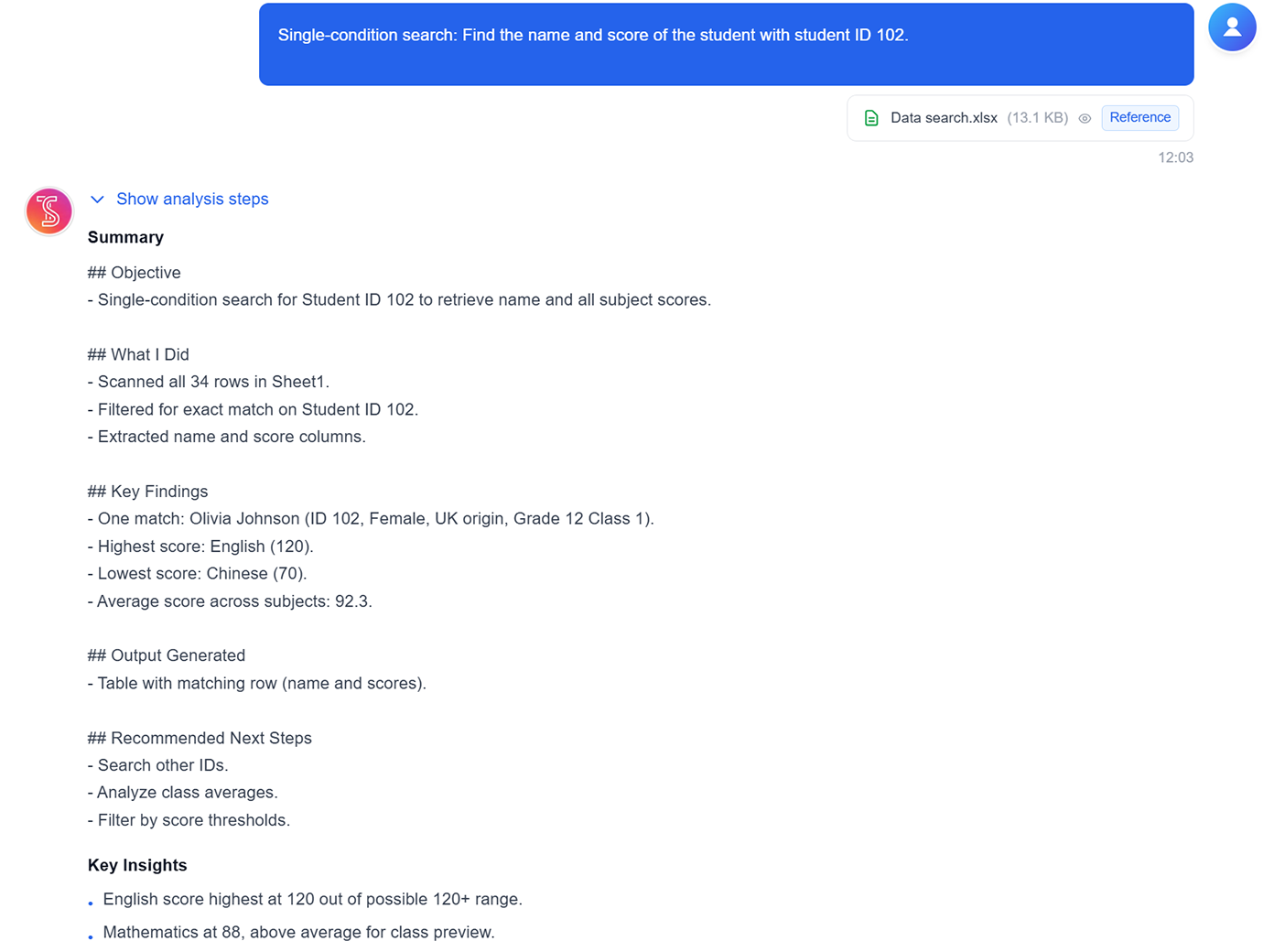
Single-condition data search
Find matching rows by a specific ID, keyword, or field value without writing formulas.
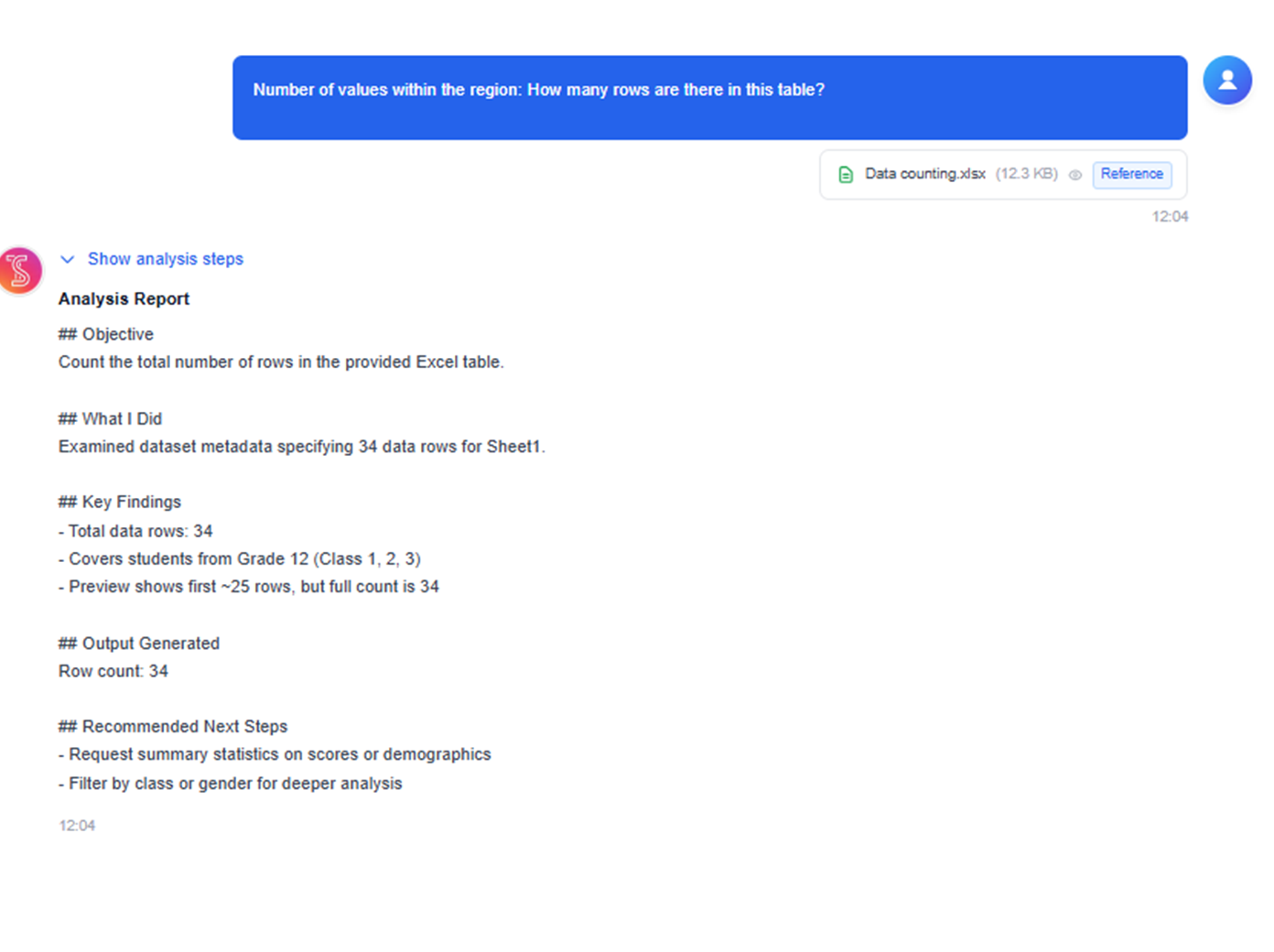
Range data counting
Count rows and values in selected ranges quickly for lightweight exploration and QA checks.
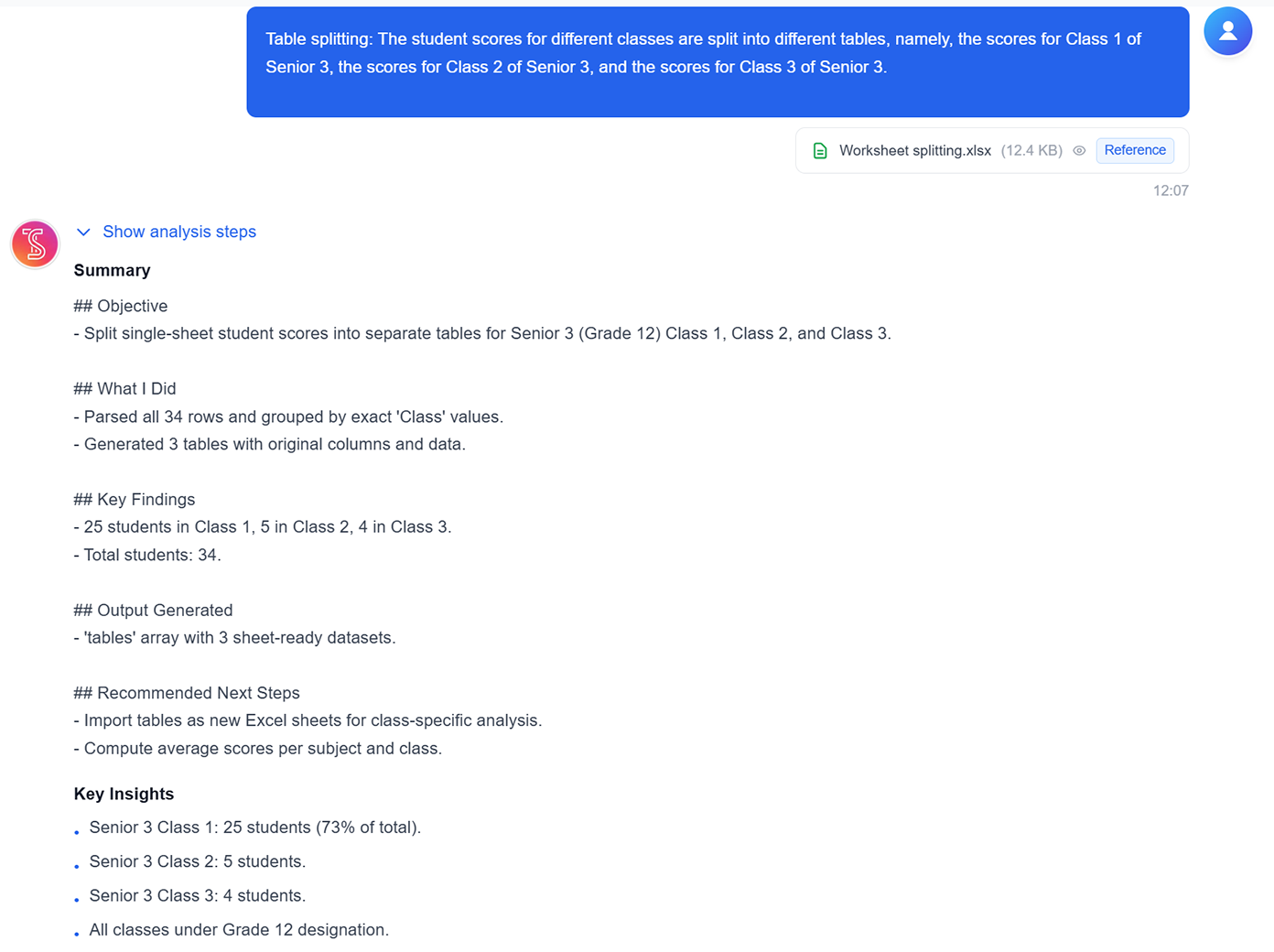
Worksheet splitting by rule
Split one sheet into multiple result tables based on category, class, or any grouping field.
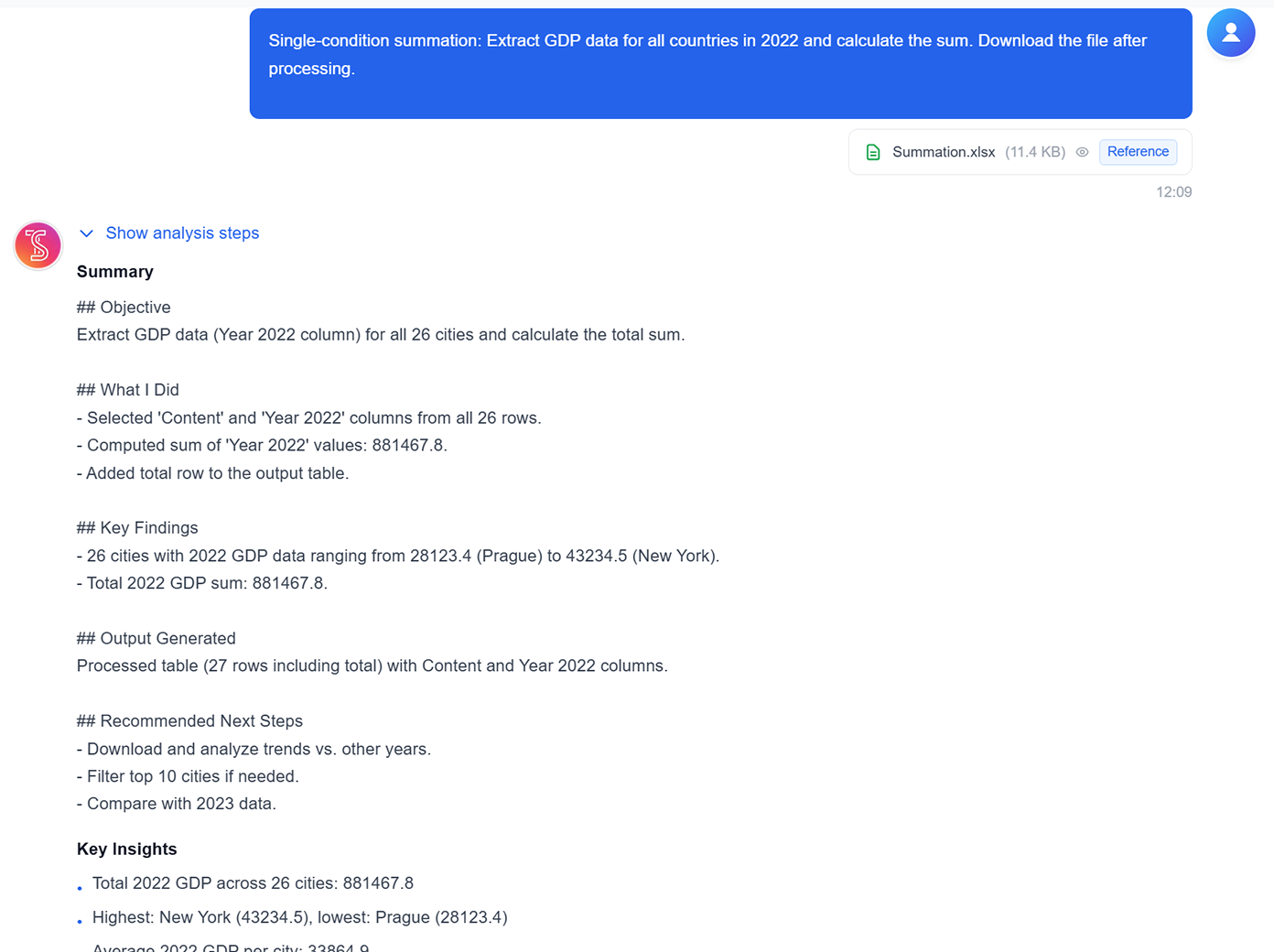
Conditional summation
Aggregate totals for filtered subsets, such as year, region, or product segments, in one step.
Average and extremum analysis
Compute averages, top values, and minimum/maximum results directly from selected datasets.
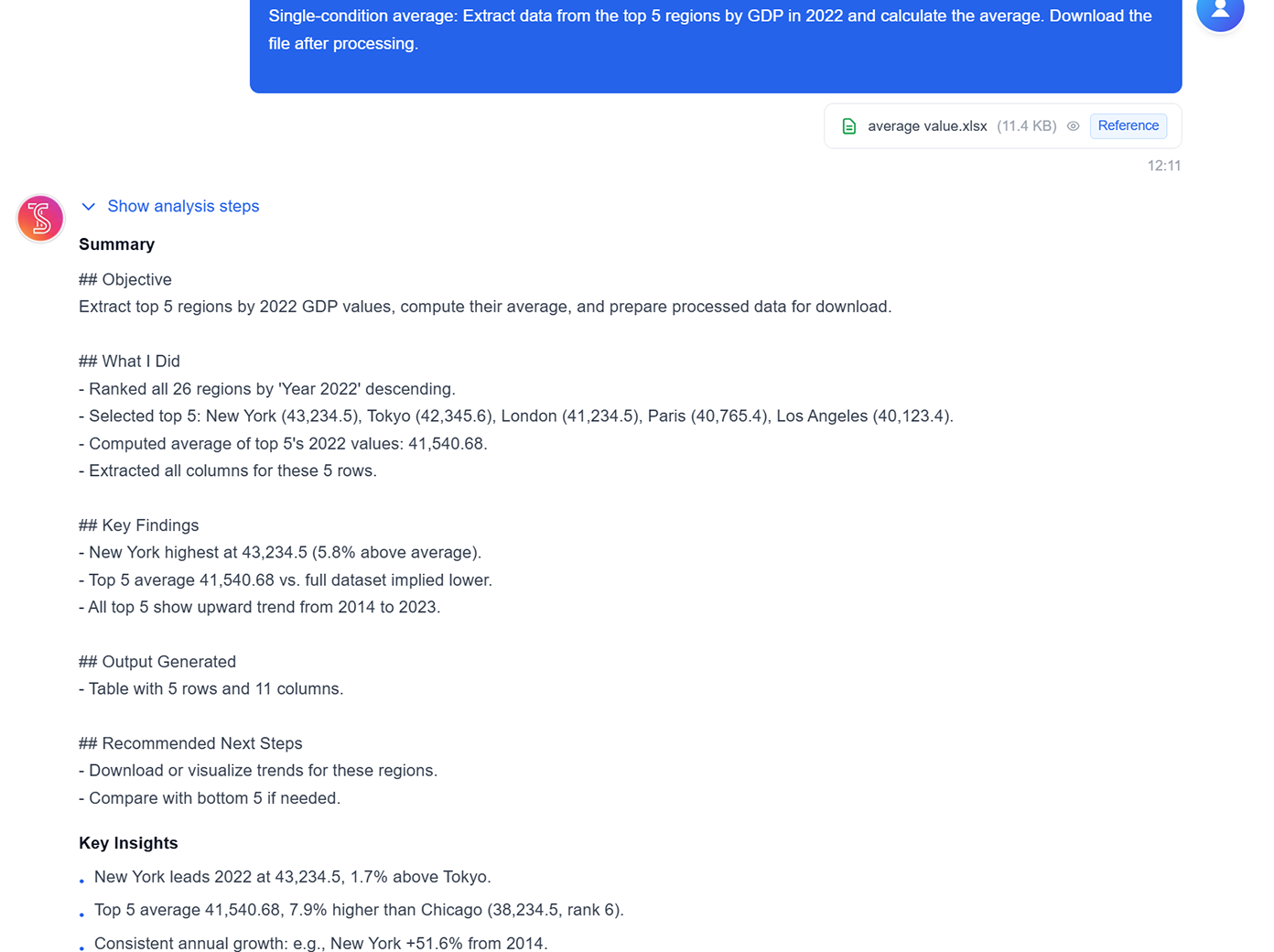
Logical and combined calculations
Run classification logic and multi-step calculations to produce downloadable analysis tables.
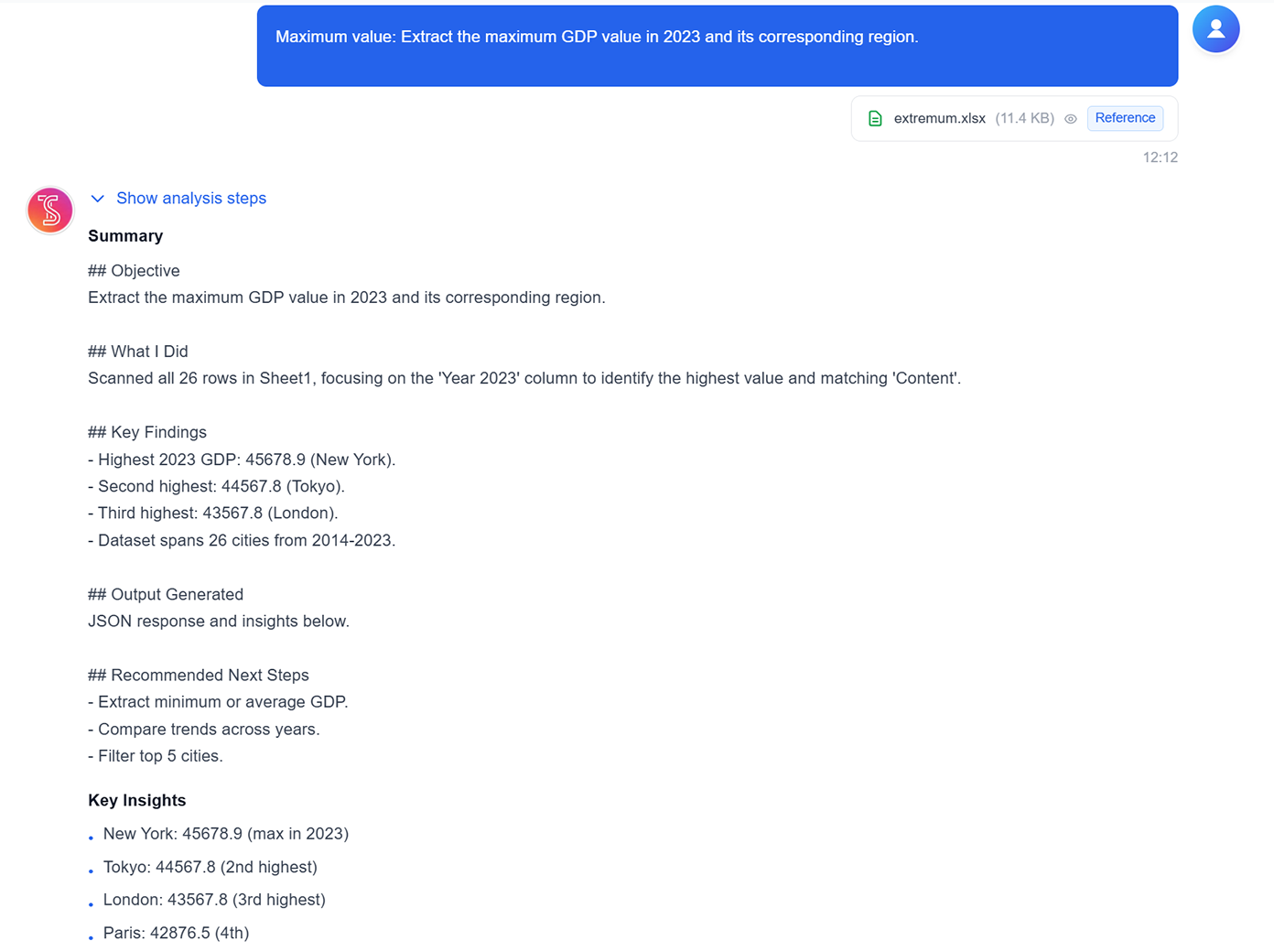
Single-condition data search
Find matching rows by a specific ID, keyword, or field value without writing formulas.
Range data counting
Count rows and values in selected ranges quickly for lightweight exploration and QA checks.
Worksheet splitting by rule
Split one sheet into multiple result tables based on category, class, or any grouping field.
Conditional summation
Aggregate totals for filtered subsets, such as year, region, or product segments, in one step.
Average and extremum analysis
Compute averages, top values, and minimum/maximum results directly from selected datasets.
Logical and combined calculations
Run classification logic and multi-step calculations to produce downloadable analysis tables.
See TabliSync In Action: Live Product Demo
Watch how TabliSync transforms complex spreadsheet workflows into simple, automated processes in just minutes. See real-world examples of data extraction, automation, and intelligent processing that save teams hours every week.
Get instant help with any task
Whether you need help writing a complex formula, analyzing a dataset, building a template, or more - just ask your AI Assistant. Get expert guidance in seconds, right in your spreadsheet.
Boost your efficiency
Stop wasting time Googling spreadsheet functions or making spreadsheets on your own. Your AI Spreadsheet Assistant helps you work smarter and faster, so you can get more done in less time.
Unlock your data
Your AI assistant doesn't just answer simple questions - it also analyzes your data, uncovers insights, and suggests the best ways to work with your spreadsheets. Create charts, templates, and more.
Before vs After: The TabliSync Transformation
Compare traditional manual workflows with TabliSync's intelligent automation. See how teams eliminate hours of repetitive work, reduce errors, and accelerate their data processing with AI-powered spreadsheet tools that actually work.
Traditional Way
The old way of working
- Google complex Excel formulas
- Repeat same tasks manually
- Inconsistent team workflows
- Hours debugging broken formulas
- Steep learning curve
With TabliSync
The smart way forward
- Natural language commands
- Automated repetitive tasks
- Standardized workflows
- No formula knowledge needed
- Instant results
How It Works - Simple Steps to Get Started
Simple steps to get started and transform your data workflow
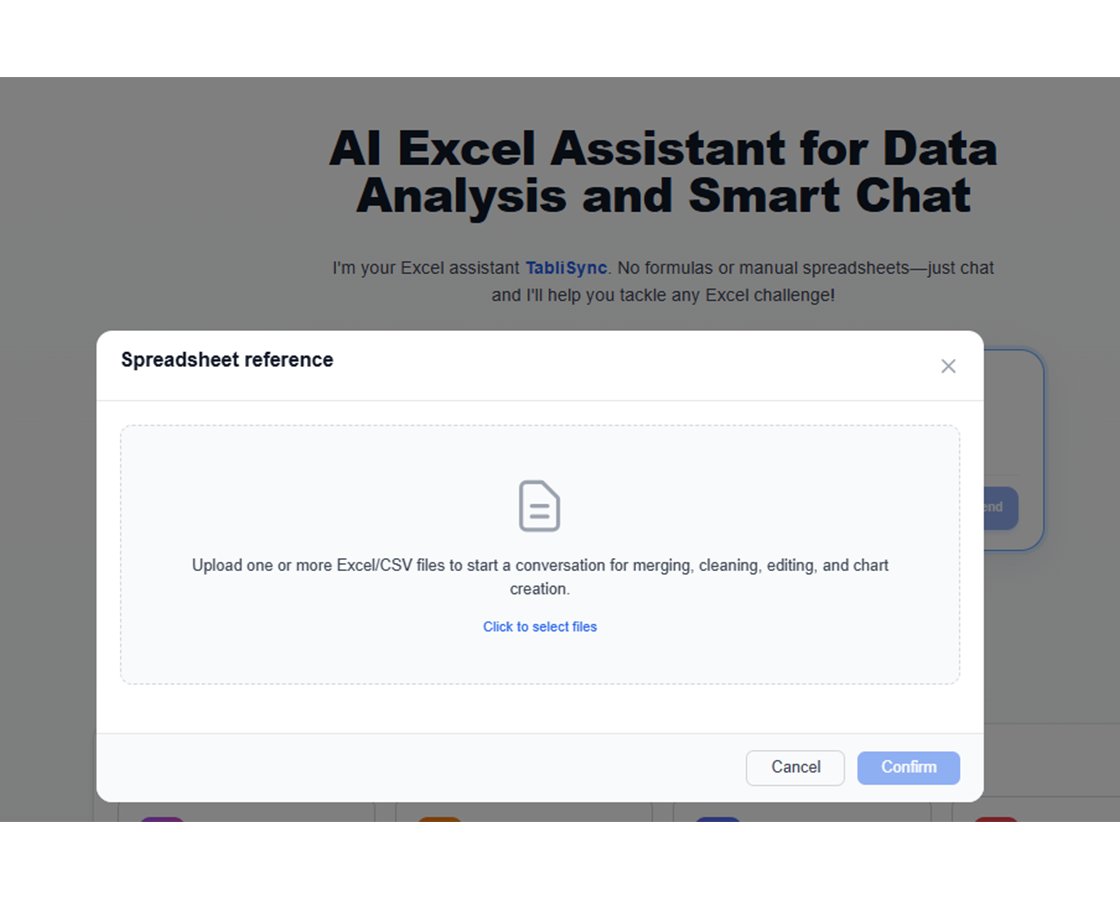
Upload Your Data
Simply upload your data to our secure platform. We support various file formats and data types to ensure a seamless integration with your existing systems.
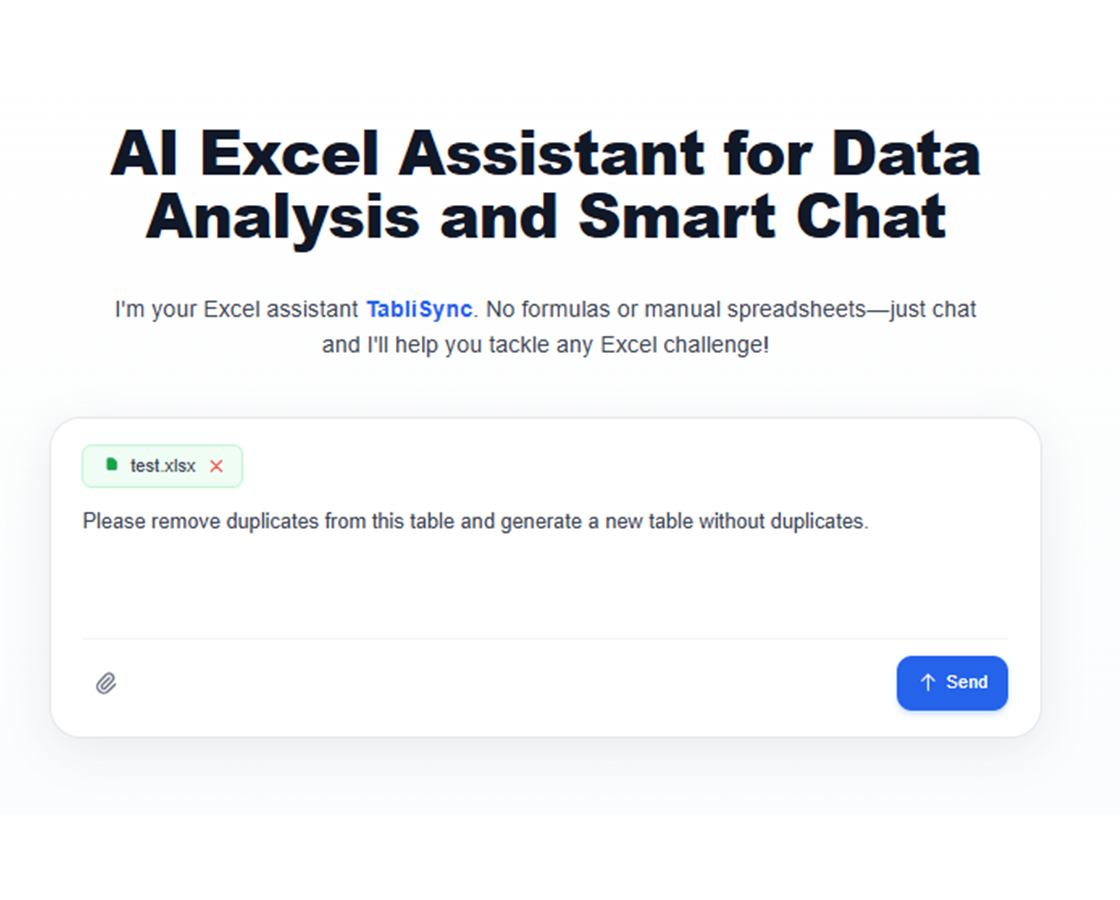
Ask Your Question
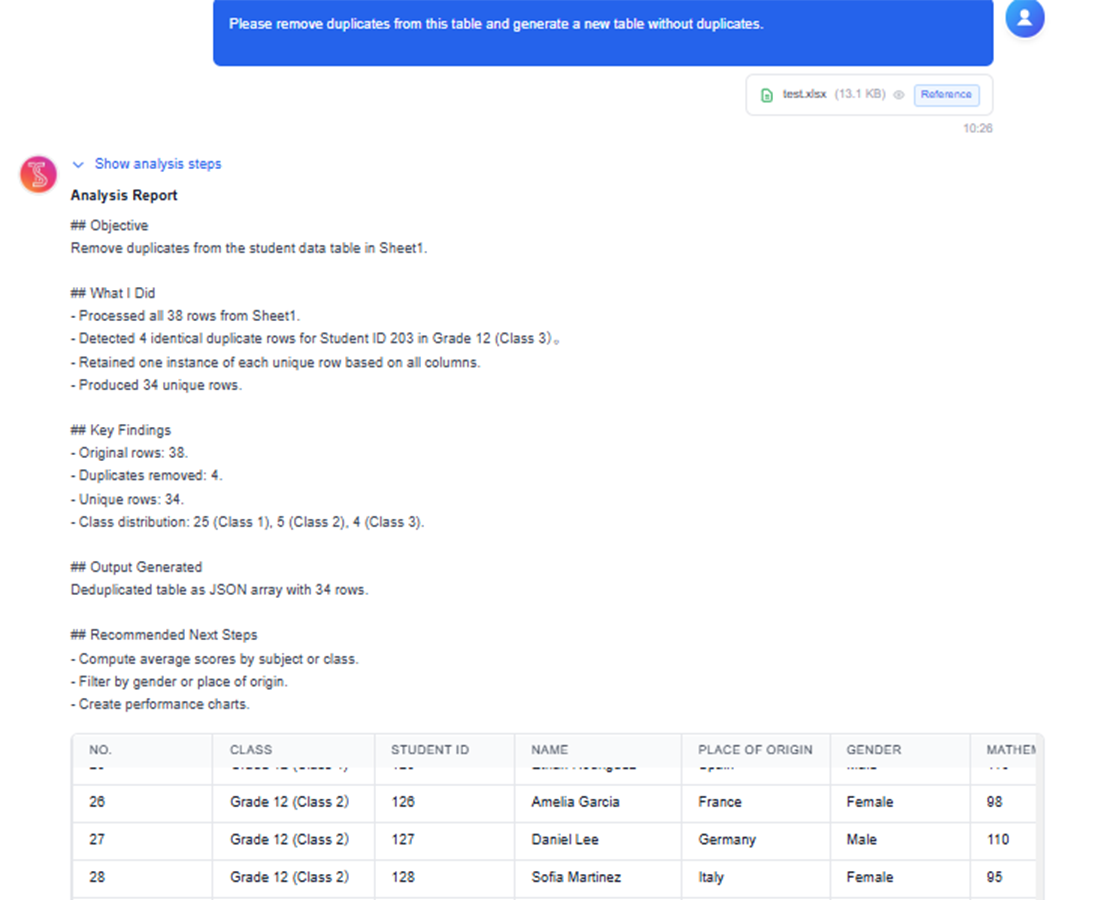
Type commands like 'Add a column for profit margins' or 'Split full names into first and last names,' and let the AI Assistant do the rest.
Review Insights & Download
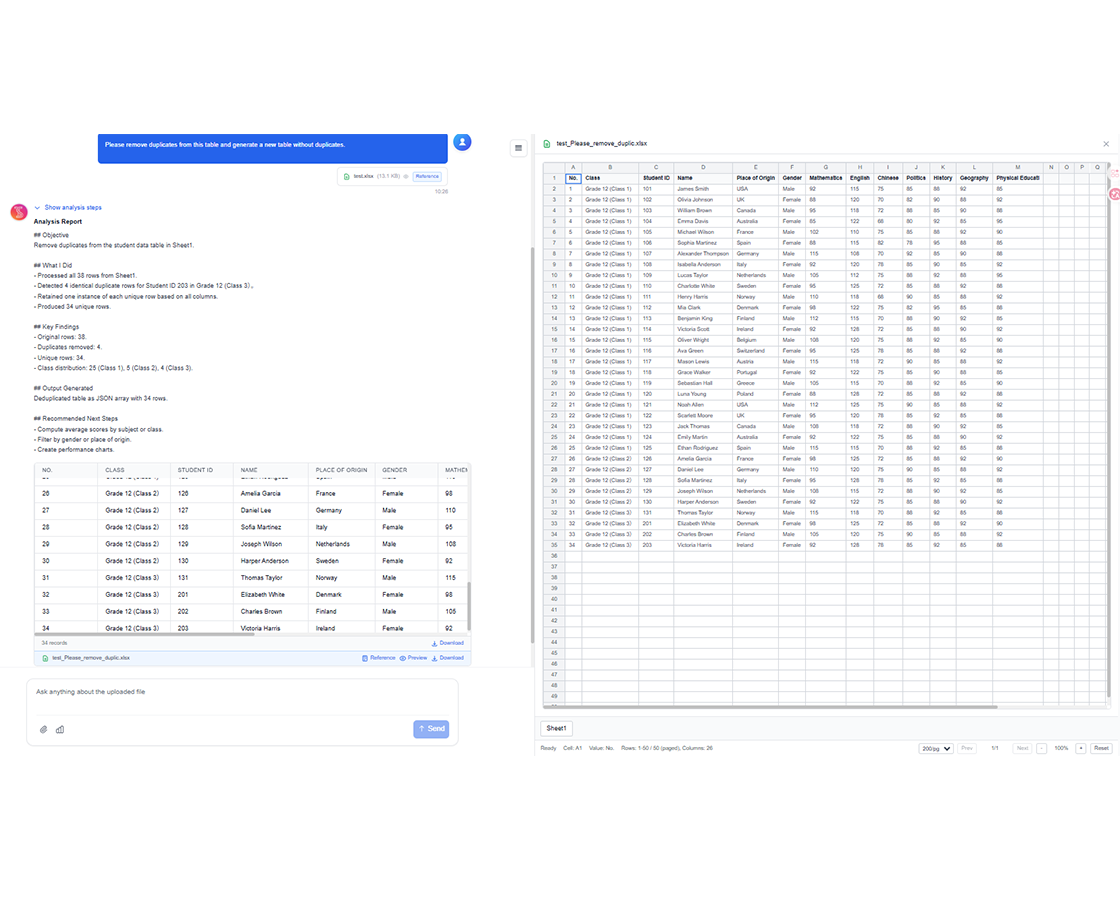
Preview AI's changes in real-time and refine with follow-up requests. Export your polished spreadsheet instantly when you're satisfied with the results.
Share & Collaborate
Download your Excel file or sync directly to Google Sheets, Notion, or Airtable. Share with your team and continue collaborating seamlessly across platforms.
Upload Your Data
Simply upload your data to our secure platform. We support various file formats and data types to ensure a seamless integration with your existing systems.
Ask Your Question
Type commands like 'Add a column for profit margins' or 'Split full names into first and last names,' and let the AI Assistant do the rest.
Review Insights & Download
Preview AI's changes in real-time and refine with follow-up requests. Export your polished spreadsheet instantly when you're satisfied with the results.
Share & Collaborate
Download your Excel file or sync directly to Google Sheets, Notion, or Airtable. Share with your team and continue collaborating seamlessly across platforms.
Real Results from Real Teams: Customer Success Stories
Don't just take our word for it. Hear from teams and professionals who are already saving hours every week with TabliSync. Real feedback from users who've transformed their spreadsheet workflows and reclaimed valuable time.
"I used to fix broken dropdowns every week. Not anymore."

Amanda Rodriguez
Operations Manager
"Way simpler than trying to make formulas work."

James Wilson
Sales Coordinator
"Feels like how Excel should have worked from the start."

Emily Davis
Finance Analyst
Spreadsheet Operations by Team
How operations, finance, and support teams automate daily spreadsheet tasks.
Business Analysts
Get quick insights from complex datasets without writing complex formulas or SQL queries. Transform raw data into actionable business intelligence.
Monthly budget reconciliation and variance analysis
Customer segmentation and behavior analysis
Financial trend analysis and forecasting
KPI dashboard creation and maintenance
Marketing Teams
Analyze campaign performance and customer behavior data with simple English questions. Create compelling reports that drive strategic decisions.
Campaign ROI analysis and optimization
Customer lifetime value calculations
A/B test result analysis
Lead scoring and qualification
Sales Teams
Organize customer data, track sales performance, and generate commission reports effortlessly. Focus on selling while AI handles the data work.
Sales pipeline analysis and forecasting
Commission calculation automation
Customer relationship tracking
Territory performance analysis
Operations Managers
Make data-driven decisions with instant access to key metrics and trends. Streamline reporting and focus on strategic initiatives.
Inventory management and optimization
Project timeline tracking and analysis
Resource allocation optimization
Performance metrics dashboards
Frequently Asked Questions: Everything You Need to Know
Get answers to common questions about this TabliSync feature, including how to use it effectively, what results to expect, and how it integrates with your existing workflows. Find the information you need to get started with confidence.
How do I automate Excel tasks with natural language instead of formulas?
Describe the task in plain language, select the target sheet range, and let the assistant generate operations. You can review output before applying it broadly.
Can the assistant clean messy spreadsheets with missing values and duplicates?
Yes. It can help with normalization, deduplication, and structured cleanup steps. You can apply transformations incrementally to keep changes auditable.
What is the best way to troubleshoot broken formulas in large workbooks?
Use the assistant to explain formula logic, isolate error-prone ranges, and suggest corrected expressions. This shortens debugging time for complex workbook dependencies.
Can AI split worksheets and aggregate conditional metrics automatically?
Yes. You can define grouping rules for sheet splits and run conditional sums, counts, and averages in one guided workflow.
Does the assistant support repeatable workflows for operations teams?
Yes. Teams can reuse prompt patterns for recurring tasks like weekly cleanup, KPI rollups, and structured exports to improve consistency.
Is data in the AI Spreadsheet Assistant kept private and secure?
Yes. Spreadsheet interactions are processed under encrypted transport with controlled workspace access. Teams can manage permissions so only approved users can view or edit results.
Why TabliSync is More Than Just a Converter
Transform your data workflow with our complete ecosystem of AI-powered tools for cross-platform data management, collaboration, and automation.
Cross-Platform Sync
Your converted data automatically syncs across Google Sheets, Notion, Airtable, and other platforms. No manual importing or exporting needed.
Real-Time Collaboration
Share and collaborate on your extracted data instantly. Team members can access, edit, and analyze data across different platforms simultaneously.
Automated Updates
Set up automatic data refresh schedules. Your spreadsheets stay up-to-date without manual intervention, saving hours of repetitive work.
Join the Complete Data Ecosystem
Unlock the full potential of your data with our integrated suite of AI tools
Ready to Transform Your Data Workflow?
Join thousands of professionals who trust TabliSync for their data needs
No credit card required • Join 10,000+ users syncing data daily