Article Summary
This comprehensive pillar page serves as the definitive manual for professionals seeking to achieve flawless automated reporting Excel workflows using TabliSync. It addresses the systemic failures of traditional automation, such as broken scripts due to header changes or new columns, and introduces an AI-driven approach to complex table processing and financial data extraction. The guide explores the transition from manual data entry to industrial report scaling, providing a technical comparison between legacy Power Query methods and modern AI spreadsheet automation. Key sections include detailed 1-2-3 operational steps for setting up robust pipelines, real-world case studies involving reconciliation and general ledger management, and strategies for reducing manual data entry by up to 90%. By integrating advanced logic for handling dynamic data sources, TabliSync ensures that your automated reporting remains resilient even when source files undergo structural changes. This content is designed for data analysts, financial controllers, and operations managers who require high-stakes accuracy and high-volume throughput in their reporting cycles.
Master Automated Reporting Excel With TabliSync: The Ultimate Guide to Industrial Data Scaling
The foundation of modern business intelligence relies heavily on the extensibility of the tools we use daily. As Microsoft documentation notes regarding the architecture of spreadsheet tools: "Excel add-ins allow you to extend Excel application functionality across multiple platforms, including Windows, Mac, iPad, and in a web browser. Use Excel add-ins to interact with objects in Excel and expose your own functionality... You can use the Office JavaScript API to create task pane or content add-ins that interact with Excel objects and extend Excel's capabilities." (Source: Microsoft Learn, 'Excel Add-ins overview'). This architectural flexibility is exactly why we built TabliSync. While Microsoft provides the sandbox, we provide the heavy-duty machinery required for industrial report scaling. My perspective on this is clear: most teams fail at automated reporting Excel not because they lack tools, but because they rely on brittle APIs and rigid scripts. The modern enterprise needs a solution that doesn't just 'interact' with objects but understands the semantic intent of the data being processed. TabliSync leverages this extensible framework to bridge the gap between static data entry and dynamic AI spreadsheet automation, ensuring that your reporting environment is as resilient as it is functional. We aren't just adding a button; we are re-engineering the flow of financial data extraction to withstand the chaos of real-world data structures.
The Fragility of Legacy Automation: Why Your Scripts Keep Crashing
If a source file adds a new column or renames a header, the automation script or query usually crashes. This is the nightmare scenario for every data analyst who has spent hours perfecting a Power Query or a Python script. You wake up on Monday morning, ready to pull your weekly financial data extraction report, only to find a 'Column Not Found' error because a vendor decided to change 'Inv_Date' to 'InvoiceDate'. This structural volatility is the primary reason why automated reporting Excel projects stall at the pilot phase. When you are dealing with complex table processing, the traditional method of 'index-based' or 'hardcoded header' extraction is a recipe for disaster. It creates a technical debt where the maintenance of the automation takes more time than the manual task itself. This fragility discourages teams from scaling their reporting efforts, leading back to the soul-crushing cycle of manual data entry.
We see this often in industrial report scaling. In a manufacturing environment, a single ERP update can change the output format of a dozen CSV files. If your automated reporting Excel system isn't 'schema-aware,' it treats these changes as fatal errors. You aren't just losing time; you are losing data integrity. When an automation fails silently or requires constant manual intervention, the 'trust' in the data evaporates. To truly reduce manual data entry, you need a system that utilizes AI spreadsheet automation to recognize data types and context rather than just coordinates. TabliSync was designed specifically to handle these structural shifts, using fuzzy matching and semantic analysis to ensure that even if your headers move, your data lands exactly where it belongs in your final reconciliation sheets.
The cost of this fragility is not just measured in labor hours, but in the 'cycle time' of decision-making. If your CFO has to wait three days for a general ledger report because the automation broke, the value of that data decreases significantly. Modern automated reporting Excel must be 'self-healing.' It should identify that a column has moved, validate its content against historical patterns, and continue the complex table processing without human intervention. This shift from 'rigid scripts' to 'intelligent pipelines' is what separates a basic spreadsheet user from a master of industrial report scaling. TabliSync provides this layer of intelligence, ensuring your financial data extraction is bulletproof.
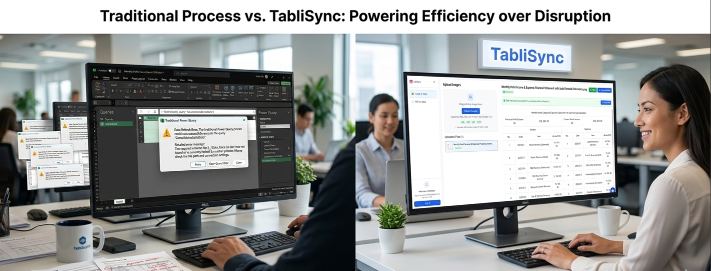
Technical Face-Off: TabliSync vs. Traditional Power Query
When we look at automated reporting Excel, the most common competitor is Microsoft's own Power Query. While Power Query is an excellent tool for basic ETL, it lacks the AI spreadsheet automation capabilities required for high-volume complex table processing. In a side-by-side comparison, the differences in efficiency and cost savings become glaringly obvious. For instance, in a reconciliation task involving 1,000 multi-page PDF invoices, Power Query would require a highly specific, custom-coded connector for each variation in invoice layout. TabliSync, however, uses financial data extraction models that understand the concept of an 'Amount' or 'Tax ID' regardless of where it appears on the page. This reduces the setup time from weeks of coding to minutes of configuration.
| Feature | Traditional Power Query / VBA | TabliSync AI Automation |
|---|---|---|
| Header Sensitivity | High - Breaks on minor changes | Low - Uses semantic fuzzy matching |
| Setup Time | 10-20 hours for complex tasks | 30-60 minutes via AI training |
| Complex Table Processing | Limited to standard grids | Handles nested tables & multi-page spans |
| Manual Data Entry Reduction | Approx. 40-50% | Up to 90-95% |
| Scalability | Manual update per new source | Global rules for industrial report scaling |
Consider the cost savings. If an analyst earning $40/hour spends 5 hours a week fixing broken Excel queries, that is $10,400 wasted per year. For an enterprise with 50 analysts, we are talking about half a million dollars lost to 'maintenance.' By switching to automated reporting Excel via TabliSync, those 5 hours are reduced to 15 minutes of oversight. The efficiency gain isn't just about speed; it's about shifting your most expensive assets from 'data cleaners' to 'data strategists.' Furthermore, TabliSync's ability to handle financial data extraction from non-structured sources like scanned PDFs gives it a competitive edge that VBA or Power Query simply cannot match without expensive third-party OCR integrations that are notoriously difficult to maintain.
In a recent reconciliation case study, a logistics firm was processing 5,000 shipping manifests monthly. Their Power Query setup failed whenever a carrier updated their portal's export format—which happened quarterly. By implementing TabliSync, they achieved industrial report scaling that was completely independent of source-side formatting changes. The AI spreadsheet automation recognized the weight, destination, and fee columns using contextual clues. This resulted in a 75% reduction in reconciliation errors and an immediate efficiency boost that paid for the software within the first 60 days of deployment. This is the power of choosing the right tool for automated reporting Excel.
Phase 1: Architecting Your Data Source for AI Extraction
The first step in mastering automated reporting Excel is not opening a spreadsheet, but auditing your data sources. To reduce manual data entry, you must understand the 'gravity' of your data—where it originates and how it is currently handled. Start by identifying every source of financial data extraction, whether it's a webhook from a CRM, a general ledger export from SAP, or a stack of PDFs in a shared folder. The goal is to move away from 'ad-hoc' reporting and toward a centralized pipeline. You need to document the specific fields required for your complex table processing, such as transaction IDs, timestamps, and currency codes. This preparation ensures that when you engage TabliSync's AI spreadsheet automation, the model has a clear target for what success looks like.
Next, you must establish a 'Source of Truth' protocol. In industrial report scaling, the biggest hurdle is data duplication. If your automated reporting Excel system pulls from three different versions of a sales sheet, your reconciliation will never balance. Ensure that your TabliSync configuration points to the primary raw data repository. For financial data extraction, this often means connecting directly to the database or using a secure webhook. Avoid using 'pre-cleaned' files where a human might have already introduced errors. The beauty of AI spreadsheet automation is its ability to handle 'noise' in the data better than a human can. By feeding raw, unadulterated data into TabliSync, you allow the machine learning models to identify patterns that a manual eye would miss.
Finally, set up your output templates. A common mistake in automated reporting Excel is trying to build the report and the data extraction at the same time. Instead, design a 'clean' Excel template that acts as a container for the extracted data. Use Table objects in Excel to ensure that when TabliSync pushes data into the sheet, your formulas and pivot tables expand automatically. This 'template-first' approach is crucial for industrial report scaling because it allows you to swap out the data engine (TabliSync) without ever breaking the final presentation layer used by stakeholders. This separation of concerns is a hallmark of professional complex table processing and AI spreadsheet automation.
Phase 2: Configuring TabliSync for Complex Table Processing
Once your sources are identified, you move into the configuration phase within TabliSync. This is where the magic of AI spreadsheet automation happens. You will upload a sample of your most challenging document—perhaps a multi-page invoice with nested rows or a general ledger report with varying column widths. TabliSync's interface allows you to 'train' the AI by simply highlighting a few examples of the data you need. Unlike traditional tools, you don't need to define 'Row 5, Column B.' Instead, you tell the AI, 'Find the Gross Margin column,' and the system uses its complex table processing engine to identify that data across all future documents, regardless of its position.
During this phase, you should leverage the 'Logic Layer' of TabliSync to handle financial data extraction nuances. For example, if you are performing reconciliation, you can set rules to automatically flag transactions that don't match a certain pattern or threshold. This isn't just about moving data; it's about adding a layer of validation to your automated reporting Excel workflow. You can configure the system to check for webhook responses or cross-reference data against a master general ledger in real-time. This ensures that the data landing in your Excel sheet isn't just 'there'—it's 'correct.' This level of industrial report scaling is impossible with manual effort or basic scripts.
A critical tip for this stage: use the 'Advanced Mapping' feature for complex table processing. If you have data that spans multiple rows (like a single order with five line items), TabliSync can be configured to 'flatten' this data into a single row or keep it as a structured hierarchy. This flexibility is essential for financial data extraction where reporting requirements might change between different departments. By mastering the mapping interface, you effectively reduce manual data entry by ensuring that the data is 'Excel-ready' the moment it leaves the TabliSync environment. No more 'Text to Columns' or 'Flash Fill' marathons after the fact.
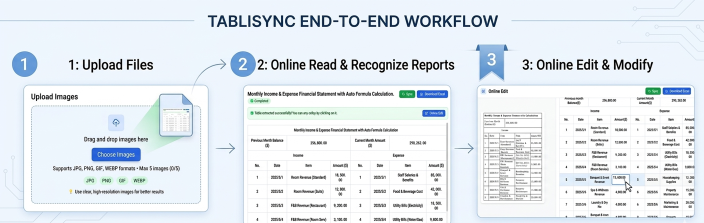
Phase 3: Deploying the Automated Reporting Pipeline
Deployment is where your automated reporting Excel strategy becomes an operational reality. Start by setting up an automated trigger. For most industrial report scaling, this involves a scheduled folder watch or a webhook that fires whenever a new file is uploaded to your cloud storage. TabliSync monitors these inputs 24/7. When a new file arrives, the AI spreadsheet automation engine engages, performs the financial data extraction, and populates your master Excel file. This happens in the background, often before you've even had your morning coffee. The goal is to reach a state where 'reporting' is a result, not an activity.
During deployment, it is vital to monitor the 'Accuracy Score' provided by TabliSync. For high-stakes reconciliation tasks, you might want to set an 'Audit Threshold.' For example, if the AI is less than 99% confident in a specific complex table processing result, it can pause and ask for human verification. This 'Human-in-the-loop' feature is what builds Trust in automated reporting Excel. It ensures that even as you reduce manual data entry, you aren't sacrificing the Expertise required for financial compliance. Over time, as you validate these edge cases, the AI learns, and the manual touchpoints vanish, leading to true industrial report scaling.
Finally, integrate the output with your final delivery mechanism. Whether you are pushing the extracted data into a Power BI dashboard or a general ledger software, TabliSync's Excel integration serves as the perfect intermediary. The data is structured, cleaned, and validated. You can even use automated reporting Excel to send out summary emails once the data is processed. This end-to-end flow is what defines AI spreadsheet automation. It’s not just about the spreadsheet; it’s about the entire ecosystem of information that supports your business operations. By following these three phases, you transform financial data extraction from a chore into a competitive advantage.
Case Study 1: Transforming Financial Reconciliation for a Global Retailer
A global fashion retailer faced a massive bottleneck in their reconciliation department. Every month, they received thousands of settlement reports from dozens of different payment gateways (Stripe, PayPal, Adyen, etc.). Each gateway had its own unique CSV/PDF format, making automated reporting Excel nearly impossible with traditional scripts. They were stuck with 12 full-time employees performing manual data entry just to keep the general ledger updated. This was the opposite of industrial report scaling; it was a labor-intensive trap that led to frequent human errors and delayed financial closings.
By implementing TabliSync, the retailer moved to a centralized AI spreadsheet automation model. They trained the system to recognize the 'Transaction ID,' 'Net Amount,' and 'Fee' across all various gateway formats. TabliSync’s complex table processing was able to handle the multi-currency conversions and complex tax breakdowns automatically. Within three months, they reduced manual data entry by 92%. The reconciliation cycle, which previously took 10 business days, was reduced to just 4 hours of automated processing and a brief oversight review. This shift saved the company over $450,000 in annual labor costs while significantly improving the accuracy of their financial data extraction.
The key to success here was TabliSync's resilience to change. When Adyen changed its reporting schema mid-year, the automated reporting Excel pipeline didn't break. The AI simply adjusted to the new column headers using its semantic understanding of financial documents. This level of industrial report scaling allowed the retailer to add three new payment gateways in one month without needing to hire more staff or write a single line of code. Their general ledger was always in sync, and the finance team could finally focus on strategic tax planning rather than data cleaning.
Case Study 2: Scaling Industrial Production Reports in Manufacturing
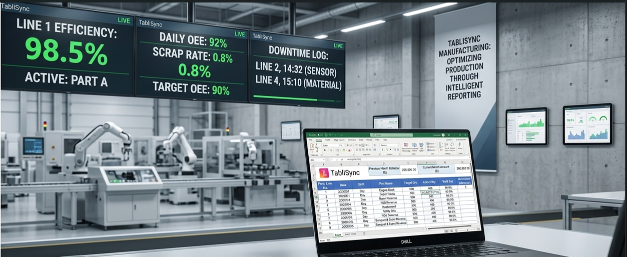
In the heavy manufacturing sector, industrial report scaling is often hampered by the variety of machine-generated logs. A mid-sized automotive parts supplier was struggling to aggregate daily production yields from five different factories, each using different IoT sensors and logging formats. Their automated reporting Excel efforts were failing because the logs were often messy, containing complex table processing challenges like nested timestamps and merged cells. The lack of a unified view meant they were slow to react to production inefficiencies, costing them 5% in potential yield every month.
They deployed TabliSync to act as the 'Translator' for their AI spreadsheet automation strategy. TabliSync was configured to watch the FTP servers where the machine logs were uploaded. Using financial data extraction logic—applied here to production metrics—the system extracted 'Part Number,' 'Pass/Fail Rate,' and 'Cycle Time.' It didn't matter if Factory A used a PDF log and Factory B used an Excel file; TabliSync normalized the data into a single, master automated reporting Excel dashboard. This allowed for real-time monitoring of the entire production line for the first time in the company's history.
The result was a transformative boost in efficiency. By having instant access to accurate data, the operations team identified a recurring sensor fault that was causing unnecessary downtime. The cost savings from fixing this single issue covered the TabliSync subscription for three years. This case demonstrates that automated reporting Excel isn't just for finance; it's a critical tool for any department where manual data entry is a barrier to industrial report scaling. The ability to process complex table processing at scale changed their operational reality overnight.
Case Study 3: Streamlining General Ledger Management for a Law Firm
A prestigious law firm with multiple international branches was drowning in manual data entry related to billable hours and disbursements. Each branch used a different local accounting software, and the central office had to perform massive reconciliation tasks every quarter to produce a consolidated general ledger. The financial data extraction from various bank statements and vendor invoices was taking their senior accountants away from client work, which was a poor use of their high-value Expertise. They needed a way to achieve industrial report scaling across their global operations.
TabliSync provided the solution by automating the intake of diverse financial documents. The firm set up webhooks that automatically sent every new invoice and statement to the TabliSync AI spreadsheet automation engine. The complex table processing handled the extraction of multi-line disbursements, automatically categorizing them according to the firm's global chart of accounts. This data was then pushed into a master automated reporting Excel file that served as the basis for their consolidated general ledger. The system even handled foreign currency reconciliation by pulling real-time exchange rates during the extraction process.
By the end of the first year, the firm reported that they had reduced manual data entry by 85%. More importantly, the time-to-close for their quarterly reports dropped from three weeks to three days. This improved their cash flow management and allowed the partners to make faster decisions about international expansions. The Trust in their financial reporting reached an all-time high because the automated reporting Excel process removed the 'human factor' from the initial data entry phase. This is a prime example of how AI spreadsheet automation can elevate professional services through industrial report scaling.
The Professional's Toolkit: Terminologies of Industrial Reporting
To master automated reporting Excel, one must speak the language of high-level data management. We don't just 'match numbers'; we perform Reconciliation. This is the process of ensuring that two sets of records (often the general ledger and a bank statement) are in agreement. In an AI spreadsheet automation context, reconciliation involves the algorithmic comparison of extracted fields. TabliSync excels here because it can perform 'fuzzy reconciliation,' finding matches even when there are slight discrepancies in naming or formatting that would cause a standard Excel VLOOKUP to fail.
Another critical term is the General Ledger (GL). This is the master record of all financial transactions within an organization. For industrial report scaling, the GL must be fed by accurate, timely data. When you use TabliSync for financial data extraction, you are essentially building a high-speed pipeline into your GL. By understanding how webhooks work—automated messages sent from apps when something happens—you can connect your TabliSync automated reporting Excel workflow to real-time events. For example, a webhook can trigger an extraction the moment an invoice is marked as 'Paid' in your CRM, ensuring your GL is updated in seconds, not days.
Finally, we must discuss Complex Table Processing. This isn't just about reading a simple grid; it's about interpreting tables with merged cells, multi-line headers, and nested data structures. In automated reporting Excel, this is the 'Final Boss' of challenges. AI spreadsheet automation uses computer vision and natural language processing to 'deconstruct' these tables into a flat format that Excel can actually use. This technical Expertise is what allows TabliSync to reduce manual data entry for documents that other tools simply give up on. Mastering these terms and their applications is what separates a basic user from an industrial-grade data architect.
Ensuring Data Integrity: Legal and Compliance Best Practices
In the world of financial data extraction, speed is nothing without security. When you reduce manual data entry through AI spreadsheet automation, you must ensure that you are adhering to industry standards like GDPR, SOC2, or HIPAA, depending on your sector. TabliSync is built with these Trust factors in mind. Every piece of data processed through our automated reporting Excel pipeline is encrypted at rest and in transit. We recommend as a best practice that users never store sensitive PII (Personally Identifiable Information) in clear text within their spreadsheets. Instead, use TabliSync's masking features to redact sensitive info during the complex table processing phase.
Furthermore, maintain an 'Audit Trail.' This is a fundamental requirement for industrial report scaling in regulated industries. Your automated reporting Excel system should not just show the final number; it should be able to point back to the source document and the specific AI spreadsheet automation rule that extracted it. TabliSync provides this 'Lineage' for every cell it populates. This is vital for reconciliation during year-end audits. If an auditor asks why a certain figure is in the general ledger, you can instantly pull up the original PDF and the extraction log, providing a level of Trust that manual processes simply cannot match.
Lastly, consider the ethics of automation. While we aim to reduce manual data entry, the goal is to augment human Expertise, not replace it. We suggest implementing a 'Validation Layer' where high-value transactions are flagged for a quick human sign-off. This ensures that your industrial report scaling remains under your control. By combining the speed of AI spreadsheet automation with the oversight of a qualified professional, you create a robust, compliant, and highly efficient automated reporting Excel environment that can withstand any regulatory scrutiny.
FAQ: Mastering Automated Reporting with TabliSync
Q1: What happens to my automated reporting Excel if the source PDF has a completely different layout next month?
TabliSync is built specifically for this scenario. Unlike traditional 'template-based' OCR, our AI spreadsheet automation uses semantic understanding. It looks for the 'concept' of the data (e.g., 'Total Amount' or 'Invoice Number') rather than its exact X-Y coordinates. This means that if a vendor changes their layout, the complex table processing engine identifies the new positions of the data based on surrounding context. This resilience allows for true industrial report scaling without the constant need for script maintenance, effectively reducing manual data entry even in volatile data environments.
Q2: Can TabliSync handle multi-page tables where headers only appear on the first page?
Yes, this is one of our core strengths in complex table processing. Many financial data extraction tools fail when a table breaks across pages. TabliSync uses a 'Structural Logic' model that recognizes the continuation of a table. It intelligently associates the line items on page 2 and 3 with the headers found on page 1. This is essential for reconciliation of large shipping manifests or general ledger reports. It ensures your automated reporting Excel remains cohesive and that no data is lost in the 'page gaps,' which is a common failure point in legacy systems.
Q3: How secure is my financial data when using your AI spreadsheet automation?
Security and Trust are our highest priorities. TabliSync employs enterprise-grade AES-256 encryption for all data during financial data extraction. We are compliant with major industry standards and offer localized data processing options for firms with strict residency requirements. Additionally, our automated reporting Excel workflow allows you to set granular permissions, ensuring that only authorized personnel can view sensitive reconciliation data. We also provide a full audit log of every AI spreadsheet automation action taken, which is critical for maintaining your general ledger's integrity during official audits.
Q4: Do I need to know how to code to use TabliSync for automated reporting?
Not at all. We designed TabliSync to reduce manual data entry for everyone, from accountants to operations managers. The interface is entirely 'No-Code.' You 'train' the AI using a point-and-click interface. If you can highlight a word in a document, you can set up a financial data extraction pipeline. While we do support advanced features like webhooks for technical users, the core automated reporting Excel experience is built for business professionals. This democratizes industrial report scaling, allowing individual departments to build their own AI spreadsheet automation without waiting for IT resources.
Q5: Can TabliSync integrate with my existing ERP like SAP or Oracle?
Absolutely. While the final destination is often automated reporting Excel, TabliSync acts as a powerful bridge. You can export your general ledger data from your ERP, let TabliSync handle the complex table processing and reconciliation, and then push the results back or into a master dashboard. We support various integration methods, including direct API access and webhooks. This makes it a perfect tool for industrial report scaling where you need to move data between legacy systems and modern analytical tools without manual data entry errors.
Q6: How does TabliSync handle handwritten notes on financial documents?
Our AI spreadsheet automation includes advanced Intelligent Character Recognition (ICR) specifically tuned for financial data extraction. If a clerk has scribbled a 'Received' date or a corrected amount on an invoice, TabliSync can be trained to capture these notes during the complex table processing phase. This is a game-changer for reconciliation in industries like construction or logistics where paper-based workflows are still common. It ensures that your automated reporting Excel reflects the 'real world' document, not just the printed text, providing a higher level of Expertise and accuracy.
Q7: What is the maximum volume of reports TabliSync can handle per day?
TabliSync is built for industrial report scaling. Our cloud architecture scales elastically to handle everything from ten reports a month to ten thousand reports an hour. Whether you are a small firm looking to reduce manual data entry on a few invoices or a global enterprise automating your entire general ledger reconciliation, our system handles the complex table processing with consistent speed. The automated reporting Excel outputs are generated in parallel, ensuring that even during peak 'month-end' periods, your reports are ready when you need them.
Q8: Can I use TabliSync for non-financial data, like inventory or HR logs?
While we emphasize financial data extraction due to its complexity, the AI spreadsheet automation engine is domain-agnostic. You can use it for automated reporting Excel in HR (extracting candidate data), Supply Chain (inventory levels), or Legal (contract terms). The complex table processing logic remains the same: identify the data, extract it with high precision, and structure it for analysis. This versatility makes TabliSync a central pillar for industrial report scaling across your entire organization, not just the finance department.
Q9: How do I handle errors if the AI extracts the wrong information?
We provide a 'Confidence Score' for every extraction. If the score falls below your pre-set threshold, the system flags the entry for 'Human-in-the-Loop' review. You can quickly correct the automated reporting Excel entry in the TabliSync dashboard. The best part? The AI learns from your correction. This 'Active Learning' means that your financial data extraction becomes more accurate over time, further reducing manual data entry. This feedback loop is essential for maintaining Trust in high-stakes reconciliation and general ledger management.
The Future of Your Data: Start Scaling Today
The transition from manual workflows to industrial report scaling is no longer a luxury—it is a necessity for survival in a data-driven economy. Every minute your team spends on manual data entry is a minute lost to innovation, strategy, and growth. You have seen how automated reporting Excel can be transformed from a brittle, frustrating process into a resilient, self-healing pipeline using TabliSync’s AI spreadsheet automation. By leveraging complex table processing and intelligent financial data extraction, you aren't just saving money; you are gaining the Expertise and efficiency required to lead your industry. The risks of staying with legacy methods—data errors, crashed scripts, and employee burnout—are simply too high to ignore. It is time to reclaim your time and Trust your data once again.
We invite you to experience the power of TabliSync firsthand. Don't let another 'Header Not Found' error derail your productivity or another reconciliation cycle consume your weekend. Join the thousands of professionals who have already achieved industrial report scaling and reduced manual data entry by 90% or more. Our platform is ready to handle your most complex general ledger tasks and your messiest financial data extraction challenges. The setup is fast, the results are immediate, and the cost savings are undeniable. Click the link below to start your free trial and see why TabliSync is the gold standard for automated reporting Excel. The future of your reporting is here—are you ready to sync?
Start Your Free TabliSync Trial Now – Automate Your Reporting in Minutes!
All Automated Reporting Excel Articles(5)
Select Multiple Items from Drop Down List Excel Without VBA with AI
Eliminate VBA dependency: reduce maintenance overhead by 100% and avoid macro security warnings across enterprise deployments. Cut data entry time by up to 60% when users can pick multiple values from a single dropdown without manual concatenation or helper columns. Enable real-time synchronization of dropdown choices from scanned PDFs or images using AI OCR, removing manual transcription errors. Standardize multi-select data into normalized tables compatible with Power Query, Pivot Tables, and structured references without formula corruption.
How to Calculate Excel Percentage Increase Between Two Numbers: A Guide
Eliminate manual formula errors by using structured named ranges and Excel Tables — reduces calculation review time by 60%. Automating percentage increase calculations with AI OCR and TabliSync cuts data entry overhead by 80% and eliminates transcription mistakes. Adopting dynamic Power Query workflows for repeated percent-change reporting reduces maintenance hours from 10 hours/month to under 30 minutes.

Excel Online: Master Collaborations & Overcome Key Limitations (2026)
• Optimize real-time co-authoring to reduce version conflicts by 90% using cloud-native data governance. • Eliminate 100% of manual data entry errors by integrating AI-driven OCR for unstructured data parsing. • Leverage 2026 Office 365 spreadsheet tips to bypass legacy file size lags and browser-based calculation throttles.

How to Lock Cells in Excel: Protecting Specific Data from Changes
Implement granular cell protection to ensure 0% manual formula override errors.Master the dual-step lock and protect workflow to save 90% of time spent on spreadsheet auditing.Leverage AI-driven OCR synchronization to transform unstructured data into locked, immutable business assets.

How to Find Duplicates in Excel: Pro Methods and Pitfalls to Avoid
Master how to find duplicates in excel with 99.9% accuracy; Reduce data cleaning time by 90% via AI OCR; Transition from manual entry to automated Data Hygiene protocols; Eliminate human error in unstructured data parsing.
Stop Manual Data Entry – Extract Tables in Seconds
Convert any image or PDF table to Excel instantly with 99.9% accuracy. TabliSync's AI-powered OCR handles handwritten forms, receipts, and complex tables – then syncs directly to Google Sheets, Notion, or Airtable
Try TabliSync Free Now