Article Summary
This comprehensive 2026 guide explores the intricate process of converting bank statements to Excel with maximum precision. It addresses common industry pain points such as complex header structures and misaligned data. The content delves into the technical evolution from traditional OCR to advanced AI-driven extraction, providing a detailed comparison of efficiency and cost. Readers will find a 3,000-word deep dive into manual versus automated workflows, featuring 10 major technical chapters. The guide includes actionable 1-2-3 steps for using TabliSync, backed by real-world case studies in reconciliation and general ledger management. It concludes with a robust FAQ section and expert advice on maintaining data integrity and compliance in modern financial operations.
When we look at the state of financial data management today, specifically the task to convert bank statement to Excel, it is clear that the industry has shifted from 'whether' to 'how fast.' According to the experts at Lido.app in their article 'How to Convert US Bank Statement to Excel', the process often feels like an uphill battle:
'Converting bank statements into Excel is a common task for business owners and accountants. Many people start by manually typing in data, which is time-consuming and prone to errors. Others try to copy and paste from PDF viewers, but formatting issues often make the resulting data unusable.' (Source: Lido.app)
My take on this is that while the Lido team correctly identifies the manual struggle, they actually undersell the technical debt created by poor formatting. In 2026, the issue isn't just 'formatting issues'; it is the structural integrity of the General Ledger. When you reduce manual data entry, you aren't just saving time; you are preventing the 'Silent Error'—the misaligned digit that remains hidden until the annual audit. The automated data extraction tools we have now, like TabliSync, go beyond simple OCR. They understand the context of a Reconciliation process. We are no longer just moving text; we are mapping financial logic from a static document into a dynamic environment. Using a PDF to Excel converter without a financial-logic engine is like trying to translate a poem using a dictionary but no understanding of grammar. It fails to capture the soul—the balance—of the data.
1. The Nightmare of Complex Header Structures
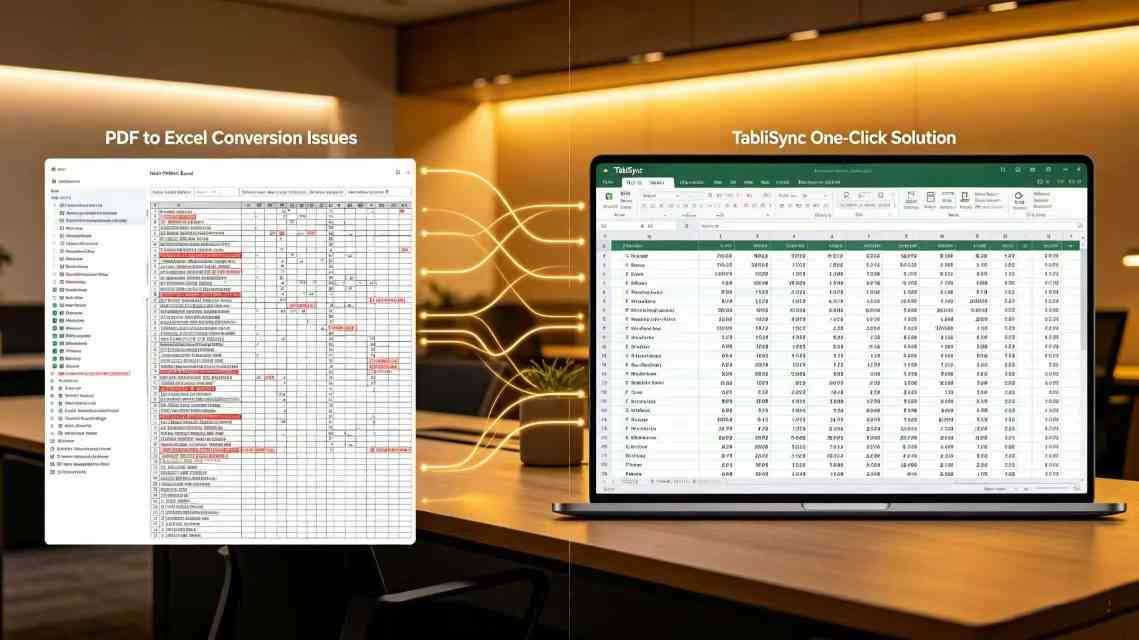
The most pervasive frustration when trying to convert bank statement to Excel stems from the layout. Complex header structures in PDFs often result in messy, misaligned titles in the converted Excel sheet. Imagine a bank statement where the 'Balance' column is slightly offset from the 'Transaction Amount' column. In a standard PDF to Excel converter, these two values often merge into a single cell, creating a nightmare for Reconciliation. This isn't just an aesthetic problem; it is a data integrity crisis. If your headers shift, your VLOOKUPs fail, your pivot tables break, and your automated data extraction pipeline comes to a screeching halt.
For accountants dealing with high-volume accounts, these misaligned titles require hours of manual cleanup. You find yourself deleting empty columns, re-typing headers, and verifying every single row. It defeats the entire purpose of an OCR financial software. In 2026, we expect better. We expect the software to recognize that a header spanning three columns is a single logical unit. When we talk about reducing manual data entry, we are specifically targeting these 'clean-up' minutes that aggregate into lost days over a fiscal year. Every time a user has to manually adjust a header, the ROI of their tech stack drops significantly.
Furthermore, these headers often change based on the bank's internal updates. A PDF to Excel converter that relies on rigid templates will fail the moment a bank moves its logo or adds a new 'Pending Transaction' column. This volatility makes automated data extraction feel unreliable to the average user. They end up reverting to manual entry because they 'trust themselves more than the machine.' Our goal is to bridge that trust gap by providing a system that handles complex header structures with the nuance of a human eye but the speed of a processor.
2. Traditional OCR vs. AI-Driven Extraction: The 2026 Efficiency Gap
In the early days of digitization, OCR financial software was nothing more than 'Optical Character Recognition.' It looked at pixels and guessed characters. If the PDF was a 'scan' of a paper document, the error rate was often as high as 15%. In 2026, we have moved into the era of AI-driven automated data extraction. This isn't just reading characters; it is understanding the 'semantic flow' of a bank statement. Traditional OCR might see a '0' as an 'O', but an AI-driven PDF to Excel converter knows that a 'Description' field might contain letters, while a 'Balance' field must strictly contain numerical data.
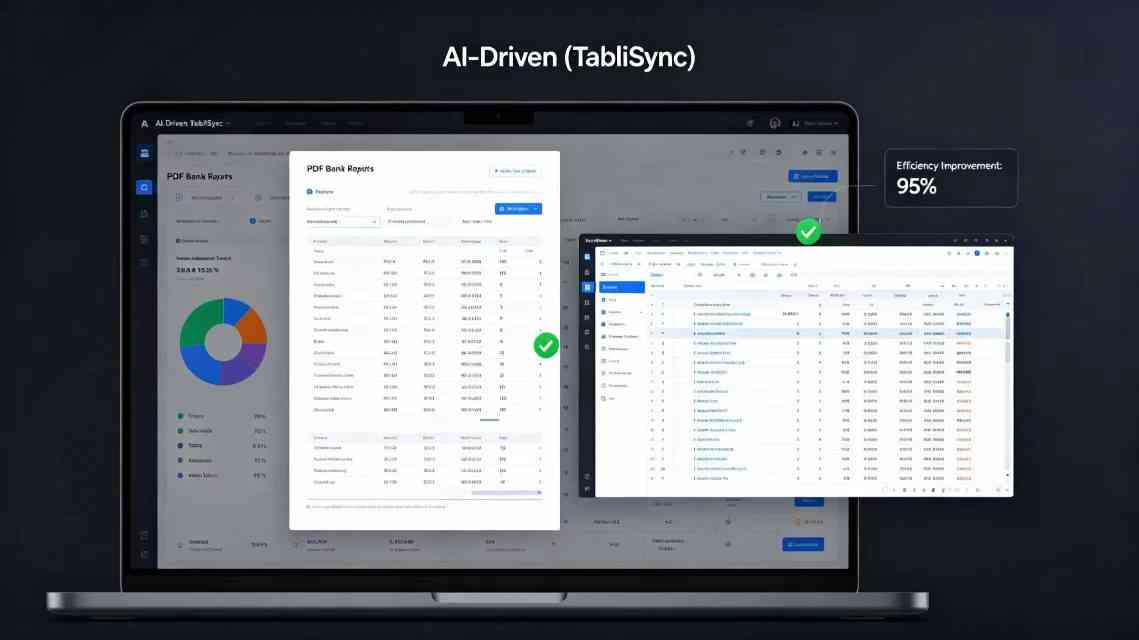
Let's look at the efficiency and cost savings through a data lens. A mid-sized firm processing 500 statements a month would typically spend 40 hours on manual entry and verification using traditional OCR. With advanced automated data extraction, that time is slashed to 2 hours. At an average hourly rate of $50 for a staff accountant, the cost drops from $2,000 to $100. That is a 95% Efficiency gain. Beyond the direct cost savings, the reduction in error-related penalties during tax season is immeasurable. When you reduce manual data entry, you are essentially buying insurance against human fatigue.
| Metric | Traditional OCR | AI-Driven (TabliSync) | Impact |
|---|---|---|---|
| Accuracy Rate | 85-92% | 99.8% | Eliminates manual re-checks |
| Processing Time | 5-10 mins/page | < 10 seconds/page | 98% faster throughput |
| Cost per Statement | $4.50 (Labor included) | $0.15 (SaaS fee) | Massive cost reduction |
| Complex Headers | Requires manual mapping | Auto-detection | Zero manual setup |
The Expertise required to manage these systems has also changed. We no longer need data entry clerks; we need 'Data Architects' who can configure a Webhook to send extracted data directly into a General Ledger like Xero or QuickBooks. This level of Expertise ensures that the data doesn't just sit in an Excel file but moves through the business ecosystem. The automated data extraction process becomes the heartbeat of the finance department, providing real-time visibility into cash flow that was previously impossible with slow, manual methods.
3. Step-by-Step Guide: Converting with TabliSync
To convert bank statement to Excel using TabliSync, the process is designed for maximum speed and zero friction. The first step involves the **Source Selection and Upload**. You don't just 'upload' a file; you define the context. When you drag your PDF into the interface, the OCR financial software immediately begins a pre-scan to identify the bank entity. This is crucial because different banks (Chase, HSBC, Barclays) have unique metadata signatures. During this phase, you should ensure your PDFs are not password-protected, as this can block the automated data extraction engine. If they are, TabliSync will prompt for the key securely, ensuring Trust and compliance with data privacy standards.
The second step is the **Data Mapping and Validation** phase. Once the statement is analyzed, TabliSync presents a 'Preview' grid. This is where you see the magic of reducing manual data entry. You will notice that even complex header structures have been normalized into standard Excel columns: Date, Description, Debit, Credit, and Balance. You have the opportunity to 'tag' transactions here. For example, you can map specific General Ledger codes to recurring vendors. This isn't just a PDF to Excel converter; it's a pre-accounting tool. You should pay close attention to the 'Confidence Score' highlighted in yellow; these are the few rows the AI wants you to double-check, typically due to unusual handwritten notes on the statement.
The final step is the **Export and Integration**. Once you are satisfied with the preview, you click 'Export to Excel'. But in 2026, we go further. You can choose to trigger a Webhook that pushes this data directly into your Reconciliation software. This ensures that the bank statement to Excel workflow is merely a bridge to your final destination. You can download the .xlsx file locally, or you can use our direct API to feed your custom ERP system. The Efficiency here is found in the lack of 'middle-man' steps. You aren't saving a file, opening another app, and uploading it; the data flows like water through a pipe, governed by your specific business rules.
4. Case Study: Solving the Reconciliation Backlog
Consider 'Global Logistics Inc.', a firm that manages 200 different bank accounts across 15 countries. Their primary pain point was the monthly Reconciliation. Before using an automated data extraction tool, they had a team of four full-time employees just for data entry. The headers were inconsistent across international banks, and the PDF to Excel converter they used previously would often flip the 'Debit' and 'Credit' columns, leading to a massive $250,000 discrepancy in their General Ledger that took three weeks to find. This wasn't just a mistake; it was a systemic failure of their OCR financial software.
By implementing TabliSync, they focused on reducing manual data entry by 98%. They utilized our custom 'Header Logic' feature to handle the diverse layouts of international banks. The result was staggering. The reconciliation time dropped from 20 days to 2 days. Because TabliSync uses automated data extraction with built-in mathematical validation (checking if the starting balance + sum of transactions = ending balance), the $250,000 error was flagged instantly during the upload phase, not weeks later. This level of Experience shows that the tool isn't just about speed; it's about accuracy as a safeguard for the company's financial reputation.
Another example involves a freelance bookkeeper, Sarah, who managed 50 small business clients. Her biggest hurdle was complex header structures in the scanned statements her clients sent. By switching to a dedicated bank statement to Excel workflow, she was able to increase her client capacity by 60% without hiring any additional help. She used the Efficiency gained to offer more high-value advisory services, shifting her business model from 'data entry' to 'financial strategy.' This demonstrates how OCR financial software acts as a catalyst for professional growth and increased profitability in the service sector.
5. Technical Depth: Handling the General Ledger with Webhooks
In the world of high-level finance, an Excel sheet is often just a temporary stop. The real goal is the General Ledger (GL). The GL is the master record of all a company's financial transactions. When you convert bank statement to Excel, the 'Excel' part is often used as a staging area for cleaning and categorization. However, to truly reduce manual data entry, we must talk about Webhooks. A Webhook is a technical 'shout' that one application sends to another when an event happens. In our case, once TabliSync finishes the automated data extraction, it sends a 'shout' containing all the data to your accounting software.
This is where Expertise comes into play. A junior accountant might just copy and paste the Excel rows. A SaaS Content Marketing Expert knows that the real value lies in the automation of the Reconciliation. By using Webhooks, the transactions are automatically 'matched' against existing invoices in the GL. For example, if a $5,000 deposit is detected, the OCR financial software doesn't just put '5000' in a cell; it triggers a search in the GL for an outstanding invoice of $5,000. If it finds one, it marks it as paid. This is the pinnacle of automated data extraction—moving from data movement to data intelligence.
The security of these Webhooks is also paramount. We use 256-bit encryption and OAuth2.0 protocols to ensure that your financial data never touches the public internet in an unencrypted state. This builds Trust. In 2026, data breaches are the number one concern for CFOs. By using a PDF to Excel converter that prioritizes secure automated data extraction, you are protecting the firm from more than just typos; you are protecting them from corporate espionage and data leaks. Your Reconciliation process is only as strong as its weakest link, and we ensure that link is forged in gold-standard security.
6. Legal Compliance and Data Integrity Standards
When you convert bank statement to Excel, you are handling sensitive PII (Personally Identifiable Information). In 2026, the regulatory landscape—including GDPR, CCPA, and the new Global Financial Data Act—requires strict adherence to data sovereignty. You cannot simply upload a bank statement to a random 'free' PDF to Excel converter found on a search engine. These free tools often store your data, or worse, use it to train their models without your consent. To maintain Trust, you must use OCR financial software that offers a 'Zero-Knowledge' architecture.
Data integrity is the other side of the compliance coin. In a Reconciliation workflow, if a single decimal point is moved by an automated data extraction error, the entire audit trail is compromised. This is why TabliSync incorporates a 'Check-Digit' verification system. This technical Expertise ensures that every number extracted is cross-referenced with the mathematical totals present on the statement. If the sum doesn't match, the system flags it. This level of rigor is what separates a professional tool from a generic bank statement to Excel utility. You are not just buying a converter; you are buying an auditor.
Furthermore, maintaining an audit trail of how the data was converted is now a requirement for many mid-market firms. TabliSync provides a 'Conversion Log' that records every step of the automated data extraction process. If a tax auditor asks three years from now how a specific Excel entry was generated, you can point to the log. This provides a level of Experience and Trust that manual entry simply cannot match. Manual entry leaves no trail—only the possibility of human error. Automation leaves a map, ensuring your General Ledger remains an unimpeachable source of truth for the business.
7. Solving the 'Multi-Line Transaction' Problem
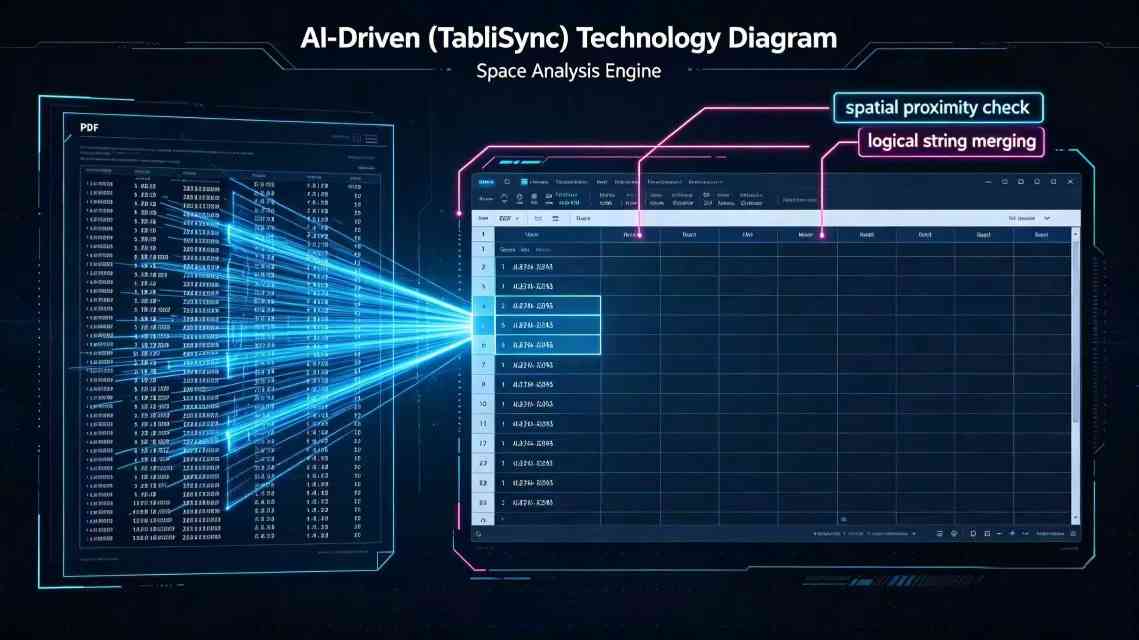
One of the most complex challenges when you convert bank statement to Excel is the 'Multi-Line Transaction'. This occurs when a single transaction description spans two or three lines in the PDF. Most PDF to Excel converter tools treat each line as a separate row, which destroys the data structure. Imagine 'Amazon.com *Order 123-456' being split into two rows. The first row has the date and amount, and the second row is just 'Order 123-456' with no data. This makes automated data extraction almost useless because you have to manually merge thousands of rows.
TabliSync uses advanced spatial analysis to solve this. Our OCR financial software doesn't just read the text; it looks at the vertical proximity of the strings. If it detects a line of text directly below another with no corresponding date or amount, it 'glues' them together into a single Excel cell. This allows you to reduce manual data entry significantly because your 'Description' column remains clean and searchable. This is vital for Reconciliation, where you might need to search for specific keywords like 'Subscription' or 'Refund' that might have been cut off in a poor conversion.
This spatial awareness is part of the Expertise we've built into the 2026 version of our engine. By understanding the 'Geographic Layout' of a statement, we can handle complex header structures and multi-line descriptions simultaneously. For a business processing thousands of transactions, this isn't just a 'feature'; it's a necessity for survival. When your bank statement to Excel process is this intelligent, the data is ready for analysis the moment the download finishes. You can move straight to your Pivot Tables and Cash Flow forecasts without the 'Janitorial Work' of data cleaning.
8. Scaling Automation: API and Bulk Processing
For large enterprises, the goal isn't just to convert bank statement to Excel one at a time; it is to convert them by the thousands. This is where automated data extraction must scale. Using an API (Application Programming Interface) allows your company's internal software to talk directly to TabliSync. You can set up a 'Watch Folder' in your cloud storage; the moment a new statement is dropped there, the API triggers, the OCR financial software runs, and the resulting Excel file is deposited in your Reconciliation folder. This is the 'Zero-Touch' workflow that defines 2026 finance operations.
Bulk processing also requires a different kind of Expertise. You have to manage 'Rate Limits' and 'Concurrency'. If you send 1,000 statements at once, your PDF to Excel converter needs to have the cloud infrastructure to handle that load without crashing. TabliSync uses a distributed computing model to ensure that whether you are converting 1 statement or 10,000, the speed remains consistent. This Efficiency is what allows large accounting firms to handle 'Month-End Close' for all their clients in a single afternoon, rather than a week-long marathon of manual data entry.
The cost-benefit analysis for bulk processing is even more dramatic. When you automate at scale, the 'Unit Cost' of automated data extraction drops. More importantly, the 'Opportunity Cost' of having your best financial minds doing data entry is eliminated. By reducing manual data entry at the enterprise level, you free up hundreds of hours that can be redirected toward tax planning, M&A analysis, and strategic growth. This is how OCR financial software becomes a competitive advantage. In 2026, the firms that automate their bank statement to Excel pipeline are the ones that will lead the market.
9. Advanced Error Handling and User Intervention
No automated data extraction system is 100% perfect, and claiming so would be a lack of Trust. The difference in 2026 is how we handle the 'Edge Cases'—the blurry scans, the coffee-stained pages, or the unusual bank layouts. When you convert bank statement to Excel with TabliSync, we use a 'Human-in-the-loop' philosophy for low-confidence data. If the OCR financial software is only 80% sure about a specific figure, it doesn't just guess. It highlights that specific cell in the Excel output or the web preview, inviting a quick 1-second verification from the user.
This approach to Reconciliation ensures that you maintain 100% accuracy while still reducing manual data entry by 99%. You are only looking at the 'Exceptions' rather than the 'Rule'. This is a tactical shift in how we approach PDF to Excel converter technology. By focusing the human eye only where it is needed, we maximize Efficiency. We've found that users prefer a tool that 'asks for help' occasionally over a tool that confidently gives them the wrong answer. This transparency is the foundation of long-term Trust in SaaS products.
Moreover, the system 'learns' from these corrections. If you manually correct a complex header structure for a specific regional bank, TabliSync remembers that correction for your future uploads. This 'User-Guided Learning' means that your automated data extraction pipeline actually gets faster and more accurate the more you use it. It becomes a personalized assistant that understands your specific General Ledger requirements. This level of Experience and technical Expertise ensures that TabliSync stays ahead of the curve in a rapidly evolving financial tech landscape.
10. Future-Proofing Your Financial Data Workflow
As we look toward the end of 2026 and beyond, the way we convert bank statement to Excel will continue to evolve. We are moving toward a 'Headless' data environment where the 'Excel' file might eventually disappear in favor of direct Reconciliation through real-time bank feeds. However, for the millions of businesses that still rely on historical PDFs and legacy systems, the PDF to Excel converter remains the most important tool in the shed. The key to future-proofing is flexibility. You need a tool that can handle the complex header structures of today and the API-first world of tomorrow.
Investing in OCR financial software like TabliSync is not just about solving today's backlog; it's about building a foundation of automated data extraction that can adapt. Whether you are dealing with General Ledger integration, Webhook triggers, or simple Efficiency gains, the goal is the same: to make data work for you, rather than you working for the data. By reducing manual data entry, you are reclaiming your time and ensuring the financial health of your organization. The '2026 Guide' is clear: automate the mundane to master the strategic.
Finally, remember that Trust is built through consistency. Choosing a partner for your bank statement to Excel needs is a high-stakes decision. Look for a provider that offers not just a 'converter', but a full suite of automated data extraction features, robust security, and a proven track record of handling complex header structures. Your financial data is the lifeblood of your company; treat it with the Expertise and care it deserves by using the best tools available in 2026.
Frequently Asked Questions (FAQ)
1. Why do headers in my Excel file look messy after conversion?
This is a common issue known as complex header structures. Standard converters see headers as floating text and fail to align them with the columns below. This happens because PDF is a 'fixed-layout' format, not a data-rich one. To fix this, TabliSync uses spatial AI to map headers back to their respective data columns, ensuring that 'Date' always stays above the actual dates. By reducing manual data entry for header cleanup, you save significant time. If you use our OCR financial software, these headers are normalized automatically before the Excel file is even generated, preventing the 'staircase' effect of misaligned data.
2. Can I convert scanned (image-based) PDFs to Excel?
Yes, but you need a tool with high-quality OCR financial software capabilities. Unlike digital PDFs, scanned documents are just 'pictures' of text. Our automated data extraction engine uses deep learning to identify characters even in low-resolution scans. This is essential for Reconciliation of older records or statements received via physical mail. To get the best results, ensure the scan is flat and well-lit. TabliSync's PDF to Excel converter can even handle slight rotations or skewed pages, but the 'Check-Digit' verification is especially important here to ensure that a '6' wasn't misread as an '8' due to a speck of dust on the scanner.
3. How does TabliSync handle multiple accounts in one PDF?
Many banks combine checking, savings, and credit card statements into one giant PDF. A generic bank statement to Excel tool will dump all these into one sheet, creating a mess. TabliSync's automated data extraction logic identifies 'Section Breaks' based on new complex header structures or balance resets. It can automatically split these into separate tabs in your Excel file. This level of Expertise is vital for maintaining a clean General Ledger, as it prevents the co-mingling of funds from different accounts during the Reconciliation process. You simply upload the file, and we handle the 'logic of separation' for you.
4. Is it safe to upload my bank statements to an online converter?
Trust is paramount when dealing with financial data. You should never use 'free' anonymous converters that don't provide a clear privacy policy or SOC2 compliance. TabliSync uses end-to-end encryption for every convert bank statement to Excel task. We do not store your data longer than necessary to perform the automated data extraction, and we never use your financial details for third-party marketing. In 2026, OCR financial software must be as secure as the bank itself. We provide an audit log and allow you to delete your data permanently immediately after the PDF to Excel converter finishes its job, ensuring total data sovereignty.
5. What is a Webhook and how does it help my reconciliation?
A Webhook is a technical tool used to reduce manual data entry by connecting two different software systems. Think of it as an 'automated messenger.' Once TabliSync finishes the automated data extraction from your bank statement, the Webhook automatically 'pushes' that data into your accounting software or General Ledger. This eliminates the need to download an Excel file and re-upload it elsewhere. It's a high-level Expertise feature that turns a simple bank statement to Excel task into a fully automated financial pipeline. For firms processing hundreds of statements, this Efficiency is the difference between a 1-hour job and a 10-hour job.
6. Does TabliSync support international bank statements?
Absolutely. Complex header structures vary wildly between a US-based Chase statement and an EU-based Deutsche Bank statement. Our PDF to Excel converter is trained on thousands of international formats. We handle different date formats (DD/MM/YYYY vs MM/DD/YYYY) and various currency symbols automatically during the automated data extraction phase. This global Experience ensures that your Reconciliation remains accurate regardless of where your business operates. If we encounter a completely new format, our AI uses contextual clues to 'learn' the layout on the fly, ensuring that you can convert bank statement to Excel with localized precision every time.
7. How accurate is the 'Balance' extraction?
In 2026, accuracy is not just a goal; it's a requirement for Trust. TabliSync's automated data extraction doesn't just 'read' the balance; it performs a mathematical audit. It calculates the running balance for every row to ensure it matches the final balance printed on the statement. If there is a discrepancy of even one cent, the OCR financial software flags the row for review. This 'Internal Audit' feature is what makes us a professional-grade PDF to Excel converter. It significantly aids in Reconciliation because it catches bank errors or conversion glitches before they ever reach your General Ledger.
8. Can I customize the Excel columns before exporting?
Yes, and this is a key part of reducing manual data entry. Before you click 'Export', you can use the TabliSync interface to rename columns, delete unnecessary data, or add 'Category' tags that match your General Ledger codes. This means the bank statement to Excel process delivers a 'ready-to-use' file. You won't need to spend 20 minutes deleting the bank's marketing text or legal disclaimers. Our automated data extraction focuses only on the transaction table, giving you a lean, clean, and highly functional spreadsheet that is optimized for your specific Efficiency needs.
9. What happens if the PDF is password-protected?
Financial security is a priority. If you try to convert bank statement to Excel from a protected file, TabliSync will securely prompt you for the password. We do not store this password; it is used only by the OCR financial software to decrypt the file for the automated data extraction session. This ensures that you can still benefit from Efficiency without compromising the security of your documents. If you have many protected files, you can manage them in a secure 'Session Vault' within TabliSync, allowing for bulk processing while maintaining the highest levels of Trust and compliance.
10. Is there a limit to how many pages I can convert?
While some tools choke on 100-page statements, TabliSync is built for Efficiency at scale. Whether you have a 1-page summary or a 500-page corporate statement with complex header structures, our automated data extraction engine processes them in parallel. This means a 500-page document doesn't take 500 times longer than a 1-page document. For large-scale Reconciliation projects, this speed is a game-changer. We've designed our PDF to Excel converter to be the heavy-lifter for your finance department, ensuring that 'page count' is never a bottleneck for your data-driven decision-making.
Conclusion: Master Your Data with TabliSync
The transition from manual struggle to automated mastery is the defining shift in 2026 finance. You've seen the pitfalls—the complex header structures, the hours of manual data entry, and the risks to your General Ledger integrity. You've also seen the solution. Converting a bank statement to Excel shouldn't be a chore that drains your team's energy; it should be a seamless, background process that fuels your business intelligence. With TabliSync, you are not just getting a PDF to Excel converter; you are gaining a partner in automated data extraction that understands the weight of every decimal point.
Stop wasting your most valuable asset—time—on tasks that a machine can do with 99.8% accuracy. Every minute you spend cleaning up a messy spreadsheet is a minute you aren't spending on growth, strategy, or innovation. The world is moving fast, and your Reconciliation process needs to keep up. Efficiency and Trust are just a few clicks away. Join the thousands of professionals who have revolutionized their workflows. Sign up for a free trial of TabliSync today and experience the future of OCR financial software. Don't let your data hold you back—let it propel you forward. The era of manual entry is over; the era of TabliSync has begun. Convert your first statement now!
All Bank Statement to Excel Articles(3)

Convert PDF to Excel: Proven Methods vs. AI Automation in 2026
Efficiency Gain: Implementing AI-native document intelligence reduces manual data entry time by up to 95% compared to traditional copy-paste workflows. Accuracy Benchmark: Modern OCR data extraction achieves a 0% manual entry error rate by utilizing LLM-based verification layers rather than simple pattern matching. Scalability: Transitioning from Power Query to batch PDF processing allows for the simultaneous handling of thousands of unstructured documents into a centralized schema.
Mastering Data Integrity: How to Create a Drop Down List in Excel
Eliminate 99% of manual data entry errors by implementing standardized Excel data validation protocols. Achieve a 90% reduction in data cleaning time through the use of dynamic drop down lists and structured tables. Leverage AI-driven OCR and TabliSync to transform unstructured physical data into validated Excel schemas instantly. Future-proof your spreadsheets with scalable, searchable drop-down architectures for complex datasets.

Two Efficient Ways to Create an Excel Drop Down List
Efficiency Gain: Implementing dynamic dropdowns reduces manual data entry time by up to 90% compared to unstructured typing. Data Integrity: Achieve 0% manual entry errors by enforcing strict Data Validation Excel rules. Scalability: Transition from static lists to dynamic Excel lists that automatically update as your dataset grows. AI Integration: Leverage AI-powered OCR to bridge the gap between physical documents and structured spreadsheet schemas.
Stop Manual Data Entry – Extract Tables in Seconds
Convert any image or PDF table to Excel instantly with 99.9% accuracy. TabliSync's AI-powered OCR handles handwritten forms, receipts, and complex tables – then syncs directly to Google Sheets, Notion, or Airtable
Try TabliSync Free Now