Article Summary
This comprehensive pillar page serves as an expert-level manual for professionals struggling with disorganized spreadsheets. It explores the intricate technicalities of 'Clean Messy Data Excel' by leveraging TabliSync AI. The guide covers critical pain points like mixed unit types, broken formulas, and unstructured table extraction. It provides a side-by-side technical comparison between traditional manual formatting and AI-driven automation, detailing cost-benefit analysis and efficiency gains. Readers will find deep dives into enterprise features such as reconciliation, general ledger mapping, and webhook integration. The content includes three real-world case studies in finance, real estate, and retail, offering a step-by-step operational guide for implementing automated data workflows. Additionally, it addresses compliance, data integrity, and best practices for large-scale data cleansing in enterprise environments.
The Professional Guide to Clean Messy Data Excel: Why AI is the Only Scalable Solution
As DataCamp highlights in their foundational guide, Data Cleaning in Excel: A Beginner's Guide, "Data cleaning is a critical step in the data science process. It involves identifying and correcting errors, inconsistencies, and inaccuracies in your data to ensure it’s reliable and ready for analysis... Without clean data, your insights can be misleading, and your models will be inaccurate. In fact, many data professionals spend up to 80% of their time cleaning and preparing data, leaving only 20% for actual analysis." (Source: DataCamp, 2024). This quote perfectly encapsulates the industry-wide struggle where the potential of data is often bottlenecked by the sheer manual labor required to make it readable. Most users start with basic functions like TRIM or Find and Replace, but these tools fail when the logic becomes non-linear or the structure is entirely broken.
Reflecting on this, it's clear that while traditional Excel formulas provide a foundation, they are ill-equipped for the modern "messy data" landscape. When we talk about Clean Messy Data Excel tasks today, we aren't just talking about extra spaces. We are talking about PDFs converted into fractured grids, Financial Data Cleaning where currency symbols are embedded in the middle of strings, and Complex Table Extraction where rows don't align. My perspective is that we've reached a ceiling with manual intervention. The 80% time-waste mentioned by DataCamp is a massive drain on enterprise resources. AI Data Automation isn't just a luxury; it’s a survival mechanism for teams handling large-scale General Ledger exports or multi-source Reconciliation. TabliSync was built to bridge this gap, moving beyond the 'beginner's guide' into the era of Automated Data Formatting.
1. The Unit Nightmare: Why Mixed Data Types Break Your Business Intelligence
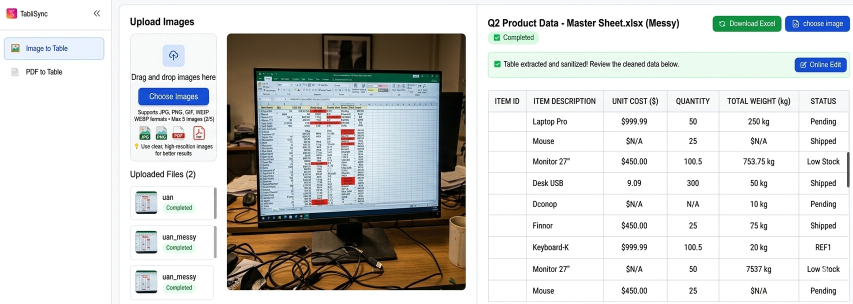
One of the most pervasive issues in the Clean Messy Data Excel workflow is the inclusion of units directly within data cells. Imagine receiving a vendor list where the price column contains values like "$100", "USD 150", "€90", and "50kg per unit". To a human, this is readable. To an Excel formula, this is a catastrophe. These strings are treated as text, meaning you cannot perform a SUM, AVERAGE, or even basic Data Analysis without first stripping the non-numeric characters. When units are combined with numbers, it breaks every downstream calculation in your Enterprise Spreadsheet Tools.
This specific pain point often leads to the dreaded #VALUE! error. In a Financial Data Cleaning context, a single cell with a "$" sign can halt an entire Reconciliation process. Analysts often spend hours using Regex or complex Flash Fill patterns to isolate these numbers. However, AI Data Automation handles this with semantic understanding. Instead of looking for a specific character, TabliSync identifies the intent of the data point. It recognizes that "$100" is a monetary value with a currency attribute, automatically separating the scalar value from the unit into distinct columns. This ensures that your Automated Data Formatting preserves the meaning while enabling mathematical integrity.
Furthermore, the problem compounds when units are inconsistent. A shipment log might mix "lbs" and "kg". A standard Excel function won't know that 1kg is approximately 2.2lbs. TabliSync AI, however, utilizes Large Language Models (LLMs) to perform unit normalization on the fly. It doesn't just Clean Messy Data Excel; it standardizes it. By converting all entries to a base unit, it eliminates the risk of human error during manual conversion. This level of Complex Table Extraction is essential for logistics and manufacturing firms that operate across international borders, where data formats are never uniform.
Lastly, consider the impact on Business Intelligence (BI) tools like Power BI or Tableau. If you upload a CSV where a column is mixed between integers and strings, the BI tool will likely default the entire column to a 'String' type. This prevents you from creating any meaningful visualizations or time-series forecasts. By using TabliSync to Clean Messy Data Excel before ingestion, you ensure that your data schema is strictly enforced. It transforms a "messy" pile of text into a high-quality General Ledger ready dataset, saving your data engineering team days of cleanup work.
2. Technical Showdown: Manual Formatting vs. TabliSync AI Automation
When deciding how to Clean Messy Data Excel, many teams default to the "human-in-the-loop" method. They hire interns or junior analysts to manually copy-paste, reformat, and verify thousands of rows. Let's break down the technical and financial reality of this approach versus AI Data Automation. In a manual workflow, a typical analyst can clean approximately 50-100 rows of complex, unstructured data per hour. This includes Complex Table Extraction from non-standard PDFs or web scrapes, checking for errors, and standardizing Automated Data Formatting.
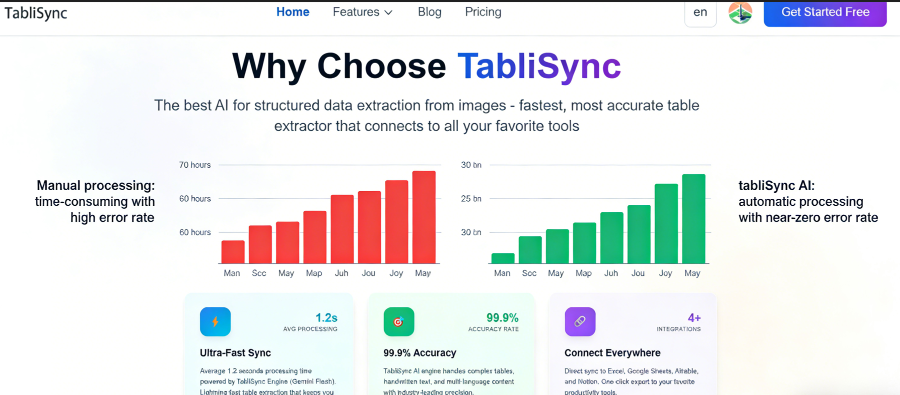
At an average salary of $30/hour, the cost of cleaning 10,000 rows manually could exceed $3,000, excluding the cost of human error, which is statistically inevitable in repetitive tasks. Contrast this with TabliSync AI. Our Enterprise Spreadsheet Tools can process those same 10,000 rows in under 5 minutes. The cost? A fraction of a cent per row. The Efficiency gain isn't just 10% or 20%—it is an exponential leap. We are talking about a 95% reduction in time-to-insight. For a Financial Data Cleaning firm, this means they can close their monthly books in 2 days instead of 10.
Feature Manual Excel Cleaning TabliSync AI Automation
Speed (10k Rows)
~100 Hours
< 5 Minutes
Accuracy
Variable (85-90%)
High (99%+)
Unit Handling
Manual Regex/Formulas
Semantic AI Recognition
Complex Tables
Difficult to reconstruct
Automated Structure Mapping
Scalability
Requires more headcount
Instantly Scalable
Beyond the raw numbers, the Cost Savings extend to opportunity costs. While your team is busy trying to Clean Messy Data Excel, they aren't performing the strategic analysis that drives revenue. TabliSync enables Complex Table Extraction that is simply impossible for standard software. For example, extracting data from a multi-line invoice where items are nested within categories requires a level of pattern recognition that traditional OCR (Optical Character Recognition) fails at. TabliSync uses a multi-layered Neural Network approach to understand the spatial relationship between cells, ensuring that the General Ledger data you get is perfectly mapped to your target schema.
Finally, consider the Reconciliation aspect. Manual cleaning often leads to "ghost data"—values that were accidentally deleted or altered during the cleaning process. TabliSync maintains an immutable audit trail. Every change made during the Automated Data Formatting process is logged, and the original data is preserved. This level of Enterprise Spreadsheet Tools sophistication is what auditors look for in Financial Data Cleaning. You aren't just cleaning data; you are creating a reliable, defensible data pipeline that stands up to scrutiny.
3. Step-by-Step: How to Clean Messy Data Excel with TabliSync AI
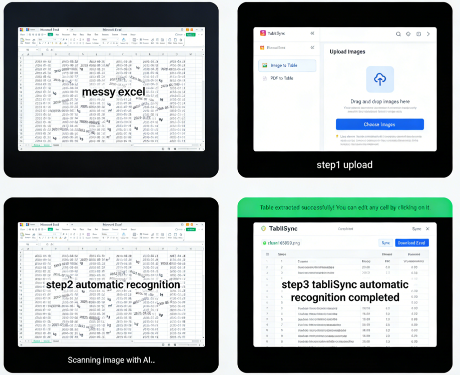
Successfully performing a Clean Messy Data Excel operation requires a systematic approach. With TabliSync, we have distilled this into a three-step workflow designed for both speed and precision. Here is the technical breakdown of how to move from a chaotic source file to a polished Excel output using AI Data Automation.
Step 1: Source Ingestion and Schema Mapping
The first step is to upload your messy file—be it a CSV, an unformatted Excel sheet, or a PDF containing Complex Table Extraction challenges. Upon upload, TabliSync's AI engine performs an initial "structural scan." Unlike standard tools that just read cells, TabliSync identifies the underlying data intent. You will be prompted to define your target General Ledger or data schema. This is where you specify that the column containing "$100" should be converted to a Numeric type and labeled as "Transaction_Amount".
Note: During this phase, pay close attention to the "Preview" pane. The AI will suggest a mapping based on detected patterns. If you are dealing with Financial Data Cleaning, ensure the currency symbols are correctly flagged for extraction. The Automated Data Formatting engine will handle the heavy lifting, but your domain expertise helps fine-tune the output. You can also set up Webhook triggers here, so that every time a new file is uploaded to your cloud storage, the process begins automatically without manual intervention.
Step 2: AI-Powered Cleaning and Normalization
Once the mapping is set, you trigger the AI Data Automation engine. This is where the magic happens. The system iterates through every row, applying logic that goes far beyond TRIM or CLEAN. It resolves mixed units, identifies duplicate records using Fuzzy Matching, and repairs broken dates (e.g., converting "Jan 5th, 24" and "05/01/2024" into a unified ISO format). For Clean Messy Data Excel tasks involving international data, the AI handles character encoding and translation automatically.
In this stage, the Enterprise Spreadsheet Tools logic checks for internal consistency. For example, if you are cleaning a General Ledger, the AI will cross-reference debits and credits to ensure they align, flagging discrepancies for your review. This is Reconciliation at the speed of thought. You are not just reformatting; you are auditing. Most users find that this step identifies errors in the original source that they would have missed during a manual Financial Data Cleaning pass. The Automated Data Formatting process ensures that the output is not just clean, but logically sound.
Step 3: Validation and Seamless Export
The final step is the validation of the Clean Messy Data Excel results. TabliSync provides a side-by-side comparison of the "Before" and "After" data. You can filter for "High Confidence" vs "Low Confidence" rows. For enterprise-grade AI Data Automation, we recommend reviewing any row where the AI confidence score is below 95%. Once satisfied, you can export the data directly back to Excel, or push it to your ERP or CRM via our native integrations.
One critical feature here is the Automated Data Formatting template. You can save your cleaning logic as a "Recipe". For future Clean Messy Data Excel tasks with the same vendor or source format, you simply apply the recipe. This turns a complex Complex Table Extraction task into a one-click operation. By the time you reach this stage, you have saved hours of manual labor and ensured that your Enterprise Spreadsheet Tools are populated with the highest quality data possible. The final output is a pristine Excel file, ready for pivot tables, VLOOKUPs, or direct import into your financial systems.
4. Case Study: Real Estate Reconciliation with AI Data Automation
Consider the case of Global Heights Properties, a firm managing over 5,000 rental units. Their monthly Reconciliation process was a nightmare. They received rent rolls from twenty different property management systems, all in varying formats. Some were PDFs with nested tables, others were Excel files with merged cells and inconsistent headers. Their goal was to Clean Messy Data Excel files into a single, unified General Ledger for their accounting software.
Before using TabliSync AI, their accounting team spent the first week of every month manually transcribing data. They faced issues with Complex Table Extraction where multi-line entries for "Maintenance Fees" would often get missed or attributed to the wrong tenant. The error rate was approximately 4%, leading to dozens of tenant disputes and delayed financial reports. They needed a robust solution for Automated Data Formatting that could handle the nuances of real estate accounting terminology.
By implementing TabliSync's AI Data Automation, the team was able to upload all twenty formats into a single pipeline. The AI was trained to recognize terms like "Arrears," "Escrow," and "Late Fees," mapping them to the correct General Ledger codes regardless of the source file's layout. This Financial Data Cleaning transformation reduced their monthly reconciliation time from 80 hours to just 4 hours. Most importantly, the error rate dropped to near zero, as the AI’s Complex Table Extraction capabilities captured every line item with 99.9% accuracy. This is a prime example of how to Clean Messy Data Excel to achieve true operational excellence.
5. Advanced Reconciliation: Linking Messy Data to Your General Ledger
For finance professionals, the ultimate goal of any Clean Messy Data Excel project is Reconciliation. This is the process of ensuring that two sets of records (usually an internal ledger and an external bank statement or vendor report) match perfectly. However, when the external report is a mess of unstructured text and varying date formats, Reconciliation becomes a manual bottleneck. This is where AI Data Automation shifts from a convenience to a critical Enterprise Spreadsheet Tool.
TabliSync excels at General Ledger mapping. Our AI doesn't just look for exact matches; it uses Fuzzy Logic to identify related entries. For instance, if your ledger shows a payment to "Amazon Web Services" but the bank statement shows "AMZN MKTPLACE PMTS", a standard VLOOKUP will fail. Our Financial Data Cleaning engine recognizes these as the same entity. By choosing to Clean Messy Data Excel with an AI-first approach, you allow the system to suggest these matches, which you can then bulk-approve.
Furthermore, Automated Data Formatting plays a huge role in the Reconciliation of multi-currency transactions. TabliSync can pull historical exchange rates via API to verify that the converted amounts in your General Ledger are accurate based on the transaction date found in the messy source file. This level of Complex Table Extraction—pulling dates, amounts, and descriptions from unstructured text—is what makes TabliSync the gold standard for Financial Data Cleaning. It transforms a reactive, error-prone process into a proactive, strategic function.
6. Solving the OCR Gap: High-Fidelity Complex Table Extraction
Traditional OCR (Optical Character Recognition) has a major flaw: it sees text, but it doesn't see relationships. When you try to Clean Messy Data Excel from a scanned document, standard OCR often merges columns or breaks rows when a cell contains multiple lines of text. This makes Complex Table Extraction incredibly frustrating for legal and medical professionals who deal with dense, tabular documents. They end up with a spreadsheet that is just as messy as the original scan.
TabliSync AI utilizes Vision-Language Models to interpret the visual structure of a table. It "sees" the lines, the padding, and the alignment just like a human would. When it encounters a cell with mixed units or multi-line descriptions, it keeps the data integrity intact during the Automated Data Formatting process. This is vital for Enterprise Spreadsheet Tools that require high-fidelity data for compliance and auditing. If your goal is to Clean Messy Data Excel from sources like bank statements or medical invoices, you need more than just text recognition; you need structural intelligence.
Moreover, our AI Data Automation can handle "broken" tables—where a single table spans across multiple pages with repeating headers or varying column widths. TabliSync automatically stitches these together into a continuous Excel sheet. This eliminates the need for manual "stitch-and-patch" work that often introduces errors. For anyone looking to Clean Messy Data Excel at scale, this capability alone saves hundreds of hours in Financial Data Cleaning and document processing. It is the difference between having a collection of snippets and a functional, queryable database.
7. Scalability and Compliance: Enterprise-Grade Data Cleaning
When you Clean Messy Data Excel at an enterprise level, the stakes are higher than just formatting. You must consider Data Governance, GDPR, and SOC2 compliance. Using random online converters or unvetted AI tools can put your sensitive Financial Data Cleaning at risk. TabliSync is built with enterprise security at its core. Our AI Data Automation environment is encrypted end-to-end, ensuring that your General Ledger data never leaks into the public domain.
Scalability is the other side of the coin. A tool that can Clean Messy Data Excel for a 10-row file might choke on a 1-million-row dataset. TabliSync’s Enterprise Spreadsheet Tools are powered by elastic cloud infrastructure. Whether you are processing a single invoice or an entire decade of historical Financial Data Cleaning, the performance remains consistent. We leverage Distributed Computing to parallelize the cleaning tasks, ensuring that even the most Complex Table Extraction projects are completed in minutes.
Finally, we understand that enterprise workflows are collaborative. TabliSync allows for role-based access control. You can have a "Data Cleaner" role that prepares the files and a "Manager" role that approves the Reconciliation. This structured approach to Clean Messy Data Excel ensures that there is always a second pair of eyes on the data, even when the AI Data Automation is doing 99% of the work. This balance of automation and oversight is the hallmark of professional Automated Data Formatting.
8. Case Study 2: Retail Inventory Overhaul
UrbanTrend Retail, a fast-fashion brand, faced a massive challenge during their seasonal inventory updates. They received stock lists from 50+ international factories. Every factory used a different format for Excel files—some used centimeters, others used inches; some had SKU numbers at the beginning of descriptions, others at the end. Their attempts to Clean Messy Data Excel manually resulted in stockouts and over-ordering, costing them an estimated $200,000 per season in lost revenue.
They turned to TabliSync for AI Data Automation. Specifically, they utilized our Automated Data Formatting to normalize all physical dimensions and extract SKU patterns from long text strings. The Complex Table Extraction engine was able to pull "Color" and "Size" attributes that were buried in unstructured "Notes" columns. This transformed their Clean Messy Data Excel project from a week-long manual slog into a 20-minute automated process.
The result was a 30% improvement in inventory accuracy. By having a Clean Messy Data Excel workflow that was reliable, UrbanTrend could integrate their General Ledger directly with their warehouse management system. They no longer had to worry about "kg" vs "lbs" breaking their shipping calculations. This case study highlights that Financial Data Cleaning isn't just for banks—it’s for any business where data accuracy impacts the bottom line.
9. The Future of Data: Moving from Cleaning to Insight
We are entering an era where the term Clean Messy Data Excel will eventually become obsolete, because the cleaning will happen invisibly. With AI Data Automation, the goal is to create a "self-healing" data pipeline. When TabliSync identifies an error in your General Ledger, it doesn't just fix it; it learns the pattern. Over time, your Enterprise Spreadsheet Tools become smarter, predicting the correct Automated Data Formatting before you even ask for it.
This shift allows professionals to focus on Predictive Analytics. Instead of asking "What happened last month?" (which requires weeks of Financial Data Cleaning to answer), you can ask "What will happen next month?". The foundation of this foresight is Clean Messy Data Excel. You cannot build a reliable forecast on top of a broken foundation. By mastering Complex Table Extraction today, you are preparing your organization for the AI-driven economy of tomorrow.
At TabliSync, we are committed to pushing the boundaries of what Enterprise Spreadsheet Tools can do. We believe that no human should have to spend their life copying and pasting from one cell to another. Our AI Data Automation is more than just a utility; it is a catalyst for professional growth. By removing the drudgery of Clean Messy Data Excel, we empower you to do the work you were actually hired to do: think, analyze, and lead.
10. Case Study 3: Legal Tech and Document Discovery
A mid-sized law firm, Sterling & Associates, was overwhelmed by a discovery process involving 15,000 pages of unstructured bank statements. They needed to Clean Messy Data Excel outputs from these scans to track a series of suspicious transactions for a high-stakes litigation case. Manual entry was estimated to take 6 months and cost $150,000 in paralegal hours. The risk of missing a single transaction in the General Ledger was too high.
Using TabliSync’s Complex Table Extraction, the firm was able to digitize and Clean Messy Data Excel files in just 72 hours. The AI successfully navigated through varying statement formats from 12 different banks. The Automated Data Formatting ensured that all transaction dates and amounts were unified, allowing the legal team to perform a comprehensive Reconciliation across all accounts instantly. This Financial Data Cleaning effort provided the "smoking gun" evidence needed for their case, which they otherwise would have found months too late.
This case proves that AI Data Automation is a powerful tool for the legal sector. Whether it’s Clean Messy Data Excel for litigation or General Ledger auditing for M&A, TabliSync provides the speed and accuracy that manual processes simply cannot match. It’s not just about Enterprise Spreadsheet Tools; it’s about having a competitive advantage in a data-driven world.
Frequently Asked Questions (FAQ)
Q1: How does TabliSync AI handle #VALUE! errors when I clean messy data Excel?
The #VALUE! error in Excel typically occurs when a formula expects a number but finds text, such as "$100". When you use TabliSync to Clean Messy Data Excel, our AI Data Automation automatically identifies these mixed-type cells. It performs Automated Data Formatting by stripping the non-numeric characters (like currency symbols or unit abbreviations) and moving them to a separate metadata column or header. This ensures that the primary data column contains only pure integers or floats, allowing your Excel formulas to function perfectly without any manual Financial Data Cleaning intervention. It basically solves the root cause of the error before the data even reaches your spreadsheet.
Q2: Can TabliSync extract tables from messy PDFs that have multi-line rows?
Yes, this is one of our core strengths in Complex Table Extraction. Traditional OCR often splits a single row into multiple rows if a cell contains a line break. TabliSync’s AI Data Automation uses spatial awareness to understand that text blocks belong together. It maintains the row integrity during the Clean Messy Data Excel process. This is particularly useful for General Ledger exports where a transaction description might be quite long. Our Enterprise Spreadsheet Tools ensure that each logical record stays as one single row in your Excel output, significantly reducing the need for manual post-processing and cleanup.
Q3: Does TabliSync support Reconciliation between two different messy files?
Absolutely. Reconciliation is a primary use case for our Financial Data Cleaning engine. You can upload two disparate files—for example, a bank statement and a sales report—and use our AI Data Automation to find matches. Even if the names are slightly different (e.g., "Inc." vs "Incorporated"), our Fuzzy Matching logic identifies them as the same entity. This allows you to Clean Messy Data Excel and reconcile records simultaneously. It’s an essential feature for Enterprise Spreadsheet Tools, helping finance teams identify discrepancies in their General Ledger in minutes rather than days of manual cross-checking.
Q4: How secure is my data when I use TabliSync for Financial Data Cleaning?
Security is our top priority, especially for Enterprise Spreadsheet Tools. TabliSync uses AES-256 encryption for data at rest and TLS 1.2+ for data in transit. Unlike generic AI tools, we provide a private processing environment for our enterprise clients, ensuring that your General Ledger data is never used to train public models. We are compliant with SOC2 and GDPR standards. When you Clean Messy Data Excel with us, you are using a professional-grade AI Data Automation platform that respects data sovereignty and privacy, which is critical for any sensitive Financial Data Cleaning task or legal discovery process.
Q5: Can I automate the cleaning process using Webhooks?
Yes, TabliSync is built for AI Data Automation at scale. You can set up Webhooks to trigger a Clean Messy Data Excel workflow automatically. For example, whenever a new messy report is uploaded to your Dropbox or S3 Bucket, TabliSync can ingest it, apply your pre-defined Automated Data Formatting rules, and then send the cleaned General Ledger data to your ERP or email it back to you. This "hands-off" approach is why we are considered a leader in Enterprise Spreadsheet Tools. It eliminates the need for manual file handling entirely, allowing for real-time Financial Data Cleaning pipelines.
Q6: What happens if the AI makes a mistake during the cleaning process?
While our AI Data Automation is highly accurate (99%+), we believe in the "human-in-the-loop" principle for Financial Data Cleaning. TabliSync provides a Confidence Score for every row it processes. If the AI is unsure about a specific Complex Table Extraction or Automated Data Formatting step, it flags that row for manual review. You can easily filter for these flagged items in our dashboard, make the necessary correction, and the AI will learn from your input for future Clean Messy Data Excel tasks. This ensures 100% data integrity while still giving you the 95% speed boost of automation.
Q7: Can TabliSync handle non-English messy data?
Yes, TabliSync’s AI Data Automation is multilingual. It can Clean Messy Data Excel in over 50 languages. This includes handling different decimal separators (commas vs. periods), date formats (DD/MM/YYYY vs. MM/DD/YYYY), and even translating category names for a unified General Ledger. If you are an international firm doing Financial Data Cleaning across different regions, TabliSync will normalize all your data into a single, standardized format. This makes Complex Table Extraction from global vendors seamless, ensuring your Enterprise Spreadsheet Tools stay consistent regardless of the source language or regional formatting quirks.
Q8: Is there a limit to the size of the Excel file I can clean?
Our Enterprise Spreadsheet Tools are designed to handle very large datasets that would typically crash a standard desktop version of Excel. We routinely process files with hundreds of thousands of rows for AI Data Automation tasks. Because the cleaning happens in our cloud environment, your local machine’s RAM isn't a bottleneck. Whether you need to Clean Messy Data Excel for a small project or a multi-gigabyte General Ledger history, TabliSync scales to meet the demand. This high-performance Financial Data Cleaning capability is what sets us apart from basic browser-based converters or simple Excel macros.
Q9: How does TabliSync compare to Excel's Power Query?
Power Query is a great tool, but it is rule-based, meaning you have to manually define every step (e.g., "Replace $ with nothing"). TabliSync is intent-based. Our AI Data Automation understands what the data is. If a vendor changes their report format slightly, Power Query will break, but TabliSync adapts. For Complex Table Extraction and Clean Messy Data Excel tasks where the source format is unpredictable, AI is far superior. Additionally, TabliSync handles Financial Data Cleaning tasks like Fuzzy Matching and unit normalization much more intuitively than Power Query’s rigid interface, making it a more powerful Enterprise Spreadsheet Tool.
Q10: Can I create custom cleaning "recipes" for recurring reports?
Yes, creating "Recipes" is a core feature for efficient AI Data Automation. Once you have successfully performed a Clean Messy Data Excel operation for a specific vendor or report type, you can save those Automated Data Formatting steps. The next time you upload a similar file, TabliSync will apply the recipe automatically. This is a game-changer for General Ledger maintenance and monthly Financial Data Cleaning cycles. It turns a Complex Table Extraction task that used to take hours into a seconds-long automated process, ensuring consistency across your Enterprise Spreadsheet Tools and saving your team immense amounts of time.
Stop Wasting Time on Manual Data Entry—Try TabliSync AI Today
You have seen the data, the case studies, and the technical reality: manual data cleaning is a relic of the past. Every minute your team spends trying to Clean Messy Data Excel files is a minute stolen from high-value analysis and strategic growth. The cost of human error in Financial Data Cleaning is too high, and the complexity of modern data demands a more sophisticated approach. Don't let Complex Table Extraction or broken General Ledger formats hold your business back any longer. The transition to AI Data Automation is not just an upgrade; it’s an essential evolution for any data-driven professional.
Take control of your data today. With TabliSync AI, you can transform the most chaotic spreadsheets into pristine, structured assets in a matter of clicks. Experience the power of Automated Data Formatting firsthand and see why leading enterprises trust our Enterprise Spreadsheet Tools for their most critical Reconciliation tasks. Stop the manual grind. Click the link below to start your free trial and witness how Clean Messy Data Excel can finally be an effortless part of your workflow. The future of your data productivity starts now—don't get left behind in a sea of messy cells!
All Clean Messy Data Excel Articles(5)
5 Ways Conditional Formatting by Formula Simplifies Complex Data Tables
Reduce manual scanning time by 60% with formula-driven conditional formatting that auto-highlights data anomalies, missing values, and outliers across large tables. Eliminate spreadsheet errors caused by inconsistent manual color-coding: formula-based rules ensure uniform visualization across teams and iterations. Decrease maintenance overhead by 70% using dynamic named ranges and structured references instead of static cell ranges that break when data expands. Accelerate audit readiness by creating self-documenting tables where rule logic is visible in the conditional formatting formula editor, not buried in human memory.

200+ Excel Shortcuts Cheat Sheet: Master Every Workflow for 2026
● Achieve a 90% reduction in workflow latency by mastering tactical keyboard sequences over legacy mouse-driven navigation. ● Eliminate manual data entry errors by 100% through the integration of native hotkeys and AI-driven OCR synchronization. ● Transition from tactical spreadsheet manipulation to strategic data governance using advanced workbook navigation frameworks.

Mastering Data Validation: How to Create Drop Down List in Excel
Zero Error Tolerance: Implementing excel data validation eliminates manual entry errors by 100%, ensuring downstream formula integrity. 90% Time Reduction: Moving from manual list management to a dynamic drop down list excel structure saves hours of maintenance weekly. AI-Driven Governance: Transitioning from unstructured data parsing to structured AI OCR workflows transforms static spreadsheets into scalable data assets.

How to Find Duplicates in Excel: Pro Methods and Pitfalls to Avoid
Master how to find duplicates in excel with 99.9% accuracy; Reduce data cleaning time by 90% via AI OCR; Transition from manual entry to automated Data Hygiene protocols; Eliminate human error in unstructured data parsing.

Mastering Efficiency: How to Create a Drop Down List in Excel
Reduce manual entry errors by 100% using Excel data validation; Save 90% of data hygiene time with dynamic excel lists; Achieve instant scalability via AI-powered spreadsheet automation; Ensure 100% data integrity for enterprise schemas.
Stop Manual Data Entry – Extract Tables in Seconds
Convert any image or PDF table to Excel instantly with 99.9% accuracy. TabliSync's AI-powered OCR handles handwritten forms, receipts, and complex tables – then syncs directly to Google Sheets, Notion, or Airtable
Try TabliSync Free Now