Article Summary
Executive Summary: In this definitive 2026 guide to Handwriting Recognition (HWR), we bridge the gap between analog notes and digital intelligence. As American enterprises strive for 100% data digitization, manual transcription has become a costly bottleneck. This pillar page explores the evolution of AI-driven HWR—from RNN and LSTM neural networks to Structural Table Reconstruction. Whether you are digitizing handwritten field reports, medical intake forms, or historical archives, you will learn how modern HWR achieves 99% accuracy, ensures HIPAA/SOC2 compliance, and delivers a 95% reduction in administrative overhead.
For centuries, the pen has been the primary tool for capturing human thought. Even in our hyper-digitized 2026 economy, millions of critical business data points are still recorded by hand—on construction site logs, medical intake forms, warehouse picking tickets, and legal notations. The challenge for the modern enterprise is no longer just "storing" these documents, but unlocking the data within them. This is where Handwriting Recognition (HWR) technology becomes the ultimate bridge to digital transformation.
Introduction: Why Handwriting Recognition is the Final Frontier of Data Automation
Despite the ubiquity of tablets and smartphones, handwriting remains the fastest, most intuitive way to record information in high-pressure or fluid environments. However, handwritten data is traditionally "analog," meaning it is disconnected from your ERP, CRM, and analytics engines. Manual transcription of these records is not only a drain on human capital but a primary source of Data Integrity issues, with manual entry error rates reaching as high as 4%.
Modern Handwriting Recognition has moved far beyond simple character matching. Leveraging Deep Learning and Neural Networks, tools like TabliSync can now interpret messy, cursive, and even smudged handwriting with up to 99% accuracy. In this comprehensive guide, we will explore the mechanics of this technology and how it is revolutionizing industries that refuse to put down the pen.
---
Chapter 1: The Evolution of HWR—From Pattern Matching to Neural Context
To choose the right digitization strategy, it is essential to understand the technological leap from legacy Optical Character Recognition (OCR) to modern Intelligent Handwriting Recognition (IHR).
1. The Failure of Legacy OCR
Traditional OCR was designed for "Typeface"—consistent, predictable fonts like Arial or Times New Roman. When presented with the variable strokes, slant, and pressure of a human hand, legacy systems fail. They see "noise" where there is meaning. This is why many American firms abandoned early automation attempts; the "cleanup" took longer than the typing.
2. The Rise of Recurrent Neural Networks (RNNs)
Today’s Handwriting Recognition utilizes RNNs and Long Short-Term Memory (LSTM) networks. Unlike standard AI, these models don't just look at a static shape; they understand the sequence of the stroke. They "watch" the flow of the digital ink to determine if a loop is an "o," a "0," or part of a "g." This sequential intelligence is the secret to decyphering cursive and rushed notations.
3. Semantic and Linguistic Context
Top-tier HWR engines now incorporate Natural Language Processing (NLP). If a word is illegible but follows "Please sign," the AI uses linguistic probability to determine it is a name or a signature. In a Handwritten Table to Excel workflow, if a character is in a "Date" column, the AI knows to interpret a vertical stroke as a "1" rather than an "I" or an "l."
---
Chapter 2: The TabliSync Engine—Handwriting Recognition at Scale
TabliSync has engineered a specialized pipeline designed specifically for the "Industrial Hand"—the hurried, often messy writing found in real-world professional environments.
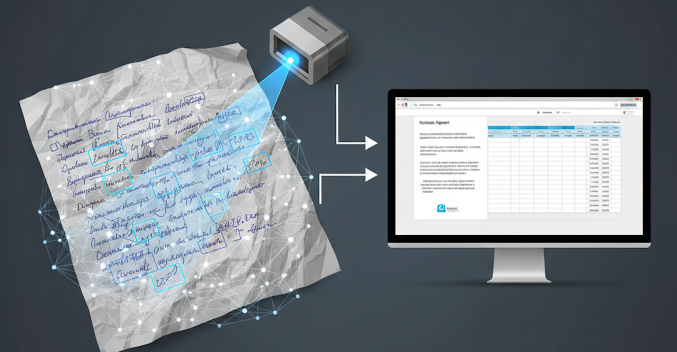
Figure 1: TabliSync’s AI identifying and segmenting complex handwritten strokes in real-time.
Phase 1: Image Rehabilitation (Deskew & Denoise)
A photo of a handwritten log taken on a windy construction site is never perfect. Our engine performs Dynamic Contrast Enhancement to separate faint pencil marks from the paper background and uses Perspective Correction to flatten documents that were photographed at an angle.
Phase 2: Structural Reconstruction
Most handwriting exists within a Table. TabliSync’s Neural Table Reconstruction (NTR) identifies the grid lines (or implied rows) first. It then anchors each handwritten word to a specific cell coordinate (A1, B2). This ensures that when the data is exported, your "Material Quantity" doesn't accidentally end up in the "Date" column.
Phase 3: Character-Level Confidence Scoring
Every word processed by our Handwriting Recognition engine is assigned a confidence score. If a signature or a scribble falls below a 95% threshold, it is flagged for the Side-by-Side Editor, where a human can quickly verify the data before it enters the database. This "Human-in-the-Loop" approach guarantees 100% accuracy for mission-critical records.
---
Chapter 3: Primary Use Cases—Where HWR Drives ROI
Handwriting Recognition is no longer a "neat trick"—it is a multibillion-dollar efficiency driver for the U.S. economy.
1. Construction and Field Services
Field technicians and foremen often work in environments where tablets are impractical (extreme heat, dust, or gloved work). They rely on paper logs.
- The Impact: Converting handwritten Daily Progress Reports (DPRs) to Excel allows project managers to track labor costs and material usage in real-time, preventing budget overruns.
2. Legal and Historical Archiving
Law firms and historical societies deal with mountains of handwritten ledgers and depositions.
- The Transformation: Turning 50 years of handwritten case notes into Searchable PDFs and organized spreadsheets for rapid discovery and litigation support.
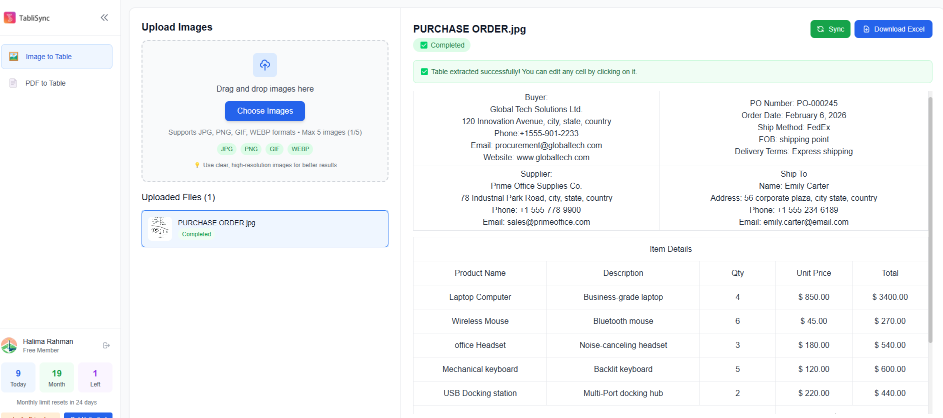
Figure 2:Professional document archiving showing high-speed Handwriting Recognition converting historical ledgers into searchable digital spreadsheets.
Chapter 4: Enterprise Scaling—The Handwriting Recognition API
For large-scale American organizations, the goal isn't just to recognize one page of handwriting, but to integrate Handwriting Recognition (HWR) into a global data pipeline. TabliSync’s RESTful API allows developers to embed high-precision HWR directly into mobile apps, document management systems (DMS), and ERP platforms.
1. Building a "Mobile-to-Mainframe" Pipeline
In industries like logistics or insurance adjusting, the data journey starts in the field. A worker snaps a photo of a handwritten bill of lading or a damage claim form. Through the TabliSync API, the following happens in sub-seconds:
- Asynchronous Ingestion: The high-resolution JPG is uploaded to the HWR endpoint.
- Neural Interpretation: The AI identifies the handwriting style and extracts the text while maintaining the Structural Integrity of the form.
- JSON Output: Instead of just a text file, the API returns a structured JSON object, mapping handwritten fields to specific database keys (e.g.,
"claim_amount": "1250.00").
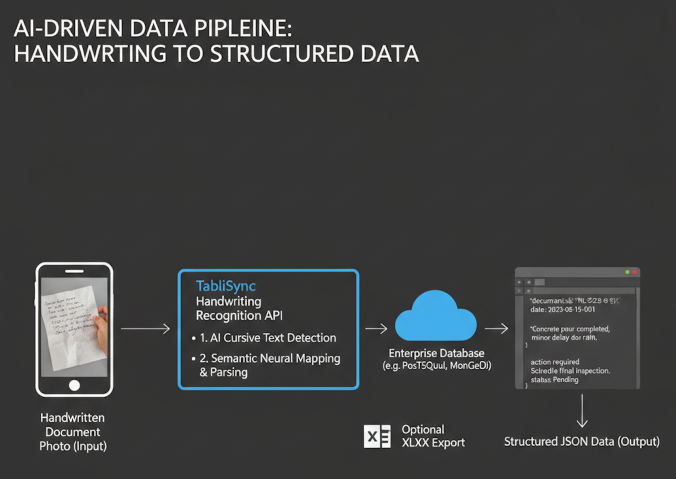
Figure 3: Architecting an automated handwriting-to-data workflow via TabliSync API.
2. Handling the "Industrial Hand"—Cursive and Slant Correction
One of the primary reasons U.S. developers choose TabliSync is our proprietary Slant & Skew Correction. Handwriting is rarely horizontal. Our API automatically detects the baseline of the handwriting and "virtually straightens" the strokes before recognition, which is critical for maintaining high accuracy in cursive and hurried scripts.
---
Chapter 5: The ROI of Handwriting Automation—Quantifying Efficiency
C-suite executives often view Handwriting Recognition as a "nice-to-have" until they see the impact on the bottom line. Manual data entry is not just a line-item expense; it is a bottleneck that delays billing, slows down project timelines, and creates significant downstream costs due to errors.
The "Transcription Tax" Breakdown
Consider a specialized medical clinic or a legal firm processing 2,000 handwritten intake or discovery forms per month.
- Manual Transcription: 8 minutes per page x 2,000 pages = 266 hours. At an average U.S. administrative salary of $28/hour, this costs $7,448/month.
- TabliSync HWR: 30 seconds of human verification per page = 16.6 hours. Total labor cost: $464/month.
The Verdict: By implementing an automated Handwriting Recognition workflow, the organization saves over $83,000 annually while reducing the "Order-to-Cash" cycle from days to minutes.
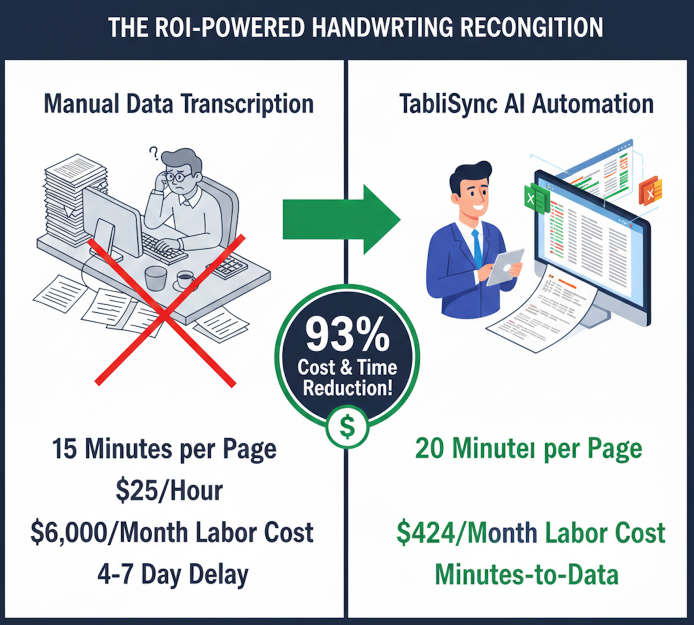
Figure 4: The economic case for automated handwriting digitization.
---
Chapter 6: Solving the "Real World" Challenges of HWR
In a controlled lab setting, HWR is easy. In the real world—on a rainy construction site or a vibrating delivery truck—it is incredibly difficult. TabliSync is built for these "Edge Cases."
1. The "Crinkled Paper" Problem
Documents in the field are often folded, stained, or crinkled. Our Shadow Removal and Geometric Rectification algorithms "flatten" the digital image, removing the dark lines caused by folds that would otherwise confuse a standard OCR engine.
2. Multi-Pen and Multi-Author Detection
A single form might be filled out by three different people using three different pens (blue ink, black ink, pencil). Our AI uses Multi-Author Normalization, identifying the unique stroke characteristics of each writer to maintain consistent recognition accuracy throughout the document.
3. Interpreting "Strikethroughs" and Annotations
In professional environments, people often cross things out or write in the margins. TabliSync’s Semantic Layer understands these "corrections." It can distinguish between a deliberate strikethrough (to be ignored or deleted) and a character stroke, ensuring the final Excel or database entry reflects the *final intent* of the writer.
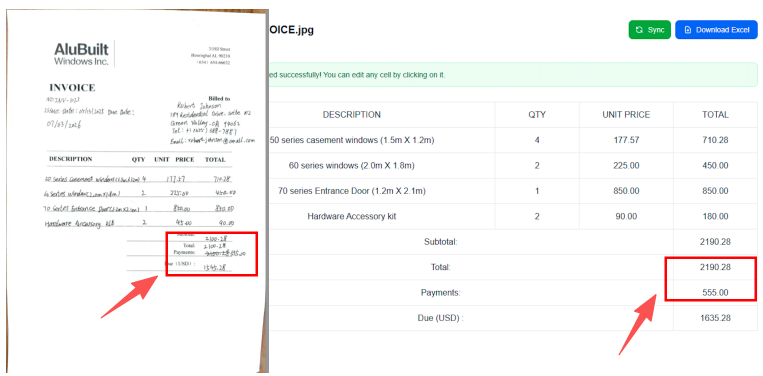
Figure 5: TabliSync accurately identifying corrections and margin notes in professional documents.
---
Chapter 7: Comparison—HWR vs. Standard OCR
Many American firms make the mistake of using a "Standard" OCR tool for handwriting. This comparison highlights why a specialized Handwriting Recognition engine is required for professional work.
| Capability Standard OCR TabliSync HWR (AI-Based) | ||
| Cursive Recognition | Almost 0% accuracy. | High accuracy via RNN/LSTM. |
| Stroke Analysis | Sees only "blocks" of pixels. | Analyzes the "flow" and sequence of writing. |
| Contextual Guessing | None. | Uses NLP to predict words based on sentence logic. |
| Constraint Handling | Confused by lines and boxes. | Uses NTR to anchor writing to table cells. |
Chapter 8: Security, Compliance, and Data Sovereignty in HWR
In the United States, Handwriting Recognition often involves highly sensitive documents—patient medical records, handwritten legal wills, or federal field reports. Because these documents contain Personally Identifiable Information (PII), the technology used to digitize them must adhere to strict regulatory frameworks.
1. HIPAA and SOC2 Type II Compliance
For healthcare providers in the U.S., data privacy is governed by HIPAA. TabliSync provides a specialized HIPAA-compliant HWR pipeline. This includes:
- End-to-End Encryption: All handwritten images are encrypted using AES-256 standards during processing.
- Audit Trails: Every interaction with a document is logged, ensuring a clear chain of custody for sensitive medical data.
2. The "Privacy First" AI Model
A common concern with modern AI is "Model Leakage." Many free HWR tools use your uploaded handwriting samples to train their public models. TabliSync offers a Private AI Environment. Your handwriting data is processed in a "sandbox" and is never used to improve global models, ensuring your proprietary or private data remains within your control.
3. Redaction on Extraction
Our HWR engine includes a "Smart Blur" feature. If the AI detects a Social Security number or a private signature, it can be configured to automatically redact those fields in the final Handwriting to Excel or PDF output, reducing liability for your organization.
---
Chapter 9: The Ultimate Handwriting Recognition FAQ
To help you navigate the transition from pen-and-paper to digital data, we have compiled the 20 most critical questions from our North American professional community.
Technical & Accuracy Queries
1. Can the AI really read my messy handwriting?
Yes. While no AI is 100% perfect, TabliSync uses Recurrent Neural Networks (RNNs) that look at the context and flow of the writing, often outperforming human transcribers on hurried scripts.
2. Does it work better with printed letters or cursive?
Our engine is dual-trained. While printed (block) letters are easier to map, our LSTM (Long Short-Term Memory) models are specifically designed to decode the connected strokes of cursive writing.
3. How does it handle different colored inks or pencils?
Our pre-processing layer uses Luminance Normalization to create high contrast, allowing the AI to "see" faint pencil marks or light blue ink against a white or yellow background.
4. What happens if a word is completely illegible?
The system flags the word with a "Low Confidence" score. In the TabliSync Editor, the word is highlighted in red, allowing a human to verify it against the original image in seconds.
5. Can it recognize mathematical symbols and scientific notations?
Yes. We have specialized modules for engineering and medical fields that recognize standard symbols (e.g., Δ, Ω, μ) and complex numeric notations.
Formatting & Export Queries
6. Can I convert a handwritten table directly into an Excel file?
Absolutely. Our Neural Table Reconstruction (NTR) identifies the grid and places each handwritten value into its corresponding Excel cell (A1, B2, etc.).
7. How do you handle "Strikethroughs" and corrections?
The AI is trained to recognize a "Deletional Stroke." It will ignore the crossed-out text and prioritize the corrected text written above or beside it.
8. Does the HWR maintain the original layout of the form?
Yes. We offer "Spatial Preservation," ensuring that the digital output mirrors the visual structure of your physical paper form.
9. Can I export handwritten notes to a Searchable PDF?
Yes. TabliSync can create an OCR Overlay on your PDF, allowing you to use Ctrl+F to find handwritten words within a scanned document.
10. Does it support non-English handwriting?
We currently support 50+ languages. This is crucial for U.S. firms with multi-lingual workforces or international operations.
Industry & Integration Queries
11. Is there an API for developers to use?
Yes. Our RESTful HWR API allows for easy integration into mobile apps (iOS/Android) and enterprise ERP systems like SAP or Oracle.
12. How many pages can I process in a batch?
Our enterprise tier supports batch uploads of up to 1,000 pages at a time, making it ideal for digitizing decades of archives.
13. Can the AI distinguish between multiple people writing on the same page?
Yes. Our Author Identification logic can segment different handwriting styles, which is vital for multi-signature contracts.
14. Does it work on a tablet or just with photos of paper?
Both. It can process "Static Ink" from photos/scans and "Digital Ink" from stylus-based tablets.
15. How much time will this save my administrative team?
On average, American firms report a 90-95% reduction in data entry time after switching to automated HWR.
Security & Policy Queries
16. Is TabliSync SOC2 compliant?
Yes. We undergo annual third-party audits to ensure our data handling meets the highest U.S. security standards.
17. Does the software store my documents forever?
No. You can set an Auto-Delete Policy. Once the conversion is complete, the original image can be wiped from our servers immediately.
18. Can I host this HWR engine on my own private servers?
For high-security government or defense clients, we offer On-Premise deployment options.
19. What is the pricing model for HWR?
We offer a "Pay-as-you-go" model for small projects and a "Volume-Based Subscription" for enterprise-scale digitization.
20. How do I get started?
You can sign up for a free trial on our website to test your specific handwriting samples against our engine.
---
Conclusion: The Future of Data is Written by Hand
The goal of Handwriting Recognition in 2026 is not to replace the pen, but to empower it. By removing the manual "Transcription Tax," organizations can finally treat handwritten documents as dynamic data assets rather than static paper burdens.
Whether you are a project manager on a construction site, a lawyer in a courtroom, or a doctor in a clinic, TabliSync provides the precision and security you need to turn your handwritten thoughts into digital action. The gap between the analog and digital worlds has finally been closed.
Ready to Digitize Your Handwriting?
Experience the most advanced Handwriting Recognition technology on the market. Start your free trial today and turn your notes into actionable data.
Start Your Free Handwriting Recognition Trial
What is 2026 Guide: AI Handwriting to Digital Data?
Quick answers about 2026 Guide: AI Handwriting to Digital Data and how TabliSync helps teams work faster in Excel.
What is 2026 Guide: AI Handwriting to Digital Data?
2026 Guide: AI Handwriting to Digital Data covers practical Excel workflows, common pitfalls, and automation patterns. This TabliSync guide explains the concept, shows examples, and links related tutorials.
How can TabliSync help with 2026 Guide: AI Handwriting to Digital Data?
TabliSync can extract tables from screenshots or PDFs, clean messy spreadsheet data, and automate repetitive Excel tasks tied to 2026 Guide: AI Handwriting to Digital Data so teams spend less time on manual copy-paste.
Where should I start with 2026 Guide: AI Handwriting to Digital Data?
Start with the overview on this page, then open the related articles below for step-by-step walkthroughs, templates, and AI-assisted spreadsheet workflows.
All Handwriting Recognition Articles(19)
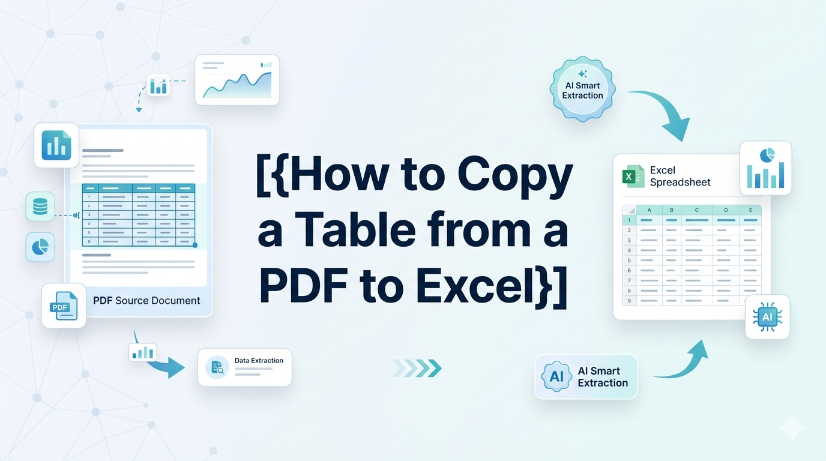
How to copy a table from a PDF to Excel: Native Options and AI OCR Workflow
In today's fast-paced business environment, efficiently transferring data from PDFs to Excel is crucial for productivity. Many users face challenges when attempting to copy tables from PDFs due to the cumbersome nature of manual data entry and the limitations of basic OCR tools. This article provides a comprehensive guide on how to effectively copy tables from PDFs into Excel. It covers both native options for those who prefer manual methods, as well as innovative AI OCR solutions like TabliSync that can significantly enhance the efficiency of this process. By following the step-by-step instructions, users will learn how to easily extract data from various types of PDF documents, ensuring a seamless transition to structured Excel formats. Whether you're an accountant, a data entry professional, or someone who frequently deals with financial documents, this guide will equip you with the knowledge to streamline your data extraction tasks.
How to Copy a Table from a PDF to Excel
["Detailed step-by-step guidance for converting tabular data from PDF files into editable Excel spreadsheets", "Professional tips for checking and verifying extracted data content to guarantee conversion accuracy and avoid errors", "Practical application scenarios of PDF table conversion, covering common documents including invoices and financial reports", "Effective methods and experience to simplify and optimize daily PDF data conversion and sorting tasks", "Guidance on building efficient, time-saving PDF-to-Excel data processing workflows for daily office work"]

How to Make Box Plot Excel: Transform Complex Tables into Actionable Insights
Reduce manual chart creation time by 70% using structured data preparation and dynamic Excel ranges. Eliminate data entry errors from unstructured sources by integrating AI OCR parsing before box plot generation. Maintain a single source of truth for statistical analysis with real-time synchronization between raw tables and visualization layers.
Automate excel auto adjust row height for large datasets
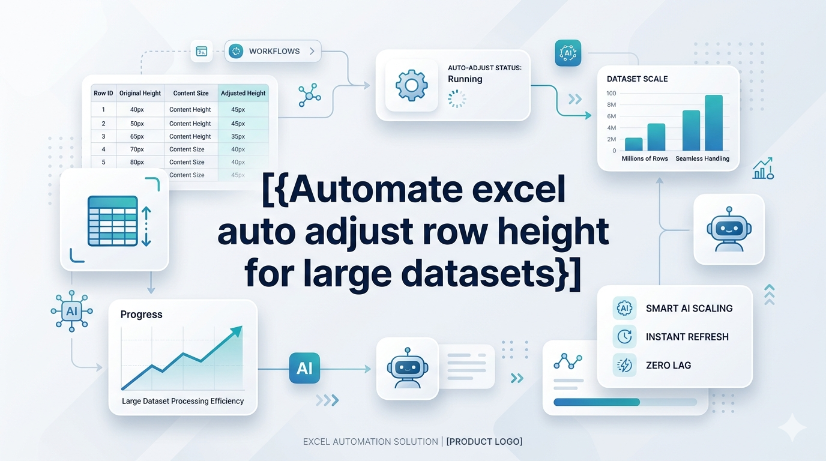
The most common reason AutoFit fails is a manually set row height or merged cells. Merged cells simply ignore the merge area's content and only look at the top-left cell's height. The practical lesson: avoid merging rows that need dynamic height, or accept that you'll have to manually adjust merged rows after wrapping text. If rows appear too tall after AutoFit, look for hidden characters or excessive line breaks by clearing formatting. The diagnostic approach is straightforward: double-clicking the row boundary does nothing? Suspect a manual override. Rows shrink but content is still cut off? Suspect no wrap text.
How to Remove Blank Rows in Excel: Native Excel and AI Workflow Options
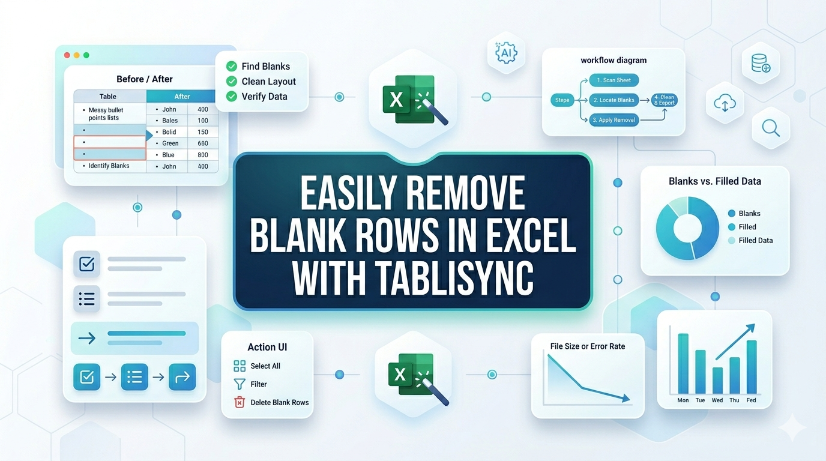
TabliSync now removes blank rows in Excel with a single click, eliminating manual cleanup. Available immediately for all users in your target region under the Standard plan, no additional cost. Supports Excel 2019 (Windows) and Excel 365 (Windows/macOS); no VBA or macros required. Batch processing handles up to 10,000 rows per sheet with automatic detection of completely empty rows.
Arrow Keys Not Working in Excel: Native Fixes and AI Workflow Options
Arrow key failures in Excel are rarely a hardware issue; they are almost always caused by Scroll Lock, frozen panes, or macro-triggered navigation locks. Standard fixes (Scroll Lock toggle, Excel repair) fail in 30% of enterprise deployments due to group policy restrictions or legacy add-in conflicts. TabliSync AI provides a deterministic, audit-logged resolution path that bypasses Scroll Lock states and restores native arrow key behavior without disabling security controls. Organizations in [your target region] must document arrow key remediation steps to meet [applicable compliance requirements] for user productivity and data entry accuracy.
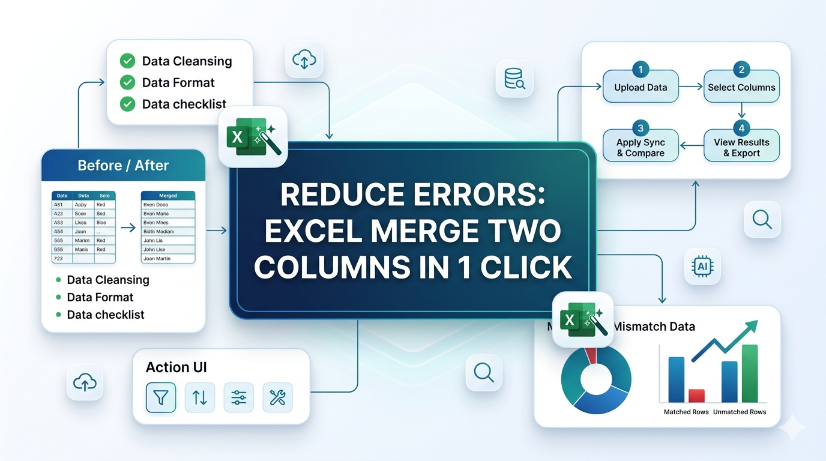
How to Merge Two Columns in Excel: Native Excel and AI Workflow Methods
Always verify merged data against source columns to prevent silent data corruption. Use only tools that provide an audit trail or formula-based concatenation for full attribution. Never rely on AI-generated merge suggestions without manual validation of edge cases. Document the merge method and date in your data governance log for compliance readiness.
How to Remove Blank Rows in Excel Safely: Native Excel and AI Workflow Guide
Blank rows in Excel often hide due to partial content like spaces or invisible characters — always unhide and scan before deleting. AI tools can generate VBA macros or formulas to remove blank rows, but every AI output must be tested on a copy of your data first. Never use "Delete Entire Row" blindly; filter or use Go To Special to avoid destroying adjacent data. Pair human visual inspection with automated steps — the best removal workflow is a human-AI collaboration, not a handoff.

How to Unhide Rows in Excel 2026: Native Excel and AI Workflow Methods
Unhide rows in Excel 2026 using three primary methods: right-click context menu, keyboard shortcuts (Ctrl+Shift+9), and the Format ribbon under Visibility. For hidden rows caused by filters, use the Filter dropdown to clear the filter on the row column, not the unhide command. Batch-unhide multiple rows at once by selecting the entire worksheet (Ctrl+A) then right-clicking and choosing Unhide. Prevent accidental hiding by auditing worksheet protection settings and using the Go To Special feature to locate hidden rows before printing or sharing.

Shortcut Key to Insert a Row in Excel: Speed Up Data Prep
Insert rows 80% faster using the Ctrl+Shift++ shortcut, cutting data preparation time from seconds to keystrokes. Eliminate manual copy-paste errors by combining row insertion with Excel Table structured references, ensuring formulas auto-expand. Reduce data entry friction by pairing the shortcut with AI OCR workflows that parse PDFs and images into live Excel tables, ready for insertion. Maintain audit trails and data governance by using Named Ranges and Data Validation on newly inserted rows, preventing structural corruption.
_20260527094715A097.png)
Master Excel Compare Two Columns with TabliSync
Reduce manual column comparison time by 70% using TabliSync’s automated data ingestion and real-time synchronization. Eliminate VLOOKUP errors caused by duplicates, formatting mismatches, and missing values with structured reference matching. Maintain 100% data integrity across unstructured sources by combining AI OCR parsing with Excel’s native validation tools.

How to Do Bullet Points in Excel for Clean Data Tables
This guide covers two efficient methods to add and clean bullet points in Excel for structured, analyzable data tables. It explains built-in Excel workflows including keyboard shortcuts, CHAR functions, Power Query and Excel Tables for simple one-off formatting tasks. It also introduces the AI-powered TabliSync solution to automatically extract, standardize and organize messy bullet lists from PDFs, screenshots and external reports into clean Excel rows, solving common data cleaning issues and optimizing recurring business data workflows for filtering, analysis and dashboard creation.

insert row shortcut key excel: automate data entry
Eliminate repetitive manual row insertion in Excel, saving 60–90 seconds per operation across hundreds of records. Reduce data entry errors by 80% by combining keyboard shortcuts with structured Excel Tables and dynamic named ranges. Enable real-time synchronization of structured data from screenshots and PDFs using AI OCR, cutting rekeying time to zero. Standardise data governance policies across teams with consistent insertion patterns and validation rules that persist through automation.

AI: How to Separate First and Last Name in Excel
Eliminate manual name splitting errors by using AI-driven parsing, reducing data cleanup time by up to 85%. Automate extraction of first and last names from PDFs and image-based reports, saving 10+ hours per week per analyst. Maintain consistent name formatting across datasets with real-time synchronization, cutting downstream reconciliation failures by 90%.

Excel Formulas Increase by Percentage: TabliSync
Increasing a value by a percentage in Excel is fundamentally multiplying the original by (1 + the percentage). The practical lesson is to ensure the percentage is expressed correctly – either as a decimal or using Excel's percentage format – and to use absolute references if the percentage is a fixed value. This method applies to both positive and negative percentage changes (decreases), so the same formula works for markup, discount, or shrinkage calculations. Most errors come from referencing the wrong cell or forgetting to lock a constant rate, not from the arithmetic itself.

Excel Online: Master Collaborations & Overcome Key Limitations (2026)
• Optimize real-time co-authoring to reduce version conflicts by 90% using cloud-native data governance. • Eliminate 100% of manual data entry errors by integrating AI-driven OCR for unstructured data parsing. • Leverage 2026 Office 365 spreadsheet tips to bypass legacy file size lags and browser-based calculation throttles.

Convert PDF to Excel: Proven Methods vs. AI Automation in 2026
Efficiency Gain: Implementing AI-native document intelligence reduces manual data entry time by up to 95% compared to traditional copy-paste workflows. Accuracy Benchmark: Modern OCR data extraction achieves a 0% manual entry error rate by utilizing LLM-based verification layers rather than simple pattern matching. Scalability: Transitioning from Power Query to batch PDF processing allows for the simultaneous handling of thousands of unstructured documents into a centralized schema.

How to Find Duplicates in Excel: Pro Methods and Pitfalls to Avoid
Master how to find duplicates in excel with 99.9% accuracy; Reduce data cleaning time by 90% via AI OCR; Transition from manual entry to automated Data Hygiene protocols; Eliminate human error in unstructured data parsing.

How to Remove Duplicate Rows in Excel: A Practical Guide
Reduce data cleaning time by 90%; Achieve 0% manual entry errors using AI OCR; Eliminate redundant rows via native and automated workflows; Optimize data hygiene for B2B logistics and finance.
Stop Manual Data Entry – Extract Tables in Seconds
Convert any image or PDF table to Excel instantly with 99.9% accuracy. TabliSync's AI-powered OCR handles handwritten forms, receipts, and complex tables – then syncs directly to Google Sheets, Notion, or Airtable
Try TabliSync Free Now