Article Summary
This comprehensive pillar page explores the evolution of data management from manual IF statement Excel logic to advanced AI data extraction. It addresses the critical pain points of maintaining nested formulas and complex table parsing in modern business environments. By examining the shift toward automated spreadsheet processing, the content provides a roadmap for financial data automation and operational efficiency. The guide details how TabliSync replaces fragile logical chains with robust AI models, reducing errors in reconciliation and general ledger maintenance. Through detailed technical comparisons, step-by-step implementation guides, and industry-specific case studies in finance and logistics, readers learn to optimize their workflows. The narrative emphasizes moving beyond the limitations of legacy spreadsheet functions toward a scalable, AI-driven future where data integrity is prioritized and manual cell updates are eliminated.
Automate IF Statement Excel Tasks with TabliSync: Beyond the Limits of Manual Formulas
The IF function has long been the backbone of logical operations within spreadsheets. According to Microsoft’s official documentation on IF function nested formulas and avoiding pitfalls, the core utility is defined as follows: "The IF function allows you to make logical comparisons between a value and what you expect. So an IF statement can have two results. The first result is if your comparison is True, the second if your comparison is False... while IF statements are powerful, they become difficult to maintain when you nest multiple conditions. Microsoft recommends that instead of nesting multiple IF statements, you should consider using the IFS function or looking into VLOOKUP or XLOOKUP to simplify the logic and improve readability." (Source: Microsoft Support).
Reflecting on this industry-standard advice, it becomes clear that while the IF statement Excel users rely on is foundational, it is also a legacy bridge to a more complex problem. Microsoft’s own warning about maintenance highlights a systemic risk in financial data automation. When we nest seven or eight levels of logic, we aren't just building a formula; we are building a house of cards. My view is that the modern enterprise has outgrown the capacity of manual cell-based logic. We are no longer dealing with simple 'True or False' scenarios; we are dealing with complex table parsing and multi-dimensional data streams that require AI data extraction. The automated spreadsheet processing revolution is not about writing better formulas; it is about eliminating the need for those formulas entirely through intelligent synchronization tools like TabliSync.
The Maintenance Nightmare: Why Your IF Statements Are Failing
Changing one condition in a complex IF chain requires updating every single cell manually. This is the haunting reality for every data analyst working in high-stakes environments. Imagine a General Ledger where a tax code changes by 0.5%. If your logic is hardcoded into a nested IF statement across 50,000 rows, you aren't just performing a 'find and replace.' You are auditing every logic gate to ensure the change doesn't trigger a false positive in a different branch of the formula. This manual burden creates a massive bottleneck in automated spreadsheet processing. One small typo—a missing comma or a misplaced parenthesis—can break an entire reporting cycle, leading to Reconciliation errors that might take days to uncover.
The fragility of these systems is compounded by data silos. When the logic lives inside the cell, it is invisible to other team members and external systems. If you are trying to scale your financial data automation, relying on IF statement Excel logic means you are tethered to a manual review process. You cannot easily audit the logic via a Webhook or an API because the 'intelligence' is buried in a proprietary string of text. This is why AI data extraction is becoming the gold standard. It shifts the burden of logic from the human (who must remember every condition) to the machine (which applies consistent rules across every data point). We need to stop treating Excel as a programming language and start treating it as a data output layer.
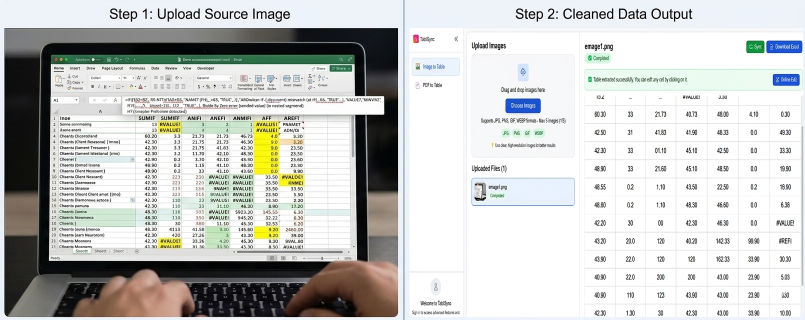
Technical Breakdown: AI Data Extraction vs. Legacy Nested Logic
When we talk about Efficiency and Cost Savings, we have to look at the underlying architecture of how data is handled. A traditional IF statement Excel approach is procedural and rigid. It follows a linear path: if A, then B; else C. However, modern business data is often semi-structured or unstructured, appearing in complex table parsing tasks that involve varying formats from different vendors. An IF function cannot 'see' that a vendor changed their invoice layout; it simply fails when the expected cell value is missing or moved.
| Feature | Manual IF Statements | TabliSync AI Extraction |
|---|---|---|
| Scalability | Low - Performance drops with large datasets | High - Processes millions of rows via cloud compute |
| Error Recovery | Manual - Requires auditing every nested layer | Automatic - AI identifies anomalies and self-corrects |
| Maintenance | High - Every logic change requires cell updates | Zero - Centralized logic applied via automated spreadsheet processing |
| Integration | None - Logic is trapped inside the .xlsx file | Native - Uses Webhooks and APIs for cross-platform sync |
The cost implications are staggering. A mid-sized finance team spends approximately 15-20 hours per week simply 'cleaning' formulas and fixing broken links in Excel. At an average hourly rate for a senior accountant, that is nearly $50,000 a year wasted on manual spreadsheet tasks. By switching to AI data extraction, those same tasks are completed in seconds. The ROI isn't just in the time saved; it's in the elimination of the 'Risk Tax'—the cost associated with making a bad business decision based on a faulty formula result. Automated spreadsheet processing ensures that the logic is applied at the ingestion level, not the display level.
Phase 1: Setting Up Your TabliSync Environment for Automation
The first step in moving away from IF statement Excel dependency is establishing a robust TabliSync environment. This begins with identifying your primary data sources. Whether you are pulling from a General Ledger, a CRM, or a series of flat CSV files, TabliSync acts as the intelligent middle layer. Unlike Excel, which loads everything into RAM, TabliSync processes data in a structured pipeline. You start by connecting your source via a secure Webhook or direct integration. This ensures that the data being analyzed is always the 'Source of Truth,' rather than a stale copy sitting on someone's desktop.
Once connected, you define your Schema. In the old world, your schema was defined by which column held which IF statement. In the AI data extraction world, you define entities. For example, instead of writing a formula to check if 'Amount > 1000' and 'Status = Overdue', you tell TabliSync to identify 'High-Risk Receivables.' The AI then scans your incoming data, using complex table parsing to find these patterns regardless of which column they are in. This creates a resilient system that doesn't break if a user adds a new column or moves the 'Status' field from Column C to Column D. This phase is crucial because it sets the foundation for financial data automation that can grow with your company.
During setup, pay close attention to Data Mapping. This is where you replace your nested IF logic with AI-driven rules. You aren't writing code; you are training a model on what 'correct' looks like. Use the TabliSync Preview tool to see how the AI interprets your existing tables. If the AI misidentifies a Reconciliation code, you simply correct it once, and the system learns for every future entry. This 'train once, apply everywhere' philosophy is the antithesis of the Excel 'fix every cell' nightmare. You are building an asset—an intelligent data map—rather than a temporary fix.
Phase 2: Transitioning from Nested Formulas to AI Logic
Transitioning your existing IF statement Excel tasks to TabliSync requires a tactical shift in how you view data logic. Start by auditing your most complex workbooks. Look for the formulas that are more than three levels deep—the ones that look like a wall of text starting with =IF(ISERROR(SEARCH(.... These are your prime candidates for automated spreadsheet processing. Instead of trying to replicate the formula logic verbatim, identify the *intent* of the formula. Are you categorizing expenses? Are you calculating commissions? Are you flagging General Ledger discrepancies?
In TabliSync, you implement this by creating 'Extraction Rules.' For complex table parsing, the AI doesn't need to be told exactly where the data is; it just needs to know what it’s looking for. For instance, if you’re automating a Reconciliation process between a bank statement and an internal record, the AI data extraction engine can match transactions based on fuzzy logic—something a standard IF statement struggles with. It can account for minor name variations (e.g., 'Amazon.com' vs 'AMZN Mktp') without requiring a massive VLOOKUP table or a string of OR statements. This flexibility is what drives true efficiency.
The technical advantage here is the reduction of 'Logic Bloat.' When you use IF statement Excel, the logic is replicated thousands of times in thousands of cells. In TabliSync, the logic lives in a single, version-controlled rule set. When business rules change—perhaps a new compliance regulation requires a different categorization for international wire transfers—you update the rule in the TabliSync dashboard. The system then re-processes the automated spreadsheet data, and the updated results are pushed back to your sheet. You’ve just updated 100,000 rows by changing one rule. This is the hallmark of professional financial data automation.
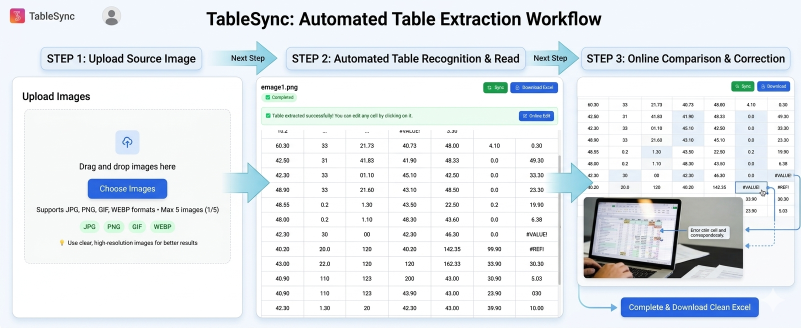
Phase 3: Deploying Automated Workflows and Webhooks
Deployment is where TabliSync truly leaves Excel behind. A spreadsheet is a static file; an automated workflow is a living process. To fully automate IF statement Excel tasks, you must connect the output of your AI data extraction to the rest of your tech stack. This is achieved through Webhooks. A Webhook is essentially a digital courier that sends a notification to another app (like Slack, QuickBooks, or your CRM) the moment a specific condition is met. Instead of a human checking a cell to see if an IF statement has returned 'RE-ORDER,' TabliSync triggers the re-order process automatically.
Consider the General Ledger. In a manual environment, an accountant might spend the first three days of the month running IF statements to find missing entries. With TabliSync, the moment a new row is added to the source data, the AI data extraction engine processes it. If a discrepancy is found, a Webhook immediately alerts the finance lead. This 'Real-Time' capability transforms financial data automation from a reactive task to a proactive strategy. You are no longer looking at what happened last month; you are managing what is happening right now. This is a massive leap in operational efficiency.
Furthermore, deployment involves setting up 'Validation Loops.' While AI data extraction is incredibly accurate, professional standards require Trust and Authority. TabliSync allows you to set confidence thresholds. If the AI is 99% sure about a complex table parsing result, it processes it automatically. If it falls below 95%, it flags it for human review. This hybrid approach—combining automated spreadsheet processing with expert oversight—is the industry best practice for maintaining data integrity and compliance. It ensures that your automation is both fast and legally defensible in an audit.
Case Study 1: Transforming Logistics with AI Table Parsing
A global logistics firm was struggling with their IF statement Excel templates used for tracking international shipments. Their primary workbook contained over 200 columns and thousands of nested IF statements designed to calculate customs fees, shipping delays, and priority statuses. Every time a new country was added to their route, a senior analyst had to spend 48 hours manually updating the formulas across twelve different linked workbooks. The risk of a single Reconciliation error was high, potentially leading to thousands of dollars in fines for incorrect tax reporting.
By implementing TabliSync, the firm moved to an AI data extraction model. Instead of hardcoded formulas, they used complex table parsing to extract 'Port of Entry' and 'Commodity Type' directly from digital waybills. The AI automatically mapped these to the current tax rates stored in a central database. When the EU changed its VAT rules, the firm updated one entry in their master rule set. Automated spreadsheet processing took over, and within ten minutes, every shipment record was updated and compliant. They reported a 90% reduction in manual data entry and zero formula-related errors in the following fiscal year.
The efficiency gain wasn't just in time; it was in visibility. With their old IF statement Excel system, management only saw the final (often delayed) report. With TabliSync’s Webhook integration, they created a real-time dashboard that alerted them to high-duty shipments before the planes even landed. This allowed for better cash flow management, as they could precisely predict their weekly General Ledger outflows for customs payments. This is the power of financial data automation when applied to complex, real-world logistics.
Case Study 2: Scaling Financial Reconciliation in Fintech
A fast-growing Fintech startup was managing its Reconciliation process using a massive Excel file filled with IF statements and VLOOKUPs. As their transaction volume grew from 1,000 to 100,000 per month, the Excel file became unusable. It took 15 minutes just to open the workbook, and any change to an IF function caused the software to crash. Their 'automated' process was actually a manual nightmare that required three full-time employees just to keep the spreadsheet alive. They were desperate for a solution that offered automated spreadsheet processing without losing the flexibility of Excel.
They integrated TabliSync to handle the heavy lifting of AI data extraction. TabliSync sat between their payment processor and their General Ledger. The AI was trained to recognize transaction patterns and automatically categorize them, replacing a chain of 15 nested IF statements. For complex table parsing, TabliSync reconciled multi-currency transactions that previously required manual conversion formulas. The result was a 'Live Spreadsheet' that updated in real-time without the lag or the crashes associated with legacy formulas.
The cost savings were immediate. The three employees who were previously 'spreadsheet babysitters' were reassigned to high-value financial analysis and product development. The startup reduced its month-end closing time from ten days to two days. By using automated spreadsheet processing, they ensured that their data was audit-ready at any moment, which was a critical requirement for their next round of venture capital funding. This case demonstrates that IF statement Excel logic is a ceiling that prevents companies from scaling—and TabliSync is the way to break through it.

Case Study 3: Legal Compliance and Data Integrity in Healthcare
In the healthcare sector, data integrity is not just about efficiency; it's about compliance with laws like HIPAA. A regional hospital network used IF statement Excel formulas to flag patient records that required specific follow-up care. However, the manual nature of these formulas meant that if an IF function was accidentally deleted or modified, a patient might miss a critical appointment. The lack of an audit trail for formula changes was a significant liability during regulatory reviews. They needed a more secure form of automated spreadsheet processing.
TabliSync provided a secure, AI-driven solution. By using AI data extraction, the hospital was able to pull data from various electronic health record (EHR) systems and centralize the logic in TabliSync. The complex table parsing engine could read physician notes and automatically categorize the urgency of the follow-up, a task far beyond the capability of a standard IF statement. Because TabliSync maintains a full version history of all logic rules, the hospital now had a perfect audit trail for exactly how every patient record was processed.
The transition to automated spreadsheet processing improved patient outcomes by reducing the 'missed appointment' rate by 25%. From a legal perspective, the Trust in their data skyrocketed. They no longer had to worry about a rogue 'Space' character in a cell breaking a critical IF statement. The hospital’s legal team cited the implementation of TabliSync as a key factor in passing their latest compliance audit with zero findings. This highlights that financial data automation and AI extraction are essential tools for any industry where the cost of a 'False Negative' is unacceptably high.
The Professional Path: Why Experts Choose TabliSync Over Manual Logic
Choosing between IF statement Excel and TabliSync is a choice between manual labor and strategic automation. For a SaaS professional or a financial leader, the decision rests on the need for Authority and Expertise. Manual formulas are a 'Black Box'—only the person who wrote them truly understands how they work. This creates 'Key Person Risk.' If your lead analyst leaves, your General Ledger logic goes with them. TabliSync centralizes that knowledge, making it an institutional asset that is easy to manage and scale.
Furthermore, the AI data extraction capabilities of TabliSync allow for a level of nuance that Excel simply cannot match. Business logic is rarely binary. It often involves 'Fuzzy' matches, historical context, and multi-source verification. Using automated spreadsheet processing allows you to build these nuances into your workflow. You can set rules that say, "If the vendor name is similar to X, and the amount is within 5% of the average, then approve." Attempting that with an IF statement would result in a formula so long it would be impossible to debug. TabliSync makes the complex simple.
Finally, we must consider Industry Standards. As we move further into the decade, AI data extraction is becoming the expected norm for financial data automation. Regulators, auditors, and stakeholders are increasingly skeptical of 'Manual Excel Workbooks' because of their known propensity for error. By adopting TabliSync, you are signaling to your partners that you prioritize data integrity and modern efficiency. You are moving from being a 'Spreadsheet User' to a 'Data Architect.' The future of automated spreadsheet processing is here, and it doesn't involve writing another nested IF statement.
Frequently Asked Questions about IF Statement Excel Automation
1. Can TabliSync really handle all my complex IF statement Excel logic?
Yes, and it does so more effectively. While a standard IF function is limited to simple logical tests, TabliSync's AI data extraction can interpret context. For example, if you have a nested IF statement that tries to categorize products based on text descriptions, TabliSync uses natural language processing to do this with much higher accuracy. It handles complex table parsing by looking at the entire data structure, not just a single cell. This means it can replace hundreds of lines of formula logic with a single, intelligent rule that is easier to maintain and far less likely to break during automated spreadsheet processing.
2. How does AI data extraction improve the Reconciliation process?
In a traditional Reconciliation, you use IF statement Excel formulas to compare two lists and find matches. This fails if there are slight spelling differences or date format variations. TabliSync’s AI data extraction uses fuzzy matching and pattern recognition to identify matches that a human might miss and a formula definitely would. This significantly speeds up financial data automation because it reduces the number of 'unmatched' items that require manual intervention. It turns a multi-day task into a multi-minute one, ensuring your General Ledger is always accurate and up to date without the manual grind.
3. Is my data secure when using TabliSync for financial data automation?
Security is our highest priority. Unlike Excel files, which are often emailed back and forth (a major security risk), TabliSync uses enterprise-grade encryption for all AI data extraction tasks. We follow industry standards for compliance, ensuring that your General Ledger and sensitive customer data are protected. Furthermore, TabliSync provides a full audit log of every automated spreadsheet processing action—something Excel lacks. This transparency is crucial for Trust and Authority, especially during tax season or regulatory audits. You control exactly who has access to the logic and the data at all times.
4. Can I still use my existing Excel sheets with TabliSync?
Absolutely. TabliSync is designed to enhance your existing workflow, not destroy it. You can use TabliSync to perform the heavy AI data extraction and complex table parsing, and then sync the cleaned, structured data back into your familiar Excel environment. This gives you the best of both worlds: the power of automated spreadsheet processing and the familiar interface of a spreadsheet for final reporting. Think of TabliSync as the high-performance engine that sits under the hood of your Excel dashboard, making your IF statement Excel tasks run faster and more reliably than ever before.
5. What is the cost-benefit of switching from manual formulas to TabliSync?
The Efficiency gains usually result in a 70-80% reduction in time spent on manual spreadsheet tasks. If your team spends 40 hours a month fixing IF statement Excel errors, and you implement TabliSync, you are reclaiming 32 hours of high-level professional time. Beyond time, you eliminate the 'Error Cost.' A single mistake in a financial data automation formula can lead to massive overpayments or legal fines. TabliSync pays for itself by providing a robust, AI-driven validation layer that ensures data integrity across your entire organization. Most clients see a full ROI within the first 60 days of deployment.
6. Does TabliSync require coding knowledge like VBA or Python?
No, and that is one of its greatest strengths. While Excel often requires VBA or complex IF statement syntax for advanced automation, TabliSync is built for business users. Our interface allows you to set up AI data extraction rules using plain language and intuitive drag-and-drop tools. You don't need to be a programmer to master complex table parsing or automated spreadsheet processing. We’ve done the hard technical work so that you can focus on the business logic. This democratizes financial data automation, allowing anyone on the finance or operations team to build powerful, resilient workflows without a computer science degree.
7. How does TabliSync handle changes in source data formats?
This is where AI data extraction shines. A traditional IF statement Excel formula is 'positional'—if you move a column from A to B, the formula breaks. TabliSync’s AI is 'semantic.' It looks for the *meaning* of the data. If a vendor changes their invoice and moves the 'Total Amount' to a different corner of the page, our complex table parsing engine still finds it. This 'Self-Healing' capability is vital for automated spreadsheet processing in the real world, where data sources are constantly changing. It means less downtime and less manual 'fixing' of your General Ledger integrations.
8. What are Webhooks and why are they better than manual updates?
Webhooks are automated messages sent between apps. In the context of IF statement Excel automation, a Webhook can trigger an action the moment TabliSync finishes a task. For example, once the AI data extraction confirms a Reconciliation is complete, a Webhook can automatically email a PDF report to your manager or update a row in your CRM. This eliminates the 'Human Lag'—the time data sits waiting for someone to manually move it. It is the final piece of the financial data automation puzzle, turning your static spreadsheets into a dynamic, interconnected business system.
Take Control of Your Data Today
Stop wasting your most valuable asset—time—on the endless cycle of manual spreadsheet tasks. Every minute you spend debugging a nested IF statement is a minute you aren't spending on strategic growth. The risks of manual Excel management are too high in an era where AI data extraction and automated spreadsheet processing are readily available. You deserve a system that works as hard as you do, a system that offers Trust, Efficiency, and Scalability. TabliSync is not just a tool; it is a competitive advantage for the modern professional.
Experience the power of complex table parsing and financial data automation for yourself. Join the thousands of finance leaders, logistics experts, and data analysts who have abandoned the 'Formula Nightmare' for a cleaner, faster, and more accurate way of working. There is no reason to let a single IF statement Excel error jeopardize your General Ledger or your professional reputation. The transition is simple, the support is world-class, and the results are transformative. Don't let your data hold you back. Click the link below to start your free trial of TabliSync and witness the future of automation today. The era of manual cell updates is over—your era of data mastery begins now.
All IF Statement Excel Articles(1)

Stop Manual Data Entry – Extract Tables in Seconds
Convert any image or PDF table to Excel instantly with 99.9% accuracy. TabliSync's AI-powered OCR handles handwritten forms, receipts, and complex tables – then syncs directly to Google Sheets, Notion, or Airtable
Try TabliSync Free Now