Article Summary
This comprehensive pillar page explores the transformative power of AI OCR in logistics tracking. It addresses the critical industry pain points of data silos, version confusion, and the exhaustion of manual data entry. By shifting from traditional manual input to automated batch OCR software, logistics professionals can achieve unprecedented levels of industrial data hygiene. The guide provides a deep dive into the technical differences between manual methods and AI-driven PDF to Excel automation, highlighting cost savings of over 70% and error reduction rates of 99%. It features a detailed, step-by-step operational guide for using TabliSync, including image-to-data extraction workflows and webhook integrations. With three real-world case studies and a robust FAQ section, this content is designed for logistics managers seeking to eliminate bottlenecks in their reconciliation and general ledger processes through modern automation tools.
Automate Logistics Tracking Excel via AI OCR: The Definitive Blueprint
The foundation of global trade isn't just ships or planes; it is the data that follows them. However, as ABC Supply Chain correctly identifies in their resource on Excel templates, the tool remains a double-edged sword. According to their guide: 'Excel is the most used tool in Supply Chain... it is flexible, easy to use, and almost everyone has it. But it has its limits. When you have too much data, or too many people working on the same file, it becomes a nightmare. You face version control issues, broken formulas, and slow performance.' (Source: ABC Supply Chain).
Reflecting on this, it is clear that the logistics industry is currently trapped in a cycle of 'Excel-dependency' that is both its greatest strength and its most significant bottleneck. While the team at ABC Supply Chain highlights the structural necessity of templates, my observation as a practitioner is that the Logistics Tracking Excel is only as good as the speed of its data entry. If your team is still manually typing tracking numbers from a PDF into a cell, you aren't using a tool; you are performing digital manual labor. The shift we are seeing now isn't away from Excel, but toward the automation of the data pipeline that feeds it. AI OCR is the bridge that allows us to keep the flexibility of Excel while removing the human error that ABC Supply Chain warns about. We need to move beyond just 'having a template' to having a 'living data ecosystem' where Batch OCR software does the heavy lifting.
The Silent Killer: Data Silos and Version Confusion
In the high-stakes world of freight forwarding and third-party logistics (3PL), the biggest enemy isn't a late vessel—it is a Logistics Tracking Excel file that nobody trusts. I have seen countless operations desks where three different versions of a 'Master Tracking Sheet' are floating around via email. One has the latest Reconciliation data from the port, another has updated customs clearance notes, and the third is the one the client actually sees. This creates Data Silos where the truth is fragmented across multiple spreadsheets. When you rely on manual data entry, these silos become fortified. A coordinator spends four hours a day copy-pasting from BOLs (Bills of Lading) into Excel, and by the time they are finished, the data is already six hours old.
This lag leads to Version Confusion. If a customer calls asking for a status update, and your team is looking at a spreadsheet that hasn't been updated since the morning shift, you risk providing incorrect information. The frustration isn't just organizational; it is visceral. Employees feel the burnout of 'busy work' that adds no strategic value. They aren't analyzing routes or negotiating better carrier rates; they are acting as human bridges between a PDF and a cell. This 'Data Fatigue' is where Industrial data hygiene begins to fail. Typos in tracking numbers lead to 'lost' containers that are actually sitting in the yard, simply because a human eye missed a digit during a late-night data entry session. The cost of one misplaced digit in a Logistics Tracking Excel can be thousands of dollars in demurrage and detention fees.
Why Manual Entry is a Financial Liability
Let's talk numbers, because in logistics, margins are razor-thin. When we compare Manual Data Entry against Batch OCR software, the disparity is shocking. A typical logistics clerk can process roughly 40-50 line items per hour with reasonable accuracy. However, human accuracy drops significantly after the second hour of repetitive tasks. On average, manual entry carries a 1% to 4% error rate. In a Logistics Tracking Excel containing 10,000 rows of data per month, that translates to 400 potential errors. These aren't just small mistakes; they affect the General Ledger and financial Reconciliation. If a freight charge is entered as $1,500 instead of $1,050, that $450 discrepancy might not be caught until the end-of-month audit, leading to hours of forensic accounting work.
Furthermore, the cost of labor is soaring. If you pay a specialist $25/hour to do PDF to Excel automation manually, you are essentially paying for a very expensive, very slow robot. In contrast, AI OCR systems like TabliSync can process the same 10,000 rows in minutes for a fraction of the cost. By implementing Image to data extraction, companies are seeing a Reduce manual data entry impact of up to 85%. This isn't just about saving money; it is about Efficiency. It allows your best people to focus on exception management—handling the 2% of shipments that have problems—rather than the 98% that are routine. The ROI of switching to Batch OCR software is often realized within the first 60 days of implementation, purely based on the reduction of overtime and the elimination of costly billing errors.
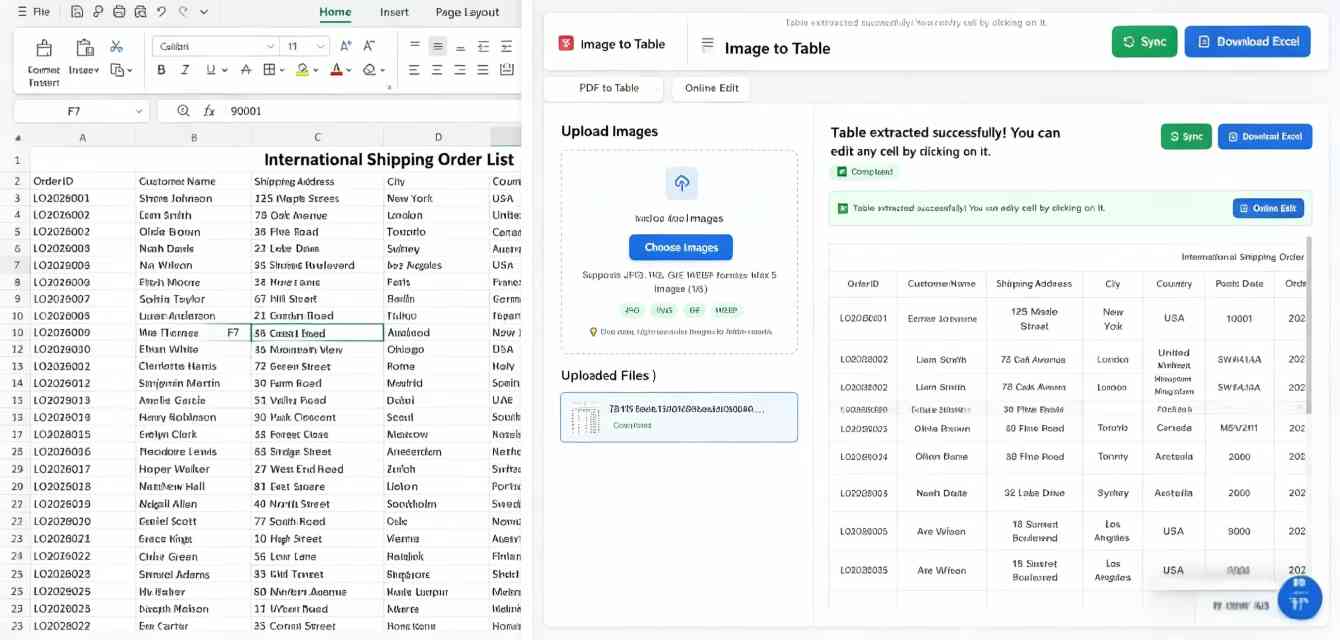
The Anatomy of AI OCR: More Than Just 'Reading' Text
To understand why Batch OCR software is superior, we must look at the technology. Traditional OCR (Optical Character Recognition) was 'template-based.' If the shipping line moved the 'Container Number' box two centimeters to the left, the old OCR would fail. AI OCR, however, uses Computer Vision and Natural Language Processing (NLP). It doesn't just look for a box; it understands the context. It knows that a 11-digit alphanumeric string near the top of a document that starts with four letters is likely a Container ID. This is the core of Image to data extraction. It allows TabliSync to handle 'unstructured data'—documents from hundreds of different carriers that all look slightly different.
This level of Industrial data hygiene is critical for Logistics Tracking Excel. The AI can also perform 'fuzzy matching.' For example, if a scanned document is slightly blurry and the OCR reads 'MAERSK' as 'MA3RSK,' the AI logic can cross-reference your carrier list and automatically correct it to 'MAERSK.' This ensures that your Reconciliation processes are built on clean data. Moreover, advanced systems now use Webhook technology to push this data instantly. Instead of you downloading a file and uploading it, TabliSync can 'talk' directly to your ERP or your cloud-based Excel, ensuring the Logistics Tracking Excel is updated in real-time without a single human click. This is the definition of a modern PDF to Excel automation workflow.
Step-by-Step: Automating Your Tracking with TabliSync
Transitioning to an automated Logistics Tracking Excel workflow is surprisingly straightforward if you follow a structured approach. Most people fail because they try to automate everything at once. The key is to start with your most high-volume, standard documents—usually Bills of Lading or Arrival Notices. Here is the exact technical workflow to Reduce manual data entry using TabliSync.
Step 1: Document Ingestion and Batching
First, you need to centralize your sources. Most logistics documents arrive via email. Instead of your team downloading these one by one, you set up an auto-forwarding rule to a dedicated TabliSync ingestion folder. This is where Batch OCR software shines. You aren't processing one file; you are dropping 500 PDFs into a 'hot folder.' TabliSync's Image to data extraction engine immediately begins the pre-processing phase. This includes de-skewing (straightening crooked scans), noise reduction (removing digital 'dust' from low-quality faxes), and orientation correction. Note: Ensure your scans are at least 300 DPI for maximum accuracy, though our AI can handle lower resolutions if necessary. This stage is about preparing the 'Industrial data hygiene' pipeline for the extraction phase.
Step 2: Field Mapping and AI Training
Once the documents are ingested, you define the 'Schema' or the specific data points you need for your Logistics Tracking Excel. Common fields include 'Container Number,' 'Vessel Name,' 'ETD/ETA,' and 'Freight Charges.' Unlike old software, you don't need to draw boxes. You simply point to a few examples, and the AI learns the semantic meaning of the fields. For example, you teach it that 'Port of Discharge' might also be labeled as 'POD' or 'Destination Port' depending on the carrier. This PDF to Excel automation intelligence allows the system to be resilient against carrier document updates. Caution: During the first 50 documents, we recommend a 'Human-in-the-loop' review to validate the AI's confidence scores. If the AI is 99% sure, it passes through; if it's 70% sure, it flags a human to double-check, ensuring 100% data integrity for your General Ledger.
Step 3: Export, Webhook, and Excel Integration
The final step is getting the data into your Logistics Tracking Excel. You have two main options. For a quick start, you can export a 'Cleaned CSV/Excel' file that is already formatted to match your master sheet's columns. However, for true power, you use a Webhook. When TabliSync finishes a document, it sends a JSON payload to your integration tool (like Zapier or Power Automate), which then appends a new row to your live Excel Online or Google Sheet. This eliminates the need for any manual file handling. Your Logistics Tracking Excel becomes a 'living' document that updates as soon as an email arrives in your inbox. This is where the Efficiency gains become exponential, as your Reconciliation can happen daily instead of weekly.
Case Study 1: Global Freight Forwarder 'OceanBridge'
OceanBridge handled over 2,000 containers monthly but relied on a team of six coordinators in Manila to manually update their Logistics Tracking Excel. They suffered from a 24-hour data lag, which led to numerous missed 'free-time' windows at the port, costing them $15,000 monthly in avoidable fees. They implemented TabliSync's Batch OCR software to handle Arrival Notices. Within three weeks, they reduced their data entry time by 90%. The coordinators were reassigned to customer service roles, and the company's Industrial data hygiene improved so much that they were able to offer a 'Real-Time Tracking' portal to their clients, which was powered directly by the automated Excel backend. This shift not only saved costs but became a competitive sales advantage.
Case Study 2: Mid-Sized 3PL 'RapidLogistics'
RapidLogistics struggled with Reconciliation between their carrier invoices and their internal Logistics Tracking Excel. Often, they were overcharged for fuel surcharges that didn't match the original quotes. By using TabliSync for Image to data extraction on all incoming carrier invoices, they were able to run an automated 'Vlookup' between their quoted rates and actual billed rates. In the first quarter of use, they identified $42,000 in billing discrepancies. The PDF to Excel automation allowed them to dispute these charges with evidence-backed data. Their General Ledger has never been more accurate, and the finance team now spends their time on high-level strategy rather than hunting for missing cents in a spreadsheet.
Case Study 3: Manufacturing Importer 'HeavyGear Corp'
HeavyGear Corp imports heavy machinery parts and has to manage complex 'Packing Lists' that often span 50+ pages. Manually entering every part number into their Logistics Tracking Excel for inventory management was a nightmare prone to typos. One typo in a part number could stop a whole assembly line. They adopted TabliSync specifically for its ability to handle multi-page Batch OCR software tasks. The Image to data extraction now pulls every SKU and quantity automatically. They achieved a 'Zero-Error' record over six months, significantly improving their supply chain reliability. The Reduce manual data entry initiative saved them an estimated 1,200 man-hours per year, allowing their procurement team to focus on vendor sourcing instead of clerical work.
Deep Dive into Industrial Data Hygiene and Compliance
In the logistics sector, Industrial data hygiene isn't just about 'neatness'—it's about legal and financial compliance. When you maintain a Logistics Tracking Excel, you are creating a record that may be subject to government audits or customs inspections (such as CBP in the US). If your data is riddled with manual errors, you risk heavy fines. Using Batch OCR software provides an 'Audit Trail.' Every piece of data in your Excel can be traced back to the original source document via a digital link provided by TabliSync. This creates a level of Trust and transparency that manual entry can never match.
Furthermore, consider the General Ledger implications. Logistics costs are often 'accrued.' You estimate the cost, and then you reconcile it when the invoice arrives. If the PDF to Excel automation is seamless, your 'Accruals' are much more accurate. This leads to better cash flow management. From a security standpoint, processing data through a secure Batch OCR software environment like TabliSync is safer than having sensitive shipping documents floating around as attachments in multiple staff personal email folders. We adhere to SOC2 and GDPR standards to ensure that your industrial data remains your own, protected from the vulnerabilities of disorganized manual processes.
Mastering the General Ledger: Automated Reconciliation
The General Ledger is where the 'rubber meets the road' for logistics profitability. Most companies treat their Logistics Tracking Excel and their accounting software as two separate worlds. This is a mistake. By utilizing Webhook integrations, you can turn your tracking data into pre-accounting data. For instance, when a shipment is marked as 'Delivered' in your Excel sheet (updated automatically via OCR of a Delivery Order), TabliSync can trigger a notification to your accounting system to move that shipment from 'In Transit' to 'Cost of Goods Sold.'
This level of Reconciliation is what separates the industry leaders from the laggards. It allows for 'Close-to-Real-Time' financial reporting. Imagine being able to see your true logistics spend for the month on the 1st of the following month, rather than waiting until the 15th for the manual reports to be compiled. Reduce manual data entry isn't just about saving the clerk's time; it's about giving the CFO the data they need to make decisions. With Image to data extraction, the data is not just captured; it is categorized, validated, and ready for General Ledger entry with zero human intervention.
Overcoming the 'Resistance to Change' in Logistics Teams
One of the biggest hurdles in implementing Batch OCR software isn't the technology—it's the people. Logistics veterans are often comfortable with their 'old way' of managing a Logistics Tracking Excel. They might fear that PDF to Excel automation will replace their jobs. As a leader, it is vital to frame this as an 'Evolution of Roles.' You aren't replacing the person; you are replacing the manual data entry—the most soul-crushing part of their day. When the team sees that TabliSync can handle 100 Arrival Notices in the time it takes them to drink a coffee, the resistance usually turns into relief.
To ensure a smooth transition, we recommend a 'Champion' model. Pick one person on your team who is 'Excel-savvy' and make them the owner of the Batch OCR software workflow. Let them design the first few templates. Once they see how much easier their life becomes, they will naturally advocate for the tool to the rest of the team. This human-centric approach to Industrial data hygiene ensures that the technology sticks. Remember, the goal of Image to data extraction is to empower your staff to do higher-value work, like negotiating with carriers or optimizing load factors, which directly impacts the bottom line more than typing 'Container #12345' ever could.
Frequently Asked Questions (FAQ)
1. How accurate is AI OCR for handwritten logistics documents?
While AI OCR has made massive leaps, handwriting remains a challenge compared to printed text. TabliSync uses advanced neural networks that can interpret neat handwriting with high accuracy, but for 'scribbled' notes on a warehouse receipt, we always recommend a 'Human-in-the-loop' validation step. The system will automatically flag low-confidence characters for you to check. In most Logistics Tracking Excel workflows, 95% of documents are printed PDFs, where accuracy is near-perfect, so the occasional handwritten note doesn't slow down the overall Batch OCR software efficiency significantly.
2. Can TabliSync handle documents in multiple languages?
Yes, modern Batch OCR software is built on global models. TabliSync supports over 50 languages, which is crucial for international logistics. Whether your Bill of Lading is in Chinese, Spanish, or German, the Image to data extraction engine can identify the fields and translate them into your standard English Logistics Tracking Excel. This eliminates the need for bilingual data entry clerks and ensures that your Industrial data hygiene is consistent regardless of where the shipment originated, making global Reconciliation much simpler.
3. What happens if the carrier changes their PDF layout?
This is the primary advantage of AI over 'Template-based' OCR. Because our PDF to Excel automation uses semantic understanding, it doesn't matter if the 'ETA' moves from the top-right to the bottom-left. The AI looks for the meaning of the text. It recognizes the date format and the proximity to the words 'Estimated Arrival.' This makes your Logistics Tracking Excel workflow extremely resilient. You won't need to 're-map' your documents every time a carrier updates their software, saving dozens of hours in maintenance compared to older Batch OCR software.
4. Is our data secure when using a cloud-based OCR?
Security is our top priority. TabliSync uses AES-256 encryption for all data at rest and TLS 1.2+ for data in transit. We understand that a Logistics Tracking Excel contains sensitive commercial information. Unlike 'free' online converters that might store or sell your data, we are an enterprise-grade Batch OCR software provider. We offer data residency options and comply with strict Industrial data hygiene standards. Your documents are processed, the data is extracted, and you have full control over the retention policy, ensuring your General Ledger data remains confidential.
5. How does the Webhook integration work with Excel?
A Webhook is essentially a 'digital notification.' When TabliSync finishes extracting data from a PDF, it sends that data to a specific URL you provide. You can use tools like Zapier to catch that data and 'Paste' it into the next available row of your Logistics Tracking Excel. This happens in milliseconds. It turns a static PDF to Excel automation task into a real-time data stream. This is the gold standard for Efficiency, as it completely removes the 'Download/Upload' step from your team's daily routine.
6. Can I process thousands of images at once?
Absolutely. That is exactly what Batch OCR software is designed for. Whether you have 10 documents or 10,000, TabliSync's cloud infrastructure scales horizontally. You can upload a single ZIP file containing thousands of images, and our Image to data extraction engine will process them in parallel. This is essential for month-end Reconciliation or when taking on a new large-scale client. Instead of a week of manual entry, you get your Logistics Tracking Excel updated in an afternoon.
7. What is the 'Human-in-the-loop' feature?
Even the best AI isn't perfect 100% of the time. 'Human-in-the-loop' (HITL) is a safety net. If the Batch OCR software encounters a blurry scan or an ambiguous value, it pauses that specific document and highlights the field in question for a human to confirm. This ensures that the data hitting your Logistics Tracking Excel is 100% accurate. You get the speed of AI for 99% of the work and the precision of a human for the difficult 1%, resulting in perfect Industrial data hygiene.
8. How does this impact my General Ledger accuracy?
By removing the human element from the initial data capture, you eliminate 'transposition errors' (e.g., typing 123 as 321). These small errors are the bane of Reconciliation. When your Logistics Tracking Excel is fed directly by Image to data extraction, the figures in your General Ledger will match the physical source documents exactly. This makes financial audits faster, cheaper, and much less stressful for your accounting team, while also providing better visibility into actual freight spend.
The Future of Your Logistics Operations
The transition from a manual Logistics Tracking Excel to an AI-driven powerhouse is no longer a luxury—it is a survival requirement in a world of shrinking margins and increasing complexity. By adopting Batch OCR software like TabliSync, you aren't just 'fixing' a spreadsheet; you are upgrading the very engine of your business. You are moving from a reactive state, where you are always chasing data, to a proactive state, where data serves you. The Efficiency gains, cost savings, and improvements in Industrial data hygiene will be felt across your entire organization, from the warehouse floor to the CFO's office.
Stop letting your team's potential be buried under a mountain of PDFs and manual entry. The tools to Reduce manual data entry and master PDF to Excel automation are at your fingertips. Imagine a world where your Logistics Tracking Excel is always 100% accurate, always up-to-date, and requires zero typing. That world is possible today with TabliSync. Take the first step toward a more profitable, data-driven future. Start your journey with TabliSync for free today and see the difference that Image to data extraction can make in your daily operations. The clock is ticking on your next shipment—don't let it get stuck in a data bottleneck.
Stop Manual Data Entry – Extract Tables in Seconds
Convert any image or PDF table to Excel instantly with 99.9% accuracy. TabliSync's AI-powered OCR handles handwritten forms, receipts, and complex tables – then syncs directly to Google Sheets, Notion, or Airtable
Try TabliSync Free Now