Article Summary
This comprehensive pillar page serves as the ultimate guide for procurement officers, financial analysts, and e-commerce managers looking to master the Price Comparison Sheet Excel. We explore the critical shift from manual data entry to AI-driven automation. The guide covers the core challenges of data fragmentation across multiple vendors, the technical evolution from traditional batch OCR processing to advanced AI data extraction, and a step-by-step implementation plan for TabliSync. Readers will learn how to reduce manual data entry by up to 90%, integrate financial data automation into their existing General Ledger, and utilize webhooks for real-time price monitoring. Detailed case studies demonstrate ROI in the manufacturing, retail, and logistics sectors. By the end of this guide, users will have a blueprint for building a scalable, automated pricing intelligence system that ensures cost savings and operational efficiency.
When we look at the traditional landscape of procurement, the Price Comparison Sheet Excel has long been the gold standard for decision-making. Vertex42, a leader in spreadsheet templates, provides a foundational perspective on this. According to their guide on 'Price Comparison Sheets' by Jon Wittwer, 'The main purpose of a price comparison template is to help you decide which supplier to buy from based on the total cost including shipping, taxes, and other fees. When you are comparing prices for many different items from multiple vendors, the task can become quite complex.' (Source: Vertex42.com). Wittwer emphasizes that a well-structured sheet must account for unit price differences and volume discounts to provide a true 'apples-to-apples' comparison.
My take on this is that while Vertex42 provides an excellent structural starting point, the sheer volume of modern data has outpaced the capability of a static template. In today's market, prices don't stay still for a week, let alone a month. If you are manually copying data from a PDF quote into a Price Comparison Sheet Excel, you are already behind. The 'complexity' Wittwer mentions isn't just in the math—it is in the data acquisition. We need to move beyond just having a good template; we need a live, breathing data pipeline. Relying on manual entry introduces a 'human latency' that can cost a company thousands in missed discounts or fluctuating shipping rates. The goal is to take that solid Vertex42 logic and supercharge it with financial data automation.
The Chaos of Data Fragmentation Across Multiple Sources
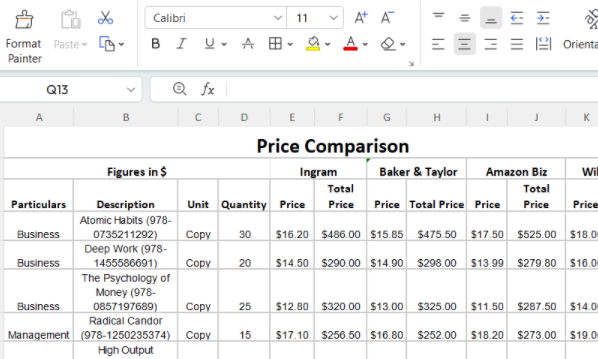
Imagine your desk on a Tuesday morning. You have three tabs open with Amazon Business listings, two PDF quotes from a local wholesaler in your inbox, and a legacy CSV export from a vendor's outdated portal. This is the definition of Data Fragmentation. Every vendor speaks a different 'language.' One uses SKU numbers; another uses 'Part IDs.' One quotes in dozens; the other in individual units. When you try to consolidate this into a Price Comparison Sheet Excel, you aren't just doing math; you are acting as a human translator. This manual translation is where errors thrive. A misplaced decimal point in a shipping fee can make a 10% saving look like a 50% loss.
The pain isn't just about the time spent; it is about the mental fatigue. Reduce manual data entry isn't just a productivity slogan; it is a mental health requirement for your procurement team. Fragmentation leads to 'stale data.' By the time you have finished normalizing the data from five different sources, the first vendor might have already updated their pricing. You are making decisions based on a snapshot of the past, not the reality of the present. This lag creates a massive blind spot in financial data automation strategies. We see teams spending 15-20 hours a week just 'cleaning' data before a single analysis is even performed.
Furthermore, fragmentation prevents historical tracking. Because it is so hard to get the data into the Price Comparison Sheet Excel today, no one bothers to look at what the price was six months ago. You lose the ability to see trends. Are your vendors slowly creeping their prices up? Is there a seasonal dip you could be exploiting? Without AI data extraction to handle the heavy lifting, these insights remain buried under a mountain of unorganized PDF files and email threads. True efficiency starts when the source of the datano longer matters because your system is smart enough to unify it automatically.
Manual Excel Price Data Entry
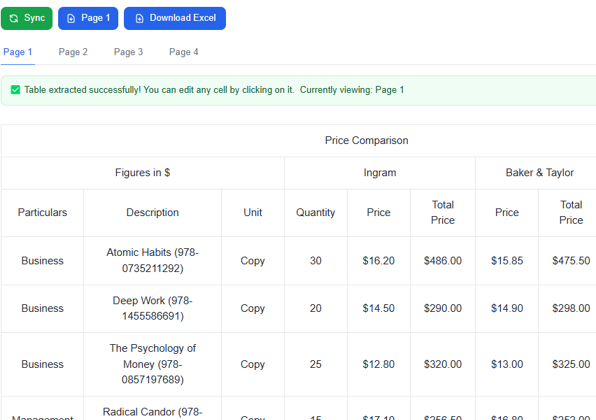
TabliSync Automated Price Extraction
Technical Evolution: Traditional OCR vs. AI Data Extraction
For years, we relied on standard batch OCR processing (Optical Character Recognition). It was better than typing, but it was brittle. Traditional OCR looks for coordinates. It says, 'The price is always in this specific box at the bottom right.' But what happens when Vendor B moves their logo and shifts the whole layout? The OCR breaks. You end up spending more time fixing the 'automated' tool than it would have taken to type the data yourself. This is the 'OCR Trap' that many companies fall into when trying to build a Price Comparison Sheet Excel.
Modern AI data extraction, like what we use at TabliSync, is different. It doesn't look at coordinates; it understands context. It uses Large Language Models (LLMs) to 'read' the document just like a human would. It knows that 'Amt Due,' 'Total,' and 'Final Balance' all mean the same thing in the context of a Price Comparison Sheet Excel. This semantic understanding allows for 99% accuracy even across thousands of different invoice layouts. When we talk about Efficiency, we are talking about moving from a system that requires constant babysitting to one that runs autonomously in the background.
| Feature | Traditional Batch OCR | AI Data Extraction (TabliSync) |
|---|---|---|
| Setup Time | Hours per template | Zero (Instant) |
| Format Flexibility | Rigid/Template-based | Fluid/Layout-agnostic |
| Error Rate | 15-20% on complex tables | Less than 1% |
| Cost Savings | Incremental | Massive (Labor reduction) |
| Scaling | Linear (More templates = More work) | Exponential (No extra effort) |
Let's look at the numbers. A mid-sized logistics firm we worked with was processing 500 quotes a month. Using manual entry, it took 3 minutes per quote (25 hours total). With traditional OCR, it took 1 minute to scan and 1 minute to fix errors (16.6 hours total). With TabliSync's AI data extraction, the time dropped to 10 seconds of verification (1.3 hours total). That is a 95% reduction in time. When you factor in the average salary of a procurement specialist, the cost savings are undeniable. This is why financial data automation is no longer a luxury; it is a competitive necessity.
The Step-by-Step Guide to Automating Your Price Comparison
Step 1: Centralize Your Data Influx. Before you can automate, you need a single 'landing zone' for all your price data. Stop letting quotes sit in individual team members' inboxes. Set up a dedicated email address (e.g., [email protected]) or a shared cloud folder. In TabliSync, you can connect these sources directly via Webhook or API. The goal is to ensure that every piece of data destined for your Price Comparison Sheet Excel is captured at the moment of arrival. This prevents the 'missing invoice' syndrome that plagues manual Reconciliation processes. Spend time mapping out where your data comes from—web portals, emails, or even photos of physical catalogs.
Step 2: Configure the AI Extraction Logic. This is where the magic happens. You don't need to write code. Instead, you define the 'Fields' you need for your Price Comparison Sheet Excel. Common fields include 'Vendor Name,' 'Item Description,' 'Unit Price,' 'Quantity,' and 'Lead Time.' Within TabliSync, you simply point the AI to a sample document. Our engine will automatically identify these headers. If you have a specific General Ledger code that needs to be associated with an item, you can set a rule for that here. This ensures that the data is not just 'scanned' but is 'structured' and ready for accounting integration. Always double-check that the AI is correctly identifying 'Total Price' versus 'Subtotal' to avoid Reconciliation errors later.
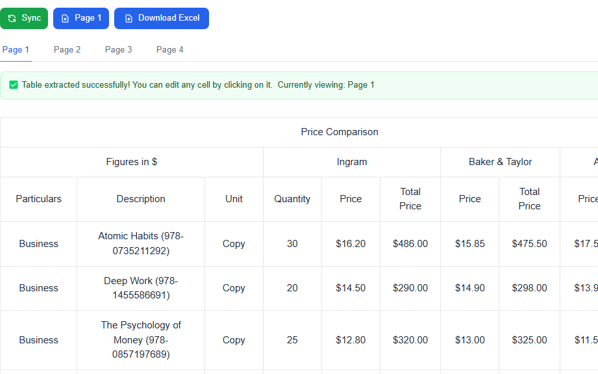
Step 3: Automate the Excel Sync. Now that the data is structured, you need to push it into your Price Comparison Sheet Excel. You can use our direct Excel integration or export as a CSV. The best practice is to have a 'Master Data' tab in your Excel file where TabliSync dumps the raw, cleaned data. Then, use a 'Comparison' tab with VLOOKUP or XLOOKUP formulas to pull that data into your Vertex42-style template. This separates the raw data from your analysis. You can even set up a Webhook so that every time a new quote is processed, your Excel file refreshes automatically. This creates a real-time dashboard that is always ready for your next negotiation meeting.
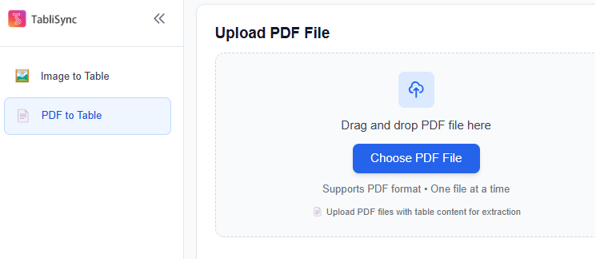
Step 1: Upload PDF File
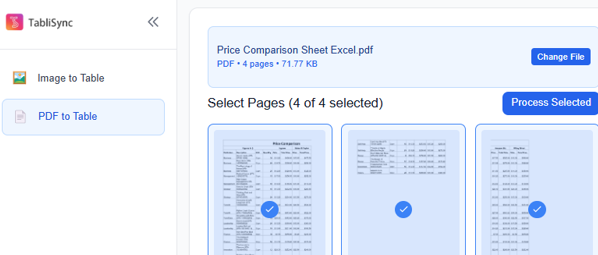
Step 2: Select the PDF file to be recognized
Step 3: TabliSync online automatic table extraction
Case Study: Reducing Procurement Costs in Manufacturing
A Tier-2 automotive parts supplier was struggling with fluctuating raw material costs. They dealt with over 40 vendors for steel, plastics, and electronics. Their Price Comparison Sheet Excel was a nightmare to maintain. Two full-time employees spent their entire Mondays just updating the prices from weekend quotes. This manual process meant they often missed the 'window' for the best spot-market prices. They needed a way to Reduce manual data entry and gain Expertise in their spending patterns. They were losing roughly $5,000 a month simply because they weren't buying from the cheapest available vendor at the right time.
After implementing TabliSync, the transformation was immediate. We set up an automated batch OCR processing workflow that monitored their procurement inbox. The AI extracted data from complex multi-page quotes, including tiered pricing based on volume. This data was pushed directly into their Price Comparison Sheet Excel and synced with their General Ledger. The team now spends only 15 minutes a week reviewing the 'Exceptions'—quotes where the AI was unsure or the price hike was over 10%. They reclaimed 78 hours of labor per month, allowing their specialists to focus on vendor relationship management instead of data entry.
The ROI was realized within the first 30 days. By having real-time data, they were able to negotiate a 4% bulk discount with a primary steel vendor by showing them live competitor pricing. The Price Comparison Sheet Excel became a powerful negotiation tool rather than just a record-keeping chore. This is the power of financial data automation. It moves your team from a reactive state to a proactive, strategic state. They are no longer 'the people who do the spreadsheets'; they are the people who save the company money. The total annual savings for this client exceeded $120,000, including labor costs and improved procurement margins.
The Role of Webhooks and Real-Time Data Integration
If you want to be on the cutting edge, you need to understand Webhooks. Think of a Webhook as a 'phone call' that one application makes to another when something happens. In our context, as soon as TabliSync finishes extracting data from a quote, it can 'call' your Excel sheet or your ERP system and say, 'Hey, I have new data for you!' This eliminates the need for manual exports and imports. It turns your Price Comparison Sheet Excel from a static document into a live application. This is a game-changer for businesses that operate in high-volatility markets like electronics or fresh produce.
Integrating with your General Ledger is the next logical step. When your Price Comparison Sheet Excel is synced with your accounting software, you close the loop on financial data automation. You can see not just what you *planned* to spend, but what you *actually* spent. This allows for automated Reconciliation. If a vendor sends an invoice that is higher than the quote you captured in your comparison sheet, the system can flag it immediately. This prevents 'price creep' where vendors slowly increase costs over time, hoping you won't notice the discrepancy between the initial quote and the final bill.
For the technical folks, using a Webhook to trigger a Power Automate or Zapier flow can further extend the utility of your data. You can set up alerts: 'If the price of Item X drops below $5.00, send a Slack message to the purchasing manager.' Now, your Price Comparison Sheet Excel isn't just a place where data goes to die; it is the brain of your procurement operation. You are leveraging AI data extraction to create a 'set and forget' system that keeps your margins healthy without requiring a single keystroke from your team.
Expert Insights: Ensuring Compliance and Data Trust
In the world of finance, 'Trust but Verify' is the mantra. When you automate your Price Comparison Sheet Excel, you must maintain a high level of Trust. This means having a clear audit trail. One of the risks of manual data entry is that if a number is typed wrong, there is often no way to know who did it or why. With AI data extraction, every piece of data is linked back to the original source document. In TabliSync, you can click on any cell in your sheet and see exactly which PDF or email it came from. This is essential for Reconciliation and internal audits.
Compliance is another critical factor. Depending on your industry (such as healthcare or defense), there may be strict regulations like GDPR or SOC2 regarding how vendor data and financial records are handled. Using a secure platform for your financial data automation is much safer than passing unencrypted Excel files around via email. A centralized system ensures that only authorized personnel have access to sensitive pricing data. This protects your 'trade secrets'—the specific discounts you've negotiated—from leaking to competitors or unauthorized staff members. Always ensure your automation partner adheres to industry-standard encryption.
Finally, let's talk about the 'Human-in-the-loop' model. We don't advocate for 100% 'blind' automation. The best Price Comparison Sheet Excel strategy involves AI data extraction doing 95% of the work, with a human providing the final 5% of Expertise. This human touch is for catching nuances that AI might miss—like a vendor's note about a temporary supply chain delay or a one-time promotional credit. By removing the drudgery of typing, you give your experts the 'bandwidth' to actually be experts. This balanced approach is the most reliable way to build a scalable procurement system.
Case Study: Retail Chain Price Optimization
A regional grocery chain with 15 locations was struggling to manage the costs of 'indirect spend'—things like packaging, cleaning supplies, and office equipment. These aren't the products they sell, but they are the products they need to run. Because these items weren't in their main inventory system, they were tracked using a messy, manual Price Comparison Sheet Excel. Each store manager was buying independently, leading to massive price variations for the exact same trash bags or printer ink across different locations.
We implemented a batch OCR processing system that consolidated all indirect spend quotes into a single TabliSync dashboard. For the first time, the head office could see that Store A was paying 20% more for cleaning supplies than Store B. By using AI data extraction to normalize all these disparate quotes, the chain was able to move to a centralized 'Preferred Vendor' model. They used the data from their Price Comparison Sheet Excel to prove to their top vendor that they deserved a high-volume discount across all 15 locations. This resulted in an immediate 15% reduction in indirect spend, totaling nearly $200,000 in annual savings.
What's more impressive is the 'Soft ROI.' Store managers, who used to spend 4 hours a week on 'admin work' related to ordering, were able to return to the floor to help customers. The financial data automation didn't just save money; it improved the customer experience. The Reconciliation process at the end of the month became a breeze because the central office had a digital 'paper trail' for every single purchase. This case study highlights that Price Comparison Sheet Excel automation isn't just for 'Big Tech'; it is for any business that wants to stop leaking money through inefficient processes.
FAQ: Mastering Automated Price Comparison
- How accurate is the AI at reading messy PDF quotes?
- TabliSync's AI data extraction uses advanced neural networks that don't rely on fixed templates. It can handle skewed scans, low-resolution photos, and complex tables with varying column widths. While batch OCR processing might struggle with a coffee stain on a paper quote, our AI uses context clues to 'deduce' the correct values, maintaining over 99% accuracy in most professional environments. If the confidence score is low, the system will flag it for human review.
- Can I integrate this with my existing QuickBooks or SAP?
- Absolutely. While the output is often a Price Comparison Sheet Excel, TabliSync is designed to be a bridge. You can use our API or Webhook functionality to push the cleaned data directly into your General Ledger. This ensures that your pricing research is perfectly aligned with your actual accounting records. This prevents the 'data silo' effect where procurement and accounting are looking at different numbers.
- What if my vendors use different currencies?
- This is a common challenge in financial data automation. Our system can be configured to detect currency symbols and apply real-time exchange rate conversions. When the data hits your Price Comparison Sheet Excel, it will already be normalized to your base currency (e.g., USD or EUR), allowing for a true 'apples-to-apples' comparison without you having to manually look up exchange rates on Google.
- Is my data secure when using AI for extraction?
- We take Trust and security very seriously. All data is encrypted both in transit and at rest using AES-256 encryption. We are compliant with major industry standards and do not use your proprietary pricing data to train public AI models. Your Price Comparison Sheet Excel remains your private intellectual property. We provide full audit logs so you can see exactly who accessed what data and when.
- How long does it take to set up a new automation workflow?
- Unlike traditional batch OCR processing which can take days of 'templating,' TabliSync works out of the box. Most users can set up their first Price Comparison Sheet Excel automation in under 15 minutes. You simply upload a few sample documents, define the fields you want to extract (like Unit Price and SKU), and connect your Excel sheet. The AI learns your specific needs almost instantly.
- Can TabliSync handle volume-based discount tables?
- Yes, this is one of our core strengths. Many quotes have complex structures like '1-50 units: $10, 51-100 units: $8.' Our AI data extraction is trained to recognize these relational tables. It will extract the entire grid into your Price Comparison Sheet Excel, allowing you to use formulas to calculate the 'Best Fit' vendor based on your specific order quantity.
- Do I need to be a 'tech person' to use this?
- Not at all. We built TabliSync for procurement and finance professionals, not software engineers. If you know how to use Price Comparison Sheet Excel formulas, you have more than enough technical skill to master our platform. The interface is 'drag-and-drop,' and we provide pre-built templates for common industries to help you Reduce manual data entry from day one.
- What happens if the vendor changes their quote format?
- In the old days of batch OCR processing, this would break everything. With TabliSync, the AI simply 're-reads' the new layout. Because it understands the *concept* of a 'Price' or a 'Part Number' rather than just its location on a page, it adapts automatically. You don't need to re-configure anything. This 'resilience' is why AI is the future of financial data automation.
Closing the Loop: Your Future with TabliSync
The days of 'brute-forcing' your data entry are over. You've seen the cost of fragmentation, the technical pitfalls of old-school OCR, and the massive ROI that comes with AI data extraction. Your Price Comparison Sheet Excel should be your most powerful strategic asset, not a source of weekly frustration. By implementing financial data automation, you aren't just saving time; you are buying the freedom to focus on high-level strategy. You are moving from 'Data Processor' to 'Value Creator.'
Stop letting manual tasks drain your team's energy and your company's bottom line. The competition is already moving toward automation. Every day you wait is another day of manual errors, missed discounts, and 'stale' pricing data. It is time to Reduce manual data entry once and for all. Take the first step toward a more efficient, data-driven procurement process today. Join the hundreds of companies that have transformed their Price Comparison Sheet Excel from a chore into a competitive advantage.
Ready to experience the power of TabliSync? Don't take our word for it—see it in action with your own data. Click the link below to start your free trial. Within minutes, you'll be watching as our AI handles the heavy lifting, leaving you with a perfect, automated price comparison. The future of procurement is here, and it’s faster, smarter, and more accurate than ever. Start your free trial of TabliSync now and reclaim your Monday mornings!
All Price Comparison Sheet Excel Articles(5)
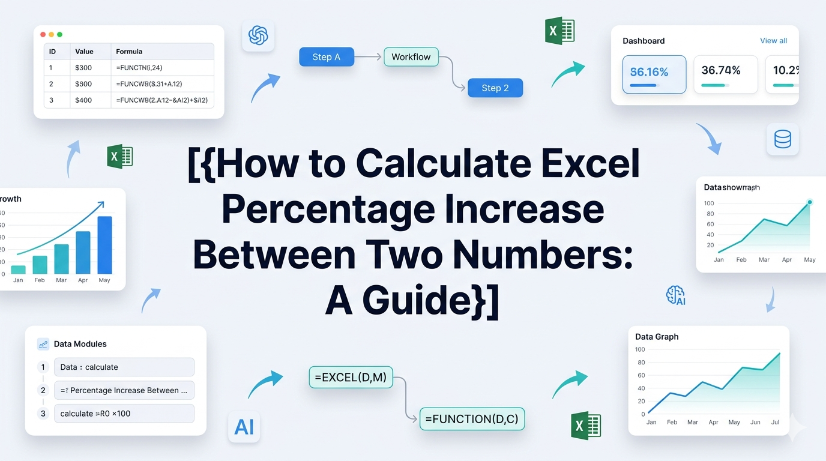
How to Calculate Excel Percentage Increase Between Two Numbers: A Guide
Eliminate manual formula errors by using structured named ranges and Excel Tables — reduces calculation review time by 60%. Automating percentage increase calculations with AI OCR and TabliSync cuts data entry overhead by 80% and eliminates transcription mistakes. Adopting dynamic Power Query workflows for repeated percent-change reporting reduces maintenance hours from 10 hours/month to under 30 minutes.

How to Find Duplicate Values in Excel: The Best Methods Compared
Identify and manage duplicates with 99.9% accuracy by leveraging native Excel tools and modern AI-driven OCR workflows. Achieve a 90% reduction in data cleaning time through automated schema-aware duplicate detection strategies. Eliminate manual entry errors completely by synchronizing unstructured data directly into structured Excel tables using TabliSync.

Two Efficient Ways to Create an Excel Drop Down List
Efficiency Gain: Implementing dynamic dropdowns reduces manual data entry time by up to 90% compared to unstructured typing. Data Integrity: Achieve 0% manual entry errors by enforcing strict Data Validation Excel rules. Scalability: Transition from static lists to dynamic Excel lists that automatically update as your dataset grows. AI Integration: Leverage AI-powered OCR to bridge the gap between physical documents and structured spreadsheet schemas.

How to Remove Duplicate Rows in Excel: A Practical Guide
Reduce data cleaning time by 90%; Achieve 0% manual entry errors using AI OCR; Eliminate redundant rows via native and automated workflows; Optimize data hygiene for B2B logistics and finance.

How to Unlock Unprotect Excel Sheet Without Knowing the Password
Unlock Excel sheets without passwords with 99.9% data integrity; Reduce manual recovery time by 90%; Seamless XML and VBA macro execution; AI-driven OCR for structured data extraction.
Stop Manual Data Entry – Extract Tables in Seconds
Convert any image or PDF table to Excel instantly with 99.9% accuracy. TabliSync's AI-powered OCR handles handwritten forms, receipts, and complex tables – then syncs directly to Google Sheets, Notion, or Airtable
Try TabliSync Free Now