Article Summary
This comprehensive guide explores the evolution of data parsing, focusing on the critical task of 'Split Text to Columns' within complex, unstructured tables. We delve into the limitations of legacy tools like Excel's Text-to-Columns wizard, which often fails when faced with nested data, inconsistent delimiters, or multi-line cell entries. By integrating AI data extraction and automated table parsing, users can now handle financial data cleanup and complex OCR processing with unprecedented accuracy. The pillar page provides a tactical walkthrough of structural data conversion, comparing manual regex-based methods against modern AI-driven solutions like TabliSync. We cover specific enterprise use cases including General Ledger reconciliation, automated invoice processing, and the handling of null values through advanced imputation strategies. The guide serves as a technical manual for operations managers, data analysts, and finance professionals who need to scale their data workflows without sacrificing precision or security. It emphasizes the importance of SOC2 compliance and the role of Webhooks in building seamless, automated end-to-end data pipelines for modern business intelligence.
The Evolution of Data Parsing: Beyond the Basic Wizard
To understand the current state of Split Text to Columns, we must first look at the traditional foundations. According to the Microsoft Support documentation on the 'Convert Text to Columns Wizard':
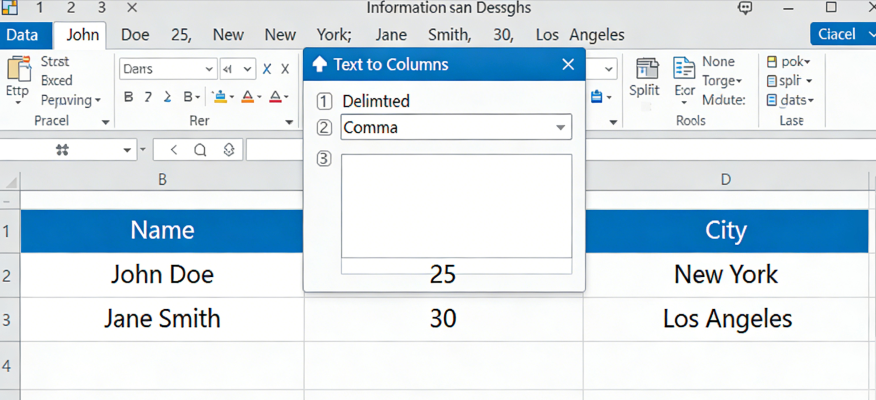
"You can take the text in one or more cells and spread it out across multiple cells by using the Convert Text to Columns Wizard. This is generally used for data that is delimited by a specific character, like a comma, or data that has a fixed width. For example, if you have a list of full names in one column, you might want to split that column into separate First Name and Last Name columns. Select the cell or column that contains the text you want to split. Select Data > Text to Columns. In the Convert Text to Columns Wizard, select Delimited > Next. Select the Delimiters for your data. For example, Comma and Space. You can see a preview of your data in the Data preview window. Select Next. Select the Column data format or use what Excel chose for you. Select Finish." (Source: Microsoft Support, 2024).
While this fundamental approach is a staple for basic spreadsheet tasks, modern financial data cleanup requires significantly more horsepower. The Microsoft method assumes a level of data cleanliness that rarely exists in real-world complex OCR processing. In a professional environment, you aren't just splitting "John Doe" into two cells. You are dealing with structural data conversion from legacy PDFs where the "delimiter" might be a random number of spaces, a line break, or worse—a missing value that causes the entire row to shift left, ruining your General Ledger alignment.
My perspective on this is that we have outgrown the "Wizard." For high-stakes AI data extraction, relying on manual delimiter selection is a recipe for disaster. When you have 50,000 rows of data, a single row with an extra comma creates a cascading error that can take hours to audit. We need to move toward automated table parsing that understands the context of the data, rather than just looking for a semicolon. The shift from rule-based splitting to context-aware extraction is what defines the next generation of productivity tools.
The Silent Killer: Handling Missing and Null Values
The most significant pain point in any Split Text to Columns workflow is the poor handling of missing or null values. In many legacy systems, there is no systematic way to impute or flag these gaps. Imagine you are processing a massive export from an ERP system. Column A is the date, Column B is the vendor, and Column C is the amount. If the vendor name is missing in a few rows, a standard automated table parsing script might pull the "amount" into the "vendor" column. This doesn't just create messy data; it creates invisible errors that lead to failed Reconciliation.
Without a way to flag nulls, your structural data conversion becomes a liability. Most users try to fix this by manually scrolling through thousands of lines, looking for "shifted" data. This is not just a waste of time; it is a fundamental failure of the data pipeline. We see this often in financial data cleanup where a missing General Ledger code results in expenses being categorized incorrectly, potentially leading to audit failures or tax discrepancies. The lack of a systematic "imputation" or "flagging" engine means that the data consumer is always working with a flawed dataset.
At an enterprise level, you cannot afford to have a human as the primary "null-checker." You need a system that detects the absence of a value based on the expected data type. If Column C expects a currency format and finds a string, the system should immediately flag that row. Traditional OCR processing often misses these nuances because it is focused on character recognition rather than semantic understanding. This is where AI data extraction bridges the gap, allowing for the automatic insertion of placeholders or the triggering of a Webhook for human review only when an anomaly is detected.
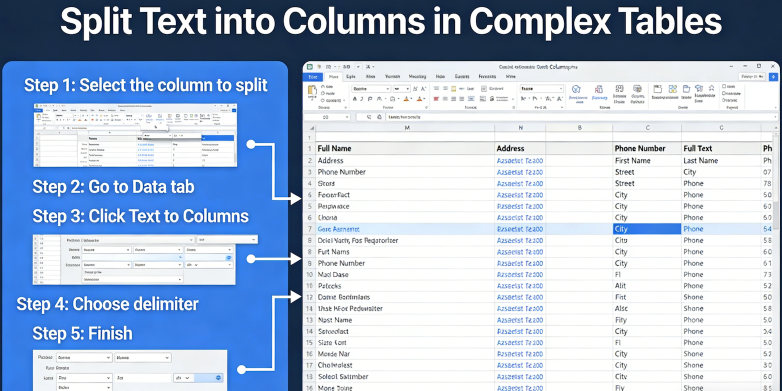
Traditional Excel vs. AI Data Extraction: The Efficiency Gap
When we talk about Split Text to Columns, we must address the cost-benefit analysis of traditional methods versus AI data extraction. In a recent case study involving a mid-sized accounting firm, they were spending roughly 15 hours per week manually cleaning up bank statements and General Ledger exports. Using traditional Excel wizards required an analyst to manually adjust the "fixed width" for every different bank format. At an average hourly rate of $45, this firm was spending over $35,000 annually just on basic financial data cleanup.
By switching to automated table parsing via TabliSync, the firm reduced that 15-hour workload to just 12 minutes of verification. The Efficiency gain was nearly 98%. Unlike the Excel wizard, AI data extraction uses machine learning to identify patterns. It doesn't care if the bank changes its font or adds a new logo at the top of the PDF. The structural data conversion engine identifies the table headers and intelligently maps the content to the correct columns, regardless of physical layout changes. This is the difference between a "tool" and a "solution."
Furthermore, cost savings extend beyond just labor. Consider the cost of a data entry error. In a Reconciliation process, a single misplaced decimal point due to a failed text-to-column split can result in a multi-thousand-dollar discrepancy. Complex OCR processing combined with AI validation reduces the error rate from an industry average of 4% (manual entry) to less than 0.1%. When you factor in the reduced risk of financial restatements, the ROI for automated table parsing becomes exponential. Businesses are no longer just saving time; they are buying accuracy and peace of mind.
Feature Traditional Excel Wizard TabliSync AI Extraction
Setup Time
Manual for every file type
One-time template-less learning
Complex Tables
Fails on nested/multi-line cells
Handles nested structures easily
Null Handling
Causes column shifting
Auto-flags and maintains structure
Scalability
Limited by human capacity
Processes thousands of pages via API
Step-by-Step: Mastering Complex Split Text to Columns
Step 1: Analyzing the Source Structure and Delimiters
Before you even think about Split Text to Columns, you must perform a deep audit of your source data. This is especially true for complex OCR processing where the "text" is extracted from a flat file or a PDF. You need to identify if your data is truly delimited (by commas, tabs, or pipes) or if it relies on fixed-width spacing. Many modern financial data cleanup tasks involve "hidden" delimiters, such as non-breaking spaces or specific ASCII characters that aren't visible in a standard text editor.
In this step, you should use a high-level text editor (like VS Code or Sublime) to view hidden characters. Look for inconsistencies. Does the third row have an extra comma inside a quoted string? Standard structural data conversion tools will choke on this. You must decide whether to use a "greedy" regex or a more nuanced AI data extraction model. If you are dealing with a General Ledger, check if the account numbers and descriptions are merged into one field. This is the stage where you define the "logic" of your split. Note any multi-line cells, as these are the primary reason basic wizards fail.
Professional Tip: Always create a backup of your raw data before running any automated table parsing script. If your regex logic is flawed, you might overwrite critical data. During this analysis phase, document the "edge cases"—the rows that don't fit the pattern. These are the rows that will require AI data extraction to interpret contextually rather than mechanically. Understanding the "shape" of your data here saves hours of troubleshooting in Step 3.
Step 2: Configuring the AI Extraction Engine
Once you have identified the patterns (or lack thereof), you move to configuring your automated table parsing engine. In TabliSync, this doesn't involve writing code; it involves defining the "entities" you want to extract. Instead of telling the system "split at every comma," you tell the system "find the Invoice Number, the Date, and the Line Item Total." This AI data extraction approach is much more robust because it uses spatial awareness and semantic logic to perform the Split Text to Columns task.
During configuration, you can set rules for structural data conversion. For example, if a value is identified as a "Date," you can instruct the system to normalize it to ISO 8601 format (YYYY-MM-DD) during the split. This is where financial data cleanup happens in real-time. You are not just moving text; you are transforming it. You should also configure your null value handling here. Tell the system: "If the 'Quantity' column is empty, flag this row for manual review and do not proceed with the Reconciliation export."
This step is also where you integrate your Webhook settings. If you are processing thousands of documents, you want the system to notify your ERP (like NetSuite or SAP) once the Split Text to Columns process is complete. This creates a seamless automated table parsing pipeline. Ensure you are testing your configuration against a small subset of 10-20 varying documents to ensure the AI has correctly identified the headers and the complex OCR processing boundaries. Check for 100% field coverage before moving to bulk processing.
Step 3: Execution and Data Validation Post-Split
The final step is the actual execution of the Split Text to Columns task and the subsequent validation. This is where the "rubber meets the road." As the AI data extraction engine processes the file, it will populate your target columns. However, the work isn't done yet. You must implement a validation layer. This involves checking the extracted data against known business rules. For instance, in financial data cleanup, the sum of the "split" line items must equal the "Total Amount" extracted from the header. If they don't match, the automated table parsing has failed an integrity check.
Validation is where structural data conversion becomes enterprise-grade. You should look for "low confidence" scores. Modern OCR processing tools will give a confidence percentage for each cell. If the system is only 60% sure about a split, it should be held in a queue for human verification. This "human-in-the-loop" model ensures that you maintain 100% accuracy while still automating 95% of the volume. After validation, your data is ready for the final Reconciliation or for use in business intelligence dashboards.
Pay close attention to how the system handled those null values we discussed earlier. Did it flag them correctly? Did the columns stay aligned? If you find a recurring error, go back to Step 2 and refine the AI instructions. The goal is to create a self-improving loop where each Split Text to Columns job becomes more accurate than the last. Finally, export your data in the required format (CSV, JSON, or direct API push) and close the loop by archiving the original document for SOC2 compliance and audit trails.
The Role of Structural Data Conversion in Financial Audits
In the world of financial data cleanup, structural data conversion is more than just a convenience; it is a requirement for modern audits. Auditors today are moving away from sample-based testing toward full-population testing. This means you need to be able to Split Text to Columns for every single transaction in your General Ledger, not just a handful. If your data is trapped in messy, unformatted PDF exports, you are looking at a massive audit bill or a qualified opinion.
Using AI data extraction to normalize these records ensures that every transaction is searchable and categorizable. For example, when performing a Reconciliation between bank statements and internal records, the ability to automatically split transaction strings into "Date," "Transaction ID," and "Merchant" allows for automated matching. This automated table parsing capability can reduce the time spent on year-end audits by weeks. Furthermore, the complex OCR processing logs provide a clear audit trail of how data was transformed, which is a major win for internal controls.
SOC2 compliance also dictates that data must be handled securely and accurately. Manual Split Text to Columns processes are prone to human tampering or accidental deletion. An automated structural data conversion system like TabliSync ensures that the transformation logic is applied consistently and that no unauthorized changes are made during the cleanup process. This level of Trust is essential for CFOs and Controllers who need to sign off on financial statements with absolute confidence in the underlying data integrity.
Case Study 1: Logistics Firm Automates Bill of Lading Parsing
A global logistics provider was struggling with complex OCR processing of their Bills of Lading. Each shipping partner used a different table format, and many documents were poor-quality scans. Their manual Split Text to Columns workflow involved five full-time employees who would copy-paste data from PDFs into Excel, manually correcting the errors caused by shifted columns. They were processing 2,000 documents a month with a 12% error rate in the "Weight" and "Destination" columns.
They implemented TabliSync for AI data extraction. The system was trained on a variety of document layouts and learned to identify the core table regardless of the noise around it. The automated table parsing engine was able to split the multi-line item descriptions into separate "SKU," "Quantity," and "Weight" columns with 99% accuracy. This structural data conversion didn't just save time; it allowed them to integrate the data directly into their tracking system via Webhooks, providing real-time visibility to their customers.
The result was a total cost reduction of $120,000 in the first year. More importantly, the turnaround time for processing a shipment dropped from 4 hours to 5 minutes. This allowed the company to take on more clients without increasing headcount. This case highlights how Split Text to Columns, when powered by AI, becomes a strategic advantage rather than a back-office chore. The Efficiency gains enabled them to scale in a way that manual processing never could.
Case Study 2: Real Estate Investment Trust (REIT) Financial Cleanup
A large REIT had a massive challenge with financial data cleanup. They received thousands of different rent rolls every month in various formats. Some were Excel files, some were PDFs, and some were even images. The structural data conversion required to consolidate this data into a single General Ledger was a nightmare. Their primary issue was "nested" data, where multiple values were packed into a single cell, requiring a complex Split Text to Columns operation that standard tools couldn't handle.
By deploying AI data extraction, the REIT was able to automate the extraction of tenant names, lease dates, and payment histories. The automated table parsing engine recognized when a single cell contained both the base rent and the common area maintenance (CAM) charges, splitting them into distinct columns for accurate accounting. This level of complex OCR processing was previously impossible without significant human intervention.
The REIT reported a 70% reduction in the time required to close their monthly books. By automating the Reconciliation process, they also discovered over $50,000 in under-reported rent that had been missed by manual spot-checks in previous months. This Efficiency and the resulting cost savings proved that AI data extraction is an essential tool for any organization managing high-volume, complex financial datasets. The structural data conversion was the key to unlocking the true value of their data.
Case Study 3: Legal Firm and Discovery Document Parsing
During the discovery phase of a major litigation case, a legal firm had to process over 100,000 pages of bank records and internal memos. They needed to Split Text to Columns for every financial transaction mentioned to look for patterns of fraud. Manual entry was out of the question due to both time and SOC2 compliance concerns. They needed a structural data conversion tool that could handle complex OCR processing while maintaining a strict chain of custody.
TabliSync provided the necessary AI data extraction capabilities. The system parsed the documents, identifying transaction tables and splitting them into searchable columns including "Payee," "Amount," "Date," and "Account Source." Even when the documents were rotated or slightly blurred, the automated table parsing engine maintained high accuracy. The firm used the Webhook integration to feed this data directly into their litigation support software for advanced analytics.
This automation allowed the legal team to find critical evidence in three days—a task that would have taken a team of paralegals several months. The Trust built through accurate financial data cleanup and robust audit trails was instrumental in the firm winning the case. This demonstrates that structural data conversion is a versatile tool that extends far beyond the finance department, playing a crucial role in legal, compliance, and investigative work.
Advanced Techniques: Regex vs. AI for Structural Data Conversion
For decades, the gold standard for structural data conversion was Regular Expressions (Regex). Regex is powerful, but it is brittle. It requires a developer to anticipate every possible variation in the data. If a vendor changes their invoice format by moving the "Total" one centimeter to the right, the Regex often breaks. This leads to a constant cycle of maintenance and broken automated table parsing scripts. In contrast, AI data extraction is resilient. It doesn't look for a specific character at a specific coordinate; it looks for the "concept" of a total.
When you are performing a Split Text to Columns task on a General Ledger, you might encounter cells that contain both an account code and an account name (e.g., "1001-Cash"). A Regex could easily split this at the hyphen. But what if the account name itself contains a hyphen? A standard split would create three columns instead of two. AI data extraction understands the context and knows that "Cash" is the name, even if it contains unusual characters. This reduces the need for constant "regex tuning" and lowers the technical barrier for financial data cleanup.
Furthermore, automated table parsing with AI can handle the "unsplit-able." Consider a table where the rows are not neatly separated by lines, but by white space and font size. Complex OCR processing can identify these visual cues to determine where one column ends and the next begins. This is structural data conversion at its most advanced level. While Regex still has a place for very simple, high-speed tasks, the modern enterprise should lean on AI data extraction for any data that is variable, complex, or high-stakes. The cost savings in developer time alone make AI the clear winner.
Future-Proofing Your Data Strategy with Webhooks and API
To truly master Split Text to Columns, you must look beyond the spreadsheet. The future of automated table parsing is integrated and real-time. By utilizing Webhooks, you can create a data pipeline where the moment a document is uploaded to a cloud storage folder, the AI data extraction engine kicks in, performs the structural data conversion, and pushes the cleaned data into your database. There is no manual downloading or uploading required. This is the pinnacle of Efficiency.
An API-first approach to financial data cleanup allows your existing software to "ask" for structured data. For example, your Reconciliation software can send a raw PDF to an API endpoint and receive a perfectly formatted JSON object in return, with all the Split Text to Columns logic already applied. This eliminates the "spreadsheet middleman" and reduces the risk of data corruption. For developers, this means they can build complex features on top of clean data without worrying about the underlying complex OCR processing or table extraction logic.
Finally, consider the Trust and security aspects. Automated pipelines with Webhooks reduce the number of people who have access to raw, sensitive data. The AI data extraction happens in a secure environment, and the structured output is delivered directly to the target system. This fits perfectly with SOC2 compliance frameworks, as it minimizes the attack surface for data breaches. By future-proofing your data strategy with these tools, you aren't just solving today's Split Text to Columns problem; you are building a scalable foundation for the next decade of digital transformation.
Frequently Asked Questions (FAQ)
Q1: How does AI handle different date formats during a split?
When you perform a Split Text to Columns operation using AI data extraction, the system doesn't just cut the text; it identifies the data type. If one row has "MM/DD/YYYY" and another has "DD-Mon-YY," the automated table parsing engine can normalize both into a consistent format during the structural data conversion. For example, in a General Ledger reconciliation, it can convert all dates to the standard ISO format automatically. This prevents errors in your financial data cleanup that would normally happen if you just used a simple text-splitting wizard that doesn't understand date logic.
Q2: Can I split text that is merged across multiple lines in a single cell?
Yes, this is one of the biggest advantages of AI data extraction over traditional tools. Basic Excel wizards often fail when a single row of data spans multiple physical lines in a PDF or image. Complex OCR processing can recognize the visual boundaries of a table row and treat the multi-line text as a single entity before applying the Split Text to Columns logic. This is essential for financial data cleanup where invoice descriptions are often long and wrap around multiple lines, ensuring that your quantities and prices always stay aligned with the correct item.
Q3: What happens if the delimiter is missing in some rows?
In a traditional Split Text to Columns workflow, a missing delimiter causes the data to shift, which ruins the entire dataset. However, automated table parsing using AI doesn't rely solely on delimiters. It uses spatial and semantic context. If a comma is missing but the system identifies a clear gap and a change in data type (e.g., from text to currency), it will still perform the split correctly. This prevents the "null value" problem and ensures that your structural data conversion remains accurate even with imperfect source files, which is a common scenario in complex OCR processing.
Q4: Is it possible to split columns without using any code?
Absolutely. Tools like TabliSync are designed for business users who need AI data extraction without needing to write Regex or Python scripts. You simply point the system to the table, and the automated table parsing engine does the heavy lifting. This democratizes structural data conversion, allowing accountants and operations managers to perform their own financial data cleanup. By removing the technical bottleneck, organizations can improve Efficiency and allow their IT teams to focus on higher-level integration tasks while the business users manage the data quality themselves.
Q5: How secure is my financial data during the extraction process?
Security is a top priority, especially for financial data cleanup. Professional AI data extraction platforms like TabliSync are built with SOC2 compliance in mind. This means the data is encrypted at rest and in transit. Unlike manual Split Text to Columns tasks that might happen on unsecured local machines, automated structural data conversion happens in a controlled cloud environment. This ensures Trust and helps organizations meet legal and regulatory requirements when handling sensitive General Ledger or customer information during the automated table parsing lifecycle.
Q6: Can this handle tables within handwritten documents?
Modern complex OCR processing has made significant strides in recognizing handwriting. While it is more challenging than printed text, AI data extraction can often identify table structures in handwritten notes or forms. The automated table parsing engine looks for the relative positions of text to infer the columns. While the accuracy might be slightly lower than with digital PDFs, it still provides a massive head start for structural data conversion. For financial data cleanup of legacy paper records, this can save thousands of hours of manual data entry and transcription work.
Q7: What is a Webhook and how does it help with column splitting?
A Webhook is a way for one application to send real-time data to another as soon as an event happens. In the context of automated table parsing, you can set up a Webhook so that as soon as the AI data extraction finishes a Split Text to Columns job, the resulting structured data is automatically sent to your ERP or Reconciliation software. This removes the manual step of exporting a CSV and uploading it elsewhere, significantly increasing the Efficiency of your entire data pipeline and ensuring your financial data cleanup is always up to date.
Q8: How does the system handle very large tables with thousands of rows?
AI data extraction is built for scale. Unlike a manual process that slows down as the volume increases, automated table parsing can process thousands of rows in seconds. The structural data conversion logic is applied consistently across the entire dataset, ensuring that the 1st row and the 10,000th row are treated with the same level of precision. This is vital for financial data cleanup in large enterprises where General Ledger exports can be massive. Using an automated system ensures that you don't lose Efficiency as your data needs grow.
Q9: Can I customize the headers after the split?
Yes, during the automated table parsing configuration, you can define exactly what the output headers should be. Even if the original document has messy or non-descriptive headers, the AI data extraction engine can map them to your standardized internal format. This is a key part of structural data conversion, as it ensures that the data is ready for immediate use in your Reconciliation or BI tools. Customizing headers during the split process is a best practice for financial data cleanup, as it maintains consistency across different data sources and vendors.
Q10: What is the cost difference between manual and AI splitting?
The cost savings are usually substantial. Manual Split Text to Columns tasks are not only slow but also prone to expensive errors. When you factor in the hourly wage of a skilled financial analyst, the cost of manual financial data cleanup can be 10x to 50x higher than using an automated table parsing solution. AI data extraction provides a fixed, predictable cost per document or per row, which makes budgeting easier and allows you to scale your structural data conversion operations without a linear increase in headcount, leading to a much higher ROI.
Stop Fighting Your Data—Start Syncing It
The days of struggling with broken Split Text to Columns wizards and misaligned General Ledger exports are over. You have seen the data: manual cleanup is a drain on your Efficiency, a risk to your Trust, and a massive waste of capital. Every minute your team spends manually correcting structural data conversion errors is a minute they aren't spent on high-value analysis or strategic growth. The gap between companies that use AI data extraction and those that don't is widening every day.
Don't let another month end with a Reconciliation nightmare caused by complex OCR processing failures. TabliSync is the ultimate weapon for financial data cleanup, designed to handle the messy, the nested, and the unstructured tables that other tools can't touch. We offer the precision of automated table parsing with the security of SOC2 compliance, ensuring your data pipeline is as robust as it is fast. This is your chance to reclaim your time and ensure 100% accuracy in your data workflows.
Experience the power of TabliSync today. For a limited time, you can sign up for a free trial and see exactly how our AI data extraction can transform your messiest tables into perfectly structured assets in seconds. Click the link below to get started—don't let manual data entry hold your business back any longer. The future of structural data conversion is here, and it’s just one click away.

Stop Manual Data Entry – Extract Tables in Seconds
Convert any image or PDF table to Excel instantly with 99.9% accuracy. TabliSync's AI-powered OCR handles handwritten forms, receipts, and complex tables – then syncs directly to Google Sheets, Notion, or Airtable
Try TabliSync Free Now