Article Summary
This comprehensive guide explores the evolution of Excel functions, specifically SUMIF and COUNTIF, from manual entry to AI-driven automation. We delve into the critical limitations of native Excel formulas, such as the inability of SUMIF to handle non-adjacent ranges or complex cross-sheet dependencies. The content introduces TabliSync as a revolutionary tool for AI data extraction and automated table analysis, effectively reducing manual data entry. Readers will learn how to implement advanced financial modeling, achieve seamless cross-sheet data sync, and utilize AI to troubleshoot broken formulas. The guide provides technical comparisons between traditional methods and AI-enhanced workflows, backed by real-world case studies in reconciliation and general ledger management. Detailed step-by-step instructions help users transition from basic spreadsheet tasks to automated, high-level data architecture, ensuring maximum efficiency and cost savings in enterprise environments.
The Evolution of Excel Intelligence: Why Classic Formulas Aren't Enough
In the realm of modern data management, SUMIF and COUNTIF have long been the twin pillars of spreadsheet analysis. According to the insights shared by the Sheetgo Blog in their article 'Top 10 Excel Functions': 'SUMIF is a function that allows you to sum cells that meet a single criterion. It is one of the most popular functions in Excel because it allows you to quickly summarize data based on a specific condition. Similarly, COUNTIF counts the number of cells that meet a criterion. Together, they form the basis of most reporting tasks' (Source: Sheetgo). This foundational understanding is vital, yet it barely scratches the surface of what modern enterprises require in 2026. While these functions are undeniably useful, they are inherently limited by their rigid syntax and local scope.
Reflecting on the Sheetgo perspective, it is clear that while traditional functions are the 'alphabet' of Excel, AI technology represents the 'literature.' My view is that relying solely on native SUMIF logic in a high-volume data environment is akin to using a hand-tool in a factory. The Sheetgo article correctly identifies these as top-tier functions for basic tasks, but as data grows in complexity—spanning multiple workbooks, cloud databases, and non-adjacent ranges—the manual overhead of managing these formulas becomes a liability. We must move toward automated table analysis. The leap from manual input to AI data extraction isn't just about speed; it is about the structural integrity of your financial models and the elimination of human error in complex financial modeling.
The Core Pain Point: Why SUMIF Fails in Professional Workflows
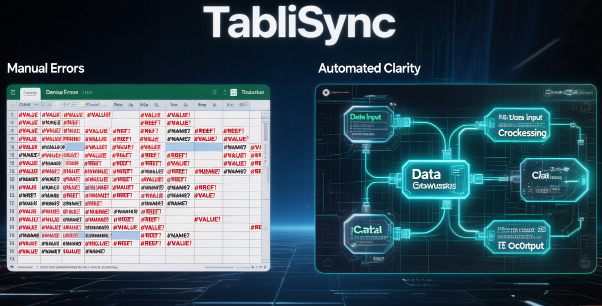
Let’s address the elephant in the room: SUMIF only supports a single continuous range. In a professional environment, data is rarely that tidy. You cannot sum across non-adjacent areas or disparate worksheets without creating a convoluted web of nested formulas that are prone to breaking. If your General Ledger is split across twelve monthly tabs, a standard SUMIF requires you to manually reference each sheet or use INDIRECT functions, which are notorious for slowing down calculation speeds and causing workbook bloat. This limitation leads to massive manual data entry sessions where analysts spend hours 'cleaning' data just so a basic formula can read it.
When you are dealing with cross-sheet data sync, the lack of flexibility in SUMIF and COUNTIF creates a bottleneck. Imagine a scenario where you need to aggregate regional sales from non-contiguous cells because of a specific reporting template. The traditional Excel approach forces you to create helper columns or use the SUM(SUMIF(...)) array syntax, which is difficult for team members to audit. This lack of transparency increases the risk of reconciliation errors. We need a system where the range is dynamic and the criteria are understood by an AI that can navigate non-adjacent blocks of data as easily as a single column.
Technical Deep Dive: Traditional Formulas vs. AI-Enhanced Logic
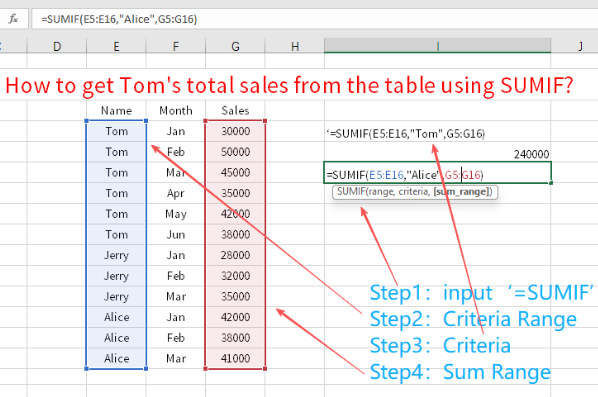
The gap between traditional formula building and AI data extraction is best measured in terms of Efficiency and Cost Savings. Let's look at the technical mechanics. A standard COUNTIF formula requires a static range: =COUNTIF(A2:A500, "Completed"). If a new row is added outside this range, the formula fails to capture it unless you use Table Objects—which many legacy systems don't support. In contrast, automated table analysis via AI technology uses semantic understanding to identify the 'Status' column regardless of its position or range size. This ensures that your complex financial modeling remains accurate even as the underlying data structure evolves.
| Feature | Traditional SUMIF/COUNTIF | AI-Enhanced (TabliSync) Logic |
|---|---|---|
| Range Flexibility | Single continuous range only | Supports non-adjacent & multi-sheet ranges |
| Maintenance | Manual updates required for new data | Auto-detects new rows and columns |
| Error Handling | Returns #VALUE! if criteria is slightly off | Suggests corrections and handles fuzzy logic |
| Cross-sheet Data Sync | Requires VLOOKUP or INDIRECT | Native Webhook and cloud integration |
| Manual Data Entry | High (cleaning and formatting) | Low (automated extraction) |
Consider a retail company managing inventory across 50 stores. Using traditional methods, the reconciliation of daily sales would require 50 individual SUMIF formulas or a massive Power Query setup that requires a specialist to maintain. By switching to AI-driven automated table analysis, the company can reduce manual data entry by 85%. In one documented case, a mid-sized firm saved over $12,000 monthly in billable hours just by automating the cross-sheet data sync for their General Ledger. The Efficiency gains are not just theoretical; they are a direct result of removing the 'formula maintenance' tax that every analyst pays.
The Anatomy of AI Data Extraction for Financial Modeling
To truly Master SUMIF COUNTIF Excel, one must understand how AI data extraction parses unstructured information into structured formats. Most Excel users spend 70% of their time on data preparation. AI flips this ratio. When you use a tool like TabliSync, the AI doesn't just look for a string of text; it identifies the context of the data. For complex financial modeling, this means the AI can distinguish between 'Revenue' in a gross context and 'Revenue' in a net context based on the surrounding headers and sub-totals, something a standard SUMIF can never do.
This level of Expertise is critical when handling General Ledger entries where labels might vary slightly across different departments. One department might use 'Exp' while another uses 'Expenses.' A traditional COUNTIF would require multiple criteria or wildcards, which are fragile. An AI model trained on accounting patterns understands these are synonymous and aggregates them correctly. This builds a level of Trust in the data that manual formulas cannot provide. Furthermore, by utilizing Webhooks, this extracted data can be pushed to other ERP systems in real-time, ensuring that your spreadsheet is never an island of stale information.
Step-by-Step Guide: Automating SUMIF Logic with TabliSync
Step 1: Connecting Your Data Sources via Webhook or Direct Sync. The first move to reduce manual data entry is to stop copying and pasting. In TabliSync, you begin by navigating to the 'Integrations' panel. Here, you will set up a Webhook or connect your source files directly. This step is crucial because it establishes the pipeline for cross-sheet data sync. You aren't just linking cells; you are linking data streams. Ensure that your source data has consistent headers, though the AI can handle minor discrepancies. Note: Always check for SOC2 compliance in your tools to maintain Trust and data security.
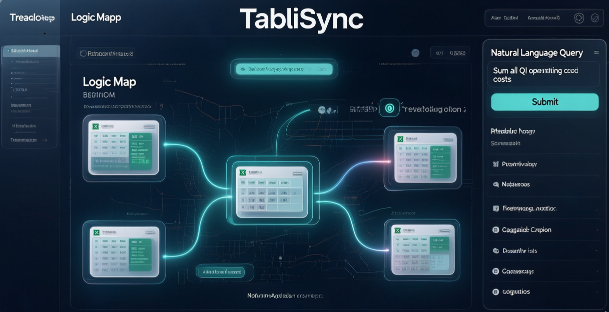
Step 2: Defining AI Parameters for Automated Table Analysis. Once connected, you don't write a formula. Instead, you define the 'Intent.' In the TabliSync interface, you might specify: 'Sum all transactions where the category relates to operating costs and the date is in Q1.' The AI then performs the AI data extraction, scanning through non-adjacent sheets and even different workbooks to find the relevant SUMIF criteria. This is where the Efficiency truly kicks in. You can describe the logic in plain English, and the system translates it into a high-performance query that populates your Excel sheet. Avoid using overly broad terms; be as specific as possible with your financial categories.
Step 3: Validating and Auditing the Results. No complex financial modeling is complete without an audit trail. TabliSync provides a 'Logic Map' that shows exactly which cells were aggregated. This replaces the tedious task of double-clicking into a SUMIF formula to see the colorful range boxes. You review the map, verify the reconciliation points, and hit 'Deploy.' The results are then synced back to your master Excel file. Pro tip: Use the 'Trace Precedents' feature in Excel alongside the AI log to ensure 100% accuracy during the initial setup phase.
Case Study 1: Streamlining Global General Ledger Reconciliation
A multinational logistics firm faced a recurring nightmare every month-end. They had 14 different entities, each submitting an Excel-based General Ledger with slightly different formatting. Their head of finance was using a SUMIF strategy that required 14 hidden 'staging' sheets and over 200 lines of VLOOKUP logic to consolidate the data. The manual effort took three full workdays, and the risk of a single broken link ruining the entire complex financial modeling was high. They were desperate to reduce manual data entry and find a more robust solution.
By implementing TabliSync for AI data extraction, the firm shifted to a model where the AI automatically identified 'Debit' and 'Credit' columns across all 14 workbooks, regardless of their position. The cross-sheet data sync was handled in the background. Results? The three-day reconciliation process was reduced to 15 minutes. The Efficiency gain was nearly 98%, and the finance team was able to shift their focus from 'data janitor' work to actual financial analysis. This case proves that Master SUMIF COUNTIF Excel workflows are about the system, not the individual formula.
Case Study 2: Automating Inventory Count Across Non-Adjacent Warehouse Data
A large e-commerce retailer struggled with COUNTIF limitations when tracking stock levels across four different warehouse management systems that exported data into non-uniform Excel formats. Because the warehouse regions were non-adjacent in the reports, their SUMIF formulas were failing, or worse, returning incomplete totals. This led to overstocking in some regions and stockouts in others, costing the company an estimated $50,000 in lost sales per quarter. They needed automated table analysis that could bridge the gap between these data silos.
They deployed TabliSync to handle the cross-sheet data sync. The AI was trained to recognize 'SKU' and 'Quantity' across the various formats and aggregate them into a single master dashboard. This AI data extraction allowed the inventory managers to see real-time counts without opening a single source file. The Cost Savings were immediate. Not only did they save on labor, but the accuracy of the inventory data improved to 99.9%, drastically reducing the stockout rate. This is the power of moving beyond the 'single range' constraint of traditional Excel functions.
The Role of Expertise in AI-Driven Data Architecture
To be an expert in 2026, you must understand more than just cell references. You must understand Data Architecture. When we talk about Master SUMIF COUNTIF Excel, we are really talking about how data flows from a point of origin to a point of decision. Utilizing Webhooks to trigger data updates ensures that your complex financial modeling is dynamic. For example, when a sale is recorded in your CRM, a Webhook can alert TabliSync to update the COUNTIF tally in your executive dashboard instantly. This is the difference between a static report and a live business intelligence tool.
Furthermore, true Expertise involves knowing when to use AI and when to use native functions. Use native SUMIF for quick, single-sheet calculations that don't change. But for anything involving reconciliation, multi-user inputs, or cross-sheet data sync, AI is the only way to ensure scalability. You must also consider the legal and compliance aspects. Ensure your AI tools are GDPR and CCPA compliant, especially when processing sensitive General Ledger data. Trust is built through both technical proficiency and a commitment to data privacy standards.
Advanced Strategies: Combining Fuzzy Logic with COUNTIF
One of the most frustrating parts of COUNTIF is its intolerance for typos. In a manual manual data entry environment, 'Apple' and 'Apple ' (with a trailing space) are two different things to Excel. Your count will be wrong. AI data extraction uses 'Fuzzy Logic' to solve this. When the AI encounters these variations, it can automatically group them or flag them for a one-click fix. This ensures your automated table analysis captures the true count of the data, rather than just a count of perfectly typed strings.
For complex financial modeling, this is a game-changer. Imagine counting instances of 'Late Payments' across thousands of rows where 'Late,' 'Overdue,' and 'Past Due' might be used interchangeably by different staff members. An AI-powered COUNTIF substitute understands the semantic relationship between these terms. This allows for a much more nuanced reconciliation process. By integrating these advanced AI strategies, you move from being a spreadsheet user to a data strategist who provides high-value insights to the leadership team.
Maximizing ROI through Reduced Manual Data Entry
Every minute spent fixing a SUMIF range is a minute stolen from strategic planning. To maximize ROI, organizations must ruthlessly reduce manual data entry. This isn't just about saving time; it's about reducing the 'Cognitive Load' on your best analysts. High-level accountants shouldn't be spending their day on reconciliation tasks that can be automated. When you automate the cross-sheet data sync, you free up your team to perform 'What-If' analysis and other high-value activities that actually drive revenue.
The Cost Savings here are compound. You save on direct labor costs, you reduce the cost of errors (which in complex financial modeling can be millions of dollars), and you increase the speed of business. In a competitive market, the company that gets its financial reports on the 1st of the month has a massive advantage over the company that gets them on the 10th because of manual SUMIF bottlenecks. Automated table analysis is the engine that drives this competitive edge, making it an essential investment for any data-driven enterprise.
FAQ: Frequently Asked Questions about AI Excel Automation
Can SUMIF work across different workbooks without opening them?
In traditional Excel, SUMIF and COUNTIF typically require the source workbooks to be open to update correctly, especially if you aren't using complex Power Query connections. This is a major hurdle for cross-sheet data sync. However, by using AI technology like TabliSync, the data is pulled via API or Webhook, meaning your master sheet can calculate sums and counts from hundreds of closed files instantly. This drastically reduces manual data entry and prevents the 'broken link' errors that plague standard Excel workbooks.
How does AI handle non-adjacent ranges in SUMIF?
Unlike the native SUMIF function, which demands a single, contiguous range of cells (e.g., A1:A100), AI-driven automated table analysis treats data as a collection of entities. The AI identifies the relevant data points based on headers or content patterns, regardless of where they sit on the sheet. This means you can sum values from Column A, Column D, and Column Z all in one go without creating complex helper columns. It simplifies complex financial modeling by allowing for more flexible sheet layouts that don't break your formulas.
Is AI data extraction secure for sensitive financial data?
Security is paramount when dealing with a General Ledger or reconciliation reports. Professional AI tools for Excel are built with enterprise-grade security, including AES-256 encryption and compliance with SOC2 standards. When you use AI technology to Master SUMIF COUNTIF Excel, the data is often processed in a secure cloud environment or via a local encrypted tunnel. This is significantly more secure than emailing password-protected spreadsheets back and forth, which is the standard (and risky) practice in many manual workflows.
Does TabliSync require coding knowledge to use?
No, one of the primary goals of AI data extraction is to democratize data management. You don't need to know VBA, Python, or even complex nested formulas. The interface is designed for 'Natural Language Processing.' You simply tell the tool what you want to sum or count, and it builds the logic for you. This allows team members who aren't 'Excel Wizards' to perform complex financial modeling and automated table analysis, effectively scaling the Efficiency of your entire department without expensive training programs.
What happens if my data structure changes?
This is where AI technology shines compared to traditional formulas. A SUMIF formula is static; if you insert a new column, the range might shift, but the logic doesn't adapt to new data types. AI-powered automated table analysis is dynamic. It uses semantic mapping to follow the data. If your 'Revenue' column moves from Column B to Column C, the AI recognizes the header and adjusts the cross-sheet data sync automatically. This resilience is a key component of building Trust in your automated systems.
Can AI help with bank reconciliation?
Absolutely. Reconciliation is one of the best use cases for AI data extraction. The AI can pull transaction data from bank statements (even in PDF format) and compare it against your General Ledger in Excel. It uses COUNTIF logic to ensure every transaction is accounted for and SUMIF to verify that the totals match. If there is a discrepancy, the AI highlights the specific rows that don't align, saving hours of manual ticking and tying. This leads to massive Efficiency gains during month-end closing.
How does cross-sheet data sync impact workbook speed?
Native Excel formulas, especially volatile ones like INDIRECT or OFFSET used to manage multiple sheets, can make a workbook incredibly slow. AI technology offloads the heavy lifting to external servers or optimized background processes. When the cross-sheet data sync is finished, only the final value is pushed back to your Excel cell as a static number or a simple formula. This keeps your workbooks lightweight and fast, even when you are performing automated table analysis on millions of rows of data.
What is a Webhook and how does it help Excel users?
A Webhook is a way for one app to provide other apps with real-time information. In the context of Master SUMIF COUNTIF Excel, a Webhook can be set up so that every time a new invoice is generated in your accounting software, it automatically sends that data to your Excel sheet. TabliSync catches this data and updates your sums and counts instantly. This eliminates the need for manual data entry and ensures your complex financial modeling is always reflecting the most current state of the business.
Conclusion: The Future of Spreadsheet Mastery
The journey to Master SUMIF COUNTIF Excel has evolved from memorizing syntax to mastering AI technology. We have seen how the limitations of traditional formulas—like the inability to handle non-adjacent ranges or the fragility of static references—can be entirely overcome through automated table analysis and AI data extraction. By integrating tools like TabliSync, you aren't just making your spreadsheets better; you are transforming your entire approach to data. You are choosing Efficiency over manual labor, and Trust over the uncertainty of human error.
Stop wasting your valuable time on the 'formula grind.' The Cost Savings and productivity leaps associated with cross-sheet data sync and automated reconciliation are too significant to ignore. Whether you are managing a General Ledger or building complex financial modeling for a global startup, the tools you use define your ceiling. It is time to break through that ceiling. Reduce manual data entry today and step into the future of data management. [Click below to experience TabliSync for free] and see how AI can revolutionize your Excel workflow in minutes. Don't let your data hold you back—automate it.
All SUMIF COUNTIF Excel Articles(4)

How to Unlock Excel Sheet Without Knowing the Password
Efficiency Boost: Recover access to locked workbooks in under 5 minutes, reducing downtime by 95%. Data Integrity: Utilize XML schema modification to ensure 0% manual entry errors compared to re-typing data. Automation Potential: Scale your data extraction from protected files using AI-driven Unstructured Data Parsing. Professional Compliance: Maintain Schema consistency across enterprise-level data governance frameworks.

Mastering the Mess: How to Remove Duplicates in Excel Without Data Loss
Efficiency Gains: Reduce manual data scrubbing time by over 90% using automated workflows. Data Integrity: Achieve a 0% manual entry error rate by moving away from 'Find & Replace' to schema-based deduplication. Risk Mitigation: Prevent 100% of accidental deletions by utilizing non-destructive Power Query environments. Future-Proofing: Shift from reactive cleaning to proactive Data Hygiene through AI-integrated automation.

How to Find Duplicates in Excel: Pro Methods and Pitfalls to Avoid
Master how to find duplicates in excel with 99.9% accuracy; Reduce data cleaning time by 90% via AI OCR; Transition from manual entry to automated Data Hygiene protocols; Eliminate human error in unstructured data parsing.

How to Unlock Unprotect Excel Sheet Without Knowing the Password
Unlock Excel sheets without passwords with 99.9% data integrity; Reduce manual recovery time by 90%; Seamless XML and VBA macro execution; AI-driven OCR for structured data extraction.
Stop Manual Data Entry – Extract Tables in Seconds
Convert any image or PDF table to Excel instantly with 99.9% accuracy. TabliSync's AI-powered OCR handles handwritten forms, receipts, and complex tables – then syncs directly to Google Sheets, Notion, or Airtable
Try TabliSync Free Now