AI Excel-to-Dashboardコンバーター:スプレッドシートをインタラクティブな可視化Dashboardへ
静的なExcelデータを、1クリックで動的・共有可能なDashboardに変換 - デザインやコーディング不要
Excelデータを、関係者に伝わるプロ品質のDashboardへ自動変換します。リアルタイムKPI追跡、インタラクティブフィルター、レスポンシブ表示を短時間で実現。従来は数か月かかるDashboard構築を、数分で完了できます。
What is AI Excel-to-Dashboardコンバーター:スプレッドシートをインタラクティブな可視化Dashboardへ?
Excelデータを、関係者に伝わるプロ品質のDashboardへ自動変換します。リアルタイムKPI追跡、インタラクティブフィルター、レスポンシブ表示を短時間で実現。従来は数か月かかるDashboard構築を、数分で完了できます。
TabliSync:AIでExcel作業を自動化
実務のワークフロー、データ処理、チーム協業のために設計されたインテリジェントな自動化レイヤーです。
ワンクリック変換
任意の Excel スプレッドシートをシングルクリックでプロフェッショナルなインタラクティブダッシュボードに変換します。デザインスキルは不要です。
ワンクリック変換
任意の Excel スプレッドシートをシングルクリックでプロフェッショナルなインタラクティブダッシュボードに変換します。デザインスキルは不要です。...
インタラクティブ要素
ユーザーがデータを動的に探索できるフィルター、ドリルダウン機能、インタラクティブチャートを追加します。
インタラクティブ要素
ユーザーがデータを動的に探索できるフィルター、ドリルダウン機能、インタラクティブチャートを追加します。...
リアルタイム更新
ソース Excel データが変更されると、ダッシュボードが自動的に更新されます。ライブデータで関係者に情報を提供し続けます。
リアルタイム更新
ソース Excel データが変更されると、ダッシュボードが自動的に更新されます。ライブデータで関係者に情報を提供し続けます。...
モバイルレスポンシブ
ダッシュボードはレスポンシブデザイン最適化でデスクトップ、タブレット、モバイルデバイスで完璧に動作します。
モバイルレスポンシブ
ダッシュボードはレスポンシブデザイン最適化でデスクトップ、タブレット、モバイルデバイスで完璧に動作します。...
共有とコラボレーション
安全なリンクでダッシュボードを共有したり、ウェブサイトに埋め込んだり、会議用のプレゼンテーションとしてエクスポートします。
共有とコラボレーション
安全なリンクでダッシュボードを共有したり、ウェブサイトに埋め込んだり、会議用のプレゼンテーションとしてエクスポートします。...
カスタムブランディング
会社の色、ロゴ、ブランディングを適用して、アイデンティティに一致するプロフェッショナルなダッシュボードを作成します。
カスタムブランディング
会社の色、ロゴ、ブランディングを適用して、アイデンティティに一致するプロフェッショナルなダッシュボードを作成します。...
ワンクリック変換
任意の Excel スプレッドシートをシングルクリックでプロフェッショナルなインタラクティブダッシュボードに変換します。デザインスキルは不要です。
インタラクティブ要素
ユーザーがデータを動的に探索できるフィルター、ドリルダウン機能、インタラクティブチャートを追加します。
リアルタイム更新
ソース Excel データが変更されると、ダッシュボードが自動的に更新されます。ライブデータで関係者に情報を提供し続けます。
ワンクリック変換
任意の Excel スプレッドシートをシングルクリックでプロフェッショナルなインタラクティブダッシュボードに変換します。デザインスキルは不要です。...
インタラクティブ要素
ユーザーがデータを動的に探索できるフィルター、ドリルダウン機能、インタラクティブチャートを追加します。...
リアルタイム更新
ソース Excel データが変更されると、ダッシュボードが自動的に更新されます。ライブデータで関係者に情報を提供し続けます。...
モバイルレスポンシブ
ダッシュボードはレスポンシブデザイン最適化でデスクトップ、タブレット、モバイルデバイスで完璧に動作します。...
共有とコラボレーション
安全なリンクでダッシュボードを共有したり、ウェブサイトに埋め込んだり、会議用のプレゼンテーションとしてエクスポートします。...
カスタムブランディング
会社の色、ロゴ、ブランディングを適用して、アイデンティティに一致するプロフェッショナルなダッシュボードを作成します。...
モバイルレスポンシブ
ダッシュボードはレスポンシブデザイン最適化でデスクトップ、タブレット、モバイルデバイスで完璧に動作します。
共有とコラボレーション
安全なリンクでダッシュボードを共有したり、ウェブサイトに埋め込んだり、会議用のプレゼンテーションとしてエクスポートします。
カスタムブランディング
会社の色、ロゴ、ブランディングを適用して、アイデンティティに一致するプロフェッショナルなダッシュボードを作成します。
TabliSyncの動作を見る:製品デモ
複雑なワークフローが数分でシンプルな自動化プロセスに変わる様子をご覧ください。
データを生き生きとさせる
退屈な Excel シートを、説得力のあるデータストーリーを語り注目を集める魅力的でインタラクティブなダッシュボードに変換します。
関係者を感動させる
エグゼクティブやクライアントを驚かせるプロフェッショナルでインタラクティブなダッシュボードでデータを提示します。インサイトを無視できないものにします。
開発時間を節約
何ヶ月ものダッシュボード開発をスキップします。数週間ではなく数分でプロフェッショナルな結果を取得します。コーディングやデザインスキルは不要です。
Before / After:TabliSyncによる変化
手作業のフローと自動化を比較し、時間短縮とミス削減を確認できます。
従来のやり方
従来のやり方
- 手作業が多く時間がかかる
- 担当者ごとに運用がばらつく
- 入力ミスや抜け漏れが起きやすい
- 更新や保守で手戻りが発生する
- 業務拡大時にスケールしにくい
TabliSync を使う場合
スマートなやり方
- AI が繰り返し作業を自動化
- 運用を標準化し結果が安定
- 人的ミスと手戻りを削減
- 変更をすばやく反映可能
- 大規模運用にも対応しやすい
仕組み - 簡単な開始ステップ
開始してデータワークフローを変革するためのシンプルなステップ
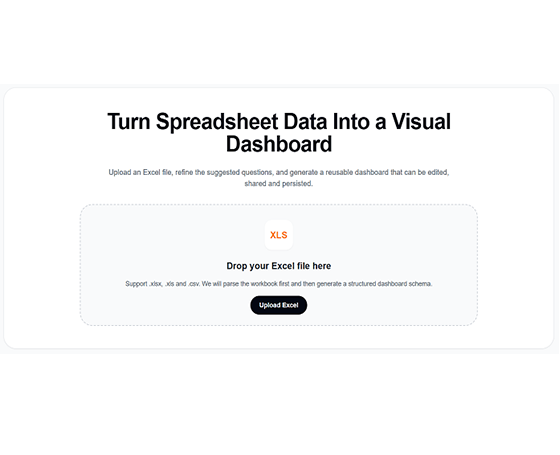
Excel ファイルをアップロード
データを含む Excel スプレッドシートをインポートします。AI が構造を分析し、主要なメトリクスとディメンションを識別します。
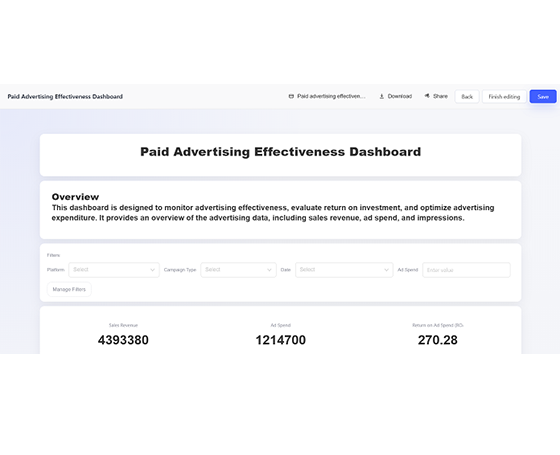
AI がダッシュボードを作成
AI がデータに基づいて適切なチャート、フィルター、レイアウトを持つインタラクティブなダッシュボードを自動的に生成します。
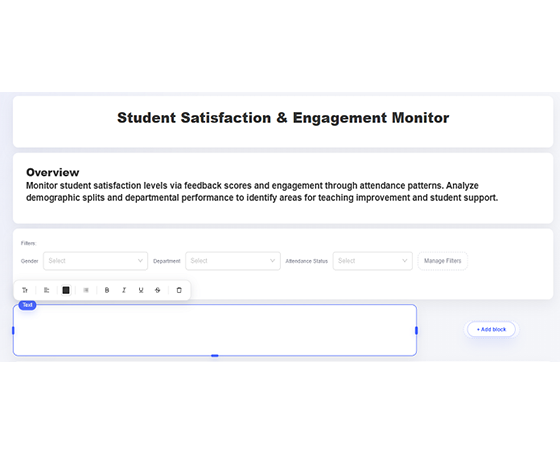
カスタマイズと調整
色を調整し、フィルターを追加し、チャートタイプを変更し、好みに合わせてレイアウトをカスタマイズします。
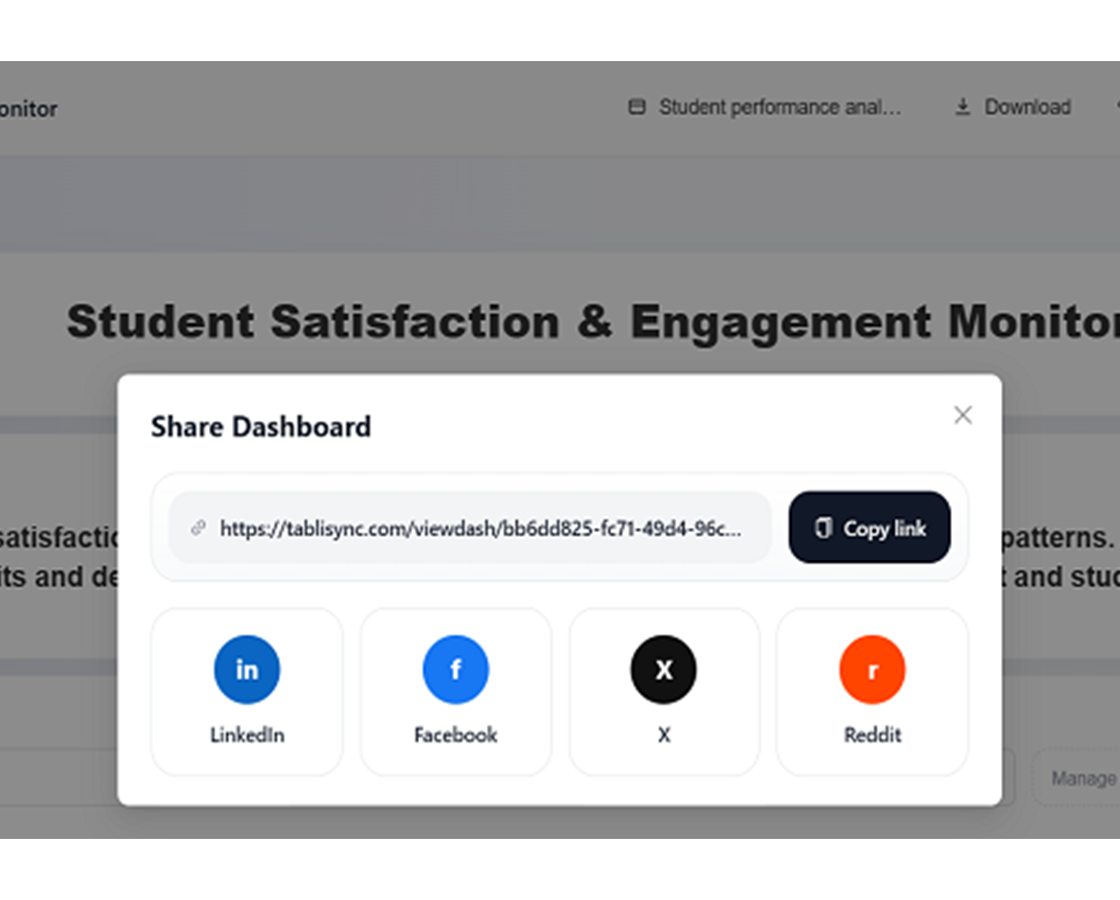
共有とコラボレーション
安全なリンクでダッシュボードを公開したり、ウェブサイトに埋め込んだり、プレゼンテーション用にエクスポートします。
Excel ファイルをアップロード
データを含む Excel スプレッドシートをインポートします。AI が構造を分析し、主要なメトリクスとディメンションを識別します。
AI がダッシュボードを作成
AI がデータに基づいて適切なチャート、フィルター、レイアウトを持つインタラクティブなダッシュボードを自動的に生成します。
カスタマイズと調整
色を調整し、フィルターを追加し、チャートタイプを変更し、好みに合わせてレイアウトをカスタマイズします。
共有とコラボレーション
安全なリンクでダッシュボードを公開したり、ウェブサイトに埋め込んだり、プレゼンテーション用にエクスポートします。
実際の成果:成功事例
TabliSyncで毎週時間を節約しているチームや専門家の声をご紹介します。
"リアルタイムダッシュボードで経営会議の質が大きく向上しました。"

Richard Martinez
CEO
"以前はグラフ更新に何時間もかかっていましたが、今は自動更新です。"

Karen White
ビジネスアナリスト
"関係者に好評です。Excelのスクショ共有よりはるかに良いです。"

Steven Clark
プロダクトマネージャー
役割別ダッシュボード活用
スプレッドシートをKPIダッシュボードに変換。
営業チーム
売上データを、パフォーマンス、パイプライン、収益メトリクスを追跡するための動的なダッシュボードに変換します。
営業パフォーマンスダッシュボード
パイプライン追跡の可視化
収益トレンド分析
マーケティング部門
キャンペーンデータを、ROI、エンゲージメント、コンバージョンメトリクスを監視するためのインタラクティブなダッシュボードに変換します。
キャンペーンパフォーマンス追跡
ソーシャルメディア分析ダッシュボード
リード生成の可視化
エグゼクティブリーダーシップ
財務および運用データから戦略的意思決定のためのエグゼクティブダッシュボードを作成します。
エグゼクティブ KPI ダッシュボード
財務パフォーマンス追跡
運用メトリクスの可視化
プロジェクトマネージャー
プロジェクトデータを、進捗、リソース、成果物を追跡するための視覚的なダッシュボードに変換します。
プロジェクトタイムラインダッシュボード
リソース配分追跡
マイルストーン進捗の可視化
よくある質問
この機能の使い方や期待できる結果、連携方法などのよくある質問にお答えします。
Excel ファイルを対話型ダッシュボードに素早く変換するには?
ブックをアップロードし、KPI の優先事項を選択し、AI にチャートブロックとフィルターを生成させます。レイアウトを調整してチームに公開してください。
ソース Excel データが変更されると、ダッシュボード指標は自動更新されますか?
はい。更新動作を設定し、KPI パネルが更新されたソースデータと一致するようにできます。手動でのレポート再構築作業を減らせます。
週次経営 KPI レビューに最適なダッシュボード構造は?
上部サマリー行、トレンドパネル、差異分解、地域・製品別ドリルダウンフィルターを使用します。意思決定会議をより速く一貫させます。
チームはロールベース権限で同一ダッシュボードを共有できますか?
はい。統制された権限でダッシュボードビューを共有し、関係者とステークホルダーが適切な詳細レベルを閲覧できます。
AI 生成ダッシュボードに会社ブランディングを適用できますか?
はい。色、ラベル、ビジュアルスタイルをカスタマイズし、内部レポート基準と対外プレゼン要件に合わせられます。
TabliSync はダッシュボードのソーススプレッドシートデータをどのように安全かつ非公開に保証しますか?
ブックのアップロードとダッシュボード生成は暗号化チャネルと workspace レベルのアクセス制御で処理されます。ダッシュボード出力の閲覧・編集・共有を管理できます。
TabliSync が単なるコンバーター以上である理由
クロスプラットフォームデータ管理、コラボレーション、自動化のための AI 搭載ツールの完全なエコシステムでデータワークフローを変革します。
クロスプラットフォーム同期
変換されたデータは Google Sheets、Notion、Airtable、その他のプラットフォーム間で自動的に同期されます。手動でのインポートやエクスポートは不要です。
リアルタイムコラボレーション
抽出されたデータを即座に共有してコラボレーションします。チームメンバーは異なるプラットフォーム間でデータにアクセス、編集、分析できます。
自動更新
自動データ更新スケジュールを設定します。スプレッドシートは手動介入なしに最新の状態を保ち、何時間もの反復作業を節約します。
完全なデータエコシステムに参加
統合された AI ツールスイートでデータの可能性を最大限に引き出す
データワークフローを変革する準備はできましたか?
データニーズに TabliSync を信頼する何千ものプロフェッショナルに参加しましょう
クレジットカード不要 • 毎日データを同期する10,000+ユーザーに参加