よりスマートなExcel作業のためのAIスプレッドシートアシスタント:自然言語データ操作
複雑なExcelタスクをシンプルな会話へ - 自然言語で編集・整形・自動化
複雑なExcel数式に悩む必要はありません。AIスプレッドシートアシスタントは自然言語の指示を理解し、高度なデータ操作を即座に実行します。データクレンジング、数式生成、自動化ワークフローまで、やりたいことを言葉で伝えるだけです。
What is よりスマートなExcel作業のためのAIスプレッドシートアシスタント:自然言語データ操作?
複雑なExcel数式に悩む必要はありません。AIスプレッドシートアシスタントは自然言語の指示を理解し、高度なデータ操作を即座に実行します。データクレンジング、数式生成、自動化ワークフローまで、やりたいことを言葉で伝えるだけです。
TabliSync:AIでExcel作業を自動化
実務のワークフロー、データ処理、チーム協業のために設計されたインテリジェントな自動化レイヤーです。
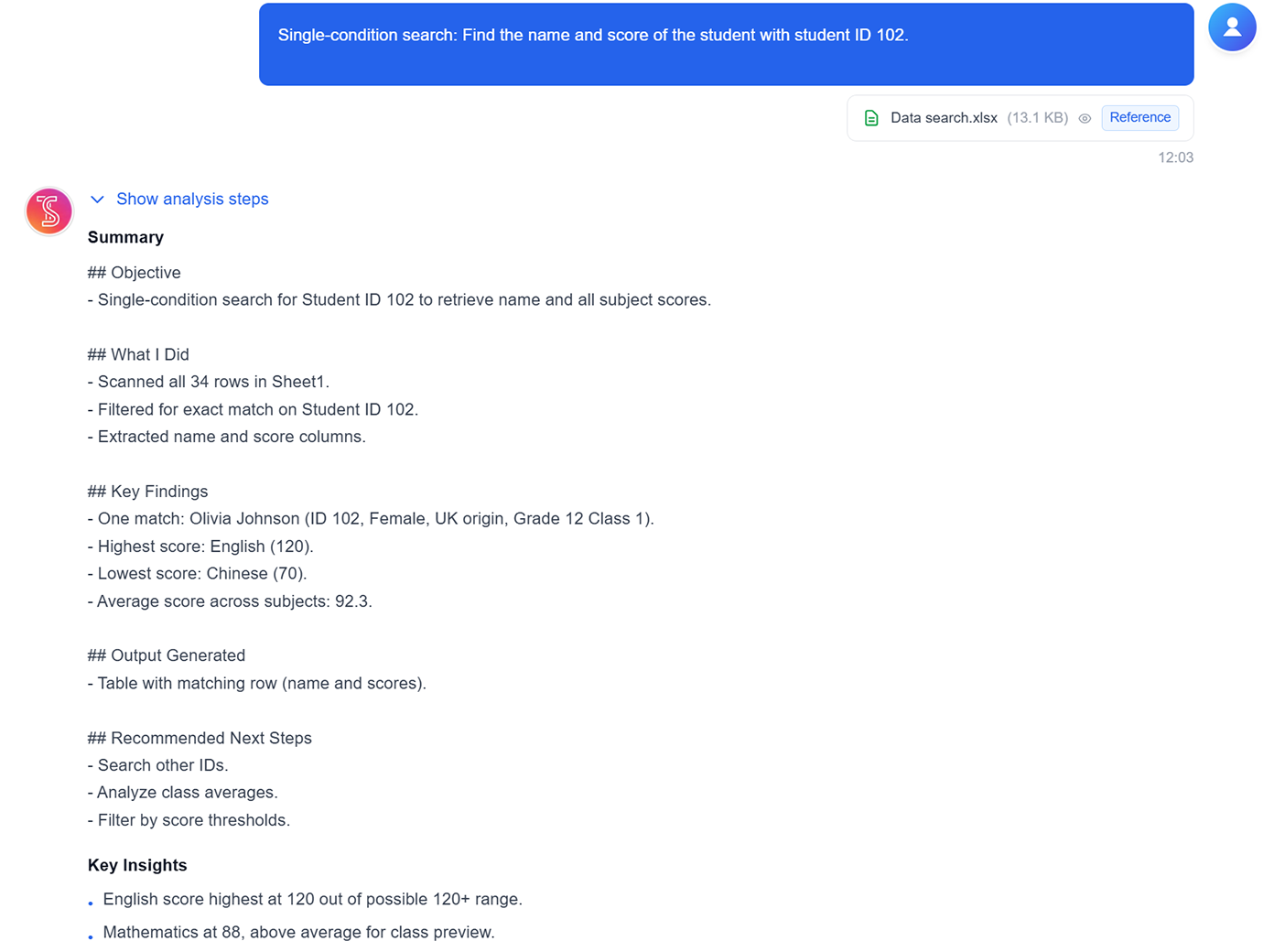
単一条件データ検索
特定のID・キーワード・フィールド値で一致する行を、数式なしで検索します。
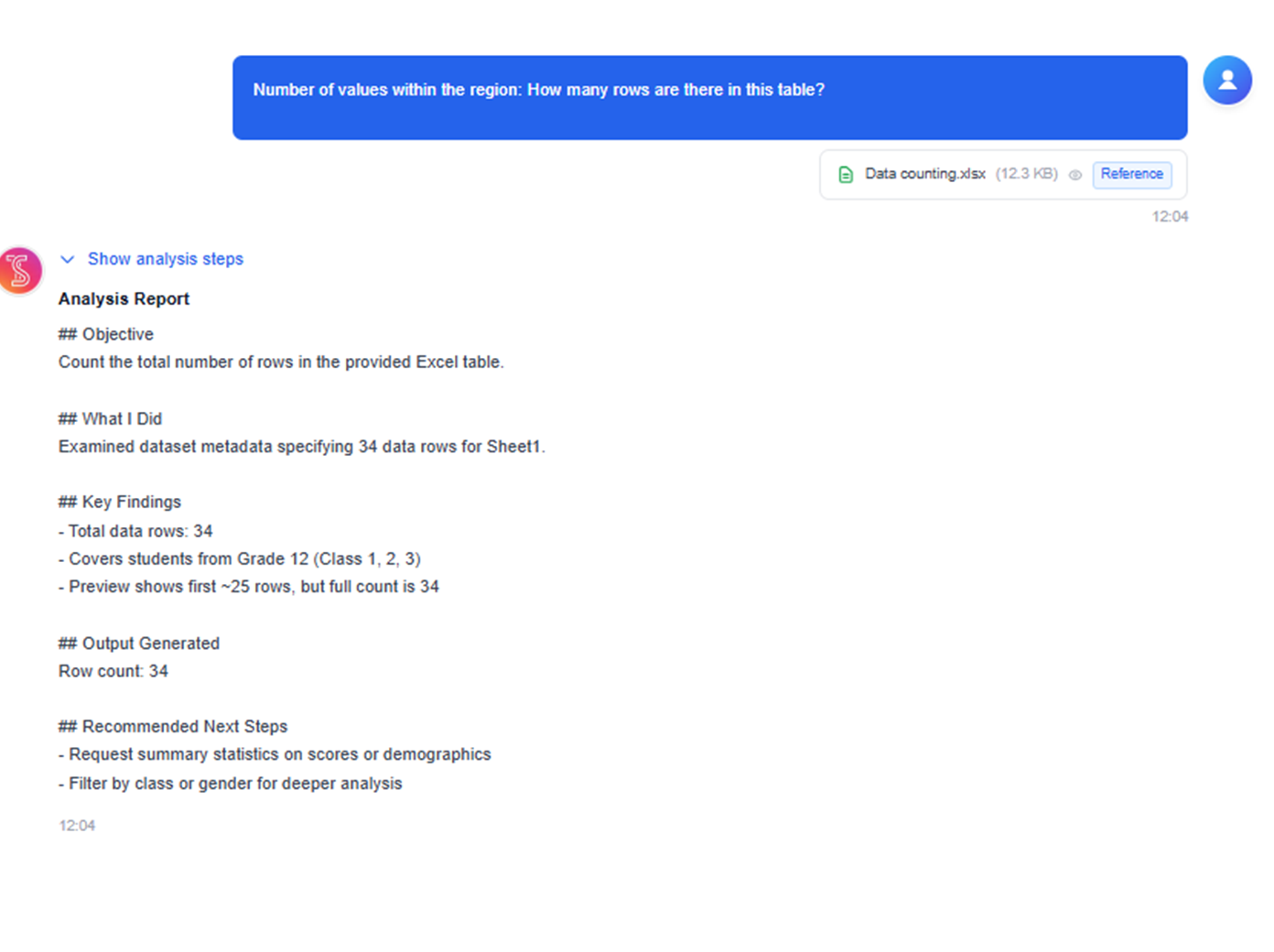
範囲データのカウント
選択した範囲の行数や値を素早く集計し、軽い探索やQAチェックに活用できます。
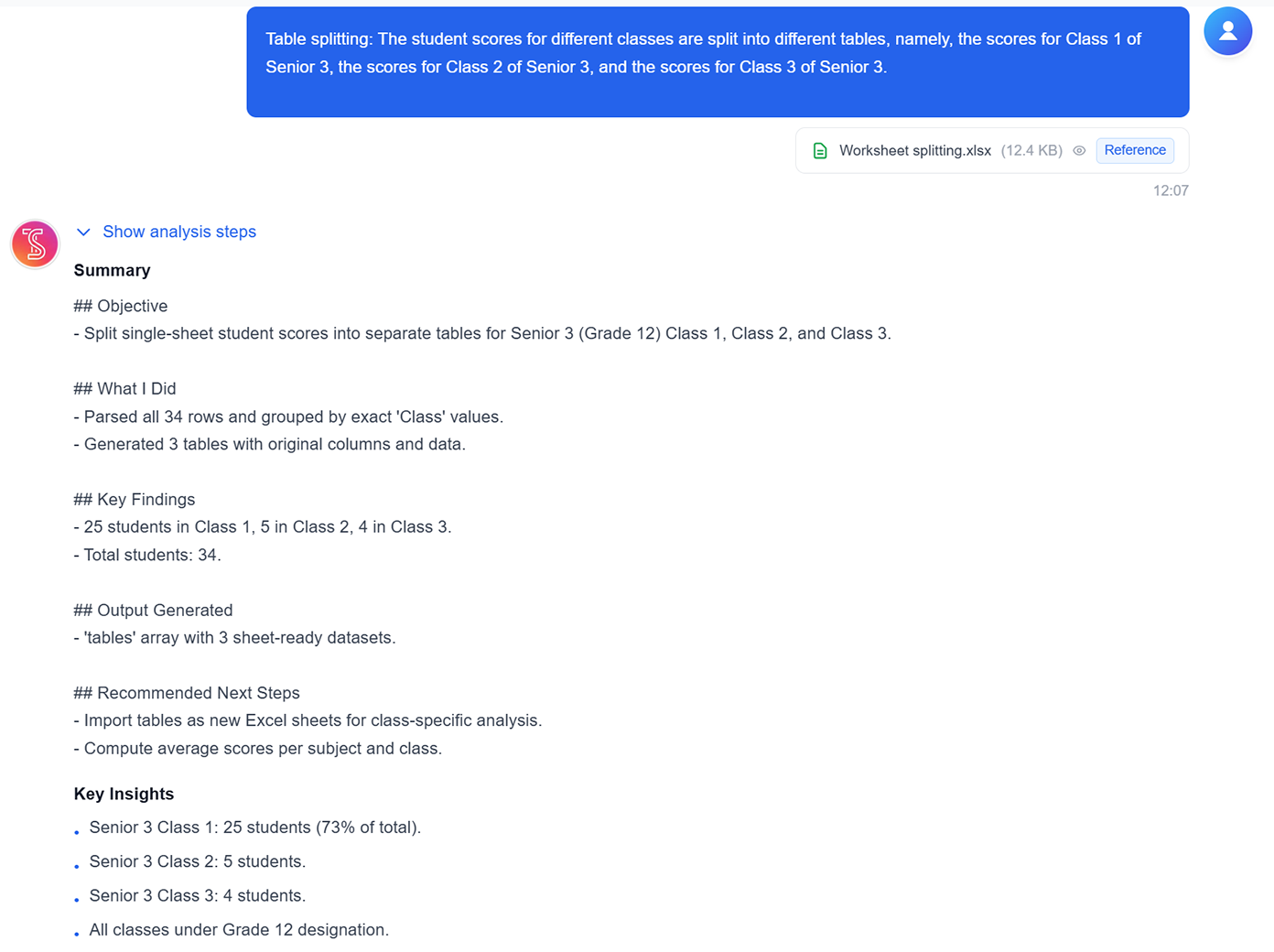
ルールでシート分割
カテゴリやクラスなどの条件で、1つのシートを複数の結果テーブルに分割します。
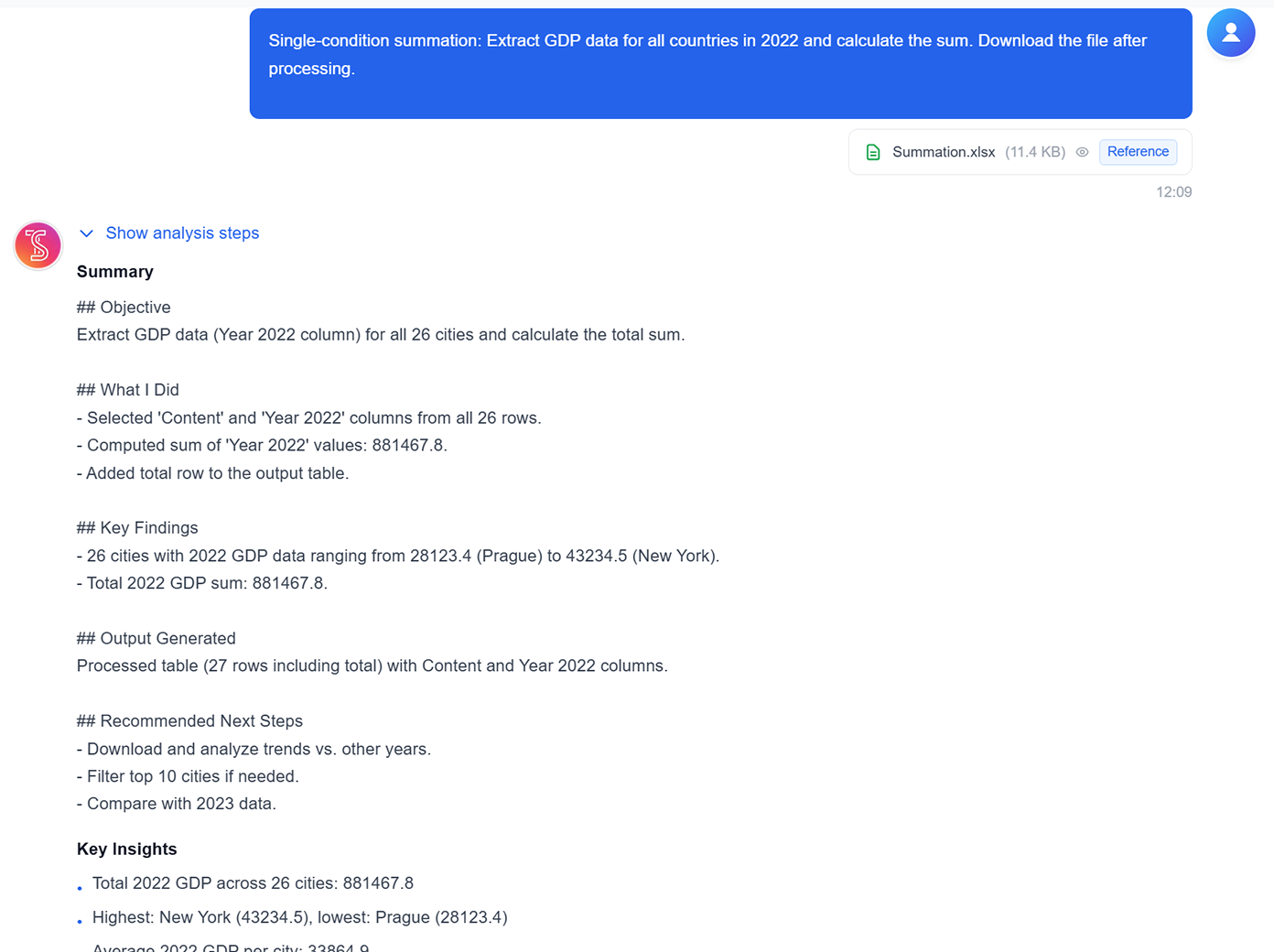
条件付き合計
年・地域・商品セグメントなどのフィルタ部分集合の合計を一括集計します。
平均・極値分析
選択データから平均、最大/最小などを直接計算します。
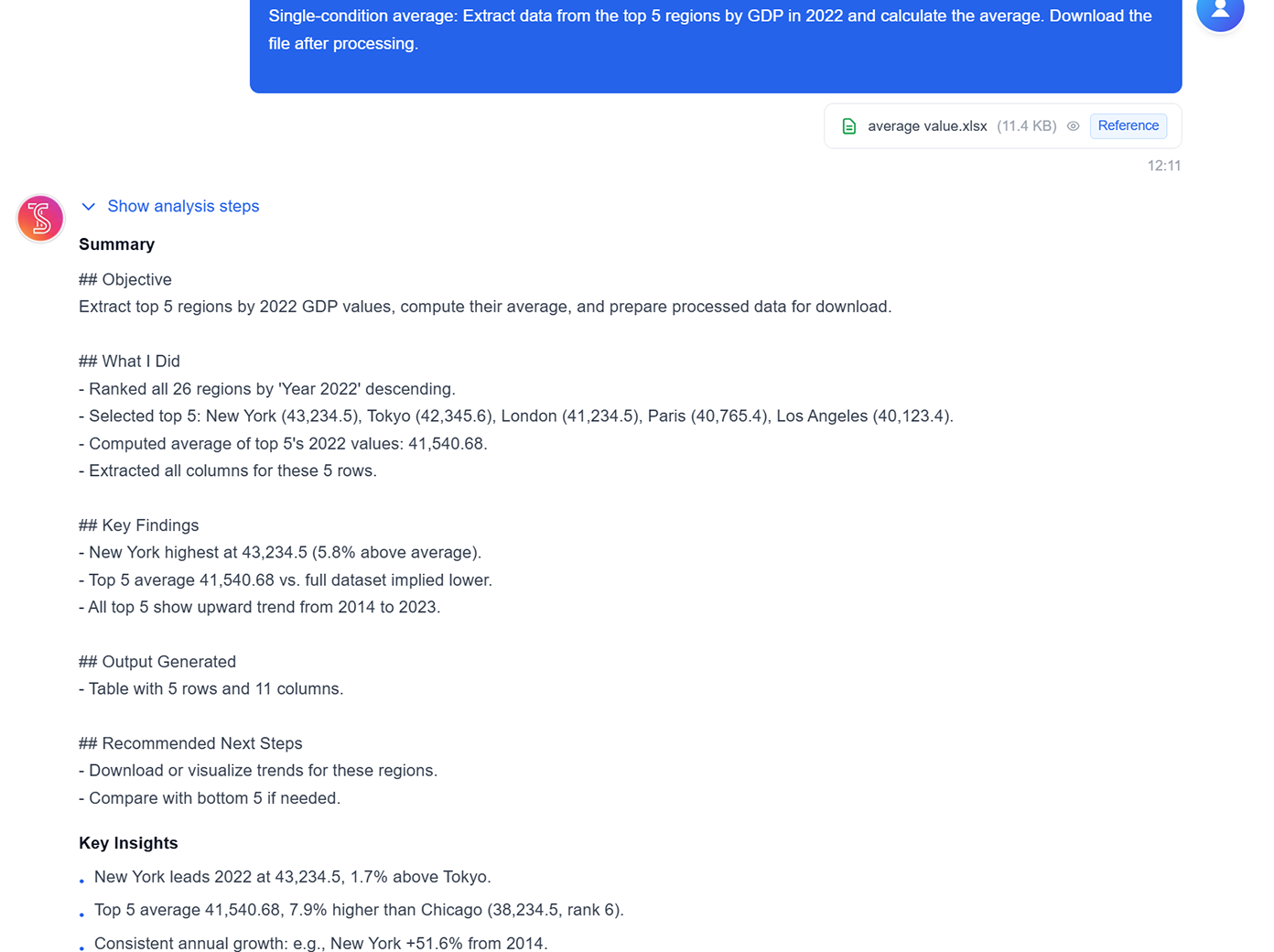
論理・複合計算
分類ロジックや多段計算を実行し、ダウンロード可能な分析テーブルを生成します。
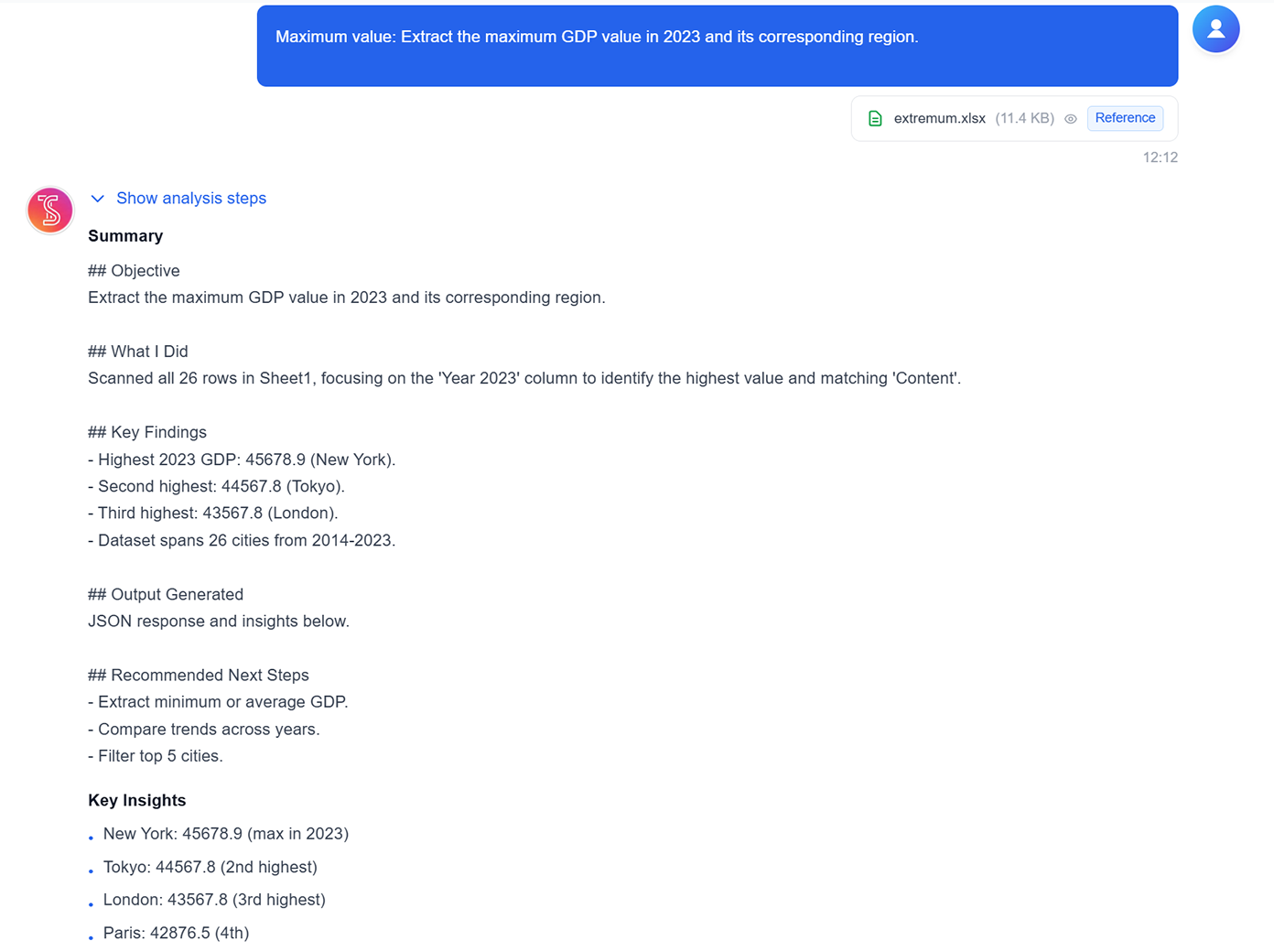
単一条件データ検索
特定のID・キーワード・フィールド値で一致する行を、数式なしで検索します。
範囲データのカウント
選択した範囲の行数や値を素早く集計し、軽い探索やQAチェックに活用できます。
ルールでシート分割
カテゴリやクラスなどの条件で、1つのシートを複数の結果テーブルに分割します。
条件付き合計
年・地域・商品セグメントなどのフィルタ部分集合の合計を一括集計します。
平均・極値分析
選択データから平均、最大/最小などを直接計算します。
論理・複合計算
分類ロジックや多段計算を実行し、ダウンロード可能な分析テーブルを生成します。
TabliSyncの動作を見る:製品デモ
複雑なワークフローが数分でシンプルな自動化プロセスに変わる様子をご覧ください。
あらゆるタスクで即座のヘルプを取得
複雑な数式の作成、データセットの分析、テンプレートの作成など、何が必要でも - AI アシスタントに尋ねるだけです。スプレッドシート内で直接、数秒でエキスパートガイダンスを取得します。
効率を向上
Google でスプレッドシート関数を検索したり、自分でスプレッドシートを作成したりする時間を無駄にしないでください。AI スプレッドシートアシスタントがよりスマートかつ迅速に作業できるよう支援し、より少ない時間でより多くを達成できます。
データのロックを解除
AI アシスタントは単純な質問に答えるだけでなく、データを分析し、インサイトを発見し、スプレッドシートで作業する最良の方法を提案します。チャート、テンプレートなどを作成します。
Before / After:TabliSyncによる変化
手作業のフローと自動化を比較し、時間短縮とミス削減を確認できます。
従来のやり方
従来のやり方
- 手作業が多く時間がかかる
- 担当者ごとに運用がばらつく
- 入力ミスや抜け漏れが起きやすい
- 更新や保守で手戻りが発生する
- 業務拡大時にスケールしにくい
TabliSync を使う場合
スマートなやり方
- AI が繰り返し作業を自動化
- 運用を標準化し結果が安定
- 人的ミスと手戻りを削減
- 変更をすばやく反映可能
- 大規模運用にも対応しやすい
仕組み - 簡単な開始ステップ
開始してデータワークフローを変革するためのシンプルなステップ
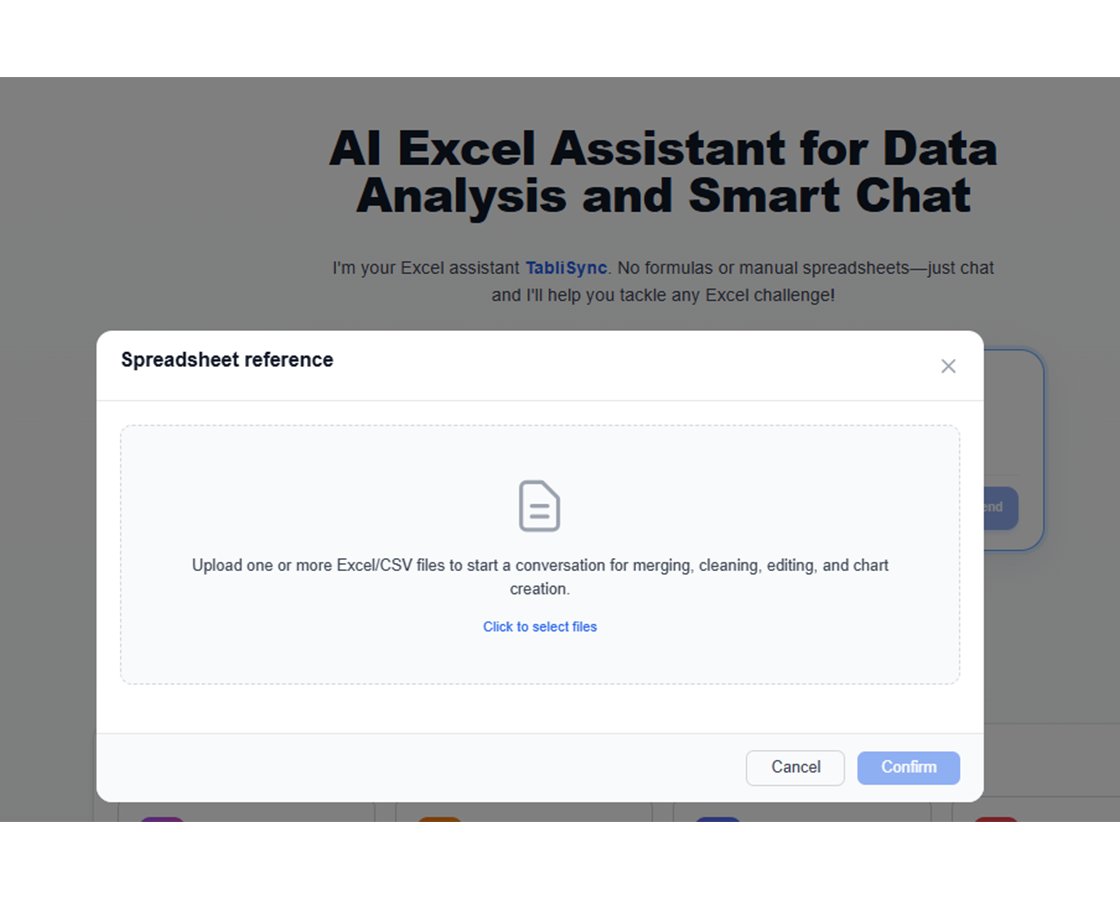
データをアップロード
安全なプラットフォームにデータをアップロードするだけです。既存のシステムとのシームレスな統合を保証するために、さまざまなファイル形式とデータ型をサポートしています。
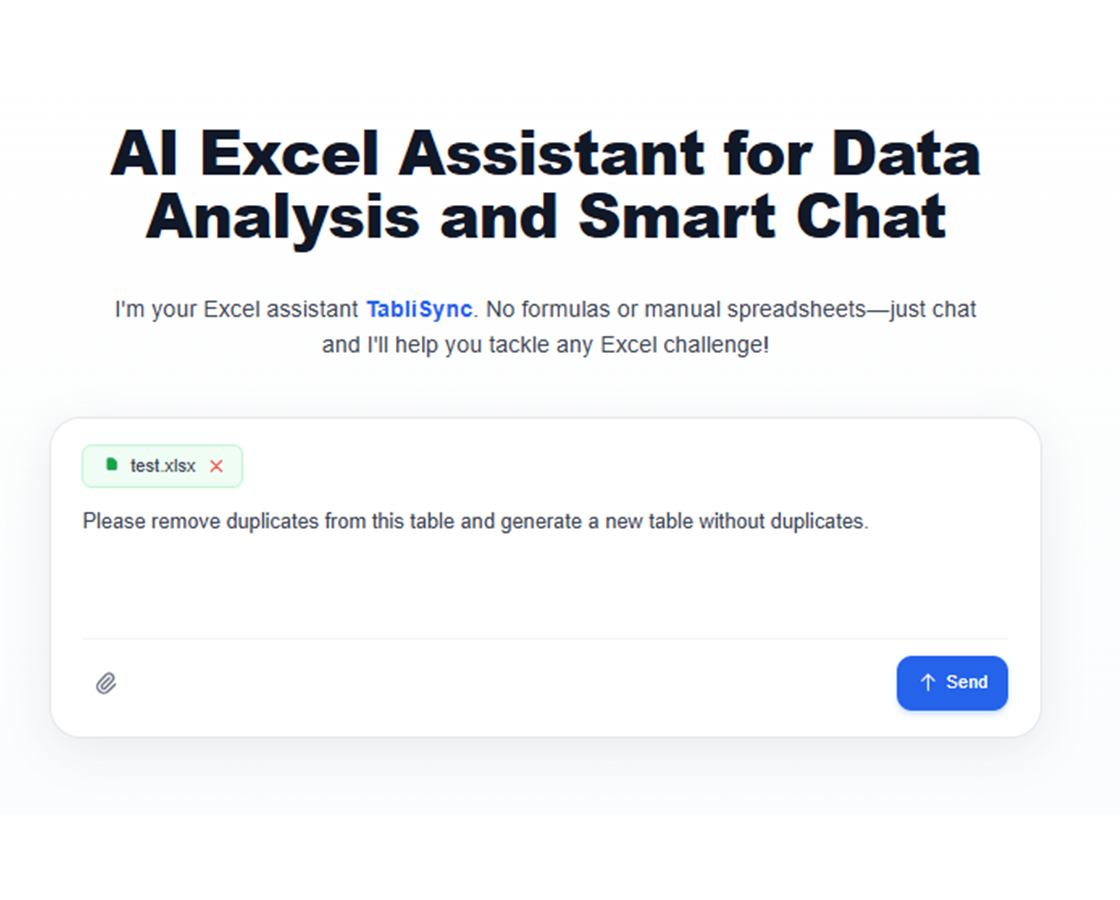
質問をする
「利益率の列を追加」や「フルネームを名と姓に分割」などのコマンドを入力すれば、AI アシスタントが残りを処理します。
インサイトを確認してダウンロード
AI の変更をリアルタイムでプレビューし、フォローアップリクエストで調整します。結果に満足したら、洗練されたスプレッドシートを即座にエクスポートします。
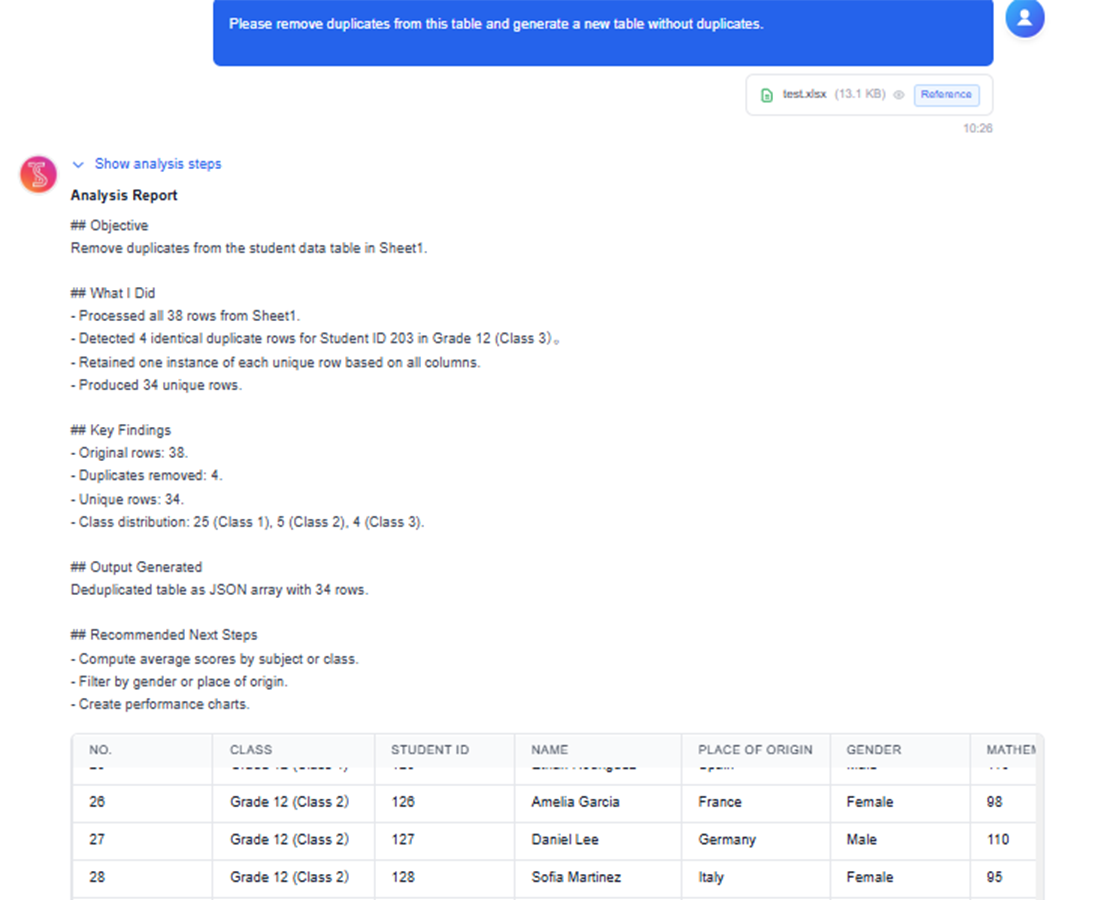
共有とコラボレーション
Excelをダウンロードするか、Google Sheets・Notion・Airtableへ直接同期できます。チームと共有して、シームレスに協業を続けられます。
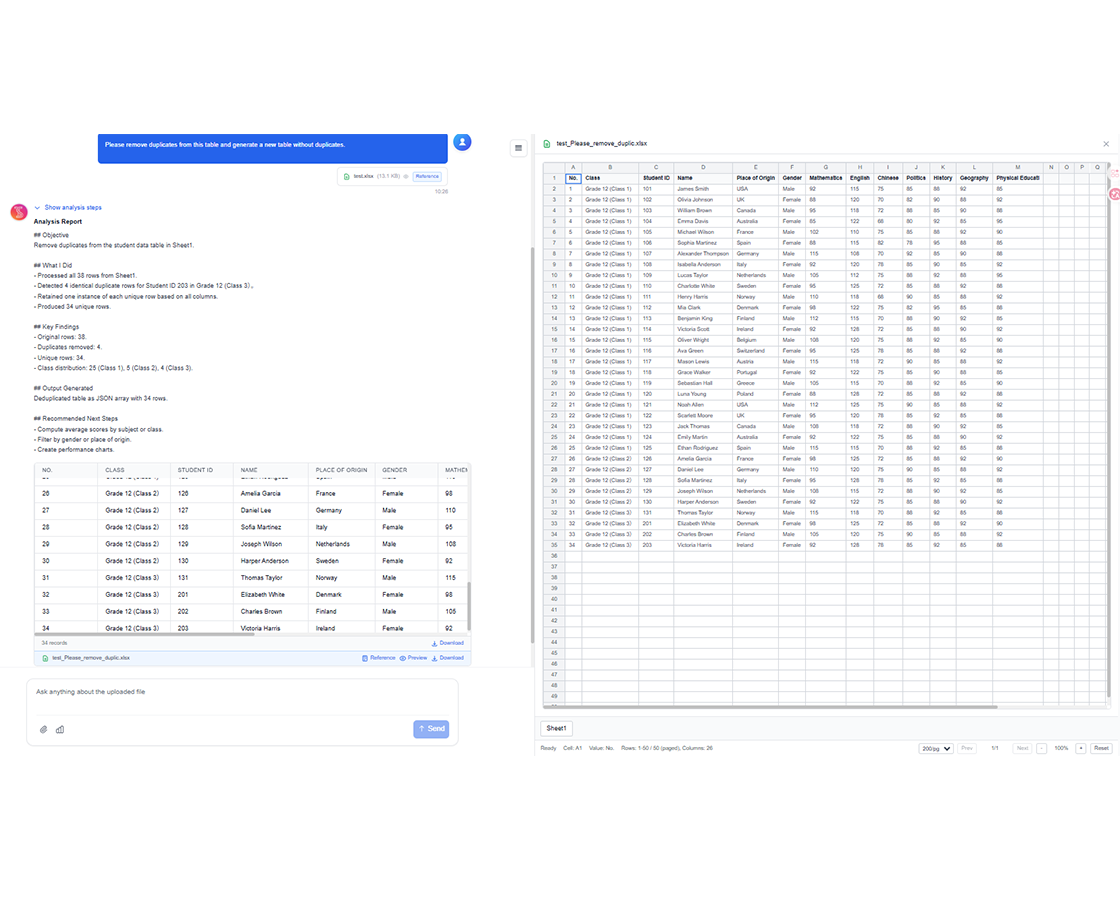
データをアップロード
安全なプラットフォームにデータをアップロードするだけです。既存のシステムとのシームレスな統合を保証するために、さまざまなファイル形式とデータ型をサポートしています。
質問をする
「利益率の列を追加」や「フルネームを名と姓に分割」などのコマンドを入力すれば、AI アシスタントが残りを処理します。
インサイトを確認してダウンロード
AI の変更をリアルタイムでプレビューし、フォローアップリクエストで調整します。結果に満足したら、洗練されたスプレッドシートを即座にエクスポートします。
共有とコラボレーション
Excelをダウンロードするか、Google Sheets・Notion・Airtableへ直接同期できます。チームと共有して、シームレスに協業を続けられます。
実際の成果:成功事例
TabliSyncで毎週時間を節約しているチームや専門家の声をご紹介します。
"毎週壊れたドロップダウンを直していましたが、今は不要です。"

Amanda Rodriguez
オペレーションマネージャー
"数式に悩むよりずっと簡単です。"

James Wilson
営業コーディネーター
"Excelは最初からこうあるべきでした。"

Emily Davis
財務アナリスト
チーム別スプレッドシート運用
日々のスプレッドシート作業を自動化する方法。
ビジネスアナリスト
複雑な数式や SQL クエリを書かずに、複雑なデータセットから迅速なインサイトを取得します。生データを実行可能なビジネスインテリジェンスに変換します。
月次予算調整と差異分析
顧客セグメンテーションと行動分析
財務トレンド分析と予測
KPI ダッシュボードの作成と保守
マーケティングチーム
シンプルな日本語の質問でキャンペーンパフォーマンスと顧客行動データを分析します。戦略的意思決定を促進する説得力のあるレポートを作成します。
キャンペーン ROI 分析と最適化
顧客生涯価値の計算
A/B テスト結果分析
リードスコアリングと資格認定
営業チーム
顧客データを整理し、営業パフォーマンスを追跡し、コミッションレポートを楽に生成します。AI がデータ作業を処理する間、販売に集中します。
営業パイプライン分析と予測
コミッション計算の自動化
顧客関係追跡
テリトリーパフォーマンス分析
オペレーションマネージャー
主要なメトリクスとトレンドへの即座のアクセスでデータ駆動の意思決定を行います。レポートを合理化し、戦略的イニシアチブに集中します。
在庫管理と最適化
プロジェクトタイムライン追跡と分析
リソース配分の最適化
パフォーマンスメトリクスダッシュボード
よくある質問
この機能の使い方や期待できる結果、連携方法などのよくある質問にお答えします。
数式の代わりに自然言語で Excel 作業を自動化するには?
やりたい作業を自然な言葉で説明し、対象のシート範囲を選択すると、アシスタントが操作を生成します。広く適用する前に結果を確認できます。
欠損値や重複がある乱れたスプレッドシートをクリーンアップできますか?
はい。正規化、重複排除、段階的なクリーンアップ手順を支援できます。変換は少しずつ適用できるため、変更内容を追跡・監査しやすくなります。
大規模なブックで壊れた数式をトラブルシュートする最良の方法は?
アシスタントに数式ロジックの説明をさせ、エラーが起きやすい範囲を切り分け、修正案を提案させます。複雑な依存関係のデバッグ時間を短縮できます。
AI でワークシートを分割し、条件付きの指標を自動で集計できますか?
はい。シート分割のグルーピングルールを定義し、条件付きの合計・件数・平均などを 1 つのガイド付きワークフローで実行できます。
運用チーム向けに繰り返し使えるワークフローはサポートされていますか?
はい。週次のクリーンアップ、KPI 集計、構造化エクスポートなどの反復作業向けに、プロンプトパターンを再利用して一貫性を高められます。
AI スプレッドシートアシスタントのデータは安全かつプライベートに扱われますか?
はい。スプレッドシートの操作は暗号化された通信と、ワークスペースのアクセス制御のもとで処理されます。権限を管理して、承認されたユーザーだけが結果を閲覧・編集できるようにできます。
TabliSync が単なるコンバーター以上である理由
クロスプラットフォームデータ管理、コラボレーション、自動化のための AI 搭載ツールの完全なエコシステムでデータワークフローを変革します。
クロスプラットフォーム同期
変換されたデータは Google Sheets、Notion、Airtable、その他のプラットフォーム間で自動的に同期されます。手動でのインポートやエクスポートは不要です。
リアルタイムコラボレーション
抽出されたデータを即座に共有してコラボレーションします。チームメンバーは異なるプラットフォーム間でデータにアクセス、編集、分析できます。
自動更新
自動データ更新スケジュールを設定します。スプレッドシートは手動介入なしに最新の状態を保ち、何時間もの反復作業を節約します。
完全なデータエコシステムに参加
統合された AI ツールスイートでデータの可能性を最大限に引き出す
データワークフローを変革する準備はできましたか?
データニーズに TabliSync を信頼する何千ものプロフェッショナルに参加しましょう
クレジットカード不要 • 毎日データを同期する10,000+ユーザーに参加